adamswindows7

New Member
Joined
Jun 28, 2011
Messages
20
/i was using easycap and that Ulead program when the program froze up and stopped working, so I finally managed to close it. Afterward clicking did no good nothing would open then my screen went black. So, having no options left I pulled out my laptop battery. I then started windows backup normally and it got to the Starting Windows screen and I waited and waited and waited abd waited and waited and nothing. So, I am now trying the Start up repair but same deal. I have no installation disc because it was preinstalled and I have no recovery disc. What can I do? Please help.
 

Solution
first of all if you can get into the repair windows bit , let it load, when it says checking pc for problems click cancel, click on advanced options, click command promt, type thes fcommands seperatly

bootrec.exe /fixmbr
bootrec.exe /fixboot
bootrec.exe /rebuildbcd

restart pc and see if this works,

pctech33

New Member
Joined
May 11, 2011
Messages
54
Hi,

One of the most frequent reasons for the crash in Windows 7 is the faulty drivers installed in the system. If you have recently installed any of the drivers in the system and the system starts to show issues after this, then certainly the reason will be that driver. The incorrect device driver also most likely won’t have anything to do with lower-level components of the system such as hard drives, CD-ROM drives, USB, LPT, or serial ports. So the driver which can make issue is the SCSI driver. This could corrupt the boot process of the system and the system will fail to start.
 

adamswindows7

New Member
Joined
Jun 28, 2011
Messages
20
HELP PLEASE PLEASE SUGGEST SOMETHING GOD D#$@ CAN SOMEONE EXPLAIN SOMETHING IN LAYMAN'S TERMS AND WHAT I CAN DO ABOUT IT!
 

Saltgrass

Excellent Member
Microsoft Community Contributor
Joined
Oct 16, 2009
Messages
15,155
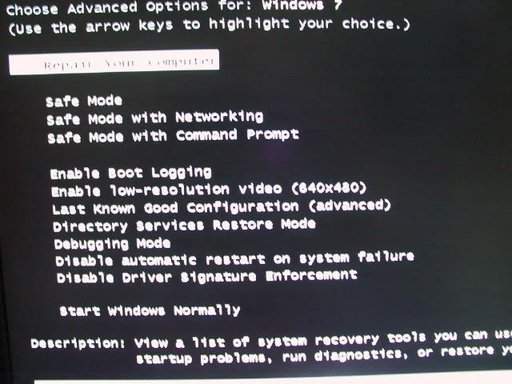
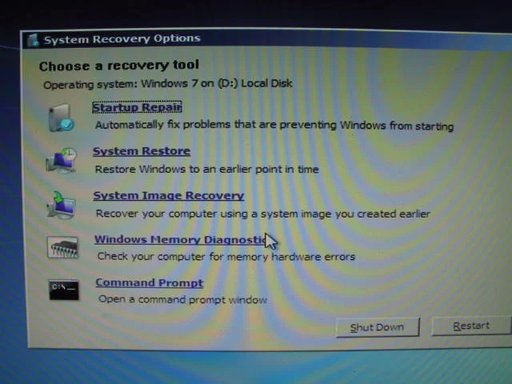
It helps us if you explain in precise terms what you have tried and failed. For instance, if you hit F8 during boot, are you able to get the boot options screen and select safe mode or Repair your computer. Check the attachments, the first one is the F8 window and the next one is what you get when you select "Repair Your Computer".

Let us know what options you have.

You can download a Windows 7 Repair CD, but they have moved the one I normally suggest, so you will have to look for one in your Bit type.

Edit: Well the CD is still there, in a way. You have to use uTorrent to download. This is the link if you want to check. You could also borrow a copy of the install DVD or even a Repair CD.
 

Attachments

  • F8 Options.webp
    F8 Options.webp
    47.5 KB · Views: 467
  • Recovery Options.webp
    Recovery Options.webp
    35.8 KB · Views: 448
Last edited:

adamswindows7

New Member
Joined
Jun 28, 2011
Messages
20
F8 takes me to advanced boot options but my pc will not start safemode it does the same thing as Starting Windows normally flashing the blue screen and then restarting. Repair your Computer takes me to loading files then that green loading thing then a black screen with a cursor and just stops there. I've tried enable low resolution, last known good configuration, and disable driver signature enforcement. I just want windows to work again. I can afford to lose any files I have. I'm not worried about programs as I can just reinstall them. So, if reinstalling windows 7 will work then thats an option. So, is it possible to use someone's installation dvd? Can I reinstall and will that fix the issue? I'm not worried about losing files and programs as my pc is mostly used for internet and entertainment.
 

adamswindows7

New Member
Joined
Jun 28, 2011
Messages
20
if i select disable reboot upon system failure I get to read that dreaded blue screen that a problem has been detected and windows has been shut down to prevent damage to your computer. Well, windows not working is damage to me.
 

Saltgrass

Excellent Member
Microsoft Community Contributor
Joined
Oct 16, 2009
Messages
15,155
If you are worried about your files, it might be a good idea to boot to something like an Ubuntu Linux DVD and use the trial option. While running Linux you should be able to copy your files to another location. Considering your situation as you describe it, you may ending up having to reinstall.

Do you trust the software download and do not suspect a virus? Have you tried running a virus checker, even Microsoft has released a bootable version of Microsoft Security Essentials called System Sweeper. It is a beta, but I have run it without damage to my system. There are probably other bootable programs you might be able to find.

Using a borrowed Install DVD or Repair CD or just having someone make you a Repair CD would normally work. Booting into the WinRE should not get the result you seem to show, but possibly the Install DVD, that does not require a password, would work differently.

You do have an option, if your system is able, to do another Windows 7 install to fix the first. Just make very sure you do not overwrite your original C: partition. If you do that, we can get the boot back to the original install after you remove the problem install. If nothing else, it will allow you to move your files if you have not been able to use Linux.

I suppose there is always the possibility of a hardware failure.....Did you put the laptop battery back in or are you running it without the battery?
 

adamswindows7

New Member
Joined
Jun 28, 2011
Messages
20
I put the battery back in. It sounds like everything is running. The hardrive light comes on, the fan spins, etc.
 

Saltgrass

Excellent Member
Microsoft Community Contributor
Joined
Oct 16, 2009
Messages
15,155
Yes, you can do that..

You might thing about leaving the battery out to test.
 

kaos

Senior Member
Joined
May 9, 2011
Messages
1,742
ok
when u try and boot up and it says repair pc, let it load, when it says checking pc for repairs, click cancel, click on advanced options then select command promt, when command promt loads enter these commands seperatly

bootrec.exe /fixmbr
bootrec.exe /fixboot
 

kaos

Senior Member
Joined
May 9, 2011
Messages
1,742
first of all if you can get into the repair windows bit , let it load, when it says checking pc for problems click cancel, click on advanced options, click command promt, type thes fcommands seperatly

bootrec.exe /fixmbr
bootrec.exe /fixboot
bootrec.exe /rebuildbcd

restart pc and see if this works,
 

Solution