Commander_Cool

Senior Member
Joined
Jun 29, 2009
Messages
343
Hi, has anyone here had Windows Troubleshooting (which offers its dubious help whenever a program hangs or, as in the case that prompted the writing of this, IE can't connect to the web (though Firefox had no problem)) ever solve any kind of problem?

If so, I would like to hear about it because I haven't. And, by the way, perhaps somebody could tell me how to turn this (imho) useless 'feature' off.
Thank you.
 

Solution
Hi, has anyone here had Windows Troubleshooting (which offers its dubious help whenever a program hangs or, as in the case that prompted the writing of this, IE can't connect to the web (though Firefox had no problem)) ever solve any kind of problem?

If so, I would like to hear about it because I haven't. And, by the way, perhaps somebody could tell me how to turn this (imho) useless 'feature' off.
Thank you.

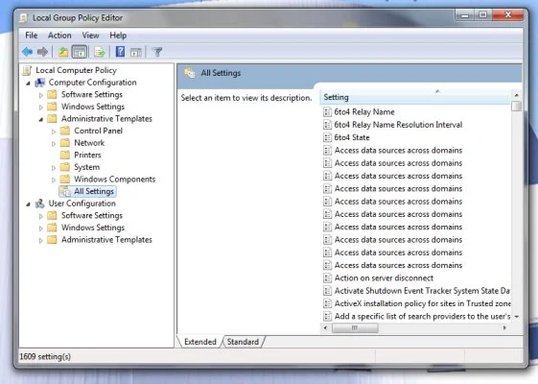
Turning it off might be possible with RUN<gpedit.msc> User Configuration/Administrative Template/All Settings. There are a gazillion setting possibilities in there.

busydog

New Member
Joined
Feb 11, 2009
Messages
1,055
Hi, has anyone here had Windows Troubleshooting (which offers its dubious help whenever a program hangs or, as in the case that prompted the writing of this, IE can't connect to the web (though Firefox had no problem)) ever solve any kind of problem?

If so, I would like to hear about it because I haven't. And, by the way, perhaps somebody could tell me how to turn this (imho) useless 'feature' off.
Thank you.
Turning it off might be possible with RUN<gpedit.msc> User Configuration/Administrative Template/All Settings. There are a gazillion setting possibilities in there.
 

Solution

Commander_Cool

Senior Member
Joined
Jun 29, 2009
Messages
343
OK, thanks. I'll go try it at once.
-------------------
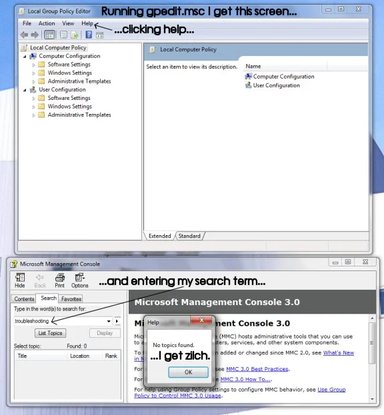
Hmm...it seems not. A search of the help file for gpedit.msc for the terms "diagnostics" and "troubleshooting" yielded nothing.
Also, browsing through the GUI I found nothing.
 

Last edited:

busydog

New Member
Joined
Feb 11, 2009
Messages
1,055
OK, thanks. I'll go try it at once.
-------------------
Hmm...it seems not. A search of the help file for gpedit.msc for the terms "diagnostics" and "troubleshooting" yielded nothing.
Also, browsing through the GUI I found nothing.

Let me be clearer.... Hold down the CTRL Key and press R. In the box that opens type gpedit.msc and follow my instructions.
 

Commander_Cool

Senior Member
Joined
Jun 29, 2009
Messages
343
Let me be clearer.... Hold down the CTRL Key and press R. In the box that opens type gpedit.msc and follow my instructions.
No need to be clearer, really. I've been using Windows since clunky old 2.0 so I know my way around. Please see the attached .jpg for clarification!
 

Attachments

  • gpedit.webp
    gpedit.webp
    40 KB · Views: 275

busydog

New Member
Joined
Feb 11, 2009
Messages
1,055
No need to be clearer, really. I've been using Windows since clunky old 2.0 so I know my way around. Please see the attached .jpg for clarification!

You're almost there.... expand Administrative Templates and then All Settings...