

📎 AI Summary:
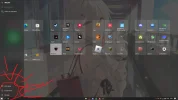
The user r3NA reported that the settings icon disappeared from the lower left corner of Windows 10 Pro (build 19045). Despite uninstalling any third-party UI customization utilities, the issue persisted, and they sought help. Neemobeer suggested confirming the Windows version and build via PowerShell but did not provide a direct solution to restore the missing icon.
The user r3NA reported that the settings icon disappeared from the lower left corner of Windows 10 Pro (build 19045). Despite uninstalling any third-party UI customization utilities, the issue persisted, and they sought help. Neemobeer suggested confirming the Windows version and build via PowerShell but did not provide a direct solution to restore the missing icon.
Solution

You'll need to uninstall them.

r3NA
New Member
Member details
- Joined
- Mar 12, 2023
- Messages
- 5
I have already closed everything but none of them workedIf you're running anything 3rd party utilities to customize the UI I would start by disabling or removing them.
what could it be?
r3NA
New Member
Member details
- Joined
- Mar 12, 2023
- Messages
- 5
already uninstalled bro...You'll need to uninstall them.

Member details
- Joined
- Jul 4, 2015
- Messages
- 8,995
Which windows version and build?
In powershell you can just run this
In powershell you can just run this
Code:
Get-CimInstance Win32_OperatingSystem | % { ("Windows Version: {0}`nBuild:{1}`nLast Boot:{2}" -f $_.Caption,$_.BuildNumber,$_.LastBootUpTime) }r3NA
New Member
Member details
- Joined
- Mar 12, 2023
- Messages
- 5
Windows Version: Microsoft Windows 10 ProWhich windows version and build?
In powershell you can just run this
Code:Get-CimInstance Win32_OperatingSystem | % { ("Windows Version: {0}`nBuild:{1}`nLast Boot:{2}" -f $_.Caption,$_.BuildNumber,$_.LastBootUpTime) }
Build:19045
