
That changes the immediate advice. Administrators cannot look for a KB number in their normal Windows Update or WSUS deployment rings, and ordinary Windows 11 24H2 or 25H2 systems should not be expected to have the changes. Microsoft says the build is being delivered to Experimental-channel Insiders, with many features subject to Controlled Feature Rollout, meaning even devices on the correct pre-release build may receive changes in stages.
The four File Explorer items themselves are real. Microsoft’s release notes for Build 26300.9032 confirm that Home now retains expanded and collapsed sections; clicking near the right edge of the address bar no longer clears its contents when entering edit mode; drag-and-drop to a disconnected network drive is more reliable; and a particular DFS reconnect sequence no longer misclassifies files as internet-originated.
For home users, the first two fixes remove everyday paper cuts. For IT departments, the latter two deserve more attention—but only after recognizing their narrow scope and pre-release status.
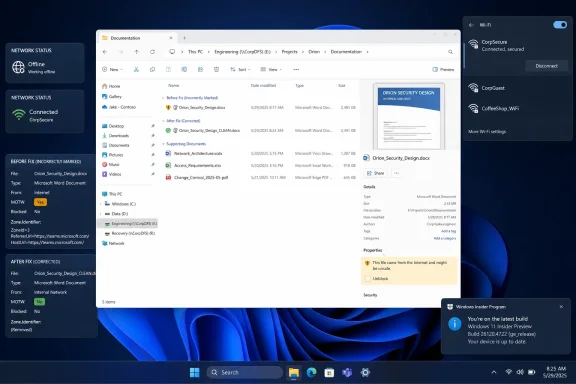 Build 26300.9032 fixes a specific DFS trust failure
The DFS issue is the material change in this release. Microsoft describes a sequence where a Windows device starts while disconnected from the network, then later reconnects to a DFS mapped drive. In that state, files on the mapped drive could be treated as originating from the internet.
That is not a cosmetic badging problem. File Explorer’s Preview pane could refuse to render a preview and display the warning, “The file you are attempting to preview could harm your computer.” Files copied from the DFS drive could also acquire an unexpected Mark of the Web, or MOTW.
MOTW is Windows provenance metadata used by Attachment Manager to decide whether a file warrants a warning or other protective behavior. The underlying Zone.Identifier data stream can cause users to see an Unblock control in file properties or trigger warnings in software that respects Windows’ zone information. It is normally an appropriate safeguard for material downloaded from a browser, received by email, or obtained from another unsafe location.
The bad DFS behavior was different: Windows was assigning that distrust to files stored on an internal mapped location after a connectivity transition. A user could therefore copy a legitimate internal script, document, installer, or project artifact to a local disk and inherit a security marker that did not reflect the file’s actual origin.
Microsoft’s wording is careful. The fix applies to files on a DFS mapped drive after the device starts offline and reconnects. It does not say every “this file might be harmful” warning on every SMB share, VPN-connected drive, IP-address-based UNC path, or ordinary mapped drive has been solved.
That distinction matters in environments where the same symptom can have several causes. Microsoft’s DFS documentation describes DFS Namespaces as a logical path over shared folders that can live on different servers, with the client transparently referred to a folder target. Such indirection is exactly the sort of situation where startup state, network availability, identity, referrals, and path classification can collide. A direct mapping such as \\server\share is not automatically the same case as a mapping through a DFS namespace such as \\domain\namespace\share.
Administrators seeing a warning today should record the actual UNC path behind the drive letter, whether it is a DFS namespace, whether the client was offline at boot, and whether the behavior follows reconnect. Those facts separate this newly acknowledged Windows defect from a real internet-zone classification issue or an existing policy configuration.
Do not solve a client bug by turning off file-origin protection
The DFS repair is useful precisely because it targets the faulty classification instead of weakening Windows protections wholesale. That is the operational consequence most likely to be missed when users are under pressure to restore previews or stop file-opening prompts.
Some organizations respond to recurring MOTW friction by disabling zone-information preservation through Attachment Manager policy or by bulk-removing Zone.Identifier streams from files. Those measures may suppress the symptom, but they also reduce the ability of Windows and compatible applications to distinguish a file acquired from an untrusted source from one created or distributed internally.
Microsoft’s Attachment Manager documentation makes clear that Windows uses this security information to determine when to warn before opening a file. If the affected files genuinely originated on the public internet, a warning is the intended outcome. Build 26300.9032 addresses the opposite case: a trusted internal DFS location being misidentified after a defined offline-to-online transition.
For the same reason, the preview-pane warning is not a finding that SmartScreen itself is malfunctioning. Microsoft says the erroneous internet origin can produce both Preview pane warnings and unexpected MOTW on copied files. The common issue is the classification attached to the source path; users may encounter different downstream symptoms depending on the file type, application, endpoint policy, and destination filesystem.
A sensible test plan is therefore more valuable than a blanket workaround:
- Reproduce the fault with a standard test file on a DFS namespace mapping after booting the client without network access and reconnecting it later.
- Compare the file’s behavior before and after copying it locally, including whether a
Zone.Identifierstream appears unexpectedly. - Test with the organization’s normal endpoint protection, preview handlers, VPN timing, logon scripts, and Group Policy configuration in place.
- Keep Attachment Manager and MOTW-preservation policy enabled while assessing whether the Insider fix corrects the false classification.
That testing also avoids mistaking a successful file preview for complete remediation. The decisive result is whether a file that remains internal to the organization is no longer tagged as internet-originated during the affected reconnect scenario.
The network-drive drag-and-drop fix is narrower than a general SMB cure
Microsoft also says it improved File Explorer reliability when dragging files to a disconnected network drive. WinCentral expands that into a claim that the updated transfer engine handles offline or intermittent drives “far more reliably” without locking up the interface. Microsoft’s official release notes do not make that broader promise.
The confirmed change is reliability during the drag operation to a disconnected target. That is welcome, especially for laptop users whose drive mappings survive sleep, docking changes, VPN reconnects, or Wi-Fi handoffs. But it is not a stated fix for all failed copies, all Explorer freezes, or every unavailable network location.
Network-copy failures can originate above or below File Explorer: SMB authentication and credential renewal, DNS, DFS referrals, VPN routing, server availability, security-product file-system filters, quota failures, or a share that has actually been removed can all produce similar user reports. Microsoft still documents unrelated network-drive hangs tied to third-party file-system minifilter drivers, underscoring why this release should not be treated as an all-purpose cure for “Explorer froze while copying.”
The practical improvement is less dramatic but still meaningful. A disconnected destination should fail or recover more gracefully instead of leaving the shell in a poor state. That reduces user-facing disruption; it does not remove the need to diagnose why the drive disconnected.
File Explorer’s smaller fixes are genuine quality-of-life repairs
The two non-network fixes are simple and overdue. File Explorer Home now remembers whether its sections were expanded or collapsed, so users who collapse areas they do not use should no longer rebuild the same view after reopening Explorer. It is a persistence fix, not a redesign of Home, Recommended files, or organizational content controls.
Microsoft also corrected a bug where clicking near the right end of the address bar while entering edit mode cleared the displayed path. Users who paste UNC paths, edit deep folder locations, or quickly switch between directories will recognize why that seemingly minor defect was disruptive: a mistimed click could force them to reconstruct a long path from scratch.
Neither change needs administrator preparation. They are evidence, however, that Build 26300.9032 is a mixed Insider flight rather than a targeted enterprise networking hotfix. The same release includes new Windows Search indexing behavior, Phone Link changes, Start and taskbar repairs, a Windows Spotlight reliability change, and a separate File History fix for SMB network-share backups that were falsely reporting invalid credentials.
That broader bundle is another reason not to install it simply to repair DFS behavior on production endpoints. The release notes also state that Insider features can change, be removed, or never reach general Windows releases.
No KB, no production deadline, and no confirmed general-availability date
WinCentral tells readers to obtain the changes by checking Windows Update alongside “the latest cumulative update.” The published Microsoft record does not identify a cumulative-update KB containing these File Explorer fixes, and it gives no general-availability date for Windows 11 24H2, 25H2, or a future 26H2 release.
Instead, Microsoft identifies the package as Windows 11 Insider Experimental Preview Build 26300.9032, based on Windows 11 version 26H2 through an enablement package. It also includes a renewed Windows Insider flight certificate; Microsoft says the prior certificate expires on August 11, 2026. That deadline is for Insider devices to remain eligible for future Insider builds, not a deployment deadline for enterprise Windows fleets.
For production administrators, the responsible position is to log the DFS/MOTW defect as a known pre-release fix, preserve current security policy, and wait for Microsoft to identify a supported production channel and KB. For teams already validating 26H2 Experimental builds, this is a worthwhile regression test—particularly for mobile users whose devices start outside the corporate network and reconnect to DFS shares later.
The immediate payoff is real for those testers: File Explorer should stop treating a correctly reconnected internal DFS path as a public-internet source. Everyone else should treat it as a preview of a fix, not as a patch already installed across Windows 11.
