

AWS published a June 1, 2026 technical guide for advanced Amazon EC2 bootstrapping, aimed especially at Windows workloads, showing how user data, Systems Manager State Manager, EventBridge, Run Command, Lambda, SNS, and Auto Scaling lifecycle hooks can be combined for reliable multi-step instance configuration.
The useful part is not that AWS has invented a new bootstrapping mechanism. It has not. The point is more pragmatic: the old habit of cramming every early-life task into one launch script has become the cloud equivalent of balancing a production deployment on a broom handle.
For years, EC2 bootstrapping has had a comforting simplicity. Launch an instance, pass it some user data, let the operating system agent run the script, and hope the machine emerges with the right hostname, packages, accounts, domain membership, security controls, and application configuration.
That model works until it does not. It is fine for a small Linux utility host or a Windows test box that needs one registry tweak and a reboot. It becomes brittle when the bootstrap sequence has dependencies, restarts, secrets, domain joins, compliance checks, monitoring hooks, and load balancer readiness all competing for the same narrow launch window.
AWS’s latest guidance is notable because it says the quiet part plainly. Real deployments usually need a layered bootstrap pipeline, not a heroic user-data script. That is not just an AWS architectural preference; it is the operational reality most Windows administrators learn the hard way after chasing intermittent first-boot failures through EC2Launch logs, Systems Manager histories, CloudWatch streams, and half-configured instances.
The guide’s examples target Windows Server on EC2, but the argument travels well. Bootstrapping is no longer simply “run this script at first boot.” It is now orchestration: deciding what should run before the operating system is useful, what should run after the management plane can see the instance, what should happen when a step fails, and when an instance is allowed to serve traffic.
That restraint matters. User data is often treated as a dumping ground because it is easy to reach for at launch time. But user data is local, instance-specific, and tied to OS-level agent behavior, which makes it a poor control plane for complex fleets.
For Windows administrators, the timing can be especially consequential. A hostname change can require a reboot. A domain join may depend on networking, DNS, credentials, time synchronization, and the instance name being settled first. Software installation might expect domain policy, local groups, certificates, or reboot state to be complete. Put all of that into one script and you are no longer bootstrapping; you are staging a race.
The more disciplined reading is that user data should start the process, not own it. It is suitable for small, deterministic actions where failure is easy to diagnose and retry is not central to the design. Once the script needs to coordinate with services outside the box, the architecture should move upward into Systems Manager, EventBridge, or Auto Scaling hooks.
That is not a demotion of user data. It is a reclassification. User data is still the match that lights the instance; it just should not be asked to heat the whole building.
In the example, Windows instances tagged
That example is intentionally simple, but it exposes the real advantage: bootstrapping becomes centralized and observable. Administrators can inspect Run Command results instead of spelunking through only first-boot logs. They can target a class of machines rather than handcrafting launch data per instance. They can also schedule recurring enforcement, which begins to blur the line between bootstrap and configuration compliance.
There is an important constraint, though. State Manager is not magic at power-on. The instance must be onboarded into Systems Manager, which means the SSM Agent must be present, running, network-capable, and authorized through IAM. On Windows EC2, the launch agent enabling SSM after user data creates a sequencing dependency that administrators should not wave away.
AWS also flags a subtle trap: Systems Manager Automation documents are not processed at instance boot when configured with a State Manager association. For multi-step configurations, composite documents may be the better fit. That distinction will matter most to teams that casually use “SSM document” as a generic phrase when, operationally, Command documents, Automation runbooks, and composite documents behave differently.
The message for Windows shops is direct. State Manager is where fleet intent belongs, but it still depends on a healthy management channel. If your instance cannot talk to Systems Manager, your centralized bootstrap plan has not failed elegantly; it has not started.
AWS’s example builds on the State Manager flow. When the bootstrap command completes, separate EventBridge rules handle successful and failed outcomes. Each rule fans out to three targets: a Systems Manager Automation document, an SNS notification, and a Lambda function. The Lambda and Automation paths write different EC2 tags, giving operators concrete evidence that both targets fired independently.
That is a small implementation detail with a large operational lesson. Bootstrap should leave a trail. Not just a log buried somewhere, not just an email, not just a green check mark in a console, but metadata attached to the resource being configured. Tags such as
The EventBridge pattern also breaks the mental model that bootstrap is linear. Once an initial configuration step completes, the system can notify humans, call APIs, trigger compliance checks, launch follow-up runbooks, update CMDB-style records, or quarantine failures. That is closer to a workflow engine than a startup script.
There is a risk here too. Event-driven automation can become beautifully observable spaghetti if teams do not name events, rules, roles, and tags consistently. A success path and failure path that each invoke multiple targets can be a maintenance win or a future archaeology dig, depending on how carefully the system is documented and bounded.
Still, the direction is right. The old bootstrap model treated failure as an exception trapped inside a script. EventBridge treats failure as an event other systems can reason about. That is the difference between a shell script with logging and an operations pipeline.
AWS’s example uses a launch lifecycle hook to place a new instance into a wait state. EventBridge captures the lifecycle event and invokes a Systems Manager Automation document. The automation waits for the SSM Agent, renames the computer, restarts the instance, and then signals the lifecycle hook to continue. Only then can the instance move into
This is the right place to solve readiness. A machine that is still renaming itself, rebooting, joining a domain, or installing an agent should not be counted as ready merely because EC2 successfully powered it on. For load-balanced services, the gap between “instance exists” and “instance is serviceable” is where bad deployments hide.
The warm pool example makes the design more nuanced. AWS shows a warm pool that pre-bootstraps instances and keeps them stopped until they are needed. The launch lifecycle hook fires when the instance enters the warm pool and again when it is promoted into the Auto Scaling group. The automation branches on the event’s
That origin-based branching is smarter than relying on a tag check after the fact. The event itself carries the context needed to choose the path, and the automation can decide before making an extra EC2 query. It is the kind of small design choice that prevents a cloud-native workflow from degenerating into polling and guesswork.
The failure behavior is also worth noting. In the launch path, the default result is
A Windows instance may need to rename itself before domain join. Domain join may require DNS correctness and line-of-sight to domain controllers. Group Policy may reshape local security settings after the join. Security agents and management tools may depend on certificates, proxy configuration, or local groups. A reboot is not an edge case; it is a routine part of the workflow.
That makes “just use user data” especially fragile. A script can restart the machine, but the administrator still needs to know what happens afterward, whether the next phase resumes, whether credentials are still available, and whether the instance is now visible to the management plane. Without an external orchestrator, the guest OS is being asked to supervise its own surgery.
Systems Manager helps because it gives administrators an AWS-side control plane once the agent is online. EventBridge helps because it can react to outcomes. Lifecycle hooks help because they keep Auto Scaling from treating partially configured capacity as good capacity. None of these individually eliminates complexity, but each places a specific responsibility in a more appropriate layer.
There is also a security angle. The example that creates a temporary local administrator account from Secrets Manager is useful, but it should make security-minded readers alert. Temporary admin accounts, secrets access, KMS permissions, and instance profiles are powerful tools. They should be scoped tightly, rotated deliberately, logged centrally, and removed when no longer required.
In other words, advanced bootstrapping does not only reduce operational risk. Done badly, it can concentrate privilege into automation that runs everywhere. The same machinery that makes fleet setup reliable can also turn a bad document or overbroad role into a fleet-wide problem.
But CloudFormation does not automatically make a bootstrap design safe. It can faithfully deploy a fragile script, a permissive IAM role, an EventBridge rule that is too broad, or a lifecycle hook with a timeout that does not match reality. Declarative deployment improves repeatability; it does not replace design review.
The strongest templates in this pattern are the ones that encode boundaries. Separate roles for Lambda, EventBridge, Systems Manager Automation, and EC2 instances are more than IAM hygiene. They make the architecture understandable. They let auditors and operators see which actor can retrieve a secret, tag an instance, publish a notification, or complete a lifecycle action.
The same is true for observable outputs. If a CloudFormation stack creates the association, the instance profile, the KMS key, the secret, and the automation documents, it should also make it easy to identify which tags to apply, which logs to inspect, and which execution histories prove success. The guide’s testing sections are useful precisely because they treat verification as part of the deployment.
This is where many internal platform teams should take the hint. A reusable bootstrap module should not merely create resources. It should define the operational contract: what tags trigger it, what logs are authoritative, how failure is surfaced, what permissions are granted, and when an instance is allowed to serve traffic.
User data belongs closest to the guest OS and the launch agent. State Manager belongs to fleet configuration after Systems Manager can manage the node. EventBridge belongs to the event fabric that reacts to outcomes. Lifecycle hooks belong at the Auto Scaling boundary where capacity is admitted or rejected.
That division of labor is cleaner than asking one tool to do everything. It also mirrors how failures occur. If user data fails, you inspect launch-agent logs. If a State Manager association fails, you inspect Run Command output and SSM execution history. If an event target fails, you inspect EventBridge delivery, Lambda logs, SNS delivery, or Automation execution. If readiness fails, the lifecycle hook keeps the instance out of service.
The trade-off is that there are now more moving parts. A simple application does not need EventBridge, Lambda, SNS, KMS, Secrets Manager, State Manager, CloudWatch, and lifecycle hooks just to install one package. Over-engineering bootstrap can be as damaging as under-engineering it, especially when every layer adds IAM policy, deployment state, and debugging surface area.
The decision boundary should be production consequence. If a misconfigured instance merely wastes a few minutes in a development sandbox, user data may be enough. If a misconfigured instance can enter a production target group, expose stale software, miss an endpoint protection agent, or fail a domain policy requirement, the architecture deserves stronger gates.
That is the practical lesson behind the AWS post. Bootstrap design should be proportional to the blast radius of bootstrap failure.
A boring instance appears with the right name, identity, software, policy, logging, and permissions. It advertises readiness only when it is actually ready. If something goes wrong, the failure is visible without remote-desktop archaeology or console superstition. If capacity scales out at 3 a.m., the automation path is the same one tested at 3 p.m.
This is why lifecycle hooks are so important in the final architecture. They convert readiness from a wish into a gate. It is no longer enough for an instance to boot; it has to pass the preparation workflow before Auto Scaling treats it as usable.
EventBridge provides the complementary piece: memory. A bootstrap that succeeds or fails should produce events that other systems can consume. Notifications, tags, Automation histories, and logs turn a transient first-boot process into a visible operational record.
For WindowsForum readers running Windows Server fleets on AWS, that should sound familiar. The cloud did not abolish imaging, naming, domain sequencing, reboots, service dependencies, or “why did this one machine come up differently?” It changed where those problems are expressed and which control planes can help tame them.
The useful part is not that AWS has invented a new bootstrapping mechanism. It has not. The point is more pragmatic: the old habit of cramming every early-life task into one launch script has become the cloud equivalent of balancing a production deployment on a broom handle.
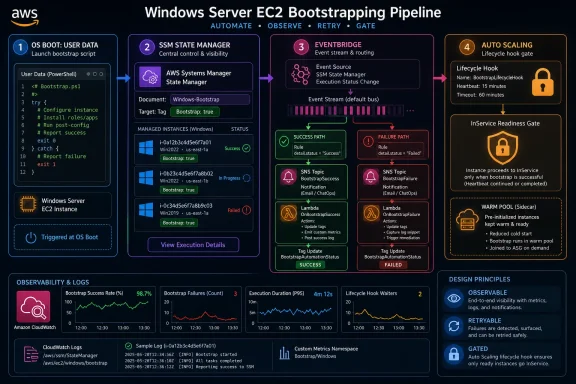 The One-Script Server Is Finally Out of Excuses
For years, EC2 bootstrapping has had a comforting simplicity. Launch an instance, pass it some user data, let the operating system agent run the script, and hope the machine emerges with the right hostname, packages, accounts, domain membership, security controls, and application configuration.That model works until it does not. It is fine for a small Linux utility host or a Windows test box that needs one registry tweak and a reboot. It becomes brittle when the bootstrap sequence has dependencies, restarts, secrets, domain joins, compliance checks, monitoring hooks, and load balancer readiness all competing for the same narrow launch window.
AWS’s latest guidance is notable because it says the quiet part plainly. Real deployments usually need a layered bootstrap pipeline, not a heroic user-data script. That is not just an AWS architectural preference; it is the operational reality most Windows administrators learn the hard way after chasing intermittent first-boot failures through EC2Launch logs, Systems Manager histories, CloudWatch streams, and half-configured instances.
The guide’s examples target Windows Server on EC2, but the argument travels well. Bootstrapping is no longer simply “run this script at first boot.” It is now orchestration: deciding what should run before the operating system is useful, what should run after the management plane can see the instance, what should happen when a step fails, and when an instance is allowed to serve traffic.
User Data Remains the Match, Not the Fireplace
The first method AWS describes is the most familiar: EC2 user data. On Windows, EC2Launch handles execution after the operating system boots; on Linux, cloud-init fills the same broad role. The example is deliberately modest, using PowerShell to rename a Windows instance and restart it.That restraint matters. User data is often treated as a dumping ground because it is easy to reach for at launch time. But user data is local, instance-specific, and tied to OS-level agent behavior, which makes it a poor control plane for complex fleets.
For Windows administrators, the timing can be especially consequential. A hostname change can require a reboot. A domain join may depend on networking, DNS, credentials, time synchronization, and the instance name being settled first. Software installation might expect domain policy, local groups, certificates, or reboot state to be complete. Put all of that into one script and you are no longer bootstrapping; you are staging a race.
The more disciplined reading is that user data should start the process, not own it. It is suitable for small, deterministic actions where failure is easy to diagnose and retry is not central to the design. Once the script needs to coordinate with services outside the box, the architecture should move upward into Systems Manager, EventBridge, or Auto Scaling hooks.
That is not a demotion of user data. It is a reclassification. User data is still the match that lights the instance; it just should not be asked to heat the whole building.
Systems Manager Turns Bootstrap Into Fleet Policy
The second method, AWS Systems Manager State Manager, is where the guide becomes more interesting for enterprise administrators. Instead of encoding all work into an instance’s launch metadata, State Manager associations apply configurations to managed instances based on targets such as tags, instance IDs, resource groups, or broad fleet selection.In the example, Windows instances tagged
Bootstrap: true are picked up when they come online. A Systems Manager document runs PowerShell, retrieves credentials from Secrets Manager, creates a local TempAdmin user, and adds that account to the Administrators group. The supporting CloudFormation stack creates the KMS key, secret, IAM role, instance profile, SSM document, and association.That example is intentionally simple, but it exposes the real advantage: bootstrapping becomes centralized and observable. Administrators can inspect Run Command results instead of spelunking through only first-boot logs. They can target a class of machines rather than handcrafting launch data per instance. They can also schedule recurring enforcement, which begins to blur the line between bootstrap and configuration compliance.
There is an important constraint, though. State Manager is not magic at power-on. The instance must be onboarded into Systems Manager, which means the SSM Agent must be present, running, network-capable, and authorized through IAM. On Windows EC2, the launch agent enabling SSM after user data creates a sequencing dependency that administrators should not wave away.
AWS also flags a subtle trap: Systems Manager Automation documents are not processed at instance boot when configured with a State Manager association. For multi-step configurations, composite documents may be the better fit. That distinction will matter most to teams that casually use “SSM document” as a generic phrase when, operationally, Command documents, Automation runbooks, and composite documents behave differently.
The message for Windows shops is direct. State Manager is where fleet intent belongs, but it still depends on a healthy management channel. If your instance cannot talk to Systems Manager, your centralized bootstrap plan has not failed elegantly; it has not started.
EventBridge Makes Failure a First-Class Signal
The third method adds EventBridge to Systems Manager Run Command, and this is the section that feels closest to how mature cloud operations actually work. A bootstrap action runs, emits a completion event, and EventBridge routes success or failure to downstream targets.AWS’s example builds on the State Manager flow. When the bootstrap command completes, separate EventBridge rules handle successful and failed outcomes. Each rule fans out to three targets: a Systems Manager Automation document, an SNS notification, and a Lambda function. The Lambda and Automation paths write different EC2 tags, giving operators concrete evidence that both targets fired independently.
That is a small implementation detail with a large operational lesson. Bootstrap should leave a trail. Not just a log buried somewhere, not just an email, not just a green check mark in a console, but metadata attached to the resource being configured. Tags such as
BootstrapLambdaStatus, BootstrapAutomationStatus, and processed timestamps may look mundane, yet they give incident responders a fast answer to the first question everyone asks during a bad rollout: Did this thing actually run?The EventBridge pattern also breaks the mental model that bootstrap is linear. Once an initial configuration step completes, the system can notify humans, call APIs, trigger compliance checks, launch follow-up runbooks, update CMDB-style records, or quarantine failures. That is closer to a workflow engine than a startup script.
There is a risk here too. Event-driven automation can become beautifully observable spaghetti if teams do not name events, rules, roles, and tags consistently. A success path and failure path that each invoke multiple targets can be a maintenance win or a future archaeology dig, depending on how carefully the system is documented and bounded.
Still, the direction is right. The old bootstrap model treated failure as an exception trapped inside a script. EventBridge treats failure as an event other systems can reason about. That is the difference between a shell script with logging and an operations pipeline.
Lifecycle Hooks Move Readiness Out of the Guest OS
The fourth method addresses the problem that matters most in production fleets: when is an instance allowed to accept work? Auto Scaling lifecycle hooks let an EC2 Auto Scaling group pause instances during launch or termination so external automation can run before the instance enters service or disappears.AWS’s example uses a launch lifecycle hook to place a new instance into a wait state. EventBridge captures the lifecycle event and invokes a Systems Manager Automation document. The automation waits for the SSM Agent, renames the computer, restarts the instance, and then signals the lifecycle hook to continue. Only then can the instance move into
InService.This is the right place to solve readiness. A machine that is still renaming itself, rebooting, joining a domain, or installing an agent should not be counted as ready merely because EC2 successfully powered it on. For load-balanced services, the gap between “instance exists” and “instance is serviceable” is where bad deployments hide.
The warm pool example makes the design more nuanced. AWS shows a warm pool that pre-bootstraps instances and keeps them stopped until they are needed. The launch lifecycle hook fires when the instance enters the warm pool and again when it is promoted into the Auto Scaling group. The automation branches on the event’s
Origin field: full bootstrap when the origin is EC2, quick continuation when the origin is the warm pool.That origin-based branching is smarter than relying on a tag check after the fact. The event itself carries the context needed to choose the path, and the automation can decide before making an extra EC2 query. It is the kind of small design choice that prevents a cloud-native workflow from degenerating into polling and guesswork.
The failure behavior is also worth noting. In the launch path, the default result is
ABANDON, so a failed bootstrap prevents the instance from entering service. In the termination path, the default is CONTINUE, allowing cleanup failure to avoid blocking termination indefinitely. That asymmetry is exactly what production systems usually need: be strict before admitting capacity, be pragmatic when removing it.Windows Workloads Make the Sequencing Problem Harder
AWS placed this post under its Microsoft workloads banner, and that context is not incidental. Windows Server bootstrapping on EC2 often has more explicit sequencing pressure than a minimal Linux host.A Windows instance may need to rename itself before domain join. Domain join may require DNS correctness and line-of-sight to domain controllers. Group Policy may reshape local security settings after the join. Security agents and management tools may depend on certificates, proxy configuration, or local groups. A reboot is not an edge case; it is a routine part of the workflow.
That makes “just use user data” especially fragile. A script can restart the machine, but the administrator still needs to know what happens afterward, whether the next phase resumes, whether credentials are still available, and whether the instance is now visible to the management plane. Without an external orchestrator, the guest OS is being asked to supervise its own surgery.
Systems Manager helps because it gives administrators an AWS-side control plane once the agent is online. EventBridge helps because it can react to outcomes. Lifecycle hooks help because they keep Auto Scaling from treating partially configured capacity as good capacity. None of these individually eliminates complexity, but each places a specific responsibility in a more appropriate layer.
There is also a security angle. The example that creates a temporary local administrator account from Secrets Manager is useful, but it should make security-minded readers alert. Temporary admin accounts, secrets access, KMS permissions, and instance profiles are powerful tools. They should be scoped tightly, rotated deliberately, logged centrally, and removed when no longer required.
In other words, advanced bootstrapping does not only reduce operational risk. Done badly, it can concentrate privilege into automation that runs everywhere. The same machinery that makes fleet setup reliable can also turn a bad document or overbroad role into a fleet-wide problem.
CloudFormation Is the Delivery Mechanism, Not the Safety Net
AWS uses CloudFormation templates throughout the guide, and that is sensible. Infrastructure-as-code is the only realistic way to reproduce these patterns across accounts, environments, and application teams without relying on tribal memory.But CloudFormation does not automatically make a bootstrap design safe. It can faithfully deploy a fragile script, a permissive IAM role, an EventBridge rule that is too broad, or a lifecycle hook with a timeout that does not match reality. Declarative deployment improves repeatability; it does not replace design review.
The strongest templates in this pattern are the ones that encode boundaries. Separate roles for Lambda, EventBridge, Systems Manager Automation, and EC2 instances are more than IAM hygiene. They make the architecture understandable. They let auditors and operators see which actor can retrieve a secret, tag an instance, publish a notification, or complete a lifecycle action.
The same is true for observable outputs. If a CloudFormation stack creates the association, the instance profile, the KMS key, the secret, and the automation documents, it should also make it easy to identify which tags to apply, which logs to inspect, and which execution histories prove success. The guide’s testing sections are useful precisely because they treat verification as part of the deployment.
This is where many internal platform teams should take the hint. A reusable bootstrap module should not merely create resources. It should define the operational contract: what tags trigger it, what logs are authoritative, how failure is surfaced, what permissions are granted, and when an instance is allowed to serve traffic.
The Real Choice Is Not Between Four Tools
AWS presents four methods, but the deeper point is that these are not mutually exclusive menu items. They are layers in a chain of custody for a machine’s early life.User data belongs closest to the guest OS and the launch agent. State Manager belongs to fleet configuration after Systems Manager can manage the node. EventBridge belongs to the event fabric that reacts to outcomes. Lifecycle hooks belong at the Auto Scaling boundary where capacity is admitted or rejected.
That division of labor is cleaner than asking one tool to do everything. It also mirrors how failures occur. If user data fails, you inspect launch-agent logs. If a State Manager association fails, you inspect Run Command output and SSM execution history. If an event target fails, you inspect EventBridge delivery, Lambda logs, SNS delivery, or Automation execution. If readiness fails, the lifecycle hook keeps the instance out of service.
The trade-off is that there are now more moving parts. A simple application does not need EventBridge, Lambda, SNS, KMS, Secrets Manager, State Manager, CloudWatch, and lifecycle hooks just to install one package. Over-engineering bootstrap can be as damaging as under-engineering it, especially when every layer adds IAM policy, deployment state, and debugging surface area.
The decision boundary should be production consequence. If a misconfigured instance merely wastes a few minutes in a development sandbox, user data may be enough. If a misconfigured instance can enter a production target group, expose stale software, miss an endpoint protection agent, or fail a domain policy requirement, the architecture deserves stronger gates.
That is the practical lesson behind the AWS post. Bootstrap design should be proportional to the blast radius of bootstrap failure.
The Operational Prize Is Boring Servers
The best bootstrap system is not the cleverest one. It is the one that makes new instances boring.A boring instance appears with the right name, identity, software, policy, logging, and permissions. It advertises readiness only when it is actually ready. If something goes wrong, the failure is visible without remote-desktop archaeology or console superstition. If capacity scales out at 3 a.m., the automation path is the same one tested at 3 p.m.
This is why lifecycle hooks are so important in the final architecture. They convert readiness from a wish into a gate. It is no longer enough for an instance to boot; it has to pass the preparation workflow before Auto Scaling treats it as usable.
EventBridge provides the complementary piece: memory. A bootstrap that succeeds or fails should produce events that other systems can consume. Notifications, tags, Automation histories, and logs turn a transient first-boot process into a visible operational record.
For WindowsForum readers running Windows Server fleets on AWS, that should sound familiar. The cloud did not abolish imaging, naming, domain sequencing, reboots, service dependencies, or “why did this one machine come up differently?” It changed where those problems are expressed and which control planes can help tame them.
The Bootstrap Script Is Now a Control-Plane Design
The most concrete lesson from AWS’s guide is that EC2 bootstrapping has grown beyond scripting. The script still exists, but it is now just one actor in a larger control-plane design.- User data is best reserved for simple first-boot work that can tolerate local execution and limited orchestration.
- Systems Manager State Manager is the better home for centralized fleet configuration once the instance is managed and reachable.
- EventBridge turns bootstrap results into actionable success and failure signals that can drive notifications, tags, runbooks, and follow-on workflows.
- Auto Scaling lifecycle hooks are the right mechanism for keeping unprepared instances out of service during launch and for allowing controlled cleanup during termination.
- Warm pools can reduce time to service by preparing instances ahead of demand, but they require careful branching so completed work is not repeated unnecessarily.
- IAM scope, logging, tags, and execution history are not secondary details; they are what make advanced bootstrap supportable after the first demo succeeds.
References
- Primary source: Amazon Web Services (AWS)
Published: 2026-06-01T17:40:06.593854
Advanced bootstrapping on Amazon Elastic Compute Cloud (Amazon EC2) | Microsoft Workloads on AWS
When building Amazon Elastic Compute Cloud (Amazon EC2) instances, you often bootstrap them to accomplish basic tasks, like OS/application configuration, domain join, installing software, and configuration at scale. However, as configurations grow more complex, requiring multiple steps such as...aws.amazon.com
