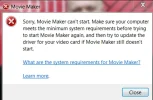
Windows 7 Can no longer open Windows Movie Maker

Jack Harmell

Active Member
Joined
Jul 20, 2015
Messages
15
I am running Windows 7 Pro 64bit. I was able to use Movie Maker a few months ago, but when I tried to open it today I got the attached error message. Any ideas how to resolve this issue?

Thanks.
 

Attachments

  • Movie Maker Error Message.webp
    Movie Maker Error Message.webp
    42.9 KB · Views: 324
Solution
The best answer? Really? Perhaps a mistake lol if your movie maker still isn't opening? Have you considered using system restore and going back before those updates were installed?

kemical

Essential Member
Joined
Aug 28, 2007
Messages
36,176
Hi,
see if the system file scan helps.
Look in the start menu for command prompt, right click on it and run as administrator. Type:
sfc /scannow
Press enter and await results.
 

kemical

Essential Member
Joined
Aug 28, 2007
Messages
36,176
If the windows movie maker your trying to use is from windows essentials have you tried simply re-installing the app?
 

kemical

Essential Member
Joined
Aug 28, 2007
Messages
36,176
I wonder if you've installed something which is stopping it from opening? Can you remember if you have installed anything new between the time it last worked and the present (especially security apps)?
 

Jack Harmell

Active Member
Joined
Jul 20, 2015
Messages
15
You may very well be right, as I install and uninstall programs a lot. The only security app, however, was an upgrade on my antivirus - ESET.

It is probably just a coincidence, but I noticed that I could not open Movie Maker less than 24 hours after Windows installed 28 updates.

 

kemical

Essential Member
Joined
Aug 28, 2007
Messages
36,176
It wouldn't surprise me if it's ESET. I recently ran it as a trial and quickly noticed apps were not working as they should. Might be worth uninstalling ESET just to see?
 

kemical

Essential Member
Joined
Aug 28, 2007
Messages
36,176
The best answer? Really? Perhaps a mistake lol if your movie maker still isn't opening? Have you considered using system restore and going back before those updates were installed?
 

Solution

Jack Harmell

Active Member
Joined
Jul 20, 2015
Messages
15
Interesting. I think what I would rather do is install an old Pinnacle Studio CD that I have. It is probably good enough to meet my needs. Thanks.
 

Back
Top