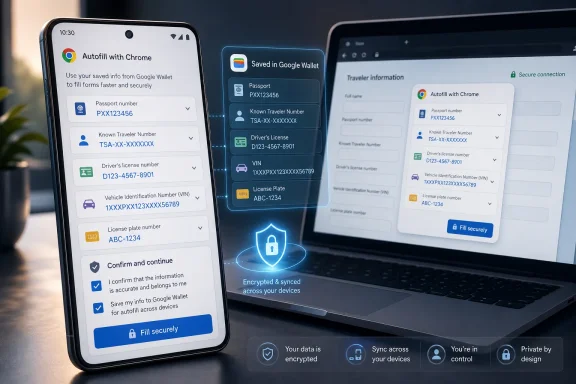
Google announced on June 23, 2026 that Chrome on Android and iOS is gaining advanced autofill for complex details such as flight, vehicle, passport, driver’s license, and Known Traveler Number data, while also pulling more information directly from Google Wallet across mobile and desktop. The change sounds like a convenience feature, and at the surface it is exactly that. But it also marks a more important shift: Chrome is no longer merely remembering what you type into forms; it is becoming the front end for a broader identity-and-payments vault.
That matters because autofill is one of those browser features users rarely think about until it fails, leaks, or saves them from rummaging through a glovebox for a VIN. Google’s move gives Chrome a stronger role in the messy, high-friction parts of online life: travel check-ins, parking payments, rentals, insurance forms, and government-adjacent identity workflows. The bargain is familiar but sharper than before: fewer manual forms in exchange for deeper trust in the browser, the account, and the wallet behind it.
For years, browser autofill has occupied an unglamorous corner of the web platform. It remembered names, addresses, phone numbers, payment cards, and passwords, then tried to match those values to fields whose labels were often inconsistent, broken, or hostile to automation. The best-case version felt invisible; the worst-case version put your apartment number in the ZIP code box and made you start over.
Google’s latest Chrome update pushes that model into more sensitive and more situational territory. Advanced autofill is being extended to iOS and Android after Google previously brought enhanced support to desktop, and the supported data classes now include travel and vehicle details alongside identity documents. Chrome can understand and offer to fill fields for flight information, license plates, VINs, passport details, driver’s license details, and Known Traveler Numbers.
That is a practical improvement, but it is not merely a bigger address book. A browser that can reliably populate a passport number or a VIN is making a judgment about context, intent, and form semantics. It has to know not just that a field wants “a number,” but that it wants this kind of number, from this kind of stored record, in a transaction where the user is likely to expect it.
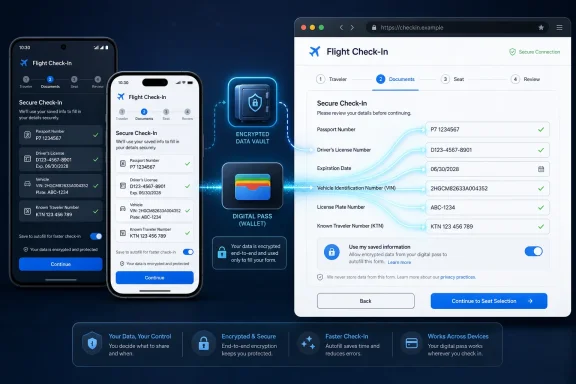
The Google Wallet connection is the real tell. Chrome is not simply expanding a local database of form entries; it is tying form completion to a personal vault that already holds payment cards, passes, IDs, tickets, and other structured records. That makes autofill less like a keyboard shortcut and more like a consumer identity broker embedded in the browser.
Chrome on Android and iOS now becomes a more useful tool for the forms users actually encounter while traveling or moving through the physical world. A parking website wants a license plate. An airline wants passport information. A trusted traveler form wants a Known Traveler Number. A rental or insurance form wants a driver’s license number. These are exactly the workflows that happen when the user is least interested in typing.
Google is betting that once users experience this kind of autofill on a phone, it will feel less like a luxury and more like expected plumbing. The company has already trained users to accept browser-based password managers and payment autofill. The next step is getting them comfortable with the browser offering government-adjacent and mobility-related data at the moment a form asks for it.
That is also why iOS support matters. Chrome on iPhone is constrained by Apple’s platform rules and uses WebKit under the hood, but Google still has a large signed-in user base there. If Wallet-backed autofill works consistently across Android, iOS, and desktop Chrome, Google can make the account layer feel more important than the operating system layer.
The browser is where many of those details are requested. A wallet may store the pass, but a web form is where the number gets typed. By letting Chrome draw from Wallet, Google reduces the gap between possession and use: the data does not just sit in a pass waiting to be scanned; it becomes available when a site asks for it.
This is a subtle but meaningful product shift. A digital wallet that only works at terminals, gates, and scanners is useful at specific moments. A wallet that feeds the browser becomes part of daily web interaction. It turns Wallet into a structured store of reusable identity, travel, and vehicle attributes.
That also gives Google a stronger reason for users to put more sensitive material into Wallet in the first place. If passport details and driver’s license details are only occasionally useful inside the Wallet app, many users will not bother. If those same details can save time on real forms across devices, the incentive changes.
Permission prompts are often treated as legal punctuation rather than meaningful decisions. A user trying to check in for a flight is not conducting a risk assessment. They are trying to get to the boarding pass. If Chrome asks whether it should save a passport number or Known Traveler Number at that moment, the immediate convenience may outweigh any abstract concern about long-term data storage.
This is where Google’s language around control matters. Users can manage or update stored data through Google Wallet settings or Chrome’s “Autofill and passwords” settings, while private passes such as IDs have their own controls. That is sensible, but it also creates another settings maze for information that may live partly in Wallet, partly in Chrome, and partly in the user’s Google Account.
The technical architecture may be coherent internally. The user-facing mental model is harder. Is the passport number “in Chrome,” “in Wallet,” “in my Google Account,” or “on this phone”? For security-minded users and administrators, the answer matters less than whether the product makes the boundary obvious.
But autofill also concentrates risk. The more valuable the stored data, the more important it becomes to protect the account, the device, the browser profile, and the moment of field insertion. Passport numbers and driver’s license details are not passwords; they cannot be rotated easily after exposure. A leaked VIN is not equivalent to a leaked credit card, but it is still a durable identifier attached to a real-world asset.
The web itself complicates the picture. Forms vary wildly in quality, and malicious or poorly designed pages can attempt to trick autofill systems into revealing more than the user intended. Browser vendors have spent years tightening heuristics and requiring user gestures for sensitive data, but the class of information now being filled raises the stakes.
Google’s permission and encryption claims are necessary, but the practical safety of the feature will depend on friction at the right moments. Users should not have to retype a passport number every time, but neither should a browser eagerly populate sensitive identity fields into ambiguous forms. The hard product design problem is making the safe path feel natural without turning every form into a security ceremony.
Enterprise IT has spent the last decade learning that browser settings are endpoint settings. Password managers, sync, extensions, profile separation, payment methods, and account sign-in policies all affect where corporate and personal data can flow. Advanced autofill adds another category of stored personal data that may appear on machines used for work, travel, field service, or shared operations.
This is especially relevant for organizations with travel-heavy employees. Known Traveler Numbers, passport details, driver’s license information, vehicle data, and payment credentials may all be personal, business-related, or both depending on the use case. The user may see one browser profile; the administrator may see a compliance boundary.
The prudent response is not panic. It is policy review. Organizations already managing Chrome should look at existing autofill, sync, password manager, and payment settings to decide whether the new behavior fits their environment. Where employees use personal Chrome profiles on work devices, the usual boundary problems become sharper.
Google’s advantage is Chrome’s reach. Even where Android is not present, Chrome often is. Even where Google Wallet is not the default wallet, Google accounts remain deeply embedded in consumer browsing, email, maps, travel, and payments. Tying Wallet data to Chrome autofill lets Google use the browser as a bridge across platform boundaries.
Microsoft’s comparable position is more complicated. Edge has strong Windows integration and enterprise manageability, and Microsoft has formidable identity infrastructure. But consumer wallet behavior has not centered on Microsoft in the way payment cards, passes, and mobile IDs have clustered around Apple and Google. For Windows users, that means the browser they use on Windows may increasingly reflect the mobile ecosystem they live in outside Windows.
Apple’s constraint is the inverse. It controls the iPhone experience more tightly than anyone else, but Chrome remains a user choice inside that environment. Google’s iOS Chrome cannot become the same kind of system-level wallet agent that Apple can build, but it can still serve signed-in Google users inside the browser. That is enough to keep the competition alive at the form field.
Autofill succeeds when it feels obvious. If Chrome offers the right passport detail on an airline form and asks for clear confirmation, the user experiences magic. If it offers the wrong identity, confuses a private pass with a generic record, or hides management controls in three different settings pages, the user experiences surveillance-shaped clutter.
Google’s pitch is that encryption and explicit permission keep the user in control. That is a defensible pitch, but control must be more than a prompt. It has to include understandable storage locations, easy deletion, predictable sync behavior, and clear separation between personal and managed contexts.
This is where Chrome’s scale cuts both ways. A small product can afford edge-case confusion. Chrome cannot. When a feature ships across Android, iOS, and desktop, any ambiguity becomes a mass-market support problem and, potentially, a trust problem.
The web has never had a single clean identity layer. Instead, it has accumulated passwords, federated sign-ins, payment wallets, passkeys, document uploads, one-time codes, and profile databases. Advanced autofill is not a grand replacement for those systems. It is a pragmatic patch over their inconvenience.
That patch can still be powerful. If Chrome knows enough to fill the fields people hate filling, it can become the default interface for a surprising amount of real-world bureaucracy. The user may think they are just saving time; Google is strengthening the connective tissue between account, wallet, browser, and device.
For Windows users, the most important lesson is that the browser keeps absorbing jobs that once belonged to the operating system or to separate apps. Chrome is not just rendering websites. It is mediating identity, payment, authentication, translation, AI assistance, and now more sensitive personal records. That makes browser choice and browser policy more consequential than ever.
That matters because autofill is one of those browser features users rarely think about until it fails, leaks, or saves them from rummaging through a glovebox for a VIN. Google’s move gives Chrome a stronger role in the messy, high-friction parts of online life: travel check-ins, parking payments, rentals, insurance forms, and government-adjacent identity workflows. The bargain is familiar but sharper than before: fewer manual forms in exchange for deeper trust in the browser, the account, and the wallet behind it.
 Chrome Is Turning Autofill Into an Identity Layer
For years, browser autofill has occupied an unglamorous corner of the web platform. It remembered names, addresses, phone numbers, payment cards, and passwords, then tried to match those values to fields whose labels were often inconsistent, broken, or hostile to automation. The best-case version felt invisible; the worst-case version put your apartment number in the ZIP code box and made you start over.Google’s latest Chrome update pushes that model into more sensitive and more situational territory. Advanced autofill is being extended to iOS and Android after Google previously brought enhanced support to desktop, and the supported data classes now include travel and vehicle details alongside identity documents. Chrome can understand and offer to fill fields for flight information, license plates, VINs, passport details, driver’s license details, and Known Traveler Numbers.
That is a practical improvement, but it is not merely a bigger address book. A browser that can reliably populate a passport number or a VIN is making a judgment about context, intent, and form semantics. It has to know not just that a field wants “a number,” but that it wants this kind of number, from this kind of stored record, in a transaction where the user is likely to expect it.
The Google Wallet connection is the real tell. Chrome is not simply expanding a local database of form entries; it is tying form completion to a personal vault that already holds payment cards, passes, IDs, tickets, and other structured records. That makes autofill less like a keyboard shortcut and more like a consumer identity broker embedded in the browser.
The Phone Was the Missing Piece
The timing of the mobile rollout is important because phones are where the pain is worst. Desktop forms are annoying, but a full keyboard and a large screen make them survivable. Mobile forms are where people abandon checkout flows, misread tiny labels, and switch apps repeatedly to copy one number at a time.Chrome on Android and iOS now becomes a more useful tool for the forms users actually encounter while traveling or moving through the physical world. A parking website wants a license plate. An airline wants passport information. A trusted traveler form wants a Known Traveler Number. A rental or insurance form wants a driver’s license number. These are exactly the workflows that happen when the user is least interested in typing.
Google is betting that once users experience this kind of autofill on a phone, it will feel less like a luxury and more like expected plumbing. The company has already trained users to accept browser-based password managers and payment autofill. The next step is getting them comfortable with the browser offering government-adjacent and mobility-related data at the moment a form asks for it.
That is also why iOS support matters. Chrome on iPhone is constrained by Apple’s platform rules and uses WebKit under the hood, but Google still has a large signed-in user base there. If Wallet-backed autofill works consistently across Android, iOS, and desktop Chrome, Google can make the account layer feel more important than the operating system layer.
Google Wallet Moves From Checkout Companion to Data Vault
Google Wallet has spent years trying to become more than a place to store payment cards. Boarding passes, loyalty cards, transit passes, event tickets, digital car keys, and IDs have gradually expanded the definition of what a wallet app is supposed to contain. Chrome’s new integration gives that stored data a more frequent job.The browser is where many of those details are requested. A wallet may store the pass, but a web form is where the number gets typed. By letting Chrome draw from Wallet, Google reduces the gap between possession and use: the data does not just sit in a pass waiting to be scanned; it becomes available when a site asks for it.
This is a subtle but meaningful product shift. A digital wallet that only works at terminals, gates, and scanners is useful at specific moments. A wallet that feeds the browser becomes part of daily web interaction. It turns Wallet into a structured store of reusable identity, travel, and vehicle attributes.
That also gives Google a stronger reason for users to put more sensitive material into Wallet in the first place. If passport details and driver’s license details are only occasionally useful inside the Wallet app, many users will not bother. If those same details can save time on real forms across devices, the incentive changes.
Permission Is the Promise, but Comprehension Is the Problem
Google says Chrome will only save or fill information with user permission, and that sensitive data is encrypted. That is the right baseline, but it does not settle the more interesting problem: whether users understand what they are agreeing to when a browser asks to store and reuse these categories of data.Permission prompts are often treated as legal punctuation rather than meaningful decisions. A user trying to check in for a flight is not conducting a risk assessment. They are trying to get to the boarding pass. If Chrome asks whether it should save a passport number or Known Traveler Number at that moment, the immediate convenience may outweigh any abstract concern about long-term data storage.
This is where Google’s language around control matters. Users can manage or update stored data through Google Wallet settings or Chrome’s “Autofill and passwords” settings, while private passes such as IDs have their own controls. That is sensible, but it also creates another settings maze for information that may live partly in Wallet, partly in Chrome, and partly in the user’s Google Account.
The technical architecture may be coherent internally. The user-facing mental model is harder. Is the passport number “in Chrome,” “in Wallet,” “in my Google Account,” or “on this phone”? For security-minded users and administrators, the answer matters less than whether the product makes the boundary obvious.
Autofill’s Security Story Has Always Been Uneven
Autofill is convenient because it reduces typing, and reducing typing can improve security. Users who rely on password managers tend to use stronger, unique passwords. Payment autofill can reduce exposure to shoulder surfing and typos. A browser that fills the right field with the right data can prevent the risky habit of keeping sensitive numbers in notes, screenshots, emails, or messaging threads.But autofill also concentrates risk. The more valuable the stored data, the more important it becomes to protect the account, the device, the browser profile, and the moment of field insertion. Passport numbers and driver’s license details are not passwords; they cannot be rotated easily after exposure. A leaked VIN is not equivalent to a leaked credit card, but it is still a durable identifier attached to a real-world asset.
The web itself complicates the picture. Forms vary wildly in quality, and malicious or poorly designed pages can attempt to trick autofill systems into revealing more than the user intended. Browser vendors have spent years tightening heuristics and requiring user gestures for sensitive data, but the class of information now being filled raises the stakes.
Google’s permission and encryption claims are necessary, but the practical safety of the feature will depend on friction at the right moments. Users should not have to retype a passport number every time, but neither should a browser eagerly populate sensitive identity fields into ambiguous forms. The hard product design problem is making the safe path feel natural without turning every form into a security ceremony.
The Enterprise Angle Is Not the Feature Google Is Selling
Google’s announcement is aimed squarely at consumers, but the implications will not stop there. Many WindowsForum readers live in mixed environments where Chrome is the default browser on Windows desktops, Android phones, and sometimes iPhones. A feature that makes sense for a family vacation can become an administrative question in a managed fleet.Enterprise IT has spent the last decade learning that browser settings are endpoint settings. Password managers, sync, extensions, profile separation, payment methods, and account sign-in policies all affect where corporate and personal data can flow. Advanced autofill adds another category of stored personal data that may appear on machines used for work, travel, field service, or shared operations.
This is especially relevant for organizations with travel-heavy employees. Known Traveler Numbers, passport details, driver’s license information, vehicle data, and payment credentials may all be personal, business-related, or both depending on the use case. The user may see one browser profile; the administrator may see a compliance boundary.
The prudent response is not panic. It is policy review. Organizations already managing Chrome should look at existing autofill, sync, password manager, and payment settings to decide whether the new behavior fits their environment. Where employees use personal Chrome profiles on work devices, the usual boundary problems become sharper.
Microsoft and Apple Are Watching the Same Wallet War
This is not happening in isolation. Apple has been turning Wallet into a broader identity, payments, transit, and keys platform. Microsoft has pushed identity and passkey adoption through Windows, Edge, Entra, Authenticator, and the Microsoft account ecosystem. Every major platform vendor understands that the next layer of lock-in is not just apps or storage; it is trusted personal data that appears at the right moment.Google’s advantage is Chrome’s reach. Even where Android is not present, Chrome often is. Even where Google Wallet is not the default wallet, Google accounts remain deeply embedded in consumer browsing, email, maps, travel, and payments. Tying Wallet data to Chrome autofill lets Google use the browser as a bridge across platform boundaries.
Microsoft’s comparable position is more complicated. Edge has strong Windows integration and enterprise manageability, and Microsoft has formidable identity infrastructure. But consumer wallet behavior has not centered on Microsoft in the way payment cards, passes, and mobile IDs have clustered around Apple and Google. For Windows users, that means the browser they use on Windows may increasingly reflect the mobile ecosystem they live in outside Windows.
Apple’s constraint is the inverse. It controls the iPhone experience more tightly than anyone else, but Chrome remains a user choice inside that environment. Google’s iOS Chrome cannot become the same kind of system-level wallet agent that Apple can build, but it can still serve signed-in Google users inside the browser. That is enough to keep the competition alive at the form field.
The Real Product Is Trust at the Moment of Typing
The most interesting part of this update is not that Chrome can fill a license plate. It is that Google is trying to own the moment when a website asks for something inconvenient and sensitive. That moment is where users decide whether to trust the browser, the website, the device, or a scrap of paper in their wallet.Autofill succeeds when it feels obvious. If Chrome offers the right passport detail on an airline form and asks for clear confirmation, the user experiences magic. If it offers the wrong identity, confuses a private pass with a generic record, or hides management controls in three different settings pages, the user experiences surveillance-shaped clutter.
Google’s pitch is that encryption and explicit permission keep the user in control. That is a defensible pitch, but control must be more than a prompt. It has to include understandable storage locations, easy deletion, predictable sync behavior, and clear separation between personal and managed contexts.
This is where Chrome’s scale cuts both ways. A small product can afford edge-case confusion. Chrome cannot. When a feature ships across Android, iOS, and desktop, any ambiguity becomes a mass-market support problem and, potentially, a trust problem.
The Small Form Field Becomes the New Platform Boundary
Browser autofill used to feel like a browser preference. Now it increasingly resembles a platform boundary between web forms and personal identity stores. That boundary will matter more as governments, airlines, banks, insurers, parking systems, and travel services keep digitizing workflows without making forms any less tedious.The web has never had a single clean identity layer. Instead, it has accumulated passwords, federated sign-ins, payment wallets, passkeys, document uploads, one-time codes, and profile databases. Advanced autofill is not a grand replacement for those systems. It is a pragmatic patch over their inconvenience.
That patch can still be powerful. If Chrome knows enough to fill the fields people hate filling, it can become the default interface for a surprising amount of real-world bureaucracy. The user may think they are just saving time; Google is strengthening the connective tissue between account, wallet, browser, and device.
For Windows users, the most important lesson is that the browser keeps absorbing jobs that once belonged to the operating system or to separate apps. Chrome is not just rendering websites. It is mediating identity, payment, authentication, translation, AI assistance, and now more sensitive personal records. That makes browser choice and browser policy more consequential than ever.
The Practical Reading of Google’s Autofill Push
The feature is easy to describe and easy to underestimate. It is not a revolution in identity, but it is a meaningful step in the steady transformation of the browser into a personal data broker. For users and administrators, the question is not whether autofill is good or bad; it is whether the convenience is matched by clear controls and sane defaults.- Chrome’s advanced autofill is now moving to Android and iOS, bringing mobile support for complex travel, vehicle, and identity-related form fields.
- Google Wallet is becoming a deeper source for Chrome autofill data, including passport details, driver’s license details, and Known Traveler Numbers.
- The feature should reduce friction in high-annoyance workflows such as flight check-ins, parking payments, rentals, and travel forms.
- The security case depends on encryption, explicit permission, and clear user understanding of where data is stored and how it syncs.
- Enterprise administrators should revisit Chrome autofill, sync, profile, and payment policies before users discover the feature organically.
- The larger platform story is that browsers are becoming the working surface for wallets, IDs, passkeys, and other personal trust systems.
References
- Primary source: gsmarena.com
Published: Wed, 24 Jun 2026 05:40:02 GMT
Google Chrome gets advanced autofill on Android and iOS, deeper Google Wallet support - GSMArena.com news
It now saves you even more time. Google Chrome's expanded autofill capabilities are now available on both Android and iOS. You can save time on flight...www.gsmarena.com
- Independent coverage: blog.google
Published: Tue, 23 Jun 2026 17:09:42 GMT
Chrome and Wallet bring advanced autofill to your phone
We’re extending Chrome autofill to iOS and Android users. Get passport details, payment info and more, at your fingertips.blog.google - Official source: support.google.com

Create or manage your ID pass - Google Wallet Help
Important: An ID pass isn't an official form of identification or a replacement for your physical documentation, so keep your physical ID with you as needed. Your ID pass may not be universally
support.google.com
- Related coverage: phonearena.com
This new Chrome feature turns your dreaded travel form into one tap on your phone - PhoneArena
Your passport, license and flight details sit one autofill away now.www.phonearena.com - Related coverage: techcrunch.com
Chrome can now autofill your passport, driver's license, and vehicle registration info | TechCrunch
Google says Chrome can now also better understand complex forms and varied formatting requirements, which will improve accuracy across the web.techcrunch.com - Related coverage: pcworld.com
Chrome can now autofill your passport and driver's license numbers | PCWorld
The autofill information will only save if you authorize it, and the saved information is protected by encryption.www.pcworld.com
- Official source: 9to5google.com
Chrome Autofill rolling out deeper Google Wallet integration
Google is introducing deeper integration between Google Wallet and Chrome Autofill to further streamline the experience of filling out... 9to5google.com
- Related coverage: androidheadlines.com
Chrome's Autofill Now Supports Passport and Driver’s License Info
Google Chrome's autofill now supports passport, driver's license, and vehicle info. However, this is available on Chrome for desktop. www.androidheadlines.com
- Related coverage: techrepublic.com
Chrome Expands Autofill to Passports, Licenses, and VINs
Google updates Chrome’s enhanced autofill to handle passports, driver’s licenses, and vehicle IDs like VINs, with opt-in confirmation and encryption.www.techrepublic.com
- Related coverage: androidcentral.com
Chrome now remembers your driver's license, passport, and vehicle info so you don't have to | Android Central
No need to go out and check your car's license plate number and VIN for the hundredth time.www.androidcentral.com - Official source: services.google.com
- Related coverage: storage.googleapis.com