

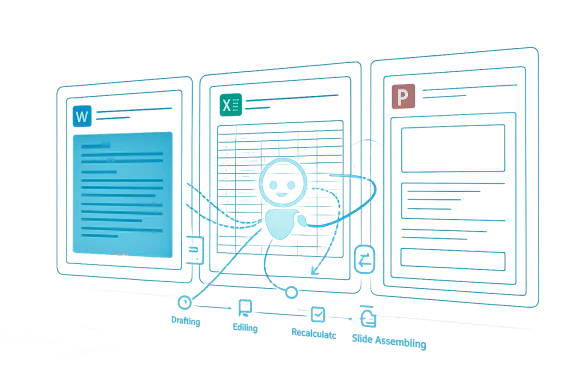
Microsoft’s decision to make Copilot’s agentic features generally available in Word, Excel, and PowerPoint marks an important shift in the company’s productivity strategy. The announcement is more than a feature drop; it signals that Microsoft now believes large language models are reliable enough to take meaningful actions inside its flagship apps, not just suggest text or answer questions. For enterprise customers, that matters because it changes Copilot from a passive assistant into a workflow participant. For consumers, it raises the ceiling on what Microsoft 365 can do with everyday tasks while also making the product more tightly tied to Microsoft’s AI vision.
Microsoft has been steadily moving Copilot from chat-style assistance toward in-app execution for more than two years. The first wave of Microsoft 365 Copilot positioning focused on summarization, drafting, and analysis, with the company framing Copilot as a way to “unleash creativity” and “unlock productivity” across the Office suite. That original pitch was deliberately cautious: Copilot could help with content, but users still had to do most of the actual editing and assembly work themselves.
The latest announcement, published on April 22, 2026, says the new agentic capabilities are now the default experience for customers with Microsoft 365 Copilot and Microsoft 365 Premium subscriptions, and that they are also available to users on Microsoft 365 Personal and Family plans. Microsoft says these features can take multi-step, app-native actions directly inside documents, worksheets, and presentations, which is a materially different promise from the earlier generation of Copilot tools.
That evolution did not happen overnight. In September 2025, Microsoft introduced Agent Mode and Office Agent, describing them as the next step in “vibe working,” borrowing a term from the software world to suggest that users could guide an AI through higher-level intent rather than micromanaging every step. The new general-availability announcement appears to formalize and broaden that direction, making it less experimental and more central to the Microsoft 365 experience.
Microsoft also emphasizes that the new experience is grounded in Work IQ, a signal layer intended to help Copilot understand intent and produce more relevant output. That framing is a clue that the company wants users to view Copilot not as a generic LLM, but as an enterprise-aware system with context, memory, and operational awareness. In practice, that could make the tool feel more useful in business settings where terminology, templates, and style matter.
At the same time, Microsoft says control remains “non-negotiable,” which is an important line. The company knows that the biggest barrier to agentic software is not capability alone, but trust. If users cannot reliably review, accept, or reject changes, then automation becomes a liability instead of a productivity gain.
For enterprise users, the implications are especially strong in recurring documents: reports, proposals, policy drafts, internal communications, and client-facing summaries. These are the kinds of materials that often start from templates, need a consistent voice, and must be adapted quickly for different audiences. Agentic editing can reduce friction in all three of those areas.
There is also a risk here, though. The more Copilot can restructure a document, the more it can also distort nuance if prompts are vague or context is incomplete. Microsoft’s insistence on review and transparency is therefore not just a nice-to-have feature; it is the safeguard that keeps Word from becoming an overconfident black box. That tension will define user trust over time.
The significance of this update is that Microsoft is pushing Copilot from “help me understand the sheet” into “help me change the sheet.” That is a major leap in trust. If the system can reliably modify formulas, rearrange data, and build charts without breaking models, it becomes much more than a conversational assistant. It becomes a practical layer of spreadsheet automation for people who do not have deep Excel expertise.
Microsoft’s own framing suggests it recognizes how demanding this environment is. The company says it is focused on deeper, more reliable editing for complex workflows and specifically calls out finance spreadsheets and legal documents as high-stakes use cases. That is a careful admission that agentic features in Excel are powerful, but not yet a substitute for human judgment in sensitive workflows.
This matters because PowerPoint production is often a bottleneck between analysis and communication. Teams frequently have the raw material for a deck but not the time to build it cleanly. If Copilot can reliably convert notes, reports, or data into a branded presentation structure, then it becomes a force multiplier across leadership, sales, marketing, and internal operations.
The catch is that presentation quality is as much about narrative as it is about slides. A deck can be visually polished and still fail if the logic is weak or the sequence is confusing. That is why Microsoft’s focus on preserving templates and staying aligned with company style is important; the tool has to handle brand discipline as much as layout.
For consumers, the value proposition is straightforward: easier document creation, simpler spreadsheet management, and faster presentation building. That could be especially useful for students, freelancers, home office users, and small businesses that do not have the time or expertise to polish every artifact manually. The downside is that consumer users may be less likely than enterprise users to understand the limitations of AI-generated work.
For enterprises, the stakes are higher because Microsoft is now embedding agentic behavior into the core productivity stack. That raises questions about governance, auditing, policy enforcement, and change management. Companies will want to know exactly what Copilot can modify, how those edits are recorded, and how admins can control rollouts across teams. Those questions will matter as much as the feature set itself.
That creates a difficult problem for rivals. Standalone AI assistants can still be faster to iterate on or more flexible in certain tasks, but they do not control the native workspace in the same way Microsoft does. If users can accomplish their work inside the apps they already trust, there is less reason to move to separate tools for drafting, analysis, or presentation generation.
The competitive challenge is not just about feature parity. It is about workflow gravity. Microsoft is trying to make Copilot the place where work starts and ends inside Office, which makes switching costs higher and user habits harder to break. That is classic platform leverage, but now it is being applied through AI rather than file formats or licensing alone.
Microsoft says users need to be able to review changes, keep what they want, and trust that structure, style, and brand preferences are respected. That signals awareness that AI-generated content must fit within the user’s operational boundaries. It also suggests the company understands the backlash that can occur when automation feels intrusive or sloppy.
Transparency will be just as important as capability. If Copilot silently changes a chart, rewrites a section, or adjusts a formula chain without enough explanation, confidence will erode quickly. The most successful agentic systems will likely be those that present themselves as assistants with receipts rather than invisible agents acting behind the scenes.
The broader strategy is to make Microsoft 365 feel less like a set of separate applications and more like an AI-enabled operating layer for knowledge work. That is why Microsoft has been talking about consistency across apps, multi-model support, and deeper integration with work signals. The goal is not just to automate tasks, but to make AI a natural part of the software environment people already live in every day.
This also helps explain why Microsoft is expanding availability across subscription tiers. More users means more feedback, more engagement, and more normalization. In platform terms, that is a smart move because it turns Copilot into an ecosystem habit rather than a niche feature reserved for early adopters.
If the rollout performs well, expect Microsoft to expand the range of native actions Copilot can take and to deepen the system’s role in workflow orchestration. If users hesitate, the company will likely respond with more transparency tools, more review layers, and tighter policy options for enterprise administrators. Either way, this announcement suggests the age of passive productivity AI is ending and the age of operational AI inside Office is beginning.
Source: Gadgets 360 https://www.gadgets360.com/ai/news/...rpoint-generally-available-features-11403024/
 Overview
Microsoft has been steadily moving Copilot from chat-style assistance toward in-app execution for more than two years. The first wave of Microsoft 365 Copilot positioning focused on summarization, drafting, and analysis, with the company framing Copilot as a way to “unleash creativity” and “unlock productivity” across the Office suite. That original pitch was deliberately cautious: Copilot could help with content, but users still had to do most of the actual editing and assembly work themselves.The latest announcement, published on April 22, 2026, says the new agentic capabilities are now the default experience for customers with Microsoft 365 Copilot and Microsoft 365 Premium subscriptions, and that they are also available to users on Microsoft 365 Personal and Family plans. Microsoft says these features can take multi-step, app-native actions directly inside documents, worksheets, and presentations, which is a materially different promise from the earlier generation of Copilot tools.
That evolution did not happen overnight. In September 2025, Microsoft introduced Agent Mode and Office Agent, describing them as the next step in “vibe working,” borrowing a term from the software world to suggest that users could guide an AI through higher-level intent rather than micromanaging every step. The new general-availability announcement appears to formalize and broaden that direction, making it less experimental and more central to the Microsoft 365 experience.
Why this matters now
Microsoft is not simply adding convenience features. It is betting that users increasingly want software that can do the work, not just describe how to do it. That is a subtle but profound product shift. If Copilot can reliably format a report, update a spreadsheet model, or assemble a presentation from source material, then Microsoft has built an AI layer that is directly tied to the highest-value tasks in office productivity.How Microsoft is Reframing Office Productivity
The company’s language around this update is telling. Microsoft says Copilot can now take multi-step, app-native actions, which suggests a tighter integration between the model and the application than a simple chatbot overlay. This is important because office work is not one action but many: editing, reviewing, rearranging, recalculating, formatting, and exporting often happen in sequence. A tool that can hold that chain together has a fundamentally different value proposition.Microsoft also emphasizes that the new experience is grounded in Work IQ, a signal layer intended to help Copilot understand intent and produce more relevant output. That framing is a clue that the company wants users to view Copilot not as a generic LLM, but as an enterprise-aware system with context, memory, and operational awareness. In practice, that could make the tool feel more useful in business settings where terminology, templates, and style matter.
At the same time, Microsoft says control remains “non-negotiable,” which is an important line. The company knows that the biggest barrier to agentic software is not capability alone, but trust. If users cannot reliably review, accept, or reject changes, then automation becomes a liability instead of a productivity gain.
The strategic message
This is not just about saving time. Microsoft is trying to redefine the relationship between user and application. The company wants Copilot to become the default interface for first drafts, first analyses, and first presentation builds, with the human user acting more like an editor-in-chief than a line-by-line producer.- Drafting becomes less manual.
- Editing becomes more guided.
- Analysis becomes more conversational.
- Presentation building becomes more automated.
- User review remains the final checkpoint.
Word: From Drafting to Document Assembly
Word is where the agentic transition may feel most natural. Microsoft says Copilot in Word can draft, rewrite, restructure, and apply the right tone for a given audience. That is valuable, but the bigger leap is that Copilot can now act inside the document rather than simply generating blocks of text to paste elsewhere. This makes it much easier to move from a rough idea to a refined draft without losing momentum.For enterprise users, the implications are especially strong in recurring documents: reports, proposals, policy drafts, internal communications, and client-facing summaries. These are the kinds of materials that often start from templates, need a consistent voice, and must be adapted quickly for different audiences. Agentic editing can reduce friction in all three of those areas.
There is also a risk here, though. The more Copilot can restructure a document, the more it can also distort nuance if prompts are vague or context is incomplete. Microsoft’s insistence on review and transparency is therefore not just a nice-to-have feature; it is the safeguard that keeps Word from becoming an overconfident black box. That tension will define user trust over time.
What Word users gain
The practical benefit is speed, but the real value is cognitive offloading. Instead of spending time on formatting and transitions, users can focus on argument quality, source integrity, and audience fit. That matters most in environments where writing is frequent, repetitive, and deadline-driven.- Faster first drafts.
- Better restructuring of existing text.
- More consistent tone matching.
- Less time spent on mechanical editing.
- Stronger support for iterative review.
Excel: The Most Interesting Frontier
Excel may be the most consequential part of the announcement because it is where agentic AI faces its toughest test. Microsoft says Copilot in Excel can explore data, build and explain analysis, and make changes directly in workbooks, including formulas, tables, and visuals. That sounds simple, but spreadsheet work is where precision matters most and where AI mistakes can be costly.The significance of this update is that Microsoft is pushing Copilot from “help me understand the sheet” into “help me change the sheet.” That is a major leap in trust. If the system can reliably modify formulas, rearrange data, and build charts without breaking models, it becomes much more than a conversational assistant. It becomes a practical layer of spreadsheet automation for people who do not have deep Excel expertise.
Microsoft’s own framing suggests it recognizes how demanding this environment is. The company says it is focused on deeper, more reliable editing for complex workflows and specifically calls out finance spreadsheets and legal documents as high-stakes use cases. That is a careful admission that agentic features in Excel are powerful, but not yet a substitute for human judgment in sensitive workflows.
Why Excel is harder than Word
Excel is not just a document editor with cells. It is a logic engine, a calculation environment, and often a business system of record. A small mistake in one formula can cascade through forecasts, budgets, and dashboards. That makes it the most promising and the most dangerous place for agentic AI to operate.- Excel changes can have downstream financial impact.
- Formula integrity is harder to preserve than text style.
- Data context matters more than surface-level phrasing.
- Visualizations must be accurate, not just attractive.
- User confidence depends on transparent change tracking.
PowerPoint and the New Presentation Workflow
PowerPoint may be the most visible beneficiary of the update, even if it is not always the most technically difficult. Microsoft says Copilot can create polished presentations, update existing decks with current talking points and data, and respect company templates. In other words, it is trying to solve one of the most common corporate pain points: turning source material into a presentation that looks finished rather than merely assembled.This matters because PowerPoint production is often a bottleneck between analysis and communication. Teams frequently have the raw material for a deck but not the time to build it cleanly. If Copilot can reliably convert notes, reports, or data into a branded presentation structure, then it becomes a force multiplier across leadership, sales, marketing, and internal operations.
The catch is that presentation quality is as much about narrative as it is about slides. A deck can be visually polished and still fail if the logic is weak or the sequence is confusing. That is why Microsoft’s focus on preserving templates and staying aligned with company style is important; the tool has to handle brand discipline as much as layout.
What good PowerPoint automation looks like
A strong Copilot experience in PowerPoint should not just create slide content. It should also preserve hierarchy, apply visual consistency, and avoid overloading slides with clutter. If Microsoft gets this right, it could reduce the need for repetitive deck production while improving overall presentation quality.- Better conversion from notes to deck.
- Faster updates to existing presentations.
- Cleaner use of company templates.
- Less manual formatting work.
- More time spent on message quality.
Consumer and Enterprise Impact
One of the more interesting details in the announcement is that the new features are not limited to enterprise Copilot customers. Microsoft says they are also available to Microsoft 365 Personal and Family subscribers, which broadens the reach of the agentic model beyond the corporate market. That is strategically important because it helps normalize Copilot as part of the everyday Office experience rather than a premium add-on for IT-managed deployments.For consumers, the value proposition is straightforward: easier document creation, simpler spreadsheet management, and faster presentation building. That could be especially useful for students, freelancers, home office users, and small businesses that do not have the time or expertise to polish every artifact manually. The downside is that consumer users may be less likely than enterprise users to understand the limitations of AI-generated work.
For enterprises, the stakes are higher because Microsoft is now embedding agentic behavior into the core productivity stack. That raises questions about governance, auditing, policy enforcement, and change management. Companies will want to know exactly what Copilot can modify, how those edits are recorded, and how admins can control rollouts across teams. Those questions will matter as much as the feature set itself.
Separate pressures, separate expectations
Consumers will judge Copilot on convenience and ease of use. Enterprises will judge it on compliance, consistency, and reliability. Microsoft has to serve both audiences without letting the product become too simplistic for business or too complex for home users.- Consumers want speed.
- Enterprises want control.
- IT wants governance.
- Creators want flexibility.
- Finance teams want accuracy.
Competitive Implications in the Productivity Market
Microsoft’s move puts pressure on every company trying to build AI productivity tools. The company has a structural advantage because it owns the apps, the cloud, the enterprise identity layer, and the distribution channel. By making agentic features the default inside Word, Excel, and PowerPoint, Microsoft is effectively turning its installed base into an AI adoption engine.That creates a difficult problem for rivals. Standalone AI assistants can still be faster to iterate on or more flexible in certain tasks, but they do not control the native workspace in the same way Microsoft does. If users can accomplish their work inside the apps they already trust, there is less reason to move to separate tools for drafting, analysis, or presentation generation.
The competitive challenge is not just about feature parity. It is about workflow gravity. Microsoft is trying to make Copilot the place where work starts and ends inside Office, which makes switching costs higher and user habits harder to break. That is classic platform leverage, but now it is being applied through AI rather than file formats or licensing alone.
The platform advantage
Microsoft can iterate in ways competitors often cannot because it owns the application context. A tool built into Word sees the document as a living artifact; a tool built into Excel can interact with the workbook’s structure; a tool built into PowerPoint can preserve brand templates and slide logic. That contextual advantage is hard to replicate outside a native suite.Trust, Safety, and User Control
The phrase “control is non-negotiable” may be the most important line in Microsoft’s announcement. Agentic AI only works if users believe they can inspect, correct, and reverse changes before damage is done. That is especially true in productivity apps where mistakes are not theoretical; they can affect budgets, communications, and executive decisions.Microsoft says users need to be able to review changes, keep what they want, and trust that structure, style, and brand preferences are respected. That signals awareness that AI-generated content must fit within the user’s operational boundaries. It also suggests the company understands the backlash that can occur when automation feels intrusive or sloppy.
Transparency will be just as important as capability. If Copilot silently changes a chart, rewrites a section, or adjusts a formula chain without enough explanation, confidence will erode quickly. The most successful agentic systems will likely be those that present themselves as assistants with receipts rather than invisible agents acting behind the scenes.
What users will expect
As these features spread, users will start demanding clearer previews, better diff-style change views, and more obvious rollback behavior. That is not an optional refinement; it is core to whether people will let AI act inside their work.- Clear previews before applying edits.
- Easy rollback of incorrect changes.
- Better explanations for transformations.
- Stronger template and brand preservation.
- Reliable handling of sensitive files.
The Bigger Product Strategy
Microsoft’s own telemetry suggests the company sees momentum in this direction. The blog post says early customer feedback showed stronger engagement and higher satisfaction, and it provides usage gains across Word, Excel, and PowerPoint. Whether those figures hold up across broader deployment remains to be seen, but they point to a simple strategic conclusion: when Copilot can act, people are more likely to use it.The broader strategy is to make Microsoft 365 feel less like a set of separate applications and more like an AI-enabled operating layer for knowledge work. That is why Microsoft has been talking about consistency across apps, multi-model support, and deeper integration with work signals. The goal is not just to automate tasks, but to make AI a natural part of the software environment people already live in every day.
This also helps explain why Microsoft is expanding availability across subscription tiers. More users means more feedback, more engagement, and more normalization. In platform terms, that is a smart move because it turns Copilot into an ecosystem habit rather than a niche feature reserved for early adopters.
A shift from feature to fabric
The most important change here is philosophical. Copilot is no longer being positioned as an add-on around the edges of Office; it is becoming part of the fabric of Office itself. That is a big bet, and it will shape how users, competitors, and regulators think about AI productivity tools in the months ahead.Strengths and Opportunities
Microsoft has several clear advantages in this rollout, and each one reinforces the others. It owns the core productivity apps, has direct access to enterprise customers, and can distribute new AI features at scale through familiar software channels. That combination gives the company an unusually strong starting position for turning agentic AI into a mainstream productivity habit.- Native integration inside Word, Excel, and PowerPoint.
- Broad reach across enterprise and consumer subscriptions.
- Stronger end-to-end workflow automation.
- Better alignment with company templates and brand rules.
- Reduced friction for first drafts and repetitive edits.
- Potentially higher user satisfaction and retention.
- A clearer path to making Copilot indispensable.
Risks and Concerns
The same features that make agentic Copilot compelling also create meaningful risks. The more responsibility AI takes on inside mission-critical documents and spreadsheets, the more damage a mistake can cause. Microsoft is right to stress control, but the real test will be whether users can trust the system consistently under pressure.- Incorrect spreadsheet edits could affect financial decisions.
- Over-automation may reduce user awareness of what changed.
- Hallucinated or misapplied content could slip into reports.
- Poor prompt quality may produce inconsistent results.
- Governance and auditability may lag feature rollouts.
- Consumer users may overestimate the system’s reliability.
- Enterprise admins may need stricter controls than default settings provide.
Looking Ahead
The next phase of this story will be about reliability, not novelty. Microsoft has already shown that it can build agentic behaviors into Office; now it has to prove that those behaviors are dependable enough for routine use across a wide range of real-world tasks. The success of this approach will depend on whether the company can make AI feel helpful, visible, and reversible at the same time.If the rollout performs well, expect Microsoft to expand the range of native actions Copilot can take and to deepen the system’s role in workflow orchestration. If users hesitate, the company will likely respond with more transparency tools, more review layers, and tighter policy options for enterprise administrators. Either way, this announcement suggests the age of passive productivity AI is ending and the age of operational AI inside Office is beginning.
- Watch for broader availability across platforms and devices.
- Track whether Microsoft adds more granular review controls.
- Monitor enterprise adoption in finance, legal, and operations teams.
- Look for further integration between Copilot and template governance.
- Pay attention to how competitors respond with their own native AI features.
Source: Gadgets 360 https://www.gadgets360.com/ai/news/...rpoint-generally-available-features-11403024/
