

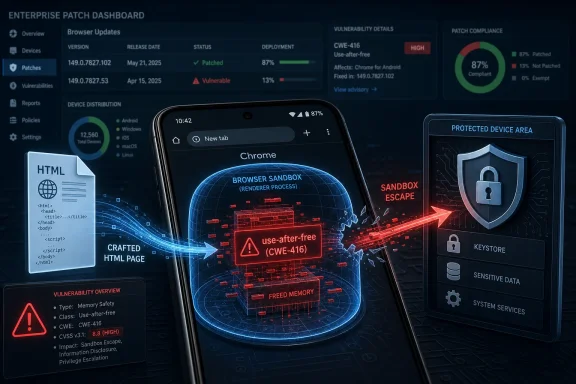
Google disclosed CVE-2026-10953 on June 4, 2026, as a high-severity use-after-free flaw in Chrome’s Core code on Android before version 149.0.7827.53, where a compromised renderer process could use a crafted HTML page to attempt a browser sandbox escape. The short version is simple: this is not “just another Chrome bug,” but one of the class of flaws that matters because it sits at the boundary between web content and the operating system. The longer version is more useful for WindowsForum readers: the vulnerability is Android-specific as described, but the release trail, CPE metadata, and Chrome’s cross-platform patch machinery make it relevant to anyone responsible for browsers at scale. In Chrome security, the CVE is only the headline; the real story is whether users, admins, scanners, and asset inventories can agree on what is vulnerable before attackers do.
CVE-2026-10953 is framed narrowly: Google Chrome on Android, prior to 149.0.7827.53, contains a use-after-free vulnerability in Core. The exploit condition is also narrower than the worst browser bugs: the attacker first needs a compromised renderer process, and the user interaction model points toward a crafted web page rather than a purely passive, no-click compromise. CISA’s ADP scoring put it at 8.3 high under CVSS 3.1, with network attack vector, high attack complexity, no privileges required, user interaction required, and high impact to confidentiality, integrity, and availability.
That combination is easy to underread. “High complexity” sounds reassuring until you remember what the Chrome sandbox is designed to do. Renderer compromise is not supposed to equal full browser or device compromise; the whole point of Chrome’s process isolation model is that dangerous parsing and scripting work occurs in a constrained environment. A sandbox escape is the second step in a chain, but it is often the step that turns a contained web exploit into a device-level incident.
The vulnerability description does not say that exploitation has been observed in the wild. That distinction matters, especially in a week when Chrome’s release notes also include separate high-profile fixes, including an actively exploited V8 issue in a later 149.0.7827.102/.103 desktop update. CVE-2026-10953 should not be inflated into a zero-day story unless Google or another authoritative source says so. It is serious enough without the embellishment.
For administrators, the practical issue is not whether every Chrome CVE deserves panic. It is whether Chrome on Android is actually in the managed fleet, whether Android browsers are covered by the same urgency as desktop browsers, and whether vulnerability tooling correctly understands the affected product and version boundary. That is where this CVE gets messy.
That matters because CPEs are not merely database decoration. They are the glue between vulnerability records and scanners, SBOMs, patch dashboards, procurement systems, and compliance reporting. A too-broad CPE can flood administrators with false positives across Windows, macOS, Linux, and ChromeOS. A too-narrow CPE can hide the vulnerable population from the people who need to patch it.
The NVD entry’s wording points specifically to Google Chrome on Android. The configuration shown in the supplied detail uses an application CPE for Chrome and an operating-system CPE for Android in an AND relationship. That is the usual way to represent “this application when running on this platform.” It does not necessarily require a separate product CPE if the data model can express the platform condition cleanly.
But the presence of the Chrome desktop release note as a reference muddies the water. Google’s Chrome release blog often groups security fixes by desktop releases, then separately notes that Android releases contain corresponding security fixes unless otherwise stated. That release process is convenient for Chrome’s publication cadence, but it is not always convenient for vulnerability consumers trying to map a CVE to a precise product/platform combination.
So are we missing a CPE? Based on the detail provided, not obviously. The more likely issue is that the vulnerability is platform-scoped in prose, while the reference trail points to the broader Chrome release machinery. If the configuration is truly an AND of Chrome plus Android, it is doing the important thing: preventing the CVE from being treated as a generic Chrome-for-Windows defect solely because the Chrome application CPE appears in the record.
The wrinkle is that Chrome’s June 2026 release cadence did not stop at 149.0.7827.53. Google later pushed Chrome 149.0.7827.102 for Android and 149.0.7827.102/.103 for desktop platforms, with additional fixes. If a device is on 149.0.7827.102, it should be past the CVE-2026-10953 threshold, but the later build exists because Chrome kept moving, not because every earlier CVE had the same exploit status or platform scope.
This is where patch reporting often goes wrong. A dashboard may say “Chrome 149 installed” and treat the fleet as current. Another may say “below 149.0.7827.103” and flag Android devices against a desktop version target. A third may simply ingest the NVD application CPE and mark every Chrome install as affected until it sees a version greater than or equal to 149.0.7827.53, regardless of operating system.
None of those shortcuts is good enough. Version, platform, channel, and package source all matter. Chrome on Android updates through Google Play on most consumer and enterprise-managed Android devices, but Android Enterprise controls, OEM lag, network restrictions, and regional rollout timing can still delay deployment. “It will roll out over the next few days” is a release statement, not a compliance state.
For Windows administrators, the lesson is not that Windows Chrome is affected by this Android-specific CVE. The lesson is that Chrome’s patch ecosystem is now sufficiently fast and cross-platform that vulnerability management has to preserve platform context. The browser is one brand, but it is not one binary.
Browsers are rich hunting grounds for this class of bug because they are giant state machines for hostile input. HTML, JavaScript, CSS, images, fonts, GPU APIs, media codecs, autofill, permissions, extensions, accessibility layers, and synchronization features all interact with lifetimes and references. A modern browser is not one parser; it is a small operating environment with a web page as its input language.
Chrome has invested heavily in mitigations: sandboxing, site isolation, fuzzing, sanitizers, hardened allocators, control-flow protections, and staged rollout. Those defenses raise the cost of exploitation. They do not make memory-unsafe code magically memory-safe.
CVE-2026-10953 is a good example of why the phrase “attacker who had compromised the renderer process” should not lull anyone to sleep. Renderer compromise is the starting point for many browser exploit chains. A sandbox escape is valuable precisely because it connects the web-facing half of the attack to a more privileged context. The exploit may be difficult, but the payoff is high enough that sophisticated actors keep looking.
The industry’s longer-term answer is more memory-safe code, but browsers cannot rewrite themselves overnight. Chromium includes vast amounts of C++, and C++ remains central to performance-critical browser internals. The transition toward safer languages and safer patterns is real, but the vulnerability feed tells us the old failure modes are still producing new CVEs.
Those devices browse the same intranet portals, identity provider pages, SaaS dashboards, and email links as desktops. In many organizations, mobile browsers are less visible than desktop browsers precisely because patch compliance reporting grew up around Windows Update, Configuration Manager, Group Policy, and endpoint agents. Chrome on Android can be business-critical while still living outside the most mature patch workflows.
The risk is especially awkward in hybrid environments. A user receives a malicious link in corporate email, opens it on a managed Android phone, authenticates through enterprise SSO, and lands in a browser context tied to real work accounts. If the browser is stale and the exploit chain is viable, the fact that the vulnerability is “mobile” does not make the enterprise impact mobile-sized.
There is also the Android WebView adjacency problem. This CVE is described as Chrome on Android, not necessarily Android System WebView, and administrators should not conflate the two without evidence. But in practice, many users experience web content through embedded web views inside apps, and Android’s browser component story can be confusing for inventory teams. The right response is not to assume WebView is affected; it is to verify the actual package versions for Chrome and WebView separately.
For Microsoft-heavy shops, the operational answer is straightforward: treat Android browser patching as part of endpoint security, not as a consumer-app afterthought. If your conditional access policy can block an unencrypted phone, it should also be able to care whether the primary browser is weeks behind on security fixes.
Security researchers and administrators often grumble about this opacity, and not without reason. A terse CVE description can make it hard to judge compensating controls. Was the bug reachable through a common API? Did it require a rare browser feature? Was it found by fuzzing, internal audit, or an external researcher? Does disabling a subsystem reduce exposure?
But full technical disclosure on day one would also hand exploit developers a map while the update is still rolling out. Chrome’s user base is enormous, Android rollout is staggered, and many devices will not update instantly. The defender’s desire for detail collides with the reality that attackers read release notes, diff patches, and weaponize bug classes quickly.
The practical compromise is to focus first on what is actionable. The affected product is Chrome on Android. The affected versions are before 149.0.7827.53. The weakness is CWE-416. The exploitation model involves a crafted HTML page and a previously compromised renderer process. The security impact is sandbox escape. That is enough to prioritize patching without waiting for a proof of concept.
More detail will eventually help researchers understand the failure and improve detections or mitigations. It is not required to make the patch decision. In browser security, waiting for exploit details before updating is like waiting to smell smoke before installing the fire door.
During the first days of a CVE’s life, different data sources may disagree on platform scope, severity, affected versions, references, and exploitability. Some scanners ingest the CNA record first. Others wait for NVD enrichment. Some vendors add their own heuristics. A security team may see the same CVE appear as “no score,” “high,” “Android only,” “Chrome,” or “Linux distros unpatched,” depending on the feed.
This is not merely cosmetic. If a scanner flags every Linux Chromium package for a Chrome-on-Android CVE, Linux admins waste time chasing a ghost. If a mobile device management console ignores the CVE because it does not understand the Chrome application CPE in an Android context, mobile users remain exposed. Bad metadata can create both alert fatigue and blind spots.
The right way to read this record is to keep three layers separate. The CVE description tells you the vulnerability scope. The CPE configuration tells automated systems how to match assets. The Chrome release note tells you where the fix entered the vendor’s release stream. None of those layers should be allowed to override the others blindly.
If you run vulnerability management, this is a good case to audit your own tooling. Search for CVE-2026-10953 across the fleet. Confirm whether Windows and macOS Chrome endpoints are being flagged. Confirm whether Android Chrome endpoints are being seen at all. Then compare the tool’s output to actual installed package versions.
For enterprises, the work is more procedural. Managed Android fleets should have an app-update policy that does not leave Chrome waiting indefinitely for user action. Devices that cannot update because of OS version limits, app-store restrictions, or kiosk lockdown should be identified rather than silently accepted as exceptions.
Administrators should also resist the urge to treat browser patching as a single Windows desktop control. Chrome’s enterprise policies on Windows are useful, but they do not automatically solve Android app hygiene. Intune, Android Enterprise, Google Play managed app settings, and device compliance policies all need to be aligned around the same expectation: browsers are critical software, not optional productivity tools.
The uncomfortable part is validation. A policy that says auto-update is enabled is not the same as evidence that every device has the fixed build. App version inventory should be sampled. High-risk groups should be checked first: executives, administrators, developers with production access, help desk staff, and field users who routinely open external links.
If your organization allows personal Android devices to access corporate mail or SaaS apps, this CVE is another reminder that BYOD risk is not limited to OS patch level. The browser version is part of the trust decision. Conditional access that cannot see browser state may be making a bigger assumption than the security team realizes.
For CVE-2026-10953, the record specifically names Google Chrome on Android. That is the boundary defenders should use unless another vendor issues its own advisory. Still, the broader ecosystem point remains: when Chromium ships fixes, downstream vendors have to ingest, test, and distribute them. The clock starts with the upstream patch, but it does not stop until the user’s actual browser has updated.
WindowsForum readers know this pattern from Edge. Microsoft’s Chromium-based browser often tracks upstream security fixes quickly, but Edge is still a separate product with separate release notes and versioning. You do not prove Edge is safe by proving Chrome was patched, and you do not prove Chrome for Android is safe by proving Windows Chrome is current.
The same principle applies to Android browsers built on Chromium. Some are close to upstream; others are not. Some update rapidly through app stores; others are tied to OEM channels or regional stores. If an organization standardizes on a non-Chrome Android browser, it should watch that vendor’s security advisories just as closely as Google’s.
The days when “the browser” could be audited once per desktop image are gone. The browser is a moving dependency graph across operating systems, app stores, mobile policies, and cloud identity. CVE-2026-10953 is one tile in that mosaic, but it reveals the shape of the whole wall.
That makes the CVSS vector’s high attack complexity credible. It also makes the vulnerability attractive to capable attackers. Browser exploit chains are not built from one perfect bug; they are assembled from primitives. One bug gives script execution or renderer compromise. Another gives sandbox escape. A third may target the operating system, a driver, or a privileged service.
This is why patch prioritization based solely on whether a CVE has a public exploit can be shortsighted. A sandbox escape may become more dangerous when paired with a separately disclosed renderer bug. Conversely, a renderer bug may become far more serious when a usable sandbox escape is available. Attackers shop for combinations.
The defensive response is layered. Patch the browser quickly. Keep Android OS patches current. Restrict risky app installation. Use site isolation and browser hardening where available. Control access to sensitive SaaS applications based on device compliance. Train users, yes, but do not pretend user training is a substitute for memory safety and timely updates.
The most important sentence in the CVE is not “crafted HTML page.” It is “sandbox escape.” That is the moment where a web bug tries to stop being a web bug.
Chrome security in 2026 is not a matter of waiting for one dramatic zero-day banner. It is a continuous negotiation between memory-unsafe legacy code, increasingly sophisticated sandboxing, fast release trains, imperfect vulnerability metadata, and fleets that no longer fit neatly under the Windows desktop. CVE-2026-10953 is a high-severity Android Chrome bug with a specific fixed version, but its wider lesson is about operational precision: know the platform, know the version, know the update channel, and know whether your tools are telling you the truth. The organizations that handle this well will not be the ones that shout loudest about every CVE; they will be the ones that can quietly prove, device by device, that the browser used to enter the enterprise is no longer the easiest way around its walls.
 A Chrome Android Bug Lands in the Enterprise Browser Queue
CVE-2026-10953 is framed narrowly: Google Chrome on Android, prior to 149.0.7827.53, contains a use-after-free vulnerability in Core. The exploit condition is also narrower than the worst browser bugs: the attacker first needs a compromised renderer process, and the user interaction model points toward a crafted web page rather than a purely passive, no-click compromise. CISA’s ADP scoring put it at 8.3 high under CVSS 3.1, with network attack vector, high attack complexity, no privileges required, user interaction required, and high impact to confidentiality, integrity, and availability.That combination is easy to underread. “High complexity” sounds reassuring until you remember what the Chrome sandbox is designed to do. Renderer compromise is not supposed to equal full browser or device compromise; the whole point of Chrome’s process isolation model is that dangerous parsing and scripting work occurs in a constrained environment. A sandbox escape is the second step in a chain, but it is often the step that turns a contained web exploit into a device-level incident.
The vulnerability description does not say that exploitation has been observed in the wild. That distinction matters, especially in a week when Chrome’s release notes also include separate high-profile fixes, including an actively exploited V8 issue in a later 149.0.7827.102/.103 desktop update. CVE-2026-10953 should not be inflated into a zero-day story unless Google or another authoritative source says so. It is serious enough without the embellishment.
For administrators, the practical issue is not whether every Chrome CVE deserves panic. It is whether Chrome on Android is actually in the managed fleet, whether Android browsers are covered by the same urgency as desktop browsers, and whether vulnerability tooling correctly understands the affected product and version boundary. That is where this CVE gets messy.
The CPE Trail Is the Clue, Not a Clerical Footnote
The user-facing question here is whether a CPE is missing. The NVD change history says NIST added a configuration that combines Google Chrome up to, but excluding, 149.0.7827.53 with Android. In plain English, that appears to express “Chrome for Android,” not all Chrome builds on all platforms.That matters because CPEs are not merely database decoration. They are the glue between vulnerability records and scanners, SBOMs, patch dashboards, procurement systems, and compliance reporting. A too-broad CPE can flood administrators with false positives across Windows, macOS, Linux, and ChromeOS. A too-narrow CPE can hide the vulnerable population from the people who need to patch it.
The NVD entry’s wording points specifically to Google Chrome on Android. The configuration shown in the supplied detail uses an application CPE for Chrome and an operating-system CPE for Android in an AND relationship. That is the usual way to represent “this application when running on this platform.” It does not necessarily require a separate product CPE if the data model can express the platform condition cleanly.
But the presence of the Chrome desktop release note as a reference muddies the water. Google’s Chrome release blog often groups security fixes by desktop releases, then separately notes that Android releases contain corresponding security fixes unless otherwise stated. That release process is convenient for Chrome’s publication cadence, but it is not always convenient for vulnerability consumers trying to map a CVE to a precise product/platform combination.
So are we missing a CPE? Based on the detail provided, not obviously. The more likely issue is that the vulnerability is platform-scoped in prose, while the reference trail points to the broader Chrome release machinery. If the configuration is truly an AND of Chrome plus Android, it is doing the important thing: preventing the CVE from being treated as a generic Chrome-for-Windows defect solely because the Chrome application CPE appears in the record.
Version Numbers Tell a Patch Story, But Not Always the Same Story
The fixed boundary for CVE-2026-10953 is Chrome for Android prior to 149.0.7827.53. That is the version administrators should key on for this particular CVE. Anything earlier on Android belongs in the vulnerable bucket; that version or later should be outside it, assuming the package is genuine and installed correctly.The wrinkle is that Chrome’s June 2026 release cadence did not stop at 149.0.7827.53. Google later pushed Chrome 149.0.7827.102 for Android and 149.0.7827.102/.103 for desktop platforms, with additional fixes. If a device is on 149.0.7827.102, it should be past the CVE-2026-10953 threshold, but the later build exists because Chrome kept moving, not because every earlier CVE had the same exploit status or platform scope.
This is where patch reporting often goes wrong. A dashboard may say “Chrome 149 installed” and treat the fleet as current. Another may say “below 149.0.7827.103” and flag Android devices against a desktop version target. A third may simply ingest the NVD application CPE and mark every Chrome install as affected until it sees a version greater than or equal to 149.0.7827.53, regardless of operating system.
None of those shortcuts is good enough. Version, platform, channel, and package source all matter. Chrome on Android updates through Google Play on most consumer and enterprise-managed Android devices, but Android Enterprise controls, OEM lag, network restrictions, and regional rollout timing can still delay deployment. “It will roll out over the next few days” is a release statement, not a compliance state.
For Windows administrators, the lesson is not that Windows Chrome is affected by this Android-specific CVE. The lesson is that Chrome’s patch ecosystem is now sufficiently fast and cross-platform that vulnerability management has to preserve platform context. The browser is one brand, but it is not one binary.
Use-After-Free Remains the Browser Bug That Refuses to Retire
A use-after-free flaw is one of the oldest memory safety failures in modern software, but it remains depressingly current in browser security. The bug class appears when software continues to use a memory object after it has been released. If an attacker can influence what occupies that memory afterward, the program may read corrupted data, follow a malicious pointer, crash, or execute code in a way the original developers never intended.Browsers are rich hunting grounds for this class of bug because they are giant state machines for hostile input. HTML, JavaScript, CSS, images, fonts, GPU APIs, media codecs, autofill, permissions, extensions, accessibility layers, and synchronization features all interact with lifetimes and references. A modern browser is not one parser; it is a small operating environment with a web page as its input language.
Chrome has invested heavily in mitigations: sandboxing, site isolation, fuzzing, sanitizers, hardened allocators, control-flow protections, and staged rollout. Those defenses raise the cost of exploitation. They do not make memory-unsafe code magically memory-safe.
CVE-2026-10953 is a good example of why the phrase “attacker who had compromised the renderer process” should not lull anyone to sleep. Renderer compromise is the starting point for many browser exploit chains. A sandbox escape is valuable precisely because it connects the web-facing half of the attack to a more privileged context. The exploit may be difficult, but the payoff is high enough that sophisticated actors keep looking.
The industry’s longer-term answer is more memory-safe code, but browsers cannot rewrite themselves overnight. Chromium includes vast amounts of C++, and C++ remains central to performance-critical browser internals. The transition toward safer languages and safer patterns is real, but the vulnerability feed tells us the old failure modes are still producing new CVEs.
Android Is the Platform Scope, But Windows Shops Still Have Exposure
It is tempting for a Windows-centric admin to file this under “not our problem.” That would be too neat. Many Windows environments also manage Android devices through Microsoft Intune, third-party MDM platforms, conditional access policies, bring-your-own-device programs, kiosk deployments, warehouse scanners, field-service phones, and shared tablets.Those devices browse the same intranet portals, identity provider pages, SaaS dashboards, and email links as desktops. In many organizations, mobile browsers are less visible than desktop browsers precisely because patch compliance reporting grew up around Windows Update, Configuration Manager, Group Policy, and endpoint agents. Chrome on Android can be business-critical while still living outside the most mature patch workflows.
The risk is especially awkward in hybrid environments. A user receives a malicious link in corporate email, opens it on a managed Android phone, authenticates through enterprise SSO, and lands in a browser context tied to real work accounts. If the browser is stale and the exploit chain is viable, the fact that the vulnerability is “mobile” does not make the enterprise impact mobile-sized.
There is also the Android WebView adjacency problem. This CVE is described as Chrome on Android, not necessarily Android System WebView, and administrators should not conflate the two without evidence. But in practice, many users experience web content through embedded web views inside apps, and Android’s browser component story can be confusing for inventory teams. The right response is not to assume WebView is affected; it is to verify the actual package versions for Chrome and WebView separately.
For Microsoft-heavy shops, the operational answer is straightforward: treat Android browser patching as part of endpoint security, not as a consumer-app afterthought. If your conditional access policy can block an unencrypted phone, it should also be able to care whether the primary browser is weeks behind on security fixes.
Google’s Restricted Bug Model Is Sensible, Even When It Frustrates Defenders
The Chromium issue linked from the CVE is marked with restricted access. That is normal. Google commonly keeps bug details and exploit-relevant links private until most users have received the fix, and sometimes longer if the same bug pattern affects third-party dependencies or downstream projects.Security researchers and administrators often grumble about this opacity, and not without reason. A terse CVE description can make it hard to judge compensating controls. Was the bug reachable through a common API? Did it require a rare browser feature? Was it found by fuzzing, internal audit, or an external researcher? Does disabling a subsystem reduce exposure?
But full technical disclosure on day one would also hand exploit developers a map while the update is still rolling out. Chrome’s user base is enormous, Android rollout is staggered, and many devices will not update instantly. The defender’s desire for detail collides with the reality that attackers read release notes, diff patches, and weaponize bug classes quickly.
The practical compromise is to focus first on what is actionable. The affected product is Chrome on Android. The affected versions are before 149.0.7827.53. The weakness is CWE-416. The exploitation model involves a crafted HTML page and a previously compromised renderer process. The security impact is sandbox escape. That is enough to prioritize patching without waiting for a proof of concept.
More detail will eventually help researchers understand the failure and improve detections or mitigations. It is not required to make the patch decision. In browser security, waiting for exploit details before updating is like waiting to smell smoke before installing the fire door.
Scanner Noise Is Now Part of the Vulnerability
The supplied NVD change history tells a familiar story: the CVE was received from Chrome on June 4, CISA-ADP added a CVSS vector later that day, and NIST added initial analysis and CPE configuration on June 8. That gap is normal, but it is also where confusion breeds.During the first days of a CVE’s life, different data sources may disagree on platform scope, severity, affected versions, references, and exploitability. Some scanners ingest the CNA record first. Others wait for NVD enrichment. Some vendors add their own heuristics. A security team may see the same CVE appear as “no score,” “high,” “Android only,” “Chrome,” or “Linux distros unpatched,” depending on the feed.
This is not merely cosmetic. If a scanner flags every Linux Chromium package for a Chrome-on-Android CVE, Linux admins waste time chasing a ghost. If a mobile device management console ignores the CVE because it does not understand the Chrome application CPE in an Android context, mobile users remain exposed. Bad metadata can create both alert fatigue and blind spots.
The right way to read this record is to keep three layers separate. The CVE description tells you the vulnerability scope. The CPE configuration tells automated systems how to match assets. The Chrome release note tells you where the fix entered the vendor’s release stream. None of those layers should be allowed to override the others blindly.
If you run vulnerability management, this is a good case to audit your own tooling. Search for CVE-2026-10953 across the fleet. Confirm whether Windows and macOS Chrome endpoints are being flagged. Confirm whether Android Chrome endpoints are being seen at all. Then compare the tool’s output to actual installed package versions.
The Patch Is Simple; Proving the Patch Is the Hard Part
For individual users, the advice is boring and correct: update Chrome from Google Play and verify the installed version is at or above 149.0.7827.53. If Chrome has already moved to 149.0.7827.102 or later on the device, this CVE should be covered. Users who sideload browsers, disable Play updates, or rely on old OEM images deserve extra scrutiny.For enterprises, the work is more procedural. Managed Android fleets should have an app-update policy that does not leave Chrome waiting indefinitely for user action. Devices that cannot update because of OS version limits, app-store restrictions, or kiosk lockdown should be identified rather than silently accepted as exceptions.
Administrators should also resist the urge to treat browser patching as a single Windows desktop control. Chrome’s enterprise policies on Windows are useful, but they do not automatically solve Android app hygiene. Intune, Android Enterprise, Google Play managed app settings, and device compliance policies all need to be aligned around the same expectation: browsers are critical software, not optional productivity tools.
The uncomfortable part is validation. A policy that says auto-update is enabled is not the same as evidence that every device has the fixed build. App version inventory should be sampled. High-risk groups should be checked first: executives, administrators, developers with production access, help desk staff, and field users who routinely open external links.
If your organization allows personal Android devices to access corporate mail or SaaS apps, this CVE is another reminder that BYOD risk is not limited to OS patch level. The browser version is part of the trust decision. Conditional access that cannot see browser state may be making a bigger assumption than the security team realizes.
The Chromium Commons Means Everyone Inherits the Clock
Chrome’s security updates matter beyond Google Chrome because Chromium is a commons. Microsoft Edge, Brave, Vivaldi, Opera, and many embedded browser products depend on Chromium code to varying degrees, though their affected status for any individual CVE depends on platform, component, branch, and integration timing.For CVE-2026-10953, the record specifically names Google Chrome on Android. That is the boundary defenders should use unless another vendor issues its own advisory. Still, the broader ecosystem point remains: when Chromium ships fixes, downstream vendors have to ingest, test, and distribute them. The clock starts with the upstream patch, but it does not stop until the user’s actual browser has updated.
WindowsForum readers know this pattern from Edge. Microsoft’s Chromium-based browser often tracks upstream security fixes quickly, but Edge is still a separate product with separate release notes and versioning. You do not prove Edge is safe by proving Chrome was patched, and you do not prove Chrome for Android is safe by proving Windows Chrome is current.
The same principle applies to Android browsers built on Chromium. Some are close to upstream; others are not. Some update rapidly through app stores; others are tied to OEM channels or regional stores. If an organization standardizes on a non-Chrome Android browser, it should watch that vendor’s security advisories just as closely as Google’s.
The days when “the browser” could be audited once per desktop image are gone. The browser is a moving dependency graph across operating systems, app stores, mobile policies, and cloud identity. CVE-2026-10953 is one tile in that mosaic, but it reveals the shape of the whole wall.
The Real Risk Is the Chain, Not the Single Link
CVE-2026-10953 requires a compromised renderer process, according to the description. That means it is best understood as part of a chain rather than a standalone magic bullet. A likely attack story would involve one vulnerability or technique to gain renderer execution, followed by this bug to break out of the sandbox.That makes the CVSS vector’s high attack complexity credible. It also makes the vulnerability attractive to capable attackers. Browser exploit chains are not built from one perfect bug; they are assembled from primitives. One bug gives script execution or renderer compromise. Another gives sandbox escape. A third may target the operating system, a driver, or a privileged service.
This is why patch prioritization based solely on whether a CVE has a public exploit can be shortsighted. A sandbox escape may become more dangerous when paired with a separately disclosed renderer bug. Conversely, a renderer bug may become far more serious when a usable sandbox escape is available. Attackers shop for combinations.
The defensive response is layered. Patch the browser quickly. Keep Android OS patches current. Restrict risky app installation. Use site isolation and browser hardening where available. Control access to sensitive SaaS applications based on device compliance. Train users, yes, but do not pretend user training is a substitute for memory safety and timely updates.
The most important sentence in the CVE is not “crafted HTML page.” It is “sandbox escape.” That is the moment where a web bug tries to stop being a web bug.
What WindowsForum Readers Should Do Before This Becomes Just Another Row in the Dashboard
The useful response to CVE-2026-10953 is neither panic nor dismissal. It is a short, concrete verification cycle that respects the Android scope while learning the broader Chrome lesson.- Confirm that managed Android devices running Google Chrome are at version 149.0.7827.53 or later, and prefer the latest available Chrome 149 build rather than merely meeting the minimum fixed boundary.
- Check whether vulnerability scanners are incorrectly flagging Windows, macOS, or Linux Chrome installs for this Android-scoped CVE, because false positives can hide the devices that actually matter.
- Verify that Android Chrome updates are enforced through managed Google Play or equivalent MDM controls, not left to users who may postpone app updates indefinitely.
- Treat Chrome, Edge, WebView, and other Chromium-based browsers as separate inventory items, because one patched product does not prove the others are current.
- Use this CVE as a prompt to review mobile conditional access policies, especially for BYOD devices that can reach corporate mail, identity portals, or administrator-facing SaaS consoles.
- Watch for later vendor clarification, because early CVE records can change as NVD enrichment, CISA scoring, and downstream advisories catch up.
Chrome security in 2026 is not a matter of waiting for one dramatic zero-day banner. It is a continuous negotiation between memory-unsafe legacy code, increasingly sophisticated sandboxing, fast release trains, imperfect vulnerability metadata, and fleets that no longer fit neatly under the Windows desktop. CVE-2026-10953 is a high-severity Android Chrome bug with a specific fixed version, but its wider lesson is about operational precision: know the platform, know the version, know the update channel, and know whether your tools are telling you the truth. The organizations that handle this well will not be the ones that shout loudest about every CVE; they will be the ones that can quietly prove, device by device, that the browser used to enter the enterprise is no longer the easiest way around its walls.
References
- Primary source: NVD / Chromium
Published: 2026-06-09T07:00:22-07:00
NVD - CVE-2026-10953
 nvd.nist.gov
- Security advisory: MSRC
Published: 2026-06-09T07:00:22-07:00
Original feed URL
Security Update Guide - Microsoft Security Response Center
 msrc.microsoft.com
- Related coverage: vuldb.com
CVE-2026-10953 Google Chrome Core use after free (ID 506147 / WID-SEC-2026-1794)
A flaw has been found in Google Chrome on Android. The identification of this vulnerability is CVE-2026-10953. The affected component should be upgraded.vuldb.com - Related coverage: radar.offseq.com
CVE-2026-10990: Use after free in Google Chrome - Live Threat Intelligence - Threat Radar | OffSeq.com
Detailed information about CVE-2026-10990: Use after free in Google Chrome affecting Google Chrome. Get real-time updates, technical details, and mitigation strradar.offseq.com
