

Google fixed CVE-2026-13800 on June 30, 2026, in Chrome 150.0.7871.47 for Windows, closing a high-severity Updater flaw that could let a local attacker escalate to operating-system privileges by using a malicious file on vulnerable Chrome installations. The short version is simple: this is not a browser-tab bug, and that is why it matters. It lives in the machinery that keeps Chrome current, the part most users never see and most administrators are forced to trust. NVD’s entry, Google’s Chrome Releases post, and CISA’s enrichment all point to the same uncomfortable lesson: the update channel is now part of the attack surface, not just the cure.
Chrome security stories usually arrive with a familiar rhythm. A renderer bug, a V8 memory issue, a sandbox escape, a user lured to a malicious page, and then the industry’s standing advice: update quickly and move on. CVE-2026-13800 does not fit that neat pattern.
According to the National Vulnerability Database, the flaw sits in Chrome’s Updater on Windows before version 150.0.7871.47. Google’s own Chrome Releases blog listed it among the high-severity issues fixed in the June 30 Stable Channel update, describing it as an “inappropriate implementation” in Updater and tying it to a Chromium issue that remains access-restricted.
That phrase, inappropriate implementation, is the kind of vendor language that says both too little and enough. It does not tell defenders exactly where the bug lives or how the malicious file is staged. But it does tell us the component performed some security-sensitive operation in a way that broke the rules Windows expects software to follow.
The important part is the privilege boundary. This is a local privilege escalation issue, not a remote code execution bug in a web page. An attacker needs some local foothold or a way to get the user to interact with a malicious file, but CISA’s CVSS 3.1 vector still scores it 7.8 high because successful exploitation can affect confidentiality, integrity, and availability at a system level.
That makes updater bugs different from bugs in tabs. A renderer compromise may still have to fight Chrome’s sandbox, Windows mitigations, and endpoint controls. An updater vulnerability may instead touch file permissions, service behavior, installation directories, scheduled tasks, or process-launch paths that already sit closer to trusted system operations.
NVD’s configuration data makes the Windows scope explicit: vulnerable Google Chrome versions up to, but excluding, 150.0.7871.47, in combination with Microsoft Windows. That does not mean Windows itself is the vulnerable product. It means the bug is exploitable in the way Chrome’s Windows updater interacts with the operating system.
For Windows administrators, that distinction matters. This is not something solved by a Windows cumulative update. It is a third-party application patch that happens to sit on one of the most widely deployed pieces of software on Windows endpoints.
So, are we “missing a CPE”? Probably not in the practical sense. The vulnerable software is Google Chrome for Windows before 150.0.7871.47, and the Windows operating-system CPE appears to be there to express the platform condition under which the Chrome updater vulnerability applies.
The bigger problem is that vulnerability databases are still awkward at describing cross-layer bugs. A flaw may belong to an application vendor, manifest only on one operating system, and depend on behavior in privileged helper components. CPE was designed to identify products, not to elegantly explain those relationships.
That is why defenders should not over-interpret the apparent absence or presence of a particular CPE line. The operational rule is cleaner than the metadata: if Chrome on Windows is below 150.0.7871.47, it is in scope.
That is exactly how a bug like CVE-2026-13800 can get lost. It appears as one line in a very long security rollup, surrounded by vulnerabilities that sound more classically browser-shaped and in some cases more immediately dramatic. A critical use-after-free in GPU or Extensions is easier to imagine in the standard exploit-chain narrative.
But for Windows fleets, the Updater line deserves disproportionate attention. The Updater is not merely another component in the browser. It is the trust conveyor belt that gets fixes from Google to the machine, and it is often allowed to operate where ordinary user processes are tightly controlled.
There is also an uncomfortable irony here. The same automated update infrastructure administrators rely on to eliminate browser risk can itself become a privilege-escalation surface. That does not argue against automatic updates; it argues for treating updater components as privileged software that deserve monitoring, hardening, and inventory discipline.
But local privilege escalation is how intrusions mature. Phishing, malicious attachments, browser exploits, stolen credentials, abused remote management tools, and misconfigured software can all provide an initial beachhead. Once code is running as a constrained user, privilege escalation becomes the step that turns nuisance into control.
CISA’s CVSS vector is revealing: local attack vector, low attack complexity, no privileges required, user interaction required, unchanged scope, and high impact across confidentiality, integrity, and availability. That combination says the bug is not wormable, but it may be potent in the hands of an attacker who can place or persuade execution of the right file.
The phrase “via a malicious file” also pulls this into very normal Windows threat territory. Defenders do not need to imagine an exotic browser exploit chain. They need to imagine a downloaded payload, a shared folder, a staging directory, a help-desk lure, or a commodity malware dropper looking for a privilege-escalation assist.
That frustrates defenders who want detections now. It also makes sense. Publishing a precise exploit recipe before the update has reached a majority of systems would convert a high-severity patch note into an attacker’s implementation guide.
The gap between disclosure and public technical detail is where enterprise security teams must operate from first principles. If the bug is in Updater and uses a malicious file to escalate privileges, then the useful hunting terrain is file creation, modification, and execution around updater-controlled paths, temp directories, install locations, and unexpected elevated child processes related to Chrome maintenance.
That does not require claiming a known exploit path that Google has not disclosed. It requires acknowledging that privileged maintenance components should not suddenly launch unfamiliar binaries, consume untrusted local files, or produce unexpected elevation events.
Enterprises may pin versions, stagger rollouts, defer browser updates for application compatibility, manage Chrome through Group Policy or cloud policies, or package updates through software distribution systems. Those mechanisms exist for good reasons, but every delay becomes part of the risk equation when the fixed version is already known.
The required target is straightforward: Chrome for Windows should be at 150.0.7871.47 or later. Google’s Stable Channel post also lists 150.0.7871.46/.47 for Windows and Mac, but the CVE record identifies Windows prior to 150.0.7871.47 as affected. For this vulnerability, administrators should not treat 150.0.7871.46 on Windows as the safe harbor unless their management tooling and Google’s channel state conclusively show otherwise.
That version nuance is exactly where security operations and endpoint management teams need to talk to each other. Vulnerability scanners, browser inventory, software deployment reports, and user-visible Chrome “About” pages can disagree during staged rollouts. The winning answer is the installed version on the machine, not the intended deployment ring.
That distinction matters. Chromium engine bugs often flow downstream into Edge, Brave, Vivaldi, Opera, and other Chromium-based browsers, depending on the affected component and vendor integration. Updater bugs may not transfer the same way because each browser vendor has its own update mechanism, installer behavior, service model, and enterprise deployment story.
For WindowsForum readers, the practical move is not to assume Edge is affected by this exact CVE. It is to check each vendor’s advisory stream separately. Microsoft’s Edge update mechanism is not Google’s Chrome Updater, even though the browser engine lineage overlaps.
The broader lesson still applies to every Chromium-family browser on Windows. The browser’s privileged scaffolding is part of the product. Security teams that track only the rendering engine version are looking at half the machine.
It should not prevent urgency. Local privilege escalation bugs become especially valuable when paired with initial-access techniques that already work. A malicious document, rogue installer, compromised user account, or browser exploit can become more dangerous if it can pivot through a privileged updater component.
The strongest case for fast patching is not that every home user is about to be hit by CVE-2026-13800 tomorrow. It is that Chrome is everywhere, Windows is everywhere, and attackers prize reliable privilege escalation on widely deployed software. A bug in an updater has the deployment footprint defenders hate and the trust characteristics attackers love.
For high-risk fleets — developers, finance, healthcare, education, government contractors, managed service providers, and environments with local admin restrictions — this should be treated as a near-term remediation item. For ordinary consumers, it is another reason not to postpone the Chrome restart sitting quietly in the corner of the browser.
Endpoint controls that block untrusted downloads from running in user-writable locations remain relevant. So do attachment filtering, Mark-of-the-Web handling, application control, controlled folder rules, and restrictions on script-based launchers. None of those are guaranteed mitigations for this specific CVE, but they reduce the pathways that make local privilege escalation bugs easy to chain.
The more subtle issue is file-system trust around maintenance tools. Updaters should not depend on writable directories in ways that permit hijacking. They should not load DLLs, manifests, archives, or configuration from locations a standard user can manipulate. They should not create predictable privileged operations from attacker-controlled input.
That is vendor engineering territory, but defenders can still monitor the symptoms. A standard user dropping files shortly before an updater-adjacent elevated process behaves strangely is the kind of sequence EDR products are supposed to notice.
That speed is worth recognizing. A decade ago, defenders often waited longer for database enrichment to catch up with vendor advisories. Here, the official vendor release, national vulnerability database entry, CISA enrichment, weakness classification, and affected-configuration modeling all arrived within roughly two days.
The tradeoff is that speed produces rough edges. NVD still lists no NIST CVSS score, and the CPE presentation can look confusing to practitioners who expect a clean product-only mapping. The Chromium bug itself remains restricted.
This is the state of modern vulnerability intelligence: timely enough to act, incomplete enough to require judgment. The best teams do not wait for every field to be perfect before patching a ubiquitous browser updater flaw.
Chrome’s automatic updater solves a lot of consumer exposure, but enterprise reality is full of exceptions. Devices sleep through maintenance windows. Users avoid restarts. Software distribution jobs fail. Browser channels diverge. Offline machines reappear weeks later with old builds.
This is why vulnerability management for browsers cannot be purely advisory-driven. It must be inventory-driven. The relevant control is not “we approved the Chrome 150 update”; it is “we verified that Windows endpoints no longer run Chrome below 150.0.7871.47.”
That verification should be repeated after the first patch wave. Updaters, ironically, are exactly the components that security tools may assume are healthy. CVE-2026-13800 is a reminder to prove it.
The safer approach is behavioral. Chrome update components should have predictable parent-child process relationships, known binary locations, expected signatures, and limited reasons to interact with user-supplied files. Deviations from that baseline deserve attention, especially when followed by elevation, service modification, persistence creation, or tampering with security tooling.
Windows event logs, EDR telemetry, Sysmon deployments, and application-control logs can all help, but only if an organization already has a baseline for normal Chrome maintenance behavior. Without that baseline, every Google update cycle can look noisy.
This is where mature endpoint engineering pays dividends. Knowing what “normal” looks like for Chrome Updater on your fleet makes a vague vendor advisory much easier to operationalize.
The safer habit is to check the Chrome About page periodically and let the browser relaunch. That is not glamorous security advice, but it is the advice that actually closes bugs like this. A patched browser that has not restarted is not always the browser you think you are running.
Users should also be skeptical of files that claim to be browser updates, codec installers, PDF tools, invoice viewers, or workplace utilities. CVE-2026-13800 does not mean every malicious file can become administrator-level malware, but the local-file requirement reinforces a long-standing truth: Windows endpoint compromise often starts with a user opening something plausible.
The browser is both shield and target. Keeping it current is necessary, but it does not replace caution about the files that enter the machine.
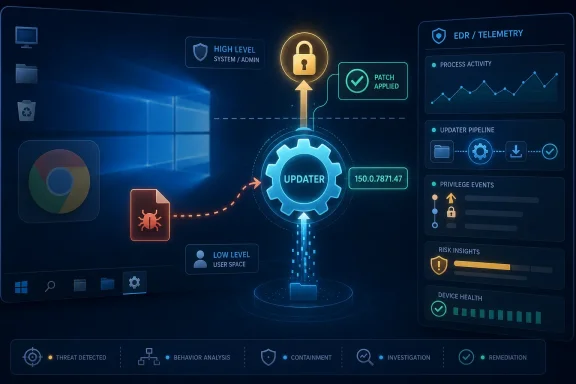 The Browser Bug That Escaped the Browser
Chrome security stories usually arrive with a familiar rhythm. A renderer bug, a V8 memory issue, a sandbox escape, a user lured to a malicious page, and then the industry’s standing advice: update quickly and move on. CVE-2026-13800 does not fit that neat pattern.According to the National Vulnerability Database, the flaw sits in Chrome’s Updater on Windows before version 150.0.7871.47. Google’s own Chrome Releases blog listed it among the high-severity issues fixed in the June 30 Stable Channel update, describing it as an “inappropriate implementation” in Updater and tying it to a Chromium issue that remains access-restricted.
That phrase, inappropriate implementation, is the kind of vendor language that says both too little and enough. It does not tell defenders exactly where the bug lives or how the malicious file is staged. But it does tell us the component performed some security-sensitive operation in a way that broke the rules Windows expects software to follow.
The important part is the privilege boundary. This is a local privilege escalation issue, not a remote code execution bug in a web page. An attacker needs some local foothold or a way to get the user to interact with a malicious file, but CISA’s CVSS 3.1 vector still scores it 7.8 high because successful exploitation can affect confidentiality, integrity, and availability at a system level.
Chrome’s Silent Maintenance Layer Becomes the Interesting Target
Modern browsers are no longer single applications. They are ecosystems of sandboxes, helper processes, policy engines, crash reporters, background services, and updaters that constantly negotiate with the operating system. Chrome’s Updater is especially sensitive because it exists to modify installed software reliably, often in enterprise environments where users do not have broad administrative freedom.That makes updater bugs different from bugs in tabs. A renderer compromise may still have to fight Chrome’s sandbox, Windows mitigations, and endpoint controls. An updater vulnerability may instead touch file permissions, service behavior, installation directories, scheduled tasks, or process-launch paths that already sit closer to trusted system operations.
NVD’s configuration data makes the Windows scope explicit: vulnerable Google Chrome versions up to, but excluding, 150.0.7871.47, in combination with Microsoft Windows. That does not mean Windows itself is the vulnerable product. It means the bug is exploitable in the way Chrome’s Windows updater interacts with the operating system.
For Windows administrators, that distinction matters. This is not something solved by a Windows cumulative update. It is a third-party application patch that happens to sit on one of the most widely deployed pieces of software on Windows endpoints.
The CPE Detail Is Messy, but the Exposure Is Not
The user-facing oddity in the NVD record is the CPE configuration. NVD’s change history shows a configuration that combines Google Chrome versions before 150.0.7871.47 with Microsoft Windows. That is a reasonable modeling choice for a Windows-only Chrome flaw, but it can look strange if you are expecting a single affected product entry.So, are we “missing a CPE”? Probably not in the practical sense. The vulnerable software is Google Chrome for Windows before 150.0.7871.47, and the Windows operating-system CPE appears to be there to express the platform condition under which the Chrome updater vulnerability applies.
The bigger problem is that vulnerability databases are still awkward at describing cross-layer bugs. A flaw may belong to an application vendor, manifest only on one operating system, and depend on behavior in privileged helper components. CPE was designed to identify products, not to elegantly explain those relationships.
That is why defenders should not over-interpret the apparent absence or presence of a particular CPE line. The operational rule is cleaner than the metadata: if Chrome on Windows is below 150.0.7871.47, it is in scope.
Google’s Giant Chrome 150 Drop Buries a Windows-Specific Risk
Google’s June 30 Chrome 150 Stable Channel update was not a one-CVE event. The Chrome Releases post says the desktop update shipped with hundreds of security fixes, including a long run of critical and high-severity Chromium issues across Extensions, GPU, ANGLE, Dawn, Skia, WebUSB, Bluetooth, Views, Chromecast, QUIC, Downloads, Accessibility, and more.That is exactly how a bug like CVE-2026-13800 can get lost. It appears as one line in a very long security rollup, surrounded by vulnerabilities that sound more classically browser-shaped and in some cases more immediately dramatic. A critical use-after-free in GPU or Extensions is easier to imagine in the standard exploit-chain narrative.
But for Windows fleets, the Updater line deserves disproportionate attention. The Updater is not merely another component in the browser. It is the trust conveyor belt that gets fixes from Google to the machine, and it is often allowed to operate where ordinary user processes are tightly controlled.
There is also an uncomfortable irony here. The same automated update infrastructure administrators rely on to eliminate browser risk can itself become a privilege-escalation surface. That does not argue against automatic updates; it argues for treating updater components as privileged software that deserve monitoring, hardening, and inventory discipline.
“Local” Does Not Mean “Low Risk” on Managed Windows
The word “local” often leads to bad triage. Security teams buried in remote-code-execution alerts may be tempted to downgrade anything that requires local access, especially when there is no public evidence of active exploitation. CISA’s SSVC enrichment for CVE-2026-13800 lists exploitation as “none” and automatable as “no,” which is useful context.But local privilege escalation is how intrusions mature. Phishing, malicious attachments, browser exploits, stolen credentials, abused remote management tools, and misconfigured software can all provide an initial beachhead. Once code is running as a constrained user, privilege escalation becomes the step that turns nuisance into control.
CISA’s CVSS vector is revealing: local attack vector, low attack complexity, no privileges required, user interaction required, unchanged scope, and high impact across confidentiality, integrity, and availability. That combination says the bug is not wormable, but it may be potent in the hands of an attacker who can place or persuade execution of the right file.
The phrase “via a malicious file” also pulls this into very normal Windows threat territory. Defenders do not need to imagine an exotic browser exploit chain. They need to imagine a downloaded payload, a shared folder, a staging directory, a help-desk lure, or a commodity malware dropper looking for a privilege-escalation assist.
The Restricted Chromium Bug Is a Feature, Not a Conspiracy
Google has not publicly exposed the full technical details of the Chromium issue linked to CVE-2026-13800. The Chrome Releases blog repeats the standard policy: access to bug details and links may remain restricted until most users are updated, and restrictions may stay in place when third-party dependencies are involved.That frustrates defenders who want detections now. It also makes sense. Publishing a precise exploit recipe before the update has reached a majority of systems would convert a high-severity patch note into an attacker’s implementation guide.
The gap between disclosure and public technical detail is where enterprise security teams must operate from first principles. If the bug is in Updater and uses a malicious file to escalate privileges, then the useful hunting terrain is file creation, modification, and execution around updater-controlled paths, temp directories, install locations, and unexpected elevated child processes related to Chrome maintenance.
That does not require claiming a known exploit path that Google has not disclosed. It requires acknowledging that privileged maintenance components should not suddenly launch unfamiliar binaries, consume untrusted local files, or produce unexpected elevation events.
Enterprise Chrome Management Turns Patch Speed Into a Governance Test
On unmanaged consumer machines, Chrome’s answer is mostly automatic. Open the browser, let the update apply, restart when prompted, and the vulnerable version disappears. On managed Windows endpoints, the story is less romantic.Enterprises may pin versions, stagger rollouts, defer browser updates for application compatibility, manage Chrome through Group Policy or cloud policies, or package updates through software distribution systems. Those mechanisms exist for good reasons, but every delay becomes part of the risk equation when the fixed version is already known.
The required target is straightforward: Chrome for Windows should be at 150.0.7871.47 or later. Google’s Stable Channel post also lists 150.0.7871.46/.47 for Windows and Mac, but the CVE record identifies Windows prior to 150.0.7871.47 as affected. For this vulnerability, administrators should not treat 150.0.7871.46 on Windows as the safe harbor unless their management tooling and Google’s channel state conclusively show otherwise.
That version nuance is exactly where security operations and endpoint management teams need to talk to each other. Vulnerability scanners, browser inventory, software deployment reports, and user-visible Chrome “About” pages can disagree during staged rollouts. The winning answer is the installed version on the machine, not the intended deployment ring.
Edge, Chromium, and the Usual Forked-Browser Question
Any Chrome security advisory inevitably raises the Microsoft Edge question because Edge is Chromium-based. But CVE-2026-13800, as currently described by NVD and Google, is a Google Chrome Updater vulnerability on Windows, not a generic Chromium rendering engine flaw.That distinction matters. Chromium engine bugs often flow downstream into Edge, Brave, Vivaldi, Opera, and other Chromium-based browsers, depending on the affected component and vendor integration. Updater bugs may not transfer the same way because each browser vendor has its own update mechanism, installer behavior, service model, and enterprise deployment story.
For WindowsForum readers, the practical move is not to assume Edge is affected by this exact CVE. It is to check each vendor’s advisory stream separately. Microsoft’s Edge update mechanism is not Google’s Chrome Updater, even though the browser engine lineage overlaps.
The broader lesson still applies to every Chromium-family browser on Windows. The browser’s privileged scaffolding is part of the product. Security teams that track only the rendering engine version are looking at half the machine.
The CVSS Score Says “High,” but the Patch Priority Depends on Your Threat Model
A 7.8 CVSS score is not an emergency siren in the same way a remotely exploitable, actively exploited zero-day might be. There is no public NVD assessment from NIST yet, and CISA’s SSVC data says exploitation is not currently observed. That should prevent panic.It should not prevent urgency. Local privilege escalation bugs become especially valuable when paired with initial-access techniques that already work. A malicious document, rogue installer, compromised user account, or browser exploit can become more dangerous if it can pivot through a privileged updater component.
The strongest case for fast patching is not that every home user is about to be hit by CVE-2026-13800 tomorrow. It is that Chrome is everywhere, Windows is everywhere, and attackers prize reliable privilege escalation on widely deployed software. A bug in an updater has the deployment footprint defenders hate and the trust characteristics attackers love.
For high-risk fleets — developers, finance, healthcare, education, government contractors, managed service providers, and environments with local admin restrictions — this should be treated as a near-term remediation item. For ordinary consumers, it is another reason not to postpone the Chrome restart sitting quietly in the corner of the browser.
The Malicious File Detail Points Back to Old Windows Hygiene
The attack description is sparse, but “via a malicious file” should make Windows administrators think beyond browser policy. This is about how files arrive, where they land, what process consumes them, and whether execution or parsing crosses a privilege boundary.Endpoint controls that block untrusted downloads from running in user-writable locations remain relevant. So do attachment filtering, Mark-of-the-Web handling, application control, controlled folder rules, and restrictions on script-based launchers. None of those are guaranteed mitigations for this specific CVE, but they reduce the pathways that make local privilege escalation bugs easy to chain.
The more subtle issue is file-system trust around maintenance tools. Updaters should not depend on writable directories in ways that permit hijacking. They should not load DLLs, manifests, archives, or configuration from locations a standard user can manipulate. They should not create predictable privileged operations from attacker-controlled input.
That is vendor engineering territory, but defenders can still monitor the symptoms. A standard user dropping files shortly before an updater-adjacent elevated process behaves strangely is the kind of sequence EDR products are supposed to notice.
The NVD Timeline Shows the Modern Disclosure Machine at Work
The chronology is quick. Google’s Chrome source became the origin for the CVE on June 30, 2026. CISA-ADP added CVSS, CWE, and SSVC data on July 1. NIST’s initial analysis added the CPE configuration and reference typing later that same day, and the NVD record was modified again on July 2.That speed is worth recognizing. A decade ago, defenders often waited longer for database enrichment to catch up with vendor advisories. Here, the official vendor release, national vulnerability database entry, CISA enrichment, weakness classification, and affected-configuration modeling all arrived within roughly two days.
The tradeoff is that speed produces rough edges. NVD still lists no NIST CVSS score, and the CPE presentation can look confusing to practitioners who expect a clean product-only mapping. The Chromium bug itself remains restricted.
This is the state of modern vulnerability intelligence: timely enough to act, incomplete enough to require judgment. The best teams do not wait for every field to be perfect before patching a ubiquitous browser updater flaw.
Inventory Is the First Control, Not the Last Report
For Windows administrators, the first practical question is embarrassingly basic: where is Chrome installed, and what version is it running? That includes standard Program Files installs, per-user installs, stale copies on rarely used endpoints, VDI images, golden images, developer workstations, lab machines, kiosk systems, and servers where Chrome was installed “just for testing” and never removed.Chrome’s automatic updater solves a lot of consumer exposure, but enterprise reality is full of exceptions. Devices sleep through maintenance windows. Users avoid restarts. Software distribution jobs fail. Browser channels diverge. Offline machines reappear weeks later with old builds.
This is why vulnerability management for browsers cannot be purely advisory-driven. It must be inventory-driven. The relevant control is not “we approved the Chrome 150 update”; it is “we verified that Windows endpoints no longer run Chrome below 150.0.7871.47.”
That verification should be repeated after the first patch wave. Updaters, ironically, are exactly the components that security tools may assume are healthy. CVE-2026-13800 is a reminder to prove it.
Detection Should Watch the Updater Without Pretending to Know the Exploit
Because the technical bug details are restricted, defenders should avoid writing fantasy indicators of compromise. There is no public basis to claim a specific file name, path, hash, command line, or registry key is tied to exploitation. Overconfident detection guidance can be worse than no guidance because it teaches teams to look only for invented artifacts.The safer approach is behavioral. Chrome update components should have predictable parent-child process relationships, known binary locations, expected signatures, and limited reasons to interact with user-supplied files. Deviations from that baseline deserve attention, especially when followed by elevation, service modification, persistence creation, or tampering with security tooling.
Windows event logs, EDR telemetry, Sysmon deployments, and application-control logs can all help, but only if an organization already has a baseline for normal Chrome maintenance behavior. Without that baseline, every Google update cycle can look noisy.
This is where mature endpoint engineering pays dividends. Knowing what “normal” looks like for Chrome Updater on your fleet makes a vague vendor advisory much easier to operationalize.
Consumers Get the Easy Fix and the Hard Habit
For home users, the advice is simple but still not trivial: update Chrome and restart it. Chrome’s update mechanism often downloads fixes automatically, but the browser generally needs a restart to complete the move to the new version. The visible update indicator is easy to ignore, especially for users who keep dozens of tabs open for weeks.The safer habit is to check the Chrome About page periodically and let the browser relaunch. That is not glamorous security advice, but it is the advice that actually closes bugs like this. A patched browser that has not restarted is not always the browser you think you are running.
Users should also be skeptical of files that claim to be browser updates, codec installers, PDF tools, invoice viewers, or workplace utilities. CVE-2026-13800 does not mean every malicious file can become administrator-level malware, but the local-file requirement reinforces a long-standing truth: Windows endpoint compromise often starts with a user opening something plausible.
The browser is both shield and target. Keeping it current is necessary, but it does not replace caution about the files that enter the machine.
The Chrome 150 Lesson for Windows Shops
CVE-2026-13800 is narrow enough to patch quickly and broad enough to deserve a policy conversation. It is not a reason to distrust automatic updates. It is a reason to treat updater infrastructure as privileged infrastructure.- Chrome for Windows installations below 150.0.7871.47 should be considered vulnerable to CVE-2026-13800 and moved to 150.0.7871.47 or later.
- The vulnerability is a local privilege escalation flaw in Google Chrome’s Updater on Windows, not a remote web-page exploit by itself.
- CISA’s enrichment scores the issue as high severity with low attack complexity, user interaction required, and high impact if successfully exploited.
- NVD’s Windows CPE entry appears to express the platform condition for a Chrome-on-Windows flaw rather than shifting ownership of the vulnerability to Microsoft Windows.
- Administrators should verify installed versions across real endpoints, not merely confirm that an update package was approved or deployed.
- Detection work should focus on abnormal Chrome updater behavior and suspicious file-to-elevation sequences rather than unconfirmed exploit artifacts.
References
- Primary source: NVD / Chromium
Published: 2026-07-03T07:00:01-07:00
NVD - CVE-2026-13800
 nvd.nist.gov
- Security advisory: MSRC
Published: 2026-07-03T07:00:01-07:00
Original feed URL
Security Update Guide - Microsoft Security Response Center
 msrc.microsoft.com
- Related coverage: cvefeed.io
CVE-2026-13800 - Google Chrome Privilege Escalation
Inappropriate implementation in Updater in Google Chrome on Windows prior to 150.0.7871.47 allowed a local attacker to perform OS-level privilege escalation via a malicious file. (Chromium security severity: High)cvefeed.io - Related coverage: windowsforum.com
CVE-2026-13844 Chrome Updater Fix: Windows build 150.0.7871.47 | Windows Forum
Google Chrome for Windows before version 150.0.7871.47 is affected by CVE-2026-13844, a high-severity use-after-free flaw in the Chrome Updater that could...windowsforum.com
