

Google fixed CVE-2026-14408 in Chrome 150.0.7871.46 after an uninitialized-use flaw in Dawn allowed a remote attacker to obtain potentially sensitive information from process memory through crafted HTML. The vulnerability is rated Medium, but the documented confidentiality impact warrants prompt action: Windows users should update Chrome, select Relaunch, and verify that the complete installed version is 150.0.7871.46 or later.
The National Vulnerability Database record for CVE-2026-14408 identifies Google Chrome versions before 150.0.7871.46 as affected. Version 150.0.7871.46 is excluded from that affected range. CISA-ADP contributed a CVSS 3.1 score of 6.5 Medium; the assessment requires user interaction and records high confidentiality impact, with no integrity or availability impact.
Windows users should verify the complete displayed Chrome version rather than relying on a major-version label such as “Chrome 150.”
A version reading below 150.0.7871.46 remains within the documented affected range. An incomplete reading such as “Chrome 150” is not enough to determine whether the installation is affected.
The record defines an affected range. It does not provide a broad product-support or release-lifecycle statement for every version that might compare numerically above the boundary. Administrators should use a direct version comparison to determine documented exposure while separately following current Google guidance about supported releases.
Inventory and vulnerability-management systems should interpret the range condition rather than marking the boundary version affected merely because its number appears in structured vulnerability data. Equally, an inventory field containing only a shortened version label cannot establish whether the endpoint is below the boundary.
The defensible technical summary is therefore narrow:
Those are point-in-time assessment fields, not guarantees about future activity. They support prompt, measured browser remediation without turning the issue into an unsupported claim of an active attack campaign or full Windows compromise.
This model avoids equating administrative intent with technical completion. A successful management command, downloaded package, update assignment, or pre-remediation inventory result may be useful evidence, but it is not equivalent to a fresh browser-version reading after the applicable update and relaunch workflow.
The CVE record does not define how any particular endpoint-management platform labels an update as assigned, installed, active, pending, successful, or compliant. Organizations should interpret those states according to the management product’s documentation and use current Chrome version evidence as the measurable closure condition.
A practical remediation record should include:
Administrators should avoid both unsupported conclusions:
Accordingly, 150.0.7871.46 is a Google Chrome boundary in this record. It should not be copied into Edge, Electron, embedded-runtime, or vendor-customized-browser compliance rules without separate product-specific evidence.
This distinction also matters when inventory reports focus on an organization’s default browser. The relevant question for this CVE is whether an affected version of Google Chrome is present and in scope—not which browser Windows currently treats as the default.
Exact publication and modification dates are omitted because the supplied evidence does not adequately confirm the previously stated July 1, 2026, and July 2, 2026 dates. Those dates are not necessary for remediation and should not be restored without verifiable sourcing.
The operational sequence can be stated without unsupported causal detail:
The National Vulnerability Database record for CVE-2026-14408 identifies Google Chrome versions before 150.0.7871.46 as affected. Version 150.0.7871.46 is excluded from that affected range. CISA-ADP contributed a CVSS 3.1 score of 6.5 Medium; the assessment requires user interaction and records high confidentiality impact, with no integrity or availability impact.
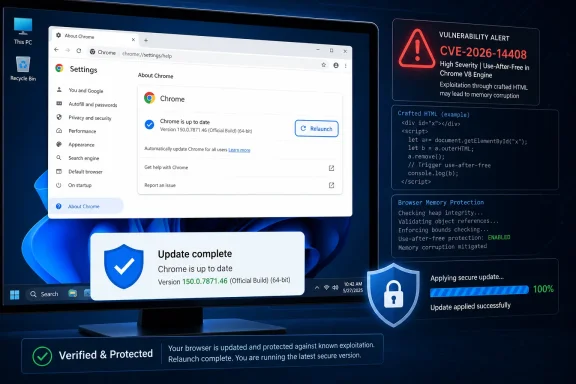 Update and Verify Chrome on Windows
Windows users should verify the complete displayed Chrome version rather than relying on a major-version label such as “Chrome 150.”- Save any work open in Chrome.
- Open Google Chrome.
- Open
chrome://settings/help, or use Chrome’s current Help/About interface. - Follow the update instructions presented by Chrome.
- Select Relaunch if Chrome offers that option.
- After Chrome reopens, return to the Help/About page.
- Confirm that the complete displayed version is 150.0.7871.46 or later.
A version reading below 150.0.7871.46 remains within the documented affected range. An incomplete reading such as “Chrome 150” is not enough to determine whether the installation is affected.
WindowsForum takeaway — Patch status is not closure status: Require fresh post-relaunch version evidence. An update assignment or deployment result shows that remediation was attempted; it does not, by itself, prove that the browser now reports a version outside the documented affected range.
Short Admin Checklist
- Identify managed Windows devices on which Google Chrome is installed.
- Collect the complete displayed or inventoried Chrome version.
- Flag versions earlier than 150.0.7871.46.
- Deploy an appropriate current Chrome update through the organization’s approved process.
- Complete any required browser relaunch using approved controls.
- Collect fresh version evidence after remediation.
- Keep missing, stale, incomplete, or contradictory results open as unverified.
- Do not apply Chrome’s version boundary automatically to Edge, Electron, or other Chromium-derived products.
- Record the 6.5 Medium score as a CISA-ADP contribution, not an NVD-authored score.
- Monitor authoritative records for changes to the affected range or exploitation assessment.
The Documented Version Boundary
The most useful operational fact is precise: Google Chrome versions before 150.0.7871.46 are within the documented affected range, while 150.0.7871.46 is excluded from that range.The record defines an affected range. It does not provide a broad product-support or release-lifecycle statement for every version that might compare numerically above the boundary. Administrators should use a direct version comparison to determine documented exposure while separately following current Google guidance about supported releases.
| Reported Chrome state | Documented affected range | Operational interpretation | Required action |
|---|---|---|---|
| Earlier than 150.0.7871.46 | Included | The installation is within the stated affected range | Update, relaunch as required, and verify |
| Exactly 150.0.7871.46 | Excluded | The boundary version is not included in the affected range | Preserve fresh version evidence |
| Later than 150.0.7871.46 | Not within the stated “before 150.0.7871.46” range | The reported value is beyond the documented range boundary; current support status must still come from Google | Record the version and maintain normal update governance |
| Version unavailable or incomplete | Unknown | Exposure cannot be determined | Obtain current, complete evidence |
What the Vulnerability Record Establishes
CVE-2026-14408 is titled “Uninitialized Use in Dawn” and is classified as CWE-457, Use of Uninitialized Variable. The documented scenario involves crafted HTML and the potential disclosure of sensitive information from process memory.The defensible technical summary is therefore narrow:
- The affected product named in the record is Google Chrome.
- The documented affected range covers versions before 150.0.7871.46.
- Version 150.0.7871.46 is excluded from that range.
- The affected component is identified as Dawn.
- The weakness is classified as uninitialized use.
- The attack medium is crafted HTML.
- The stated consequence is potentially sensitive information obtained from process memory.
- User interaction is required under the contributed CVSS assessment.
- The modeled impact is concentrated in confidentiality.
Those are point-in-time assessment fields, not guarantees about future activity. They support prompt, measured browser remediation without turning the issue into an unsupported claim of an active attack campaign or full Windows compromise.
What is not publicly established
The supplied record does not establish:- Which particular secrets, browser contents, credentials, files, tokens, or other data could be disclosed.
- A public proof of concept, trigger sequence, reproduction procedure, or reliable success rate.
- Remote code execution, sandbox escape, privilege escalation, persistence, data modification, denial of service, or compromise of Windows.
- Known exploitation, a specific delivery campaign, or a named social-engineering method.
- That every Chromium-derived browser or application shares Chrome’s affected status or version boundary.
Enterprise Verification Model
For managed Windows fleets, remediation should be separated into two distinct stages: update action and closure evidence.| Compliance state | Meaning | Required response |
|---|---|---|
| Below boundary | Chrome reports a version earlier than 150.0.7871.46 | Initiate remediation |
| Remediation initiated | An update or management action has been assigned | Keep the finding open |
| Version newly reported | Current inventory shows a value outside the documented affected range | Confirm that the evidence reflects the remediated browser state |
| Post-relaunch evidence obtained | A fresh check after the required update workflow reports 150.0.7871.46 or later | Record closure evidence |
| Status unknown | Evidence is missing, incomplete, stale, or conflicting | Keep open and obtain a current result |
| Verification failed | Chrome remains below the boundary or cannot be checked | Investigate through the approved support process |
The CVE record does not define how any particular endpoint-management platform labels an update as assigned, installed, active, pending, successful, or compliant. Organizations should interpret those states according to the management product’s documentation and use current Chrome version evidence as the measurable closure condition.
A practical remediation record should include:
- The device or asset identity.
- The Chrome version observed before remediation.
- The time or collection period of that observation.
- The remediation action taken.
- The Chrome version observed afterward.
- Enough timing or workflow context to show that the final result is fresh.
- An owner and follow-up action for every unresolved endpoint.
Chrome’s Boundary Does Not Apply Automatically to Every Chromium Product
The affected product identified in the NVD record is Google Chrome. Chrome may share upstream components with Microsoft Edge, Electron applications, embedded browser runtimes, and other Chromium-derived products, but shared technology alone does not establish identical exposure.Administrators should avoid both unsupported conclusions:
- Do not label every Chromium-derived product vulnerable solely because the Chrome record names Dawn.
- Do not declare another product unaffected merely because it is absent from this Chrome-specific record.
Accordingly, 150.0.7871.46 is a Google Chrome boundary in this record. It should not be copied into Edge, Electron, embedded-runtime, or vendor-customized-browser compliance rules without separate product-specific evidence.
This distinction also matters when inventory reports focus on an organization’s default browser. The relevant question for this CVE is whether an affected version of Google Chrome is present and in scope—not which browser Windows currently treats as the default.
Record Attribution and Timeline
The record combines information supplied by different organizations. The Chrome-originated CVE information provides the core vulnerability description and affected-version details. CISA-ADP contributed the CVSS 3.1 and SSVC assessments. NIST added affected-product configuration and related analysis within NVD.Exact publication and modification dates are omitted because the supplied evidence does not adequately confirm the previously stated July 1, 2026, and July 2, 2026 dates. Those dates are not necessary for remediation and should not be restored without verifiable sourcing.
The operational sequence can be stated without unsupported causal detail:
- The initial CVE information identified the Chrome vulnerability, weakness category, crafted-HTML scenario, and affected-version boundary.
- CISA-ADP contributed the 6.5 Medium CVSS 3.1 score and the listed SSVC fields.
- NIST provided affected-product configuration information for Google Chrome.
- NVD presents these elements together, but presentation on an NVD page does not make every displayed assessment NVD-authored.
Action Checklist for Admins
- Inventory in-scope Windows devices for Google Chrome.
- Obtain the complete Chrome version for each identified installation.
- Treat versions earlier than 150.0.7871.46 as within the documented affected range.
- Deploy an appropriate current Chrome update through the approved management process.
- Complete the applicable relaunch workflow.
- Re-query or recheck the Chrome version after remediation.
- Require fresh post-relaunch evidence before closing the finding.
- Keep devices with missing, incomplete, stale, or conflicting evidence unresolved.
- Investigate failures through the organization’s established endpoint-management and support procedures.
- Preserve the distinction between an update assignment and a verified result.
- Attribute the 6.5 Medium score to CISA-ADP.
- Record that the supplied SSVC assessment lists exploitation as none, automatable as no, and technical impact as partial.
- Do not describe the vulnerability as code execution, sandbox escape, Windows compromise, or known exploitation without new evidence.
- Do not apply Chrome’s version boundary to other Chromium-derived products without their vendors’ confirmation.
- Continue monitoring authoritative Chrome, NVD, and CISA information for changes.
References
- Primary source: NVD / Chromium
Published: 2026-07-11T15:37:54-07:00
NVD - CVE-2026-14408
 nvd.nist.gov
- Security advisory: MSRC
Published: 2026-07-11T15:37:54-07:00
Original feed URL
Security Update Guide - Microsoft Security Response Center
 msrc.microsoft.com
- Related coverage: windowsforum.com
CVE-2026-7924: Chrome 148 WebGPU Dawn Memory Leak Exposes Process Data | Windows Forum
Google and the Chromium project disclosed CVE-2026-7924 on May 6, 2026, describing a high-severity uninitialized-use flaw in Dawn that affected Google...windowsforum.com - Related coverage: dawn.googlesource.com
- Related coverage: chromium.org
- Related coverage: bugs.chromium.org
