

Microsoft’s Quiet UDFS Bug Lands in the Loudest Part of Windows
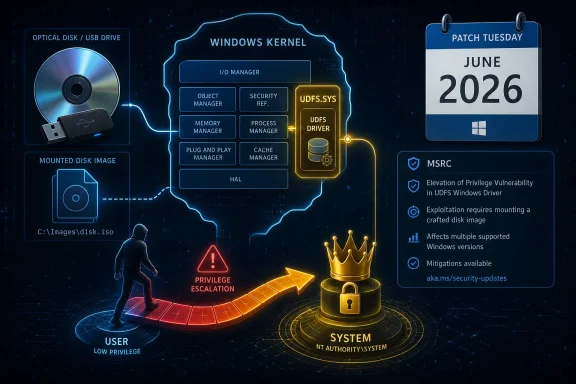
CVE-2026-40409 is, on its face, a familiar Microsoft security bulletin entry: Windows component, elevation of privilege, update available, limited public detail. The affected component, UDFS, is the Windows driver responsible for handling Universal Disk Format, a file system historically associated with DVDs, Blu-ray media, packet-written discs, and some removable storage scenarios.
That pedigree makes the bug easy to underrate. UDF feels like an optical-media relic in a world of cloud drives, USB-C docks, and NVMe storage. But Windows does not get to forget old formats just because the average laptop no longer ships with a disc tray. Compatibility is a security surface, and UDFS is a reminder that long-lived operating systems carry their past inside the kernel.
An elevation-of-privilege bug in a file-system driver is not an initial-access story by itself. The attacker generally needs some way to run code locally or otherwise cause the target system to process hostile input through the vulnerable path. But once that first step is achieved, the gap between “standard user” and “kernel-adjacent code path” is precisely where ransomware crews, post-exploitation frameworks, and insider-threat tooling like to operate.
Microsoft’s own public wording is spare, and that sparseness matters. The company has confirmed the vulnerability’s existence through the MSRC entry, but public technical details appear limited at disclosure time. That keeps defenders from knowing exactly what trigger to hunt for, while also denying copy-and-paste exploit builders a clean recipe.
The Report Confidence Signal Is the Real Tell
The text accompanying the vulnerability points to a CVSS metric that too often gets ignored: report confidence. This metric is not about how bad exploitation could be. It is about how much confidence exists that the vulnerability is real and that the public technical description is credible.
That distinction is important. A vulnerability can be high impact but poorly understood, or modestly scoped but fully confirmed by the vendor. In this case, the presence of an MSRC entry means the issue has crossed the threshold from rumor or third-party speculation into vendor-acknowledged security work. Even if Microsoft has not published root-cause detail, the patch train itself is the confirmation.
For defenders, that changes the calculus. A speculative advisory can sometimes wait for clarification. A vendor-confirmed Windows kernel-adjacent elevation-of-privilege flaw should not be treated as a curiosity just because the public write-up is thin. The lack of technical depth is not evidence of low risk; it is often evidence of a disclosure process intentionally designed to limit attacker acceleration.
Attackers read the same entries administrators do, but they read them differently. A terse MSRC page tells a reverse engineer which component changed, which binaries to diff, and which subsystem to fuzz. The shorter the public explanation, the more the patch itself becomes the map.
UDF Looks Legacy Until It Becomes an Attack Surface
Universal Disk Format was designed to solve real cross-platform storage problems. It supports large media, long filenames, richer metadata, and rewritable optical storage patterns that ISO 9660 was never meant to handle elegantly. Windows has supported UDF for decades, and modern Windows versions support read/write handling for multiple UDF revisions.
That history creates an awkward security inheritance. File systems are parsers, and parsers sit at the boundary between attacker-controlled structure and trusted operating-system behavior. A malformed directory record, allocation descriptor, volume metadata field, or edge-case attribute can turn what looks like “just a mounted disc image” into input for privileged kernel code.
The obvious mental model is a malicious DVD or Blu-ray, but that is too narrow. UDF can appear in disk images, archival workflows, forensic media, virtualized testing, lab environments, and enterprise edge cases where old application stacks or imaging processes persist. The attack surface is not huge compared with SMB or browsers, but it is real enough to keep shipping inside Windows.
The uncomfortable truth is that defenders rarely inventory file-system exposure with the same seriousness they apply to open ports or browser versions. Yet the driver stack that interprets storage formats can be just as security-critical. If Windows auto-mounts or opportunistically parses a crafted file system image in the wrong context, old media support can become a modern escalation path.
Elevation of Privilege Is the Second Act, Not the Opening Scene
The phrase “elevation of privilege” can sound less urgent than “remote code execution,” but in modern intrusions it is often the hinge on which the incident turns. Initial access gets an attacker onto the box. Privilege escalation decides whether that attacker can dump credentials, tamper with security tooling, persist across reboots, and move laterally.
That is why local Windows EoP flaws remain valuable even when they require authentication or user-level execution. Many real intrusions begin with exactly that: a phished user session, a low-privilege web shell, a malicious help-desk tool, or abuse of a legitimate remote-management agent. Once the attacker has code running as a normal user, a reliable privilege-escalation primitive can turn a contained compromise into a domain problem.
UDFS is especially interesting because it is not a flashy surface. Security teams may have policies for Office macros, PowerShell logging, browser isolation, and application control. They may not have an equally crisp answer for whether UDF media parsing is allowed, monitored, or relevant in their environment. That gap between policy attention and kernel trust is where low-glamour bugs earn their keep.
The practical risk depends on exploitability details Microsoft has not publicly laid out in depth. Attack complexity, required privileges, user interaction, and affected build coverage all matter. But security programs should resist the reflex to equate “local” with “minor.” Local privilege escalation is what turns yesterday’s nuisance into tomorrow’s incident report.
Patch Tuesday Still Rewards the Teams That Understand Boring Components
The right response to CVE-2026-40409 starts with ordinary patch discipline. Supported Windows client and server systems should receive the relevant cumulative security updates through Windows Update, Windows Update for Business, WSUS, Microsoft Configuration Manager, Intune, or whatever patch pipeline the organization already trusts. The operational challenge is not discovering an exotic workaround; it is getting boring deployment mechanics right.
That means treating UDFS as part of the Windows kernel attack surface, not as an optional curiosity. If a machine is in scope for Microsoft’s update, it is in scope for the fix. The fact that a workstation has no optical drive does not automatically remove every possible UDF parsing path, especially in a world of mounted images, external storage, virtualization, and file-handling workflows that users and administrators may not fully document.
Home users should do the simple thing: install the June 2026 Windows security updates and reboot. Enthusiasts who defer cumulative updates because they fear regressions should at least distinguish between feature irritation and kernel security exposure. Waiting a few days for deployment telemetry is one thing; turning a confirmed privilege-escalation fix into a month-long experiment is another.
Enterprises have the harder job. They need rings, testing, rollback plans, and line-of-business validation. But the existence of that machinery is not a reason to slow-walk every kernel fix. It is the reason the organization can move with controlled urgency instead of panic.
The Mitigation Story Is Mostly About Reducing Paths to the Driver
When public exploit detail is limited, defenders naturally ask what they can do besides patch. The honest answer is that compensating controls are weaker here than the update. You can reduce exposure, but you probably cannot prove the vulnerable code path is unreachable without knowing the exact trigger.
Still, there are useful defensive moves. Organizations can restrict removable media, limit mounting of untrusted disk images, harden endpoint controls around archive and image-handling workflows, and watch for unusual mount activity on systems that should not be interacting with optical-style media at all. These measures will not “fix” CVE-2026-40409, but they can reduce the number of opportunities an attacker has to reach UDFS in the first place.
Application control also matters. If exploitation requires a local helper process, script, or delivered payload, policies such as Windows Defender Application Control, AppLocker, and constrained administrative workflows can reduce the chance that an attacker gets to stage the second act. Likewise, removing unnecessary local admin rights does not stop a kernel EoP, but it reduces the number of ways an attacker gets close enough to use one.
Detection is trickier. A public bulletin rarely provides the sort of indicators defenders want, and kernel exploitation often leaves less tidy telemetry than commodity malware. Instead of chasing imaginary signatures, teams should watch for the surrounding behaviors: suspicious mounting of images, unexpected access to removable media paths, post-exploitation credential tooling, security product tampering, and sudden privilege changes that do not match administrative workflows.
The Absence of Public Exploit Detail Is Not a Comfort Blanket
One of the most common mistakes after a terse Microsoft advisory is to confuse “no known public exploit” with “not worth prioritizing.” Those are different claims. A vulnerability can be undisclosed today and weaponized after patch diffing tomorrow. Windows patches are not just remedies; they are also clues.
Patch diffing is a mature discipline. Attackers compare vulnerable and fixed binaries, identify changed functions, and work backward toward a trigger. File-system drivers can be difficult targets, but they also have well-defined input structures and decades of research patterns around malformed metadata. A motivated researcher does not need Microsoft to publish exploit notes to begin looking.
This is why the report-confidence metric is worth foregrounding. The vulnerability is not just a possible bug in an obscure subsystem. It is a vendor-confirmed issue with enough credibility to receive a CVE and a place in the Security Update Guide. Public details may be thin, but the existence of the bug is not the uncertain part.
The defender’s job is to act before exploit reliability improves. Once exploit code exists in private hands, the window between targeted use and broader criminal adoption can narrow quickly. The boring patch you install now is cheaper than the emergency change window you schedule after someone posts a proof of concept.
Where Windows Enthusiasts Should Be More Skeptical Than Cynical
There is a tendency in the Windows community to respond to every security update with one of two unhelpful moods: alarmism or fatigue. Alarmism treats every CVE as if it will be in a worm by Friday. Fatigue treats every CVE as another line item in Microsoft’s endless patch conveyor belt. CVE-2026-40409 deserves neither reaction.
The measured view is that this is a credible Windows elevation-of-privilege issue in a privileged file-system component, with limited public detail at disclosure time. That makes it important for patch prioritization, especially on systems that handle untrusted media, disk images, lab samples, forensic artifacts, or user-submitted files. It does not mean every unpatched home PC is about to be remotely owned through UDF magic.
Enthusiasts should also resist the “I do not use that feature” shortcut. Windows components are often reachable through indirect workflows. You may not burn discs, but you may mount ISOs. You may not own an optical drive, but your backup software, imaging tool, virtual machine workflow, or help-desk process may still touch file-system formats you never think about.
The right skepticism is aimed at certainty. If someone claims the bug is trivial to exploit without showing evidence, be skeptical. If someone claims it is irrelevant because UDF is old, be skeptical. The accurate position is narrower and more useful: Microsoft has confirmed a UDFS privilege-escalation vulnerability, and the prudent response is to patch supported systems promptly while reducing unnecessary exposure to untrusted file-system images.
Security Teams Should Fold UDFS Into a Bigger Kernel Hygiene Conversation
The deeper lesson is not about UDF alone. Windows carries a broad set of kernel-mode parsers, compatibility layers, drivers, and file-system handlers because enterprise computing demands continuity. Every one of those components has a security cost, even when almost nobody in the organization can name it.
That cost is manageable, but only if it is acknowledged. Asset management should include not just applications and services, but device classes, driver exposure, removable-media policies, and image-mounting workflows. Patch prioritization should consider whether a component is kernel-mode and whether exploitation would plausibly lead to SYSTEM-level control. Security awareness should extend beyond “do not click suspicious links” to “do not mount or process untrusted media just because it looks inert.”
For administrators, CVE-2026-40409 is an opportunity to review assumptions. Are removable storage restrictions actually enforced? Can standard users mount arbitrary images? Do security tools log mount events in a way analysts can query? Are lab machines that process untrusted samples isolated from production credentials? These are not UDFS-specific questions, which is exactly why they are valuable.
Kernel hygiene is also about update velocity. The organizations best positioned for this class of flaw are not the ones that guess the root cause fastest. They are the ones that can test, deploy, and verify Windows cumulative updates without turning every Patch Tuesday into a bespoke crisis.
The Patch Is Small; the Lesson Is Not
CVE-2026-40409 will probably not become the most famous Windows vulnerability of 2026. It lacks the drama of a pre-authentication server RCE, the visibility of a browser zero-day, or the instant recognizability of a named exploit campaign. But its quietness is part of the point.
Windows security is not only decided in the components users can see. It is decided in the drivers that parse old formats, the compatibility layers that preserve enterprise workflows, and the kernel code paths that exist because removing them would break somebody’s business process. UDFS sits in that category: easy to ignore until a CVE reminds everyone it is still trusted code.
The best response is correspondingly unspectacular. Patch. Reboot. Verify deployment. Reduce unnecessary handling of untrusted media and disk images. Watch for post-exploitation behavior rather than waiting for a perfect indicator. Treat local privilege escalation as a serious stage of the attack chain, not as a second-class vulnerability.
The UDFS Entry That Should Change the Patch Queue
The practical read on CVE-2026-40409 is less about panic and more about disciplined prioritization. Microsoft has identified a vulnerability in a Windows file-system driver, the public detail is limited, and the safest assumption is that the update carries information attackers will study.
- Microsoft disclosed CVE-2026-40409 on June 9, 2026, as a Windows UDFS elevation-of-privilege vulnerability.
- The affected component is a kernel-mode file-system driver used to process Universal Disk Format media and images.
- The public advisory confirms the vulnerability’s existence but does not provide enough root-cause detail for defenders to rely on narrow mitigations.
- The most reliable fix is to deploy the relevant June 2026 Windows security updates and confirm successful installation.
- Organizations should reduce unnecessary exposure to untrusted removable media and disk images while monitoring for suspicious mount and post-exploitation activity.
- The bug is best understood as a second-stage intrusion risk: dangerous after an attacker has obtained some local execution path.
CVE-2026-40409 is a reminder that the Windows attack surface is not only where the industry’s attention happens to be pointed this week. The next serious escalation path may come from a subsystem most users never name, a format most organizations no longer think they use, and a driver that has quietly done its job for years. That is why good Windows security remains less about chasing the loudest vulnerability and more about maintaining the boring, repeatable discipline that keeps obscure bugs from becoming decisive ones.