Windows 10 Going to install update

Fenway16

Honorable Member
Joined
Jan 6, 2017
Messages
461
I did a Macrium backup yesterday, ran a Dell Support Assist scan, installed new BIOS, and an Intel Interface Driver. Is there anything else I should do? I am on admin account for this upgrade. Thanks.
 

Neemobeer

Windows Forum Team
Staff member
Joined
Jul 4, 2015
Messages
8,998
You should be fine even without performing those steps, but they never hurt especially the backup.
 

Fenway16

Honorable Member
Joined
Jan 6, 2017
Messages
461
OK - thanks - I'll let you know how it goes. Gulp.
 

Fenway16

Honorable Member
Joined
Jan 6, 2017
Messages
461
Also, on average about how long should this process take. I know all systems are different - also, if it seems to stop, I should not interfere, as in shutting it down - from what I've read online. Thanks.
 

Neemobeer

Windows Forum Team
Staff member
Joined
Jul 4, 2015
Messages
8,998
On average it should take around a hour.
 

Fenway16

Honorable Member
Joined
Jan 6, 2017
Messages
461
ok. Thanks.
 

nmsuk

Essential Member
Joined
Sep 7, 2009
Messages
4,329
Varies from 20 mins to an hour+
 

Fenway16

Honorable Member
Joined
Jan 6, 2017
Messages
461
ok thanks again. haven't done it yet - o_O
 

Fenway16

Honorable Member
Joined
Jan 6, 2017
Messages
461
Just finished the update. For my system it took about 90 minutes. Happily the update looks to have cured a couple of issues. My photos now open without that message about the registry that I was getting yesterday. A;so, not sure if I did it or the update did it, but I found the media folder where my audio books reside. I still am not getting the transparency feature to work - no big deal-just like the way the task bar looks when it's applied. As everyone said, update should go smoothly and it did!! Thanks to all.
 

umitsayman

Senior Member
Joined
Jun 15, 2019
Messages
3
Hello folks, I recently updated to v1903 x64 with success on June 12, 2019.
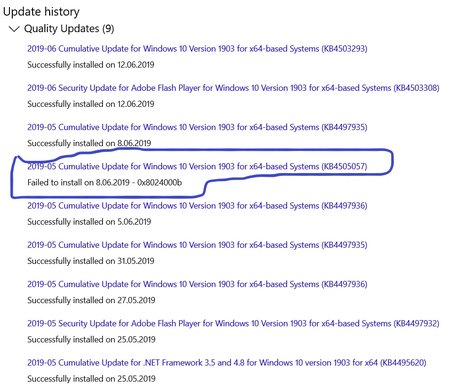
When I check my update history, I saw that 2019-05 Cumulative Update (KB4505057) had failed to update on 8.06.2019 which did not try to update by itself, instead my computer updated to 2019-06 (KB4503293) with success.
I wonder if the missing (KB4505057) will be an issue in operations or should I simply neglect this failure???
If it is a must to have the KB4503293, will it cause problems to force to update with an iso or whatever??? Please respond..

 

Attachments

  • Annotation 2019-06-12 163146.webp
    Annotation 2019-06-12 163146.webp
    88 KB · Views: 154

helpifIcan

Fantastic Member
Joined
Jun 20, 2009
Messages
932
I THINK that a later update has the pervious updates included.
 

nmsuk

Essential Member
Joined
Sep 7, 2009
Messages
4,329
You're correct it does.
 

Back
Top