

Windows 8.1 How to apply icons in windows 10?

Lambada10

Active Member
Joined
Nov 18, 2019
Messages
7
Hi. I have downloaded some icons (.ico files) and I want to apply it. But in every page on Internet says I must go to control panel -> personalization -> change desktop icons. But I don't have that. Can u give me step by step guide how to do it? Thanks a lot.

Wysłane z mojego RNE-L21 przy użyciu Tapatalka
 

Neemobeer

Windows Forum Team
Staff member
Joined
Jul 4, 2015
Messages
8,998
Right click the desktop, select "Personalize" > Themes > "Desktop Icon Settings" (on the right)
 

Lambada10

Active Member
Joined
Nov 18, 2019
Messages
7
Thanks! But can I change other icons e. g. Excel, chrome?

Wysłane z mojego RNE-L21 przy użyciu Tapatalka
 

Neemobeer

Windows Forum Team
Staff member
Joined
Jul 4, 2015
Messages
8,998
You can change the icons on short cuts by right clicking them and selecting properties. Then click "Change Icon"
 

Solution

Lambada10

Active Member
Joined
Nov 18, 2019
Messages
7
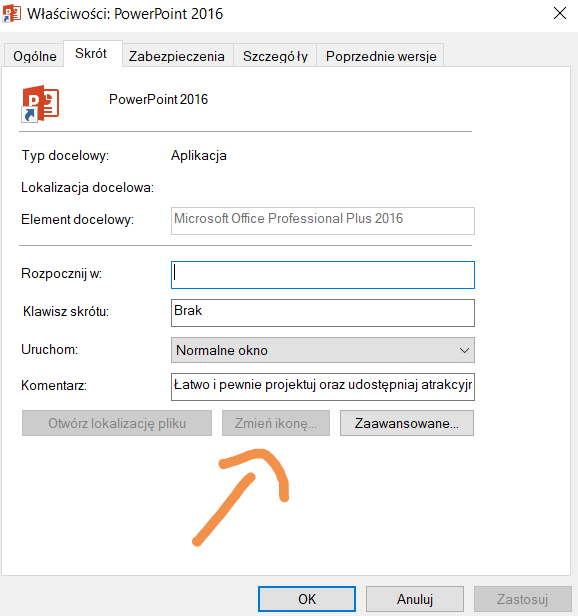
Why I can't change the icons of Microsoft Office apps
a0440f56af82112bb2f96e30642eace9.jpg


Wysłane z mojego RNE-L21 przy użyciu Tapatalka
 

Neemobeer

Windows Forum Team
Staff member
Joined
Jul 4, 2015
Messages
8,998
Because a flag can be set in the shortcut that doesn't allow for a different icon. You'd have to create a new shortcut to the Office apps to be able to change the icon.
 

Lambada10

Active Member
Joined
Nov 18, 2019
Messages
7
And (I think) last question. Why I can't change icons of appp, only shortcuts.

Wysłane z mojego RNE-L21 przy użyciu Tapatalka
 

Back
Top