Windows 7 How to Move Icons Back to the Left Side of My Screen

Jimmy

New Member
Joined
Jan 26, 2010
Messages
14
How do I get my icons,to go back to the left side of the screen,where they were?
Right now there on top,left side of the screen.:confused:
 

Solution
I think you may mean the desktop icons?
Right click anywhere on the screen and select "View"
Select (either or both) "Auto arrange icons" and "Align icons to grid"

Sonny

Fantastic Member
Joined
Nov 17, 2009
Messages
1,387
How do I get my icons,to go back to the left side of the screen,where they were?
Right now there on top,left side of the screen.:confused:

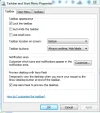
Try right clicking on start, then click properties. click on the taskbar and change the location of your icons.


Capture.webp
 

RAK

Extraordinary Member
Joined
Jul 6, 2009
Messages
2,502
I think you may mean the desktop icons?
Right click anywhere on the screen and select "View"
Select (either or both) "Auto arrange icons" and "Align icons to grid"
 

Last edited:
Solution

Sonny

Fantastic Member
Joined
Nov 17, 2009
Messages
1,387
I think you may mean the desktop icons?
Right clcik anywhere on the screen and select "View"
Select (either or both) "Auto arrange icons" and "Align icons to grid"

Rak your right, my mistake, I think I need new glasses. :redface:
 

Back
Top