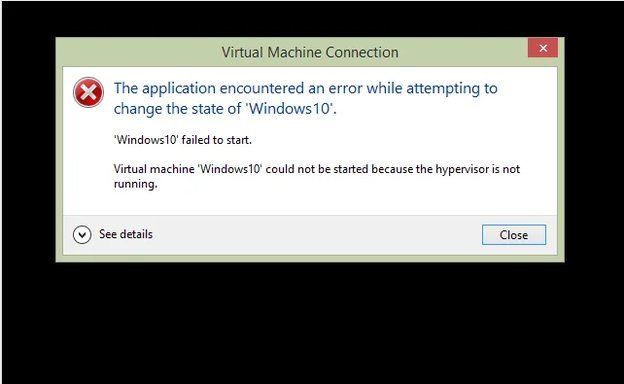
Windows 8 Hyper-V Not Working

Sonny

Fantastic Member
Joined
Nov 17, 2009
Messages
1,387
Hyper-V is giving me this message every time I try to connect. I have checked and double checked my bios to make sure every thing was enabled and even went back into programs and features to make sure every thing was checked. I hope someone here has an answer. I am totally lost.

An image from 'Hyper-V Not Working'. Hyper-V Manager error shows the virtual machine failed to start because the hypervisor is not running.
 

Last edited by a moderator:
Solution
Control Panel -> Programs and Features -> Turn Windows Features on or off -> Hyper-V-> Make sure everything is checked there.
You may need to reboot not sure but
Launch Hyper-V Manager and in the top right click "Start Service"

EDIT: When you run systeminfo in a command prompt. If hyper-v is configured properly then it should say this.

Hyper-V Requirements: A hypervisor has been detected. Features required for Hyper-V will not be displayed.
OK.... looks like you have one Virtual Machine.
And, it is currently "Off"
so on the right side under Windows 10 click the start button
and then click the connect button
Let me know what happens
 

ok, I did that, here are the attachments.
 

Attachments

  • Capture4.webp
    Capture4.webp
    8.2 KB · Views: 373
  • Capture2.webp
    Capture2.webp
    14.2 KB · Views: 424
Did you install that windows X yourself Sonny or copy it from someone elses machine?
 

Looks like a memory issue to me --- Can you post a sreenshot of the memory settings for the windows X Please?

As an example this screen is a server I'm working on but the memory setting on your windows X should look similar.
An image from 'Hyper-V Not Working'. Hyper-V Manager shows dynamic memory settings for a virtual machine named 'laptop term2 server.'
 

Last edited by a moderator:
upload_2014-10-8_15-11-39-png.28260

Sonny,

I do not think your CPU supports Hyper-V. When I redesigned my tower the impetus was switching to a CPU that was/is capable on running Hyper-V. I do not think your is. Please, research that issue.

Cheers,
Drew
An image from 'Hyper-V Not Working'. Windows 10 startup screen showing the logo and loading bar.
 

Last edited by a moderator:
Hi ussnorway and Drew, Sorry I didn't get back here sooner. I do have it up and running now. Thanks to Trouble it was just a matter of finding the right switches to throw I guess you could say. Thank you all I appreciate the help you have given me.
 

Back
Top