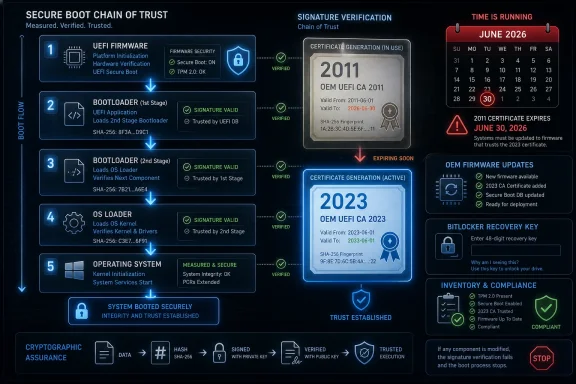
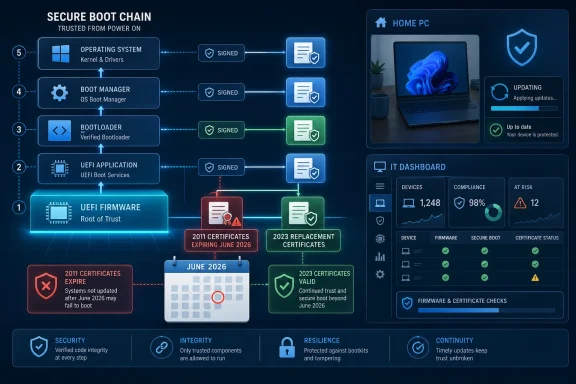
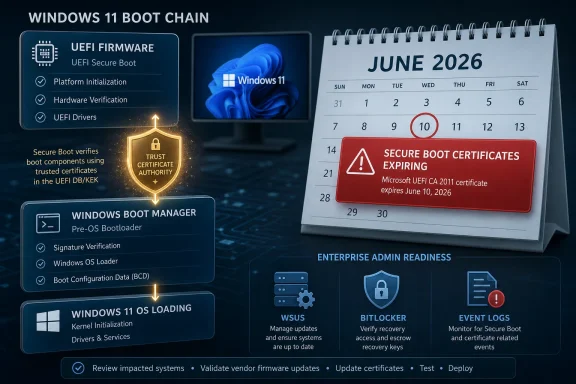
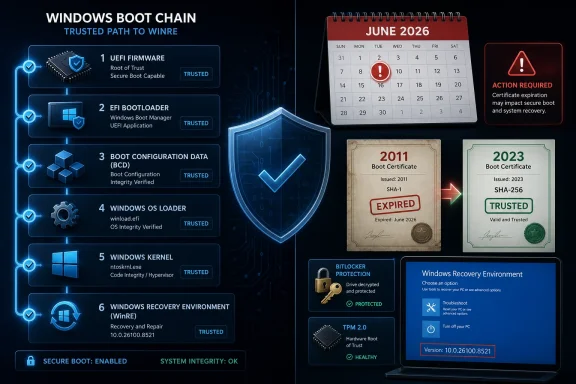
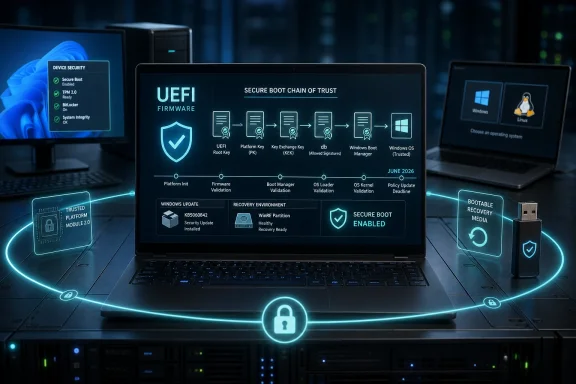
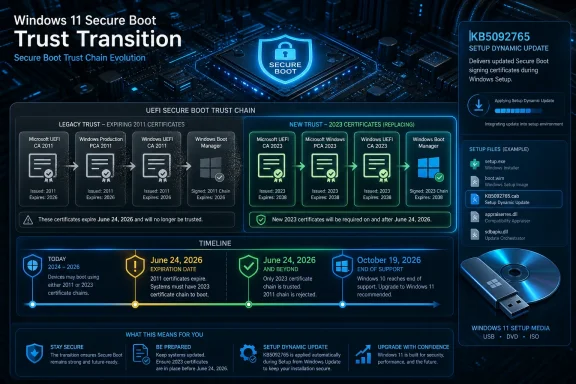
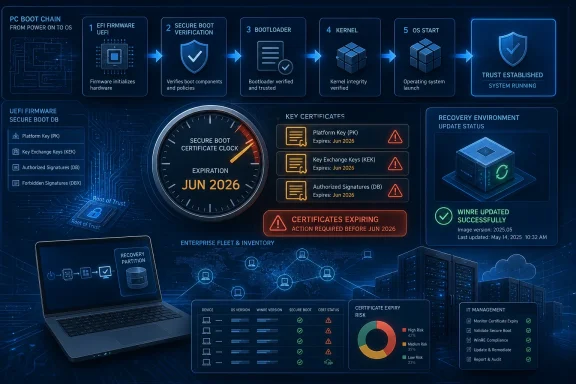
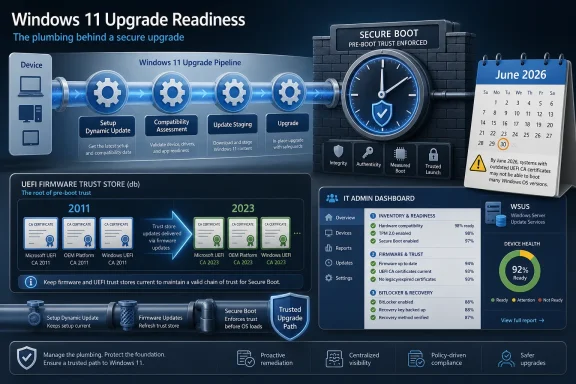
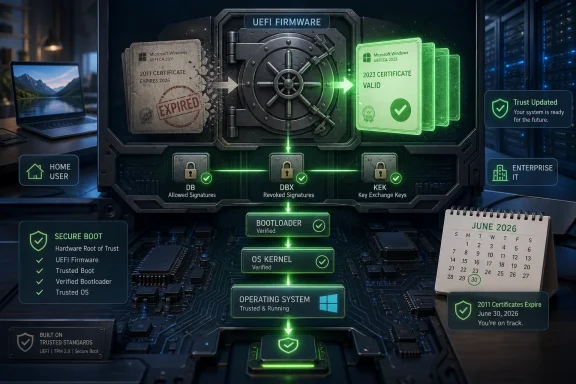
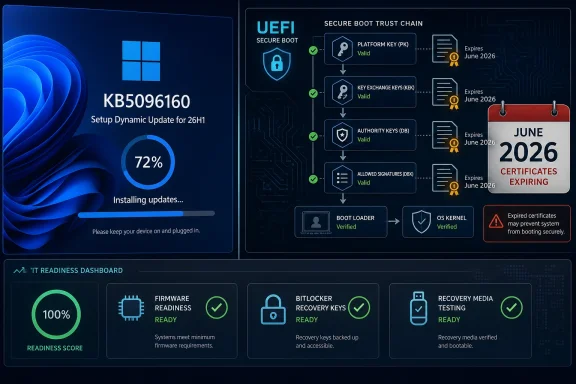
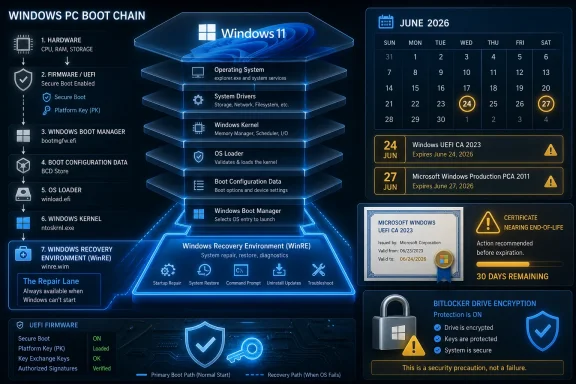
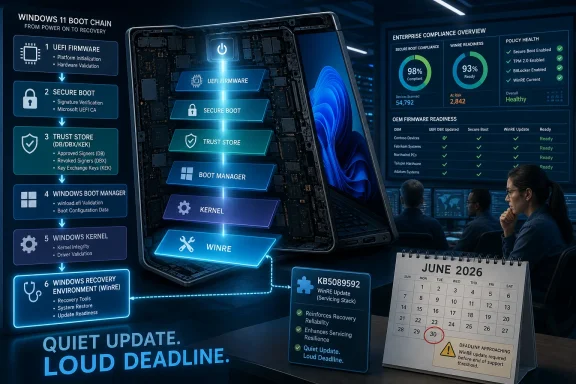
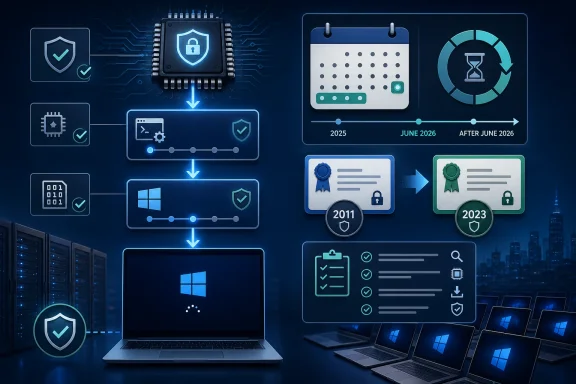
Microsoft is replacing the original 2011 Secure Boot certificate chain across Windows PCs and servers before certificates begin expiring in June 2026 and continue expiring into October, affecting supported Windows 10, Windows 11, and Windows Server systems that still trust those aging boot authorities. The update is not a flashy feature release; it is plumbing work at the foundation of the Windows security model. But plumbing is exactly what makes this story matter. When the trust anchors under Secure Boot age out, Windows does not instantly fall over — it slowly loses the ability to evolve its defenses before the operating system even starts.
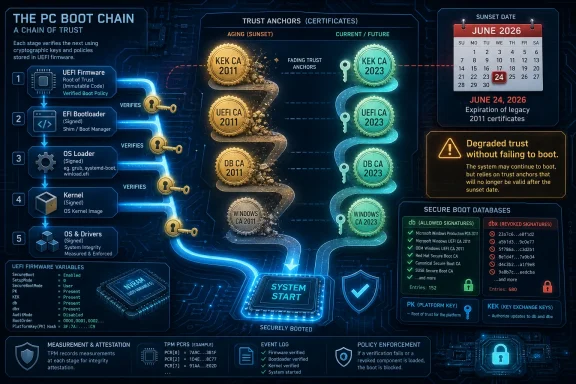
Secure Boot was always a long bet on the idea that the PC boot chain could be made boring, predictable, and resistant to tampering. When UEFI replaced the old BIOS model, Microsoft and the PC industry moved toward a world where firmware checks signatures before handing control to bootloaders, option ROMs, and operating system components. That model depends on certificates, and certificates depend on time.
The awkward part is that the first generation of Microsoft Secure Boot certificates has lasted nearly the entire modern Windows era. The same 2011-era authorities that helped usher in Windows 8-era hardware are still present across huge numbers of Windows 10, Windows 11, and Windows Server machines. That longevity was convenient until it became a deadline.
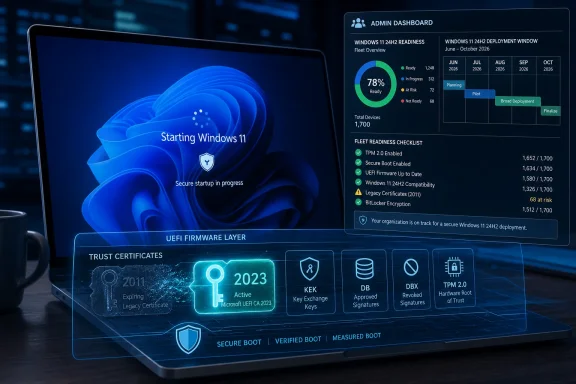
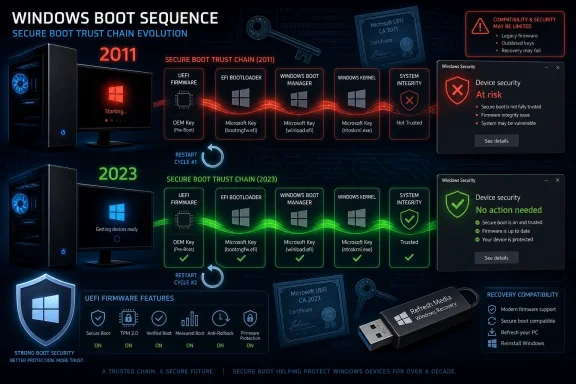
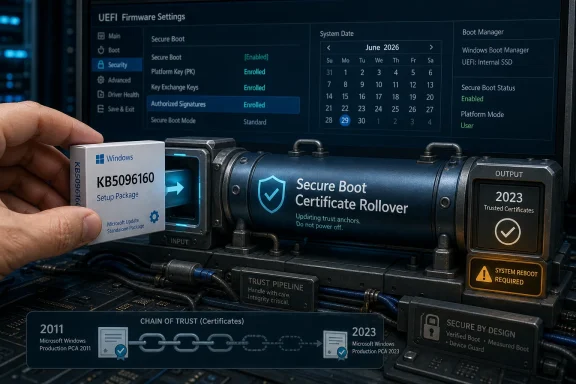
The first wave of expirations begins in late June 2026, with additional Secure Boot certificate expirations following in October 2026. Microsoft’s answer is a new 2023 certificate generation, distributed through Windows servicing, firmware updates, and enterprise deployment channels. In ordinary desktop language, that means Windows Update and possibly a BIOS or UEFI firmware update. In enterprise language, it means inventory, sequencing, rollback planning, BitLocker testing, and a nervous eye on every server SKU that does anything unusual before boot.
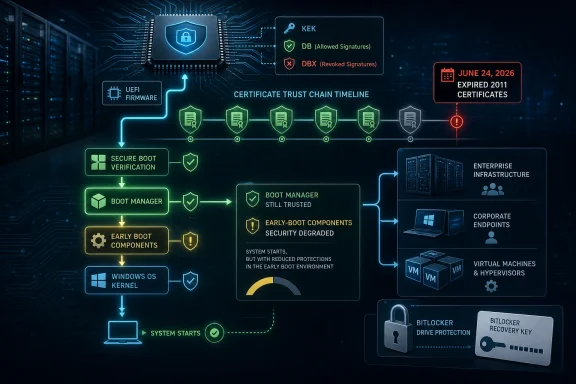
This is not a story about PCs refusing to turn on the morning after a certificate expires. It is more subtle than that, and therefore easier to underestimate. Unsupported or unrefreshed systems may continue to boot and receive normal operating system patches, while losing the ability to receive future Secure Boot protections for early boot components.
That distinction matters because panic is a poor patch-management strategy. Secure Boot is a chain of trust, not a subscription license check. Firmware uses databases of allowed and revoked signatures to decide whether pre-OS code should run. If the old trust material is still present, already-signed components can continue to work.
But the second half of that sentence is where the risk lives. A system that has not moved to the 2023 authorities may be unable to accept future updates to the Secure Boot database, the revocation database, or boot components signed under the newer chain. That leaves the machine in what Microsoft describes as a degraded security posture.
For home users, “degraded” can sound abstract. For administrators, it is concrete. It means future defenses against bootkits, vulnerable boot managers, or malicious pre-OS components may not apply. The operating system can still be patched while the layer beneath it stops receiving the same quality of protection.
The Secure Boot database, usually described as db, contains trusted signatures and hashes. The revocation database, dbx, contains signatures and hashes that should no longer be trusted. The Key Exchange Key, or KEK, authorizes updates to those databases. Together, these components allow the PC ecosystem to respond when something once trusted becomes dangerous.
That is why the certificate refresh matters beyond bureaucratic expiration hygiene. The boot security model has to change over time because attackers change over time. A bootloader, shim, option ROM, or early boot component that looked acceptable years ago may become part of a bypass chain later.
The BlackLotus episode made that painfully clear. Microsoft has spent years staging mitigations for Secure Boot bypasses, including revocations that must be deployed carefully because revoking the wrong thing too quickly can strand legitimate systems. The 2026 certificate transition is part of that same uncomfortable lesson: Secure Boot is only as strong as the ecosystem’s ability to update what it trusts and distrusts.
The catch is that Secure Boot lives in the borderland between Windows and firmware. Microsoft can ship certificate updates through Windows servicing, but the firmware ultimately stores and enforces Secure Boot variables. If a machine’s UEFI implementation is buggy, outdated, locked down, or weirdly customized, the operating system alone may not be able to complete the transition cleanly.
That is why Microsoft and OEMs keep pointing users toward firmware updates. Firmware updates can add compatibility for the new trust anchors, reduce the odds of failed certificate updates, and prepare systems for future Secure Boot enforcement. Anyone who has administered PCs at scale knows this is the part where theory meets the vendor support matrix.
Consumer devices complicate the picture further. Some older PCs may be technically capable of receiving certificate updates through Windows but may never receive a polished firmware update from the manufacturer. Others may have firmware updates available only through vendor utilities that users have disabled, uninstalled, or never noticed. The security foundation of a Windows PC is, inconveniently, still partly at the mercy of OEM maintenance habits.
Supported Windows 10 devices, including those covered by ESU where applicable, can receive the relevant updates. Unsupported Windows 10 systems are a different matter. They may keep running, and they may keep booting, but they should not be assumed to receive the same Secure Boot certificate maintenance as supported Windows builds.
This is the hidden pressure behind Microsoft’s messaging. The company does not need to say “upgrade to Windows 11” in every paragraph for the implication to be obvious. A security feature that depends on ongoing servicing becomes another reason unsupported Windows 10 machines are less defensible over time.
That does not mean every Windows 10 holdout is doomed. Many organizations have legitimate reasons for staged migrations, application compatibility testing, and hardware replacement cycles. But the Secure Boot refresh narrows the space for complacency. If a device is old enough to be stranded on Windows 10 and neglected by its OEM, it is exactly the sort of device that deserves scrutiny before the certificate deadlines arrive.
Servers are full of special cases. They run older firmware, vendor storage controllers, signed option ROMs, out-of-band management stacks, clustering configurations, BitLocker or TPM dependencies, virtualization hosts, and boot paths that may have accumulated years of local assumptions. A certificate change at the boot layer touches all of that before the operating system has a chance to help.
Microsoft’s guidance for servers emphasizes inventory and troubleshooting because that is where the work is. Administrators need to identify machines still using 2011 Secure Boot certificates, confirm whether UEFI CA 2023 status has moved to the expected state, and watch event logs for signals that the transition did not apply cleanly. Those are not optional niceties; they are the only way to know whether a reboot after patch night is actually exercising the new trust chain.
The largest risk is not that every server fails. The largest risk is unevenness. A rack of nominally identical servers may have different firmware levels, different add-in cards, different histories of Secure Boot toggles, or different update channels. The machines that look boring on a spreadsheet are often the ones that ruin a maintenance window.
Microsoft has warned that some affected configurations can see BitLocker recovery prompts, startup hangs, or Secure Boot validation errors if the transition goes badly. These risks are higher on systems with older firmware or incomplete certificate updates. They are also exactly why Microsoft recommends pilots and staged deployments instead of fleet-wide enthusiasm.
For enterprises, the practical answer is boring and essential. Recovery keys must be escrowed and verified before touching boot trust. Pilot rings should include multiple OEMs, firmware generations, and device classes. The first successful reboot in a lab is not proof that every branch-office workstation or hypervisor host will behave.
The consumer version is simpler but still important. Before installing firmware updates, users should make sure BitLocker recovery information is available through their Microsoft account or organizational recovery process. Most people will never need it. The unlucky minority will be very glad they checked.
That is not new, but Secure Boot makes it more visible. For years, users could treat firmware as something updated only when a fan curve was broken or a CPU compatibility issue appeared. Now firmware becomes part of a timed security transition across the Windows estate.
The server vendor angle is especially important. Major OEMs have been publishing guidance for PowerEdge, UCS, and other platforms because enterprise customers cannot remediate what they cannot certify. A server that boots Windows is not automatically ready for a Secure Boot certificate transition. The platform firmware, option ROMs, and management stack all matter.
This is also where small organizations are most exposed. Big enterprises have endpoint management platforms and vendor account teams. A 40-person company with a mix of old desktops, one aging Hyper-V host, and a part-time IT provider may not even know which firmware is current. The 2026 transition rewards organizations that kept boring asset records and punishes those that treated firmware as folklore.
That is harder than it sounds. If Microsoft revokes old trust too aggressively, legitimate systems can fail to boot. If it moves too slowly, vulnerable boot paths remain usable for attackers. If it relies entirely on users, many machines will never update. If it relies entirely on automation, some unusual systems will break in ways that are hard to diagnose.
The result is a staged, cautious transition that can look indecisive from the outside. Microsoft is trying to get new certificates onto devices, preserve compatibility with old signatures long enough to avoid mass disruption, and create a path for future revocations. That balancing act is messy because the PC ecosystem is messy.
The alternative would be worse. A security architecture that cannot rotate keys is not a security architecture; it is a monument. The fact that this refresh is operationally painful is evidence that it should not be allowed to become a once-every-15-years ritual again.
For client fleets, Microsoft Intune, Group Policy, registry signals, event logs, and remediation scripts can help identify devices that have not moved to the 2023 certificate authorities. For server fleets, the process should be slower and more explicit. Anything that changes boot trust on a server belongs in change control, especially when storage controllers, clustering, virtualization, or remote sites are involved.
The most useful question for IT teams is not “Will this machine boot on June 28?” It is “Will this machine be able to accept the next boot-level security update after June 2026?” That reframing turns the issue from a deadline scare into a maintainability problem.
It also exposes unsupported systems. If a machine cannot receive current Windows updates, cannot receive OEM firmware updates, and cannot be verified for the 2023 Secure Boot chain, then the organization has learned something valuable. The device may still have a business purpose, but it no longer belongs in the same risk category as maintained hardware.
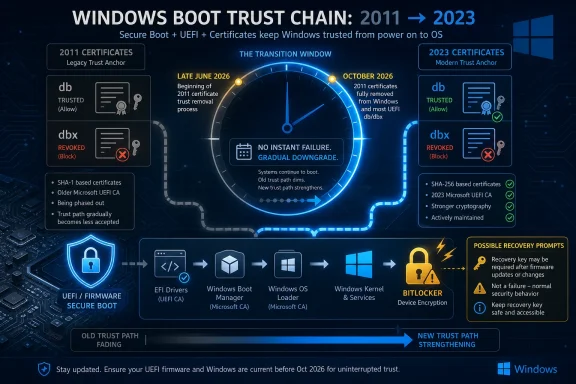 Microsoft’s Fifteen-Year Bet Is Coming Due
Secure Boot was always a long bet on the idea that the PC boot chain could be made boring, predictable, and resistant to tampering. When UEFI replaced the old BIOS model, Microsoft and the PC industry moved toward a world where firmware checks signatures before handing control to bootloaders, option ROMs, and operating system components. That model depends on certificates, and certificates depend on time.The awkward part is that the first generation of Microsoft Secure Boot certificates has lasted nearly the entire modern Windows era. The same 2011-era authorities that helped usher in Windows 8-era hardware are still present across huge numbers of Windows 10, Windows 11, and Windows Server machines. That longevity was convenient until it became a deadline.
The first wave of expirations begins in late June 2026, with additional Secure Boot certificate expirations following in October 2026. Microsoft’s answer is a new 2023 certificate generation, distributed through Windows servicing, firmware updates, and enterprise deployment channels. In ordinary desktop language, that means Windows Update and possibly a BIOS or UEFI firmware update. In enterprise language, it means inventory, sequencing, rollback planning, BitLocker testing, and a nervous eye on every server SKU that does anything unusual before boot.
This is not a story about PCs refusing to turn on the morning after a certificate expires. It is more subtle than that, and therefore easier to underestimate. Unsupported or unrefreshed systems may continue to boot and receive normal operating system patches, while losing the ability to receive future Secure Boot protections for early boot components.
The Expiration Is Not a Cliff, but It Is a Security Downgrade
The most important correction to make is also the most reassuring: the expiration of the old certificates does not mean every affected Windows system becomes a brick. Microsoft’s own guidance has been clear that devices may keep starting normally. Existing signed boot components do not simply vanish from trust because the calendar has advanced.That distinction matters because panic is a poor patch-management strategy. Secure Boot is a chain of trust, not a subscription license check. Firmware uses databases of allowed and revoked signatures to decide whether pre-OS code should run. If the old trust material is still present, already-signed components can continue to work.
But the second half of that sentence is where the risk lives. A system that has not moved to the 2023 authorities may be unable to accept future updates to the Secure Boot database, the revocation database, or boot components signed under the newer chain. That leaves the machine in what Microsoft describes as a degraded security posture.
For home users, “degraded” can sound abstract. For administrators, it is concrete. It means future defenses against bootkits, vulnerable boot managers, or malicious pre-OS components may not apply. The operating system can still be patched while the layer beneath it stops receiving the same quality of protection.
Secure Boot’s Real Job Is Revocation, Not Just Permission
Secure Boot is often described as a mechanism that allows only trusted software to run at startup. That is true, but incomplete. The more interesting part of the design is not simply what Secure Boot permits; it is what it can later revoke.The Secure Boot database, usually described as db, contains trusted signatures and hashes. The revocation database, dbx, contains signatures and hashes that should no longer be trusted. The Key Exchange Key, or KEK, authorizes updates to those databases. Together, these components allow the PC ecosystem to respond when something once trusted becomes dangerous.
That is why the certificate refresh matters beyond bureaucratic expiration hygiene. The boot security model has to change over time because attackers change over time. A bootloader, shim, option ROM, or early boot component that looked acceptable years ago may become part of a bypass chain later.
The BlackLotus episode made that painfully clear. Microsoft has spent years staging mitigations for Secure Boot bypasses, including revocations that must be deployed carefully because revoking the wrong thing too quickly can strand legitimate systems. The 2026 certificate transition is part of that same uncomfortable lesson: Secure Boot is only as strong as the ecosystem’s ability to update what it trusts and distrusts.
Windows Update Can Carry the Load, but Firmware Still Owns the Door
On many client PCs, the fix should look mundane. Keep Windows current, install the relevant cumulative updates, and apply OEM firmware updates when they are offered. For a large share of consumer and business laptops, that will be enough.The catch is that Secure Boot lives in the borderland between Windows and firmware. Microsoft can ship certificate updates through Windows servicing, but the firmware ultimately stores and enforces Secure Boot variables. If a machine’s UEFI implementation is buggy, outdated, locked down, or weirdly customized, the operating system alone may not be able to complete the transition cleanly.
That is why Microsoft and OEMs keep pointing users toward firmware updates. Firmware updates can add compatibility for the new trust anchors, reduce the odds of failed certificate updates, and prepare systems for future Secure Boot enforcement. Anyone who has administered PCs at scale knows this is the part where theory meets the vendor support matrix.
Consumer devices complicate the picture further. Some older PCs may be technically capable of receiving certificate updates through Windows but may never receive a polished firmware update from the manufacturer. Others may have firmware updates available only through vendor utilities that users have disabled, uninstalled, or never noticed. The security foundation of a Windows PC is, inconveniently, still partly at the mercy of OEM maintenance habits.
Windows 10 Turns the Certificate Refresh Into a Lifecycle Test
Windows 10 is where the story becomes less about cryptography and more about product lifecycle. Microsoft ended mainstream support for Windows 10 in October 2025, with Extended Security Updates available for eligible systems. That timing collides awkwardly with a Secure Boot transition that begins in 2026.Supported Windows 10 devices, including those covered by ESU where applicable, can receive the relevant updates. Unsupported Windows 10 systems are a different matter. They may keep running, and they may keep booting, but they should not be assumed to receive the same Secure Boot certificate maintenance as supported Windows builds.
This is the hidden pressure behind Microsoft’s messaging. The company does not need to say “upgrade to Windows 11” in every paragraph for the implication to be obvious. A security feature that depends on ongoing servicing becomes another reason unsupported Windows 10 machines are less defensible over time.
That does not mean every Windows 10 holdout is doomed. Many organizations have legitimate reasons for staged migrations, application compatibility testing, and hardware replacement cycles. But the Secure Boot refresh narrows the space for complacency. If a device is old enough to be stranded on Windows 10 and neglected by its OEM, it is exactly the sort of device that deserves scrutiny before the certificate deadlines arrive.
Servers Turn a Maintenance Event Into a Change-Control Exercise
The desktop version of this story is annoying. The server version is operationally serious. Windows Server 2016, 2019, 2022, and 2025 environments can be affected, and the path to remediation is more complex than “click update and reboot.”Servers are full of special cases. They run older firmware, vendor storage controllers, signed option ROMs, out-of-band management stacks, clustering configurations, BitLocker or TPM dependencies, virtualization hosts, and boot paths that may have accumulated years of local assumptions. A certificate change at the boot layer touches all of that before the operating system has a chance to help.
Microsoft’s guidance for servers emphasizes inventory and troubleshooting because that is where the work is. Administrators need to identify machines still using 2011 Secure Boot certificates, confirm whether UEFI CA 2023 status has moved to the expected state, and watch event logs for signals that the transition did not apply cleanly. Those are not optional niceties; they are the only way to know whether a reboot after patch night is actually exercising the new trust chain.
The largest risk is not that every server fails. The largest risk is unevenness. A rack of nominally identical servers may have different firmware levels, different add-in cards, different histories of Secure Boot toggles, or different update channels. The machines that look boring on a spreadsheet are often the ones that ruin a maintenance window.
BitLocker Is the Canary in the Firmware Mine
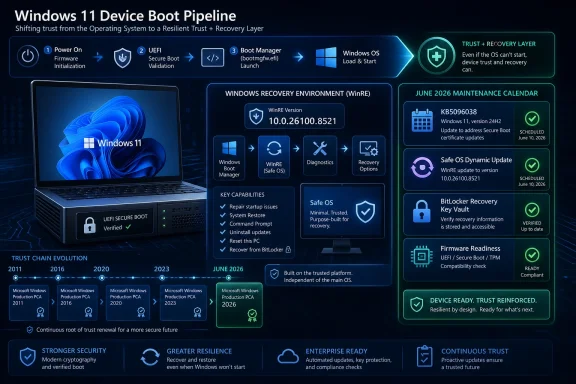
Secure Boot certificate updates interact with other boot-time security features, and BitLocker is the one most users and administrators will notice first. When boot measurements change, BitLocker can decide that the environment no longer matches what it expected and prompt for recovery. That is not a bug in the simple sense; it is BitLocker doing its job with incomplete context.Microsoft has warned that some affected configurations can see BitLocker recovery prompts, startup hangs, or Secure Boot validation errors if the transition goes badly. These risks are higher on systems with older firmware or incomplete certificate updates. They are also exactly why Microsoft recommends pilots and staged deployments instead of fleet-wide enthusiasm.
For enterprises, the practical answer is boring and essential. Recovery keys must be escrowed and verified before touching boot trust. Pilot rings should include multiple OEMs, firmware generations, and device classes. The first successful reboot in a lab is not proof that every branch-office workstation or hypervisor host will behave.
The consumer version is simpler but still important. Before installing firmware updates, users should make sure BitLocker recovery information is available through their Microsoft account or organizational recovery process. Most people will never need it. The unlucky minority will be very glad they checked.
The OEM Layer Is Where Confidence Gets Uneven
Microsoft can coordinate the Windows side, but the PC ecosystem is not a single organism. Dell, Lenovo, HP, server vendors, motherboard makers, and niche hardware suppliers all have different firmware release policies. Some will publish clear advisories and BIOS updates. Some will update only supported models. Some older systems will be left in the gray zone.That is not new, but Secure Boot makes it more visible. For years, users could treat firmware as something updated only when a fan curve was broken or a CPU compatibility issue appeared. Now firmware becomes part of a timed security transition across the Windows estate.
The server vendor angle is especially important. Major OEMs have been publishing guidance for PowerEdge, UCS, and other platforms because enterprise customers cannot remediate what they cannot certify. A server that boots Windows is not automatically ready for a Secure Boot certificate transition. The platform firmware, option ROMs, and management stack all matter.
This is also where small organizations are most exposed. Big enterprises have endpoint management platforms and vendor account teams. A 40-person company with a mix of old desktops, one aging Hyper-V host, and a part-time IT provider may not even know which firmware is current. The 2026 transition rewards organizations that kept boring asset records and punishes those that treated firmware as folklore.
The Calendar Is Forcing a Cleaner Trust Boundary
There is a philosophical tension under this whole episode. Secure Boot was designed to reduce trust in arbitrary early boot code, but the ecosystem itself became dependent on a long-lived set of broadly trusted Microsoft certificates. The 2026 refresh is an attempt to modernize that trust without breaking the world.That is harder than it sounds. If Microsoft revokes old trust too aggressively, legitimate systems can fail to boot. If it moves too slowly, vulnerable boot paths remain usable for attackers. If it relies entirely on users, many machines will never update. If it relies entirely on automation, some unusual systems will break in ways that are hard to diagnose.
The result is a staged, cautious transition that can look indecisive from the outside. Microsoft is trying to get new certificates onto devices, preserve compatibility with old signatures long enough to avoid mass disruption, and create a path for future revocations. That balancing act is messy because the PC ecosystem is messy.
The alternative would be worse. A security architecture that cannot rotate keys is not a security architecture; it is a monument. The fact that this refresh is operationally painful is evidence that it should not be allowed to become a once-every-15-years ritual again.
Administrators Should Treat This as a Fleet Health Audit
The right response is not panic, and it is not indifference. The right response is to treat Secure Boot certificate status as a fleet health signal alongside TPM readiness, firmware age, Windows support state, and BitLocker recovery posture.For client fleets, Microsoft Intune, Group Policy, registry signals, event logs, and remediation scripts can help identify devices that have not moved to the 2023 certificate authorities. For server fleets, the process should be slower and more explicit. Anything that changes boot trust on a server belongs in change control, especially when storage controllers, clustering, virtualization, or remote sites are involved.
The most useful question for IT teams is not “Will this machine boot on June 28?” It is “Will this machine be able to accept the next boot-level security update after June 2026?” That reframing turns the issue from a deadline scare into a maintainability problem.
It also exposes unsupported systems. If a machine cannot receive current Windows updates, cannot receive OEM firmware updates, and cannot be verified for the 2023 Secure Boot chain, then the organization has learned something valuable. The device may still have a business purpose, but it no longer belongs in the same risk category as maintained hardware.
Microsoft’s Quiet Update Has a Loud Security Message
The concrete lessons are not complicated, but they are easy to defer because the machines mostly keep working. That is the trap. Secure Boot certificate expiration is a security-maintenance problem whose consequences appear gradually, not a dramatic outage that forces instant attention.- Systems using Microsoft’s 2011 Secure Boot certificates need to transition to the 2023 certificate authorities before the old certificates expire in June and October 2026.
- Updated systems should continue receiving future Secure Boot protections for boot managers, Secure Boot databases, and revocation lists.
- Unupdated systems may still boot and receive ordinary Windows updates, but they can fall behind on boot-level security protections.
- Client PCs will often be remediated through Windows Update plus OEM firmware, while servers require more deliberate testing and sequencing.
- Administrators should verify BitLocker recovery readiness before boot-chain updates and should pilot changes across representative hardware.
- Unsupported Windows and abandoned firmware are now more than lifecycle annoyances; they are obstacles to maintaining the platform’s root of trust.
References
- Primary source: Network World
Published: Thu, 21 May 2026 18:34:31 GMT
Microsoft plans significant update to Windows Secure Boot | Network World
Microsoft has not updated the certificates to Secure Boot since it was first introduced 15 years ago. Every PC manufactured since 2012 running Windows 10, Windows 11, or the last four versions of Windows Server has been relying on certificates from 2011.www.networkworld.com
- Related coverage: windowscentral.com
Microsoft fixes annoying BitLocker lockout — but only for Windows 11, leaving Windows 10 stuck | Windows Central
Windows 11 25H2 users get a BitLocker bug fix, while Windows 10 remains stuck with recovery headaches until Microsoft rolls out a broader solution.www.windowscentral.com - Official source: support.microsoft.com
- Official source: microsoft.com
Prepare your servers for Secure Boot certificate updates | Microsoft Windows Server Blog
The original Secure Boot certificates introduced in 2011 are approaching the end of their planned lifecycle, with expirations beginning in late June 2026.www.microsoft.com - Official source: learn.microsoft.com
Update Secure Boot Certificates for Windows Devices - Windows Client | Microsoft Learn
Update your Windows devices to maintain Secure Boot protection with 2023 certificates before they expire in June 2026.learn.microsoft.com - Official source: techcommunity.microsoft.com
Secure Boot playbook for certificates expiring in 2026
Explore tools and step-by-step guidance to help you proactively update your Secure Boot certificates. techcommunity.microsoft.com

- Related coverage: dell.com
Microsoft Secure Boot 2011 Certificate Expiration Impact on Dell PowerEdge Servers | Dell US
Microsoft Secure Boot 2011 certificates begin expiring in June 2026. Dell is working to ensure supported PowerEdge platforms are updated with the new 2023 Secure Boot certificates.www.dell.com - Related coverage: tomshardware.com
Microsoft is refreshing Secure Boot certificates to plug security holes before they happen — if you bought a PC last year, you should be set | Tom's Hardware
Be sure to keep Windows 11 systems updated to get refreshed security certificates.www.tomshardware.com - Related coverage: techradar.com
Still using Windows 10? Microsoft is automatically replacing Secure Boot certificates on older PCs ahead of expiration, so you might want to update ASAP | TechRadar
Secure Boot certificate upgrades is bad news for Windows 10www.techradar.com - Related coverage: tomsguide.com
Windows 10 users warned to upgrade now or risk a ‘degraded security state’ as Microsoft ends Secure Boot support | Tom's Guide
Support for Windows 10 officially ended in October 2025, and Microsoft says devices that don’t upgrade could enter a degraded security state — leaving them vulnerable to threats. Here’s what it means for your PC and how to protect it.www.tomsguide.com - Related coverage: pcgamer.com
Secure Boot certificates used by anti-cheat software are set to expire in June but new ones are already in the mail | PC Gamer
You shouldn't have to worry about expired certificates if you keep your PC up-to-date.www.pcgamer.com - Related coverage: cisco.com