Hermitkrab

Extraordinary Member
Joined
Nov 27, 2016
Messages
284
I have aToshiba Satellite laptop. It's used mainly plugged in. For those times I'd like to use it unplugged, I want to extend the battery's life as much as possible since this model laptop has a battery that is very hard to replace by the average user. Is it good policy to run it only on battery on occasion, or doesn't that matter anymore? I notice that when plugged in, the battery charges only to 80%. I suppose that's a protective feature. Thanks for your insight.
 

Solution
Laptop batteries will stop charging when they hit 100% after which the battery will be bypassed. Leaving a laptop plugged won't cause any problems to the battery. The fact that yours isn't charging beyond 80% would indicate a problem with the battery, possibly a bad cell.
 

Solution
I've owned a Lenovo and Samsung (Windows 7) and they both came with custom battery management software. And they both had settings that allowed for longer battery life. And this setting didn't allow the battery to reach 100% charge while plugged in. I believe they stopped around 80% too?

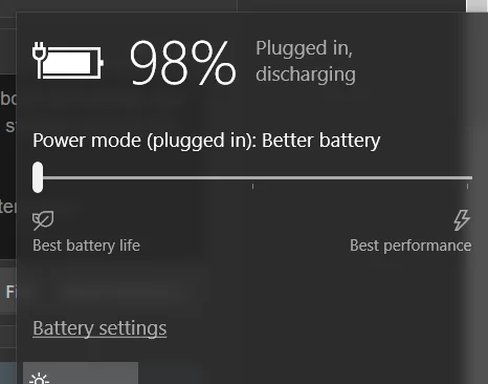
My current Asus laptop (Windows 10) also came with similar battery management software. However, Windows 10 has battery saver settings built in.

But yeah after some time but years and usage factored in (discharging + discharging) your batter will not hold a full charge and/or for as long as it used to. But honestly even my older laptops, I didn't noticed the downturn in battery performance till 3 years after purchasing.

Hope this helps?
 

Attachments

  • battery.webp
    battery.webp
    9.3 KB · Views: 385
hermitkrab … similar to you, i also use my laptop (toshiba satellite) via ac-plug. the unit arrived to me as oem win-8 and never rose above 74% … now that i have win-10 integrated … she seems comfortable at 80%.

furthermore … i stipulate there is nothing wrong with any of the battery's cells … it's simply configured for econo-mode … to preserve life of the battery. purportedly, this econo-mode behavior can be changed via toshiba's battery-lifecycle option. however … i decided not to alter my default settings.

feel free to review the attached screen-cap.

An image from 'Laptop Battery, Extending Life'. Windows 10 desktop with open Toshiba eco Utility and expanded Start Menu.
 

Last edited by a moderator:
Thanks for the replies, friends. I'm glad to learn my PC is operating correctly.
 

Back
Top