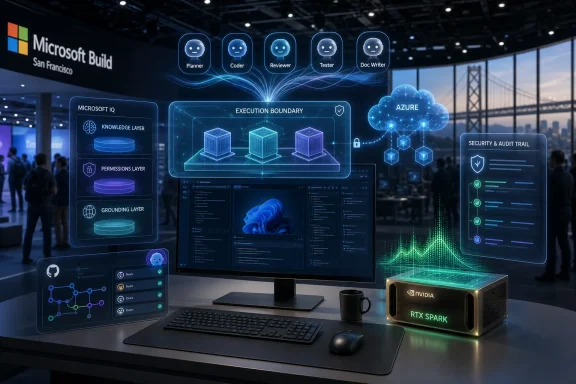
Microsoft opened Build 2026 on June 2 in San Francisco with a Windows AI push centered on local models, Nvidia RTX Spark hardware, and developer tooling meant to move Copilot-style agents from cloud demos into everyday PCs. That is the factual headline, but it undersells the strategic turn. Microsoft is no longer merely putting an assistant on top of Windows. It is trying to make Windows the operating system for agentic computing before Apple, Google, or the Linux workstation crowd can define that category without it.
For most of the past three years, Microsoft’s Windows AI story has been louder than it has been coherent. Copilot arrived in the taskbar, then floated into Edge, Office, Teams, and search boxes. The result was familiar to anyone who has watched Microsoft’s platform instincts collide with its growth targets: many entry points, lots of branding, and an uneasy sense that the assistant was being stapled onto the operating system rather than born from it.
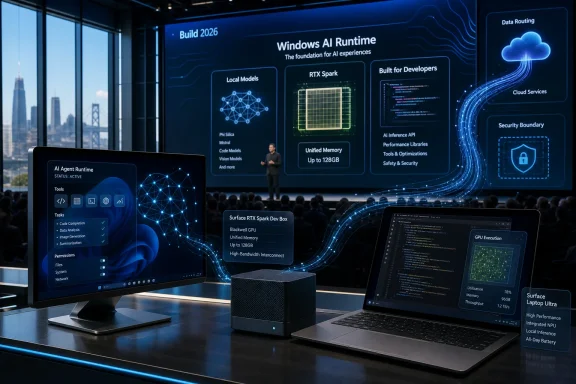
Build 2026 marks a more serious attempt to fix that. The company’s pitch is shifting from “there is an AI button in Windows” to “Windows is where local and cloud AI workloads should run.” That distinction matters. A chatbot can be dismissed, disabled, ignored, or resented; a runtime becomes infrastructure.
The Nvidia partnership is the clearest sign that Microsoft understands the difference. Local models require memory bandwidth, GPU acceleration, developer APIs, security boundaries, and predictable scheduling. They also require a Windows software stack that does not make developers feel as if they are fighting the platform to reach the hardware. Microsoft’s new message is that Windows should expose those capabilities as a first-class layer, not as a maze of vendor SDKs, preview features, and cloud service hooks.
The ambition is obvious: Microsoft wants the next generation of Windows apps to assume that AI inference is available nearby, sometimes on the device, sometimes on a workstation-class box, sometimes in Azure. That is a platform story, not a feature story. It also raises the stakes considerably, because platform stories are judged by whether developers actually build on them.
The first wave of Copilot+ PCs leaned heavily on NPUs and battery-efficient inference. That made sense for features like background blur, image generation, recall-style indexing, live captions, and small-model assistance. But it did not fully satisfy developers, creators, or enterprises who wanted to run heavier models, test agents locally, or keep sensitive workflows off external cloud infrastructure. An NPU can be useful without being transformative.
RTX Spark changes the scale of the conversation. By pairing a Grace-class Arm CPU with a Blackwell RTX GPU and large unified memory configurations, Nvidia is selling a Windows machine that looks less like a thin client for AI services and more like a compact personal AI workstation. The headline numbers — up to 128GB of unified memory, CUDA support, and enough local horsepower for very large models — are the kind of specifications that developers and technical buyers immediately understand.
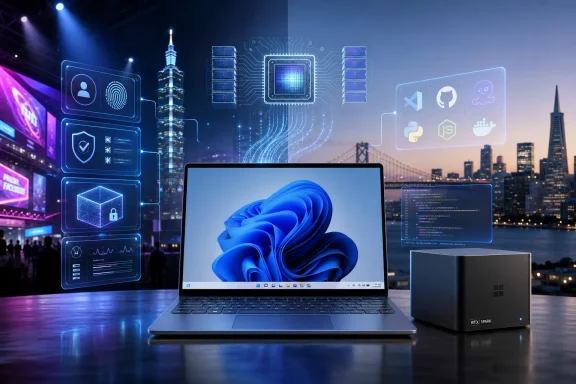
That is why the Surface Laptop Ultra and Surface RTX Spark Dev Box matter even if most Windows users will never buy them. Flagship devices establish a target. They tell software makers what Microsoft wants the high end of the ecosystem to look like, and they give OEMs a template to copy, undercut, or specialize.
Microsoft has tried for years to make Windows on Arm feel inevitable. Qualcomm’s Snapdragon X push helped on battery life and mainstream performance, but Nvidia brings a different kind of credibility: the AI developer stack. CUDA remains one of Nvidia’s strongest moats, and Microsoft’s willingness to embrace that reality is pragmatic. If developers already think in CUDA, PyTorch, local inference, and GPU memory, Windows has to meet them there rather than pretend a cleaner abstraction will win by decree.
The Surface Laptop Ultra is the emotional product in that story: portable, premium, MacBook Pro-adjacent, and aimed at people who want power without being tethered to a tower. But the Surface RTX Spark Dev Box may be the more revealing device. A compact desktop for sustained local AI workloads says Microsoft knows the agentic future will involve long-running jobs, fine-tuning experiments, tool-calling workflows, and background tasks that do not map neatly onto the old laptop productivity model.
This is also where Microsoft’s Apple envy becomes productive rather than awkward. Apple has spent years turning unified memory into a developer and creator selling point. Microsoft and its partners now have a comparable story to tell at the high end, but with Nvidia’s software ecosystem attached. The pitch is not merely that Windows can match Apple’s local AI posture; it is that Windows can do so while preserving the messy, powerful heterogeneity that developers expect from the PC world.
That heterogeneity cuts both ways. A unified Apple platform is easier to explain and easier to optimize for. A Windows platform spread across AMD, Intel, Qualcomm, Nvidia, discrete GPUs, NPUs, cloud endpoints, and enterprise management layers is harder to tame. Microsoft’s challenge is to turn that complexity into choice rather than fragmentation.
The answer is that Microsoft is not abandoning the cloud; it is trying to control the routing layer. In the agent era, the valuable question is not simply where a model runs. It is who decides where the model runs, how identity and permissions travel with the task, how data is governed, and how developers write once for multiple execution targets.
That is why local AI in Windows is strategically consistent with Azure. Microsoft wants Windows to become the client-side edge of its AI platform. A developer might prototype locally, run sensitive inference on-device, escalate heavier workloads to Azure, and orchestrate enterprise agents through Microsoft 365 and GitHub tooling. The cloud is still there, but the PC stops being a passive endpoint.
This is also a response to developer skepticism. Cloud-only AI has costs that are not just financial. Latency, privacy, rate limits, data residency, procurement approvals, and model availability all affect whether a feature gets built. Local inference gives developers a sandbox with fewer excuses. It also gives enterprises a way to experiment without immediately shipping proprietary data to a hosted model.
The danger for Microsoft is that “local plus cloud” can become an architecture PowerPoint rather than a daily development experience. If APIs are inconsistent, if drivers lag, if model packaging is brittle, or if Windows management policies cannot keep up, developers will retreat to Linux boxes and cloud notebooks. Microsoft’s job now is to make the hybrid path feel boringly reliable.
Reasoning models are especially important for agents because the agent pitch depends on more than fluent text. Agents need to plan, inspect intermediate results, call tools, revise their approach, and decide when to ask for help. Whether Microsoft’s model is best-in-class on benchmarks matters less, initially, than whether it is integrated into the enterprise surfaces Microsoft already controls.
A Microsoft-built reasoning model can be optimized for Microsoft’s own stack: Windows, Microsoft 365, GitHub, Azure, Entra, Defender, and enterprise policy. That is where the company’s advantage lies. The model does not need to win every public leaderboard if it can understand a corporate tenant, respect permissions, and operate within admin-defined boundaries.
The risk is branding inflation. Every vendor now wants an “agent,” a “reasoning model,” and a “super app.” Those words are being stretched until they are nearly meaningless. Microsoft will have to show that its reasoning work changes actual workflows, not just keynote demos.
A super app would be a more explicit admission that the current Copilot sprawl is not sustainable. Users do not want five slightly different Copilots, each with its own context and limitations. Developers do not want to guess which Copilot surface matters. Administrators do not want another uncontrolled assistant appearing in every corner of the OS.
Centralization could help if Microsoft uses it to simplify the experience. A single Copilot hub that understands files, settings, apps, calendars, web context, and device capabilities could become genuinely useful. It could also become the latest place where Microsoft pushes services, ads, subscriptions, and account nudges under the banner of productivity.
That tension is the Windows story in miniature. Microsoft’s best platform moves create leverage for users and developers. Its worst ones convert platform control into distribution for Microsoft services. The difference will determine whether Copilot becomes infrastructure or clutter.
Windows 11 has spent years carrying the perception that it is heavier, more inconsistent, and more web-service-dependent than it should be. Some complaints are exaggerated. Others are not. File Explorer regressions, context menu delays, settings fragmentation, taskbar limitations, and search behavior have all contributed to the sense that Microsoft modernized the surface without fully cleaning up the foundations underneath.
If Microsoft wants Windows to host local agents and long-running AI tasks, the OS cannot feel like it struggles with its own shell. An agentic operating system requires trust in background execution, permissions, resource management, indexing, and UI predictability. Users will not delegate more to Windows if they already suspect Windows is wasting cycles on things they did not ask for.
This is where performance work intersects with AI strategy. Local models will make PCs busier, not quieter. They will consume memory, GPU time, storage, and battery. Microsoft has to prove that Windows can arbitrate those resources intelligently, especially on machines that are not $3,000 developer flagships.
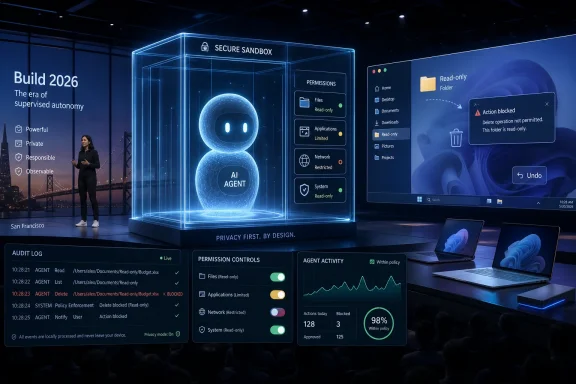
Administrators will want to know how models are installed, updated, audited, blocked, and approved. They will ask whether local model outputs are logged, whether prompts become discoverable records, whether agents can touch regulated data, and whether a compromised plugin can turn an assistant into an exfiltration path. These are not edge cases. They are the ordinary questions enterprises ask whenever a platform gains power.
Microsoft is better positioned than most vendors to answer them because it owns identity, endpoint management, productivity apps, security tooling, and the operating system. But that also means excuses will be less convincing. If Copilot agents are going to act across Windows and Microsoft 365, administrators will expect policy controls that are specific, testable, and enforceable.
There is also a procurement reality. RTX Spark-class machines will not instantly replace standard corporate laptops. They will begin as developer, engineering, research, and creative systems. The broader Windows fleet will still be a mixture of aging x86 laptops, new AI PCs, virtual desktops, and managed cloud environments. Microsoft’s AI platform must degrade gracefully across that uneven terrain.
A credible Windows AI development story needs several layers to work together. Model discovery must be straightforward. Packaging must be sane. Hardware acceleration must be available without hand-tuned misery. Privacy boundaries must be explicit. Debugging must feel like software engineering rather than séance work.
Microsoft’s advantage is that it can tie this into tools developers already use. Visual Studio Code, GitHub Copilot, Windows Subsystem for Linux, WinUI, Windows ML, and Azure all give the company distribution channels. The question is whether those channels converge into a coherent workflow or remain a collection of adjacent announcements.
The Nvidia collaboration helps because developers trust performance they can measure. If a local model runs fast, if CUDA works, if PyTorch behaves, if WSL GPU passthrough is reliable, and if the same workload can move between a laptop, a dev box, and cloud infrastructure, developers will forgive a lot of branding noise. If any of those links break, the story collapses quickly.
Nvidia’s arrival reframes that trade-off. Instead of asking users to accept Arm for efficiency alone, Microsoft can now pitch Arm as the foundation for high-performance AI and graphics workloads. That is a more compelling argument to developers and creators than thin-and-light battery claims by themselves.
Still, the old problems do not vanish. Driver availability, niche utilities, virtualization workflows, anti-cheat systems, emulation performance, enterprise agents, and specialized hardware tools all matter in the Windows ecosystem. A premium Nvidia-powered Surface can demonstrate what is possible, but the platform only succeeds if the long tail of Windows software behaves.
This is also a competitive threat to Intel and AMD, though not a simple one. Both companies have their own AI PC roadmaps, and AMD in particular has strong integrated graphics and workstation credibility. But Nvidia’s control over the AI software stack gives it a wedge. If local AI becomes the defining high-end PC workload, the GPU company suddenly has a stronger claim on the center of the Windows experience.
The RTX Spark push suggests Microsoft wants some of Apple’s integration story without surrendering the PC model. A Surface Laptop Ultra can be a reference machine. A Surface RTX Spark Dev Box can be a reference workstation. Nvidia can supply a powerful shared architecture. Windows can provide the runtime. OEMs can then build variants around that template.
That is a delicate balance. Too little integration, and developers face fragmentation. Too much, and Microsoft alienates the OEM ecosystem that gives Windows its reach. The company has to create a premium path without making every non-Spark Windows machine feel like second-class hardware.
The likely outcome is tiering. Everyday AI features will run across NPUs, CPUs, and cloud services. Heavier local agents and large-model workflows will target machines with far more memory and GPU capability. Enterprises will map workloads to hardware classes. Enthusiasts will argue about whether the tiers are artificial, necessary, or both.
The PC industry has a long history of trying to manufacture upgrade cycles around labels. Multimedia PCs, Ultrabooks, 2-in-1s, creator laptops, metaverse-ready machines, and AI PCs have all had moments when branding outpaced utility. Some categories eventually mattered. Others dissolved into stickers.
For AI PCs to matter, Microsoft needs killer workflows, not just capable hardware. A local agent that can refactor a project, inspect logs, summarize a file corpus, automate a secure admin task, or generate a draft while respecting enterprise permissions is valuable. A sidebar that answers web questions while consuming RAM is not.
That is the line Microsoft must walk. The company has the pieces: Windows, Surface, Azure, GitHub, Microsoft 365, Copilot, security tools, and now a deeper Nvidia hardware story. The hard part is making the pieces feel inevitable rather than imposed.
 Microsoft Is Turning Windows From a Shell Into an AI Runtime
For most of the past three years, Microsoft’s Windows AI story has been louder than it has been coherent. Copilot arrived in the taskbar, then floated into Edge, Office, Teams, and search boxes. The result was familiar to anyone who has watched Microsoft’s platform instincts collide with its growth targets: many entry points, lots of branding, and an uneasy sense that the assistant was being stapled onto the operating system rather than born from it.Build 2026 marks a more serious attempt to fix that. The company’s pitch is shifting from “there is an AI button in Windows” to “Windows is where local and cloud AI workloads should run.” That distinction matters. A chatbot can be dismissed, disabled, ignored, or resented; a runtime becomes infrastructure.
The Nvidia partnership is the clearest sign that Microsoft understands the difference. Local models require memory bandwidth, GPU acceleration, developer APIs, security boundaries, and predictable scheduling. They also require a Windows software stack that does not make developers feel as if they are fighting the platform to reach the hardware. Microsoft’s new message is that Windows should expose those capabilities as a first-class layer, not as a maze of vendor SDKs, preview features, and cloud service hooks.
The ambition is obvious: Microsoft wants the next generation of Windows apps to assume that AI inference is available nearby, sometimes on the device, sometimes on a workstation-class box, sometimes in Azure. That is a platform story, not a feature story. It also raises the stakes considerably, because platform stories are judged by whether developers actually build on them.
Nvidia Gives Microsoft the Hardware Narrative It Has Been Missing
Nvidia’s RTX Spark is not just another chip announcement to adorn a keynote. It gives Microsoft a concrete answer to a question that has dogged the AI PC era from the start: what, exactly, is the local AI computer supposed to be good at?The first wave of Copilot+ PCs leaned heavily on NPUs and battery-efficient inference. That made sense for features like background blur, image generation, recall-style indexing, live captions, and small-model assistance. But it did not fully satisfy developers, creators, or enterprises who wanted to run heavier models, test agents locally, or keep sensitive workflows off external cloud infrastructure. An NPU can be useful without being transformative.
RTX Spark changes the scale of the conversation. By pairing a Grace-class Arm CPU with a Blackwell RTX GPU and large unified memory configurations, Nvidia is selling a Windows machine that looks less like a thin client for AI services and more like a compact personal AI workstation. The headline numbers — up to 128GB of unified memory, CUDA support, and enough local horsepower for very large models — are the kind of specifications that developers and technical buyers immediately understand.
That is why the Surface Laptop Ultra and Surface RTX Spark Dev Box matter even if most Windows users will never buy them. Flagship devices establish a target. They tell software makers what Microsoft wants the high end of the ecosystem to look like, and they give OEMs a template to copy, undercut, or specialize.
Microsoft has tried for years to make Windows on Arm feel inevitable. Qualcomm’s Snapdragon X push helped on battery life and mainstream performance, but Nvidia brings a different kind of credibility: the AI developer stack. CUDA remains one of Nvidia’s strongest moats, and Microsoft’s willingness to embrace that reality is pragmatic. If developers already think in CUDA, PyTorch, local inference, and GPU memory, Windows has to meet them there rather than pretend a cleaner abstraction will win by decree.
The “Personal AI Computer” Is Really a Developer Workstation in Disguise
Nvidia’s phrase “personal AI computer” sounds consumer-friendly, but the first practical audience is not a casual laptop buyer asking Copilot to summarize email. It is the developer, data scientist, 3D artist, researcher, or enterprise engineer who needs local compute that behaves more like a mini workstation than a web terminal. Microsoft is packaging that audience as the vanguard of the next PC cycle.The Surface Laptop Ultra is the emotional product in that story: portable, premium, MacBook Pro-adjacent, and aimed at people who want power without being tethered to a tower. But the Surface RTX Spark Dev Box may be the more revealing device. A compact desktop for sustained local AI workloads says Microsoft knows the agentic future will involve long-running jobs, fine-tuning experiments, tool-calling workflows, and background tasks that do not map neatly onto the old laptop productivity model.
This is also where Microsoft’s Apple envy becomes productive rather than awkward. Apple has spent years turning unified memory into a developer and creator selling point. Microsoft and its partners now have a comparable story to tell at the high end, but with Nvidia’s software ecosystem attached. The pitch is not merely that Windows can match Apple’s local AI posture; it is that Windows can do so while preserving the messy, powerful heterogeneity that developers expect from the PC world.
That heterogeneity cuts both ways. A unified Apple platform is easier to explain and easier to optimize for. A Windows platform spread across AMD, Intel, Qualcomm, Nvidia, discrete GPUs, NPUs, cloud endpoints, and enterprise management layers is harder to tame. Microsoft’s challenge is to turn that complexity into choice rather than fragmentation.
Local Models Are the New Front in the Cloud Wars
The most interesting part of Microsoft’s Windows AI push is that it appears, at first glance, to undermine Microsoft’s cloud business. If developers can run models locally, why pay for cloud inference? If a Surface RTX Spark Dev Box can handle a large local model, why rent cycles elsewhere?The answer is that Microsoft is not abandoning the cloud; it is trying to control the routing layer. In the agent era, the valuable question is not simply where a model runs. It is who decides where the model runs, how identity and permissions travel with the task, how data is governed, and how developers write once for multiple execution targets.
That is why local AI in Windows is strategically consistent with Azure. Microsoft wants Windows to become the client-side edge of its AI platform. A developer might prototype locally, run sensitive inference on-device, escalate heavier workloads to Azure, and orchestrate enterprise agents through Microsoft 365 and GitHub tooling. The cloud is still there, but the PC stops being a passive endpoint.
This is also a response to developer skepticism. Cloud-only AI has costs that are not just financial. Latency, privacy, rate limits, data residency, procurement approvals, and model availability all affect whether a feature gets built. Local inference gives developers a sandbox with fewer excuses. It also gives enterprises a way to experiment without immediately shipping proprietary data to a hosted model.
The danger for Microsoft is that “local plus cloud” can become an architecture PowerPoint rather than a daily development experience. If APIs are inconsistent, if drivers lag, if model packaging is brittle, or if Windows management policies cannot keep up, developers will retreat to Linux boxes and cloud notebooks. Microsoft’s job now is to make the hybrid path feel boringly reliable.
A Reasoning Model Signals Microsoft’s Post-OpenAI Insurance Policy
Reports that Microsoft is preparing a new reasoning model from its own AI division should be read in the context of the company’s broader multi-model strategy. Microsoft has benefited enormously from its OpenAI partnership, but it has also spent the past year making clear that Copilot will not be synonymous with a single model provider forever. That is not betrayal. It is platform hygiene.Reasoning models are especially important for agents because the agent pitch depends on more than fluent text. Agents need to plan, inspect intermediate results, call tools, revise their approach, and decide when to ask for help. Whether Microsoft’s model is best-in-class on benchmarks matters less, initially, than whether it is integrated into the enterprise surfaces Microsoft already controls.
A Microsoft-built reasoning model can be optimized for Microsoft’s own stack: Windows, Microsoft 365, GitHub, Azure, Entra, Defender, and enterprise policy. That is where the company’s advantage lies. The model does not need to win every public leaderboard if it can understand a corporate tenant, respect permissions, and operate within admin-defined boundaries.
The risk is branding inflation. Every vendor now wants an “agent,” a “reasoning model,” and a “super app.” Those words are being stretched until they are nearly meaningless. Microsoft will have to show that its reasoning work changes actual workflows, not just keynote demos.
Copilot Wants to Become the Front Door Again
The rumored Copilot “super app” is the consumer-facing half of the same platform bet. Microsoft has tried this before, in spirit if not in exact form. Cortana was supposed to be the intelligent front door to Windows. The Microsoft Launcher, Edge sidebar, Bing Chat, and various Copilot panels have all tried to gather user intent into a Microsoft-controlled surface.A super app would be a more explicit admission that the current Copilot sprawl is not sustainable. Users do not want five slightly different Copilots, each with its own context and limitations. Developers do not want to guess which Copilot surface matters. Administrators do not want another uncontrolled assistant appearing in every corner of the OS.
Centralization could help if Microsoft uses it to simplify the experience. A single Copilot hub that understands files, settings, apps, calendars, web context, and device capabilities could become genuinely useful. It could also become the latest place where Microsoft pushes services, ads, subscriptions, and account nudges under the banner of productivity.
That tension is the Windows story in miniature. Microsoft’s best platform moves create leverage for users and developers. Its worst ones convert platform control into distribution for Microsoft services. The difference will determine whether Copilot becomes infrastructure or clutter.
Rewriting Parts of Windows Is the Quiet Admission Users Wanted
Reports that Microsoft may rewrite parts of Windows 11 to improve performance and user experience should not be treated as a side note. For enthusiasts and IT pros, this may be the most important promise in the entire Build cycle. AI features are exciting; basic responsiveness is existential.Windows 11 has spent years carrying the perception that it is heavier, more inconsistent, and more web-service-dependent than it should be. Some complaints are exaggerated. Others are not. File Explorer regressions, context menu delays, settings fragmentation, taskbar limitations, and search behavior have all contributed to the sense that Microsoft modernized the surface without fully cleaning up the foundations underneath.
If Microsoft wants Windows to host local agents and long-running AI tasks, the OS cannot feel like it struggles with its own shell. An agentic operating system requires trust in background execution, permissions, resource management, indexing, and UI predictability. Users will not delegate more to Windows if they already suspect Windows is wasting cycles on things they did not ask for.
This is where performance work intersects with AI strategy. Local models will make PCs busier, not quieter. They will consume memory, GPU time, storage, and battery. Microsoft has to prove that Windows can arbitrate those resources intelligently, especially on machines that are not $3,000 developer flagships.
Enterprise IT Will Ask the Questions the Keynote Skips
The enterprise reaction to local AI in Windows will be more complicated than the keynote suggests. On one hand, local inference is attractive because it can reduce exposure of sensitive data to third-party services and lower recurring cloud costs for some workloads. On the other hand, local agents introduce a new management problem: autonomous software operating close to corporate data.Administrators will want to know how models are installed, updated, audited, blocked, and approved. They will ask whether local model outputs are logged, whether prompts become discoverable records, whether agents can touch regulated data, and whether a compromised plugin can turn an assistant into an exfiltration path. These are not edge cases. They are the ordinary questions enterprises ask whenever a platform gains power.
Microsoft is better positioned than most vendors to answer them because it owns identity, endpoint management, productivity apps, security tooling, and the operating system. But that also means excuses will be less convincing. If Copilot agents are going to act across Windows and Microsoft 365, administrators will expect policy controls that are specific, testable, and enforceable.
There is also a procurement reality. RTX Spark-class machines will not instantly replace standard corporate laptops. They will begin as developer, engineering, research, and creative systems. The broader Windows fleet will still be a mixture of aging x86 laptops, new AI PCs, virtual desktops, and managed cloud environments. Microsoft’s AI platform must degrade gracefully across that uneven terrain.
Developers Are the Real Audience for Build’s AI Reset
Build is a developer conference, and this year Microsoft appears to be treating it like one. That is a welcome change from AI events that confuse developers with spectators. The success of local AI in Windows will depend less on marketing than on whether developers can build useful applications without becoming experts in every chip vendor’s stack.A credible Windows AI development story needs several layers to work together. Model discovery must be straightforward. Packaging must be sane. Hardware acceleration must be available without hand-tuned misery. Privacy boundaries must be explicit. Debugging must feel like software engineering rather than séance work.
Microsoft’s advantage is that it can tie this into tools developers already use. Visual Studio Code, GitHub Copilot, Windows Subsystem for Linux, WinUI, Windows ML, and Azure all give the company distribution channels. The question is whether those channels converge into a coherent workflow or remain a collection of adjacent announcements.
The Nvidia collaboration helps because developers trust performance they can measure. If a local model runs fast, if CUDA works, if PyTorch behaves, if WSL GPU passthrough is reliable, and if the same workload can move between a laptop, a dev box, and cloud infrastructure, developers will forgive a lot of branding noise. If any of those links break, the story collapses quickly.
Windows on Arm Gets Its Most Serious Test Yet
Windows on Arm has had many “turning point” moments, which is another way of saying it has not yet had a decisive one. Battery life improved. App compatibility improved. Qualcomm gave the category a real push. But for many Windows power users, Arm still felt like a trade-off: elegant in the abstract, risky in the details.Nvidia’s arrival reframes that trade-off. Instead of asking users to accept Arm for efficiency alone, Microsoft can now pitch Arm as the foundation for high-performance AI and graphics workloads. That is a more compelling argument to developers and creators than thin-and-light battery claims by themselves.
Still, the old problems do not vanish. Driver availability, niche utilities, virtualization workflows, anti-cheat systems, emulation performance, enterprise agents, and specialized hardware tools all matter in the Windows ecosystem. A premium Nvidia-powered Surface can demonstrate what is possible, but the platform only succeeds if the long tail of Windows software behaves.
This is also a competitive threat to Intel and AMD, though not a simple one. Both companies have their own AI PC roadmaps, and AMD in particular has strong integrated graphics and workstation credibility. But Nvidia’s control over the AI software stack gives it a wedge. If local AI becomes the defining high-end PC workload, the GPU company suddenly has a stronger claim on the center of the Windows experience.
Microsoft Is Borrowing Apple’s Integration Argument Without Apple’s Control
The comparison to Apple is unavoidable. Apple has spent years arguing that tight integration of silicon, operating system, memory architecture, and developer frameworks produces better computers. Microsoft historically answered with ecosystem breadth: more OEMs, more price points, more hardware types, more compatibility.The RTX Spark push suggests Microsoft wants some of Apple’s integration story without surrendering the PC model. A Surface Laptop Ultra can be a reference machine. A Surface RTX Spark Dev Box can be a reference workstation. Nvidia can supply a powerful shared architecture. Windows can provide the runtime. OEMs can then build variants around that template.
That is a delicate balance. Too little integration, and developers face fragmentation. Too much, and Microsoft alienates the OEM ecosystem that gives Windows its reach. The company has to create a premium path without making every non-Spark Windows machine feel like second-class hardware.
The likely outcome is tiering. Everyday AI features will run across NPUs, CPUs, and cloud services. Heavier local agents and large-model workflows will target machines with far more memory and GPU capability. Enterprises will map workloads to hardware classes. Enthusiasts will argue about whether the tiers are artificial, necessary, or both.
The Market Hype Is Running Ahead of the User Experience
The stock-market reaction around Microsoft and Nvidia is easy to understand. AI infrastructure has been the dominant technology trade for years, and a credible story about bringing agentic AI to PCs gives investors another growth narrative. But Wall Street enthusiasm does not guarantee a better Start menu, a faster File Explorer, or a Copilot users actually trust.The PC industry has a long history of trying to manufacture upgrade cycles around labels. Multimedia PCs, Ultrabooks, 2-in-1s, creator laptops, metaverse-ready machines, and AI PCs have all had moments when branding outpaced utility. Some categories eventually mattered. Others dissolved into stickers.
For AI PCs to matter, Microsoft needs killer workflows, not just capable hardware. A local agent that can refactor a project, inspect logs, summarize a file corpus, automate a secure admin task, or generate a draft while respecting enterprise permissions is valuable. A sidebar that answers web questions while consuming RAM is not.
That is the line Microsoft must walk. The company has the pieces: Windows, Surface, Azure, GitHub, Microsoft 365, Copilot, security tools, and now a deeper Nvidia hardware story. The hard part is making the pieces feel inevitable rather than imposed.
The RTX Spark Era Will Be Won or Lost in the Boring Middle
The most concrete lesson from Build 2026 is that Microsoft has moved beyond treating AI as a decorative layer on Windows. The company is now trying to define a stack that runs from silicon to model to agent to app. That makes the stakes higher and the failure modes more practical.- Microsoft is positioning Windows as a local-and-cloud AI runtime, not merely a place where Copilot happens to appear.
- Nvidia’s RTX Spark gives the Windows ecosystem a high-end hardware target for local agents, large models, and developer workloads.
- Surface Laptop Ultra and Surface RTX Spark Dev Box are reference devices meant to shape the market more than dominate unit sales.
- A Microsoft-built reasoning model would reduce dependence on any single AI partner while giving Copilot deeper enterprise integration.
- Enterprise adoption will depend on management, auditing, identity, and security controls as much as model quality.
- The Windows AI push will only succeed if Microsoft also improves the everyday performance and coherence of Windows 11.
References
- Primary source: Stocktwits
Published: 2026-06-02T07:04:32.898884
Microsoft Gears Up To Unveil New AI Models In Windows After Teaming Up With Nvidia – All Eyes On Build 2026
Microsoft Corp. (MSFT) is reportedly gearing up to unveil new AI models in Windows at the Build 2026 conference later this week.stocktwits.com - Related coverage: tomshardware.com
- Related coverage: windowscentral.com
How to watch Microsoft Build 2026: Windows 11, NVIDIA RTX Spark, AI agents, and more | Windows Central
Build isn't just some boring developer conference. It showcases the future of Windows and computing.www.windowscentral.com - Related coverage: pcgamer.com
Nvidia RTX Spark's gaming battery life will be 'better than anything you've seen before on RTX laptops' | PC Gamer
Well, it is the "most efficient PC chip ever built" after all.www.pcgamer.com - Related coverage: nvidia.com
NVIDIA RTX Spark — Slim Laptops & Small Desktops
The fusion of NVIDIA AI and RTX graphics in slim laptops and small desktops. For creators, developers, and gamers.www.nvidia.com - Related coverage: techspot.com
Microsoft unveils Surface Laptop Ultra with Nvidia RTX Spark chip and up to 128GB of RAM | TechSpot
The Surface Laptop Ultra features a standard design, without the more experimental elements seen in earlier Surface devices. That means it does not include a removable display...www.techspot.com
- Related coverage: blogs.nvidia.com
NVIDIA Partners With Microsoft on Unified Stack for Agentic AI Deployment, From Windows Devices to Cloud to Local | NVIDIA Blog
At Microsoft Build, NVIDIA founder and CEO Jensen Huang joined Microsoft chairman and CEO Satya Nadella's keynote via livestream from Taipei to discuss the expanded partnership.blogs.nvidia.com - Official source: blogs.microsoft.com
Microsoft Build 2026: Be yourself at work - The Official Microsoft Blog
Platforms shift when developers build. We explore, choose tools, dream, create. This platform shift comes with more information than ever, ready at your fingertips. This shift, it’s about building fast AND THEN: it’s about building, operating, optimizing and observing. Securing your...blogs.microsoft.com - Official source: news.microsoft.com
Microsoft Build Live
The home for real-time coverage of the news as it is announced from Microsoft Build, June 2-3, 2026.news.microsoft.com - Related coverage: winbuzzer.com
Microsoft Unveils Surface Laptop Ultra With Nvidia RTX Spark Superchip
Microsoft has unveiled Surface Laptop Ultra with Nvidia RTX Spark, bringing up to 128GB RAM and local AI power to its flagship Windows on ARM laptops. winbuzzer.com
- Related coverage: axios.com
Microsoft debuts Nvidia-powered Microsoft Surface Ultra laptop
Microsoft is trying again to redefine the PC for the AI era.www.axios.com
- Official source: blogs.windows.com
Build 2026: Furthering Windows as the trusted platform for development
Build is one of our favorite moments each year - a chance to connect with the global developer community and share what we’ve been building. Over the past year, we have connected with many developers pushing the boundaries of what’s possible onblogs.windows.com - Related coverage: windowslatest.com
Microsoft builds its ultimate MacBook Pro rival with the NVIDIA powered Surface Laptop Ultra
Microsoft launches the Surface Laptop Ultra with an NVIDIA RTX Spark chip and 128GB unified memory to challenge Apple MacBook Pro dominance. www.windowslatest.com
- Official source: microsoft.com
- Related coverage: nvidianews.nvidia.com
- Related coverage: intuitionlabs.ai