

Microsoft Teams administrators should treat the External Domain Anomalies report as a prompt to make a domain-policy decision, not as proof of phishing or compromise. A domain that suddenly creates many first-time contacts may deserve to stay open, move to a named-domain allowlist, or be blocked after investigation—but a routine partner rollout can produce the same signal.
Microsoft’s documentation, last updated March 12, 2026, positions the report as a behavioral view of unusual external collaboration. That distinction matters: this is not a content scanner, a verdict on a message, or a complete inventory of risky conversations. It is a daily measure of whether a particular outside domain is initiating new contact with internal Teams users at a rate that exceeds its own historical pattern.
For IT teams, the real work begins before the first red indicator appears. Establish which external domains are expected to communicate with the organization, which business owners sponsor those relationships, and which domains have no recognized purpose. Without that baseline, the report can turn normal onboarding activity into avoidable incident noise.
The report is in the Teams admin center at Analytics & reports > Protection reports. On the View reports tab, select Communication anomalies from the Report menu; External domains anomalies is the default report type. Choose a date range—Microsoft offers predefined ranges including the last 24 hours, three days, seven days, and 10 days—then run the report.
Use the first review as a baseline exercise rather than a blocklist exercise:
That question needs an answer from the business as well as security. A security operations analyst can verify that a domain is real; they cannot independently decide whether a new external relationship is appropriate for Finance, engineering, legal, or a regional sales organization. Build a lightweight ownership process before an event arrives: every important external domain should have a named sponsor and an expected collaboration scope.
Microsoft evaluates anomalies daily and separately for newly created 1:1 threads and newly created group threads. If a single external domain exceeds the baseline for both kinds of activity on the same day, Teams records two anomaly events. A domain with a Total anomalies value of two could therefore reflect one day of unusual new 1:1 contact and unusual new group contact—not two days of activity, and not two messages.
That accounting model changes how administrators should triage the table. A high event count merits attention because it suggests repeated threshold crossings, but it does not automatically tell you how many users were contacted, what was said, or whether the activity was malicious. The useful comparison is between observed new-thread activity and the domain’s historical baseline, with the business reason layered on top.
The report also distinguishes new 1:1 threads from new group threads. That separation can offer operational context even before an investigation is complete. A sharp rise in group threads may align with a managed project kickoff, while a rise in first-time 1:1 chats may call for closer ownership validation. Neither pattern is inherently benign or malicious; the value is in discovering the departure from normal behavior.
This is why the report should not be handed to an incident team as though it were a finished detection. It is a triage signal. Teams is showing where a domain’s newly established external reach has become unusual for your tenant, not making a claim about intent.
A practical decision model looks like this:
For organizations currently allowing all external domains, the report can expose where a named-domain model would reduce unnecessary exposure without breaking routine work. For organizations already using allow-only-named-domains, it can reveal a different problem: whether a permitted partner’s behavior has materially changed and now needs reconfirmation from its business owner.
The policy has a critical edge case: blocking a parent domain does not automatically block its subdomains. Administrators should not assume that blocking a broad corporate domain controls every associated subdomain. Investigation and policy design need to use the actual domain observed in Teams, then account for relevant subdomains explicitly where required.
That pairing helps prevent two opposing mistakes. The first is underreacting because a domain name looks familiar even though the pattern is newly unusual. The second is overreacting because a legitimate domain is unfamiliar to the security team but is already part of an authorized business relationship.
An effective review sequence is simple:
WindowsForum’s recent coverage of Teams external-user reporting is relevant here: user reports and domain anomalies answer different questions. A user report can give administrators a direct suspicion signal from the person receiving the contact. The anomalies report instead shows a domain-level behavioral shift. Together, they can support a stronger review process, but neither replaces ownership verification or external-access policy.
That baseline should be practical, not bureaucratic. A spreadsheet, service catalog entry, or security review record can be enough if it answers three questions: who owns this external relationship, why is Teams access needed, and should access be broad or limited to a governed exception? What matters is that an analyst can get an answer quickly when a domain appears in the anomalies report.
Avoid treating a lack of immediate recognition as evidence of hostile activity. Large organizations regularly have distributed purchasing, regional business units, temporary projects, and supplier relationships that central IT cannot name from memory. At the same time, do not let that reality become a reason to ignore unexplained new-contact spikes. The report is useful precisely because it identifies the moments when a previously quiet or new relationship should be made explicit.
The report’s practical value will depend less on the number of red markers it produces than on whether IT has a repeatable way to turn each one into an accountable access decision. Build that baseline now, and the next external-domain spike becomes a controlled choice between open access, a governed allowlist, and a defensible block—not a guess made under pressure.
Microsoft’s documentation, last updated March 12, 2026, positions the report as a behavioral view of unusual external collaboration. That distinction matters: this is not a content scanner, a verdict on a message, or a complete inventory of risky conversations. It is a daily measure of whether a particular outside domain is initiating new contact with internal Teams users at a rate that exceeds its own historical pattern.
For IT teams, the real work begins before the first red indicator appears. Establish which external domains are expected to communicate with the organization, which business owners sponsor those relationships, and which domains have no recognized purpose. Without that baseline, the report can turn normal onboarding activity into avoidable incident noise.
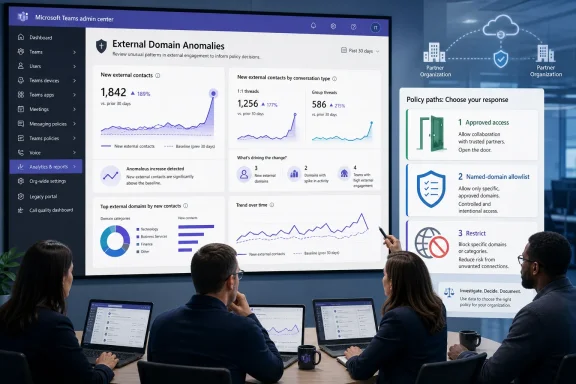 Start With the Report, Then Establish the Business Context
The report is in the Teams admin center at Analytics & reports > Protection reports. On the View reports tab, select Communication anomalies from the Report menu; External domains anomalies is the default report type. Choose a date range—Microsoft offers predefined ranges including the last 24 hours, three days, seven days, and 10 days—then run the report.Use the first review as a baseline exercise rather than a blocklist exercise:
- Export or record the domains shown during a normal operating period.
- Identify the internal business owner, project, supplier, or customer relationship associated with each domain.
- Separate domains that are broadly expected from domains that should contact only a limited department or project team.
- Flag domains that have no accountable owner or no clear business rationale for first-time Teams contact.
- Review external-access policy choices for domains that repeatedly appear without a durable business case.
That question needs an answer from the business as well as security. A security operations analyst can verify that a domain is real; they cannot independently decide whether a new external relationship is appropriate for Finance, engineering, legal, or a regional sales organization. Build a lightweight ownership process before an event arrives: every important external domain should have a named sponsor and an expected collaboration scope.
The Metric Is an Event Counter, Not a Volume Gauge
The most common interpretation error is treating Total anomalies as a count of messages, conversations, or bad days. It is none of those things.Microsoft evaluates anomalies daily and separately for newly created 1:1 threads and newly created group threads. If a single external domain exceeds the baseline for both kinds of activity on the same day, Teams records two anomaly events. A domain with a Total anomalies value of two could therefore reflect one day of unusual new 1:1 contact and unusual new group contact—not two days of activity, and not two messages.
That accounting model changes how administrators should triage the table. A high event count merits attention because it suggests repeated threshold crossings, but it does not automatically tell you how many users were contacted, what was said, or whether the activity was malicious. The useful comparison is between observed new-thread activity and the domain’s historical baseline, with the business reason layered on top.
The report also distinguishes new 1:1 threads from new group threads. That separation can offer operational context even before an investigation is complete. A sharp rise in group threads may align with a managed project kickoff, while a rise in first-time 1:1 chats may call for closer ownership validation. Neither pattern is inherently benign or malicious; the value is in discovering the departure from normal behavior.
This is why the report should not be handed to an incident team as though it were a finished detection. It is a triage signal. Teams is showing where a domain’s newly established external reach has become unusual for your tenant, not making a claim about intent.
Turn a Spike Into an Open, Allowlist, or Block Decision
Teams external access gives organizations four broad policy choices: allow all external domains, allow only named domains, block named domains, or block all external domains. The anomaly report becomes useful when it informs how those choices should be applied to individual business relationships.A practical decision model looks like this:
- Keep a domain open when its first-time contact spike has a verified business explanation, an accountable internal owner, and a collaboration pattern that matches the expected rollout or relationship.
- Move a domain into a governed named-domain allowlist when the relationship is valid but should be explicitly approved rather than covered by an organization-wide “allow all” posture.
- Block a domain when the organization cannot validate the relationship, the contact pattern lacks a business purpose, or an investigation establishes that external access should not continue.
- Use a temporary review state operationally when evidence is incomplete, rather than turning an anomaly score alone into a permanent access decision.
For organizations currently allowing all external domains, the report can expose where a named-domain model would reduce unnecessary exposure without breaking routine work. For organizations already using allow-only-named-domains, it can reveal a different problem: whether a permitted partner’s behavior has materially changed and now needs reconfirmation from its business owner.
The policy has a critical edge case: blocking a parent domain does not automatically block its subdomains. Administrators should not assume that blocking a broad corporate domain controls every associated subdomain. Investigation and policy design need to use the actual domain observed in Teams, then account for relevant subdomains explicitly where required.
Use External Domain Activity to Fill in the Missing Context
The External Domain Anomalies report is strongest when paired with the existing External domain activity report. The activity report can help administrators inventory managed external organizations rather than viewing only deviations from a baseline. In Teams Premium, it adds domain-specific message and internal-user detail.That pairing helps prevent two opposing mistakes. The first is underreacting because a domain name looks familiar even though the pattern is newly unusual. The second is overreacting because a legitimate domain is unfamiliar to the security team but is already part of an authorized business relationship.
An effective review sequence is simple:
- Start with the anomalous domain and determine whether the spike is in new 1:1 threads, group threads, or both.
- Check the External domain activity report to understand whether the domain already has managed external activity and, where Teams Premium is available, the domain-specific message and internal-user details.
- Ask the accountable business owner whether the observed new-contact pattern matches a known event, such as a partner onboarding or project launch.
- Compare the answer with the organization’s external-access posture and decide whether broad access, a named allowlist entry, or a block is appropriate.
- Record the decision and its owner so that the next spike can be evaluated against a known history rather than institutional memory.
WindowsForum’s recent coverage of Teams external-user reporting is relevant here: user reports and domain anomalies answer different questions. A user report can give administrators a direct suspicion signal from the person receiving the contact. The anomalies report instead shows a domain-level behavioral shift. Together, they can support a stronger review process, but neither replaces ownership verification or external-access policy.
Baseline Work Is the Control That Makes the Signal Useful
A new report often creates pressure to build an alert workflow immediately. The more important first step is deciding what “normal” external collaboration looks like in the tenant. Microsoft’s design already uses each domain’s historical communication patterns to establish a baseline; administrators need the corresponding organizational baseline of approved partners, expected projects, and responsible owners.That baseline should be practical, not bureaucratic. A spreadsheet, service catalog entry, or security review record can be enough if it answers three questions: who owns this external relationship, why is Teams access needed, and should access be broad or limited to a governed exception? What matters is that an analyst can get an answer quickly when a domain appears in the anomalies report.
Avoid treating a lack of immediate recognition as evidence of hostile activity. Large organizations regularly have distributed purchasing, regional business units, temporary projects, and supplier relationships that central IT cannot name from memory. At the same time, do not let that reality become a reason to ignore unexplained new-contact spikes. The report is useful precisely because it identifies the moments when a previously quiet or new relationship should be made explicit.
Frequently Asked Questions
Is the External Domain Anomalies report a phishing detector?
No. It identifies unusual increases in first-time external-to-internal Teams contact by domain. It is a behavioral signal for review, not a determination that a message or domain is malicious.Does Total anomalies show how many messages were sent?
No. It counts anomaly events. Teams evaluates new 1:1 and group threads separately each day, so one domain can generate two events on the same day.Will established partner relationships be evaluated the same way?
No. The detection is focused on first-time external-to-internal contact patterns. Ongoing or previously established relationships are not evaluated in the same way.Does blocking a parent domain also block its subdomains?
No. Microsoft states that blocking a parent domain does not block its subdomains by default. Policies must account for the specific domains that need to be restricted.The report’s practical value will depend less on the number of red markers it produces than on whether IT has a repeatable way to turn each one into an accountable access decision. Build that baseline now, and the next external-domain spike becomes a controlled choice between open access, a governed allowlist, and a defensible block—not a guess made under pressure.
References
- Primary source: learn.microsoft.com
Microsoft Teams external domain anomalies report - Microsoft Teams | Microsoft Learn
The External Domain Anomalies Report surfaces unusual external collaboration patterns between users in your organization and external domains in Microsoft Teams.learn.microsoft.com - Independent coverage: blog.admindroid.com
External Domains Anomalies Report in Microsoft Teams
Explore the new external domains anomalies report in Teams to detect unusual behaviour from external domains early and take immediate action.blog.admindroid.com - Independent coverage: cybersecuritynews.com
- Independent coverage: support.microsoft.com
Prevent spam or phishing attempts from external chats in Microsoft Teams | Microsoft Support
Ensure your security from spam, phishing, or impersonation attempts from external chats in Microsoft Teams.support.microsoft.com - Independent coverage: kbworks.eu
Spotting the Smoke: The New Teams External Domains Anomalies Report - KbWorks - SharePoint and Teams Specialist
TL;DR: Microsoft is introducing the External Domains Anomalies Report to help Teams admins detect unusual communication patterns with external organizations.kbworks.eu - Independent coverage: cisonode.com
Microsoft Teams adds “External Domains Anomalies” reporting to catch attackers early (Rollout: Feb–Mar 2026) – Cyber Security News
Microsoft Teams adds “External Domains Anomalies” reporting to catch attackers early (Rollout: Feb–Mar 2026) – Cyber Security Newswww.cisonode.com
