

Navigation section
You are using an out of date browser. It may not display this or other websites correctly.
You should upgrade or use an alternative browser.
You should upgrade or use an alternative browser.
Windows 10 One day to go for Windows 10 Upgrade.
- Thread starter Nimit
- Start date
- 4 min read


Trouble
Noob Whisperer
- Joined
- Nov 30, 2009
- Messages
- 13,722
That would definitely be cool, but....So, today this is the last day of my Windows 8.1.
I'm not completely sure that updaters will be able to get the Windows 10 version that is suppose to be available on the 29th.
I believe that insiders will probably get it (maybe) and then some time later they intend to roll it out to a broader base.



- Joined
- Jul 22, 2005
- Messages
- 9,250
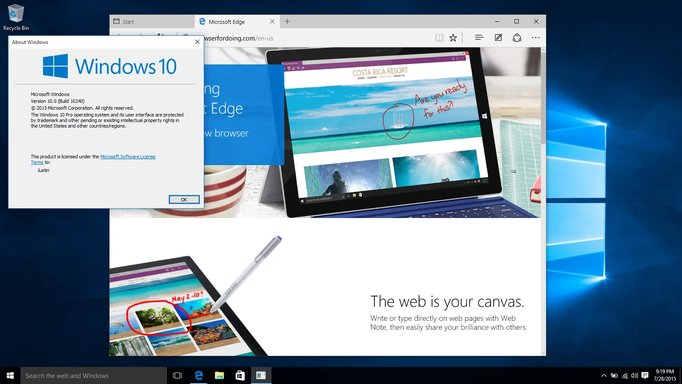
Annnd I am now on Windows 10.
On the right panel, you will find the key “CurrentBuildNumber“.The value of this key is your Windows Build Number. Then find a key called “CurrentVersion” and its value is your windows version i.e. the version of your windows vista, windows xp, etc. You will also find keys called “EditionID” and “ProductId” to know the windows edition and product id.
- Click Start, type regedit and press Enter to open the Windows registry
- Navigate to the registry key – HKEY_LOCAL_MACHINE\Software\Microsoft\Windows NT\CurrentVersion
The key BuildLabEx contains build number and revision number.For example, in the value 6001.17387.x86fre.vistasp1_gdr.070927-1921, the first four digits stand for build number i.e. 6001 and the next five digits stand for windows revision number i.e. 17387. x86 tells you that you are running a 32-bit operating system.
Or, even easier, open a Command Prompt and type:
reg query "HKLM\SOFTWARE\Microsoft\Windows NT\CurrentVersion" /v BuildLabEx
What is your full BuildLabEx string? Thanks for the info.
Last edited:
- Joined
- Jul 22, 2005
- Messages
- 9,250
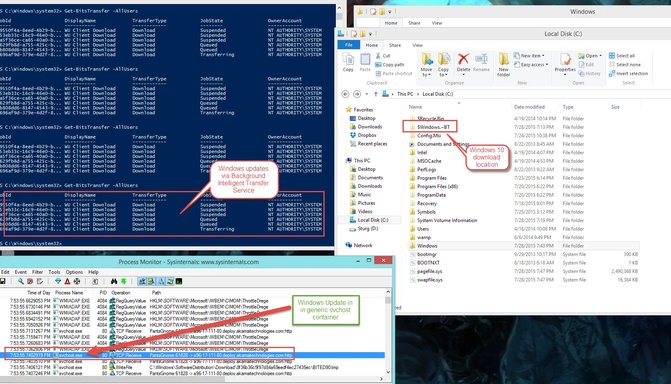
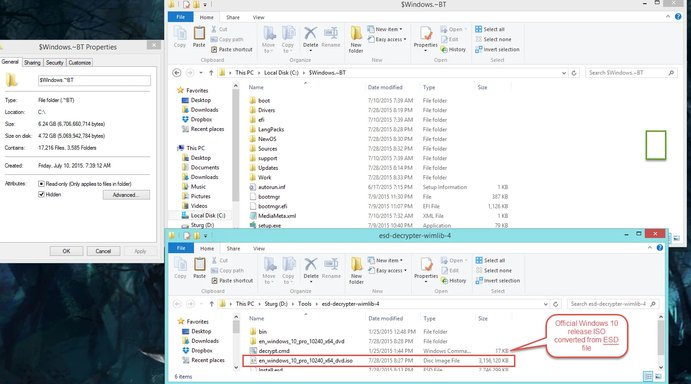
Yes, I am looking into this as well.I did it via converting the ESD, so it doesn't include the updates, they appear to be currently disabled on Windows Updates server.
10240.16384.amd64fre.th1.150709-1700
This is extremely useful. I will test this on a virtual machine.You can get the download from here Link Removed
You can upgrade or download the ISO for another machine, or for later in the event you need to reinstall or whatever.
As far as this new "automatic update" process, I can see it is going as we predicted... i.e... whenever someone pushes a button in the desert, maybe this thing will prompt me to upgrade.
Trouble
Noob Whisperer
- Joined
- Nov 30, 2009
- Messages
- 13,722
OR NOT!maybe this thing will prompt me to upgrade.
I'm currently up to 5 failures on my Windows 8.1 machine in update history.
It's getting late.
I shouldn't be doing this $h!t at this time of night.

Sonny
Fantastic Member
- Joined
- Nov 17, 2009
- Messages
- 1,387
OR NOT!
I'm currently up to 5 failures on my Windows 8.1 machine in update history.
It's getting late.
I shouldn't be doing this $h!t at this time of night.
Trouble I had 13 failures on Windows 8.1 before it took and I got started on upgrading. On 10 now. So far so good.
Similar threads

- Replies
- 0
- Views
- 117
- Article
- Replies
- 0
- Views
- 254
- Article
- Replies
- 0
- Views
- 445
- Replies
- 0
- Views
- 301
- Replies
- 0
- Views
- 723