

Windows 10 Store is bugged

ThisIsMyName

New Member
Joined
Apr 11, 2016
Messages
10
So here's the problem. There are some apps in the store and when I click them I get the message "To use this, you need to upgrade Windows" - example:
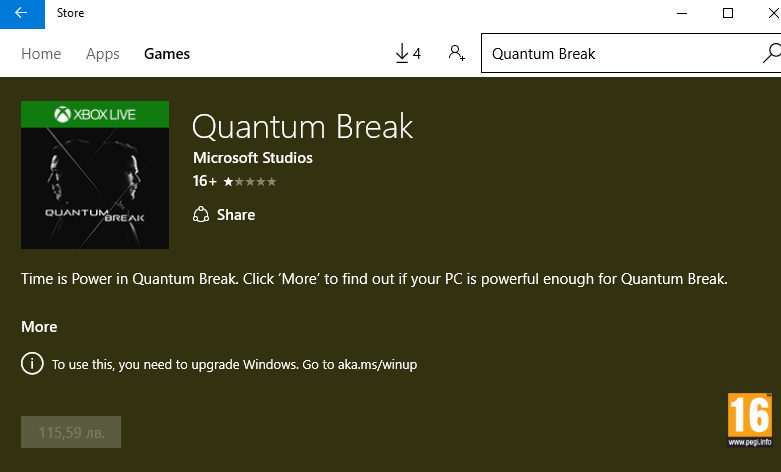
UBhFnMU.png

I'm using Windows 10 Pro so the error shouldn't be happening. How do I fix this?
 

kemical

Essential Member
Joined
Aug 28, 2007
Messages
36,176
Hi,
try running these scans:
File scans
Right click on the Start menu icon and from the revealed list choose 'admin command prompt'. Type:
sfc /scannow
press enter and await results

In the same command prompt and after the above scan has finished type:
dism /online /cleanup-image /restorehealth
Press enter and await results (longer this time).

If the first scan found files it could not repair but the second scan is successful, run the first scan again using the same command prompt box and this time it should repair the files found.

May I ask are you going to buy Quantum Break? Might be worth waiting until a few patches have been released?
 

ThisIsMyName

New Member
Joined
Apr 11, 2016
Messages
10
So, I ran both scans just like you told me, the first one said that nothing is found, the second one completed successfully too, however the problem still persists :\
 

kemical

Essential Member
Joined
Aug 28, 2007
Messages
36,176
I had a look through the requirements and did you notice this and if so have you upgraded to this build?
An image from 'Store is bugged'. Minimum PC specifications text for Quantum Break game on Windows 10 (64-bit only).
 

Last edited by a moderator:

ThisIsMyName

New Member
Joined
Apr 11, 2016
Messages
10
Unfortunately the app troubleshooter didn't find anything. I check for updates daily from Settings > Update & Security > Windows Update, so I guess the November update must be installed, also I'm running the 64-bit version, so it's not that either. What do you mean that I must have an Xbox account? Do I have to be login-ed into it while browsing the store? I've also uninstalled some of the default apps that come with Windows 10, one of which was some kind of Xbox app, maybe this has a relation?
 

kemical

Essential Member
Joined
Aug 28, 2007
Messages
36,176
I just read somewhere that to play the game even on pc you need an Xbox account, now I'm not sure if this is your issue or not. I guess you could always create one and see if it makes a difference? I think you can download the Xbox app from the store.
 

Neemobeer

Windows Forum Team
Staff member
Joined
Jul 4, 2015
Messages
8,998
You can confirm you're on the correct build
  • Press [Windows key + r]
  • Type winver
 

Back
Top