

Microsoft is planning a Microsoft Teams setting for GCC High and Department of Defense tenants that will let users stop Teams from automatically switching their presence to Do Not Disturb when they begin presenting or screen sharing.
The feature, listed as Microsoft 365 Roadmap ID 567300, is currently marked In development with general availability targeted for September 2026. Microsoft added the entry on July 14, 2026. It applies to the Teams desktop clients on Windows and Mac, not the worldwide commercial Microsoft 365 cloud.
Today, automatic Do Not Disturb behavior during presentation helps reduce interruptions for a presenter, but it can also prevent them from receiving incoming Teams calls at moments when they deliberately need to remain reachable. Microsoft says the upcoming setting will allow users to opt out of the automatic presence transition, so calls can continue to arrive without users having to manually change their status before sharing.
Microsoft’s roadmap description frames this as an opt-out setting rather than a change to Teams’ default behavior. In other words, users who prefer presentation-time silence should still be able to retain the existing Do Not Disturb workflow, while those handling operational calls, incident response, or time-sensitive coordination can choose to stay available.
That distinction matters in GCC High and DoD environments, where Teams is often used for both scheduled collaboration and real-time operational communication. A user presenting a dashboard, briefing material, or remote-support session may not want an automatic presence state to block a legitimate call from a supervisor, service desk, or response team.
The roadmap item does not yet say whether tenant administrators will be able to control the setting through Teams policy, set an organization-wide default, or restrict user access to it. Microsoft also has not published the exact location of the control in the Teams client.
Organizations using GCC High or DoD should nevertheless review internal guidance that tells users to rely on Teams presence while someone is presenting. Once the setting arrives, a presenter’s active screen share will no longer necessarily mean that Teams calls are being suppressed.
For users, the practical trade-off will be straightforward: keeping automatic Do Not Disturb enabled reduces interruptions during a presentation, while opting out preserves call availability but may require managing incoming calls while sharing content.
Microsoft is targeting the setting for Teams desktop and Mac clients in GCC High and DoD tenants in September 2026.
The feature, listed as Microsoft 365 Roadmap ID 567300, is currently marked In development with general availability targeted for September 2026. Microsoft added the entry on July 14, 2026. It applies to the Teams desktop clients on Windows and Mac, not the worldwide commercial Microsoft 365 cloud.
Today, automatic Do Not Disturb behavior during presentation helps reduce interruptions for a presenter, but it can also prevent them from receiving incoming Teams calls at moments when they deliberately need to remain reachable. Microsoft says the upcoming setting will allow users to opt out of the automatic presence transition, so calls can continue to arrive without users having to manually change their status before sharing.
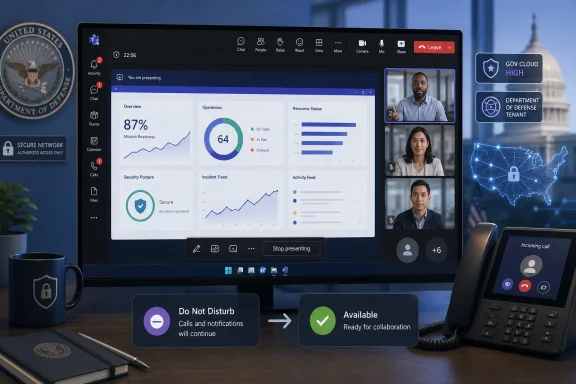 A user-level choice, not a blanket behavior change
Microsoft’s roadmap description frames this as an opt-out setting rather than a change to Teams’ default behavior. In other words, users who prefer presentation-time silence should still be able to retain the existing Do Not Disturb workflow, while those handling operational calls, incident response, or time-sensitive coordination can choose to stay available.That distinction matters in GCC High and DoD environments, where Teams is often used for both scheduled collaboration and real-time operational communication. A user presenting a dashboard, briefing material, or remote-support session may not want an automatic presence state to block a legitimate call from a supervisor, service desk, or response team.
The roadmap item does not yet say whether tenant administrators will be able to control the setting through Teams policy, set an organization-wide default, or restrict user access to it. Microsoft also has not published the exact location of the control in the Teams client.
What Windows admins and users should do
There is no action to take yet. The feature is not generally available, and Microsoft’s September 2026 date is a rollout target rather than a firm delivery commitment; the company notes that Microsoft 365 roadmap plans can change.Organizations using GCC High or DoD should nevertheless review internal guidance that tells users to rely on Teams presence while someone is presenting. Once the setting arrives, a presenter’s active screen share will no longer necessarily mean that Teams calls are being suppressed.
For users, the practical trade-off will be straightforward: keeping automatic Do Not Disturb enabled reduces interruptions during a presentation, while opting out preserves call availability but may require managing incoming calls while sharing content.
Microsoft is targeting the setting for Teams desktop and Mac clients in GCC High and DoD tenants in September 2026.
References
- Primary source: Microsoft 365 Roadmap
Published: 2026-07-14T22:41:38.6349466Z
Microsoft 365 Roadmap | Microsoft 365
The Microsoft 365 Roadmap lists updates that are currently planned for applicable subscribers. Check here for more information on the status of new features and updates.www.microsoft.com
- Official source: techcommunity.microsoft.com
