

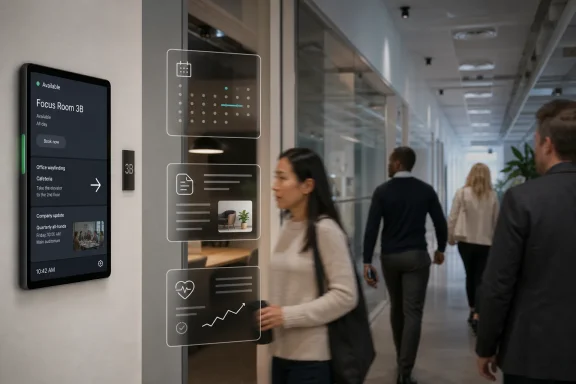
Microsoft is developing digital signage support for idle Microsoft Teams panel devices, with worldwide general availability planned for August 2026 on Android-based Teams and Surface devices for spaces licensed with Teams Rooms Pro or Shared space. The change sounds minor until you remember where Teams panels live: not in a dashboard tab, but on the wall outside a room, in the sightline of everyone walking past. Microsoft is turning a narrow scheduling appliance into another managed display endpoint. That is the real story: the meeting-room estate is becoming a communications surface, and Teams is increasingly the control plane for it.
Teams panels have always had an odd relationship with attention. Their job is to be useful precisely when nobody is touching them: show whether a room is free, warn that the next meeting is coming, let someone reserve the space, and otherwise stay out of the way. Microsoft’s new roadmap item changes that idle state from dead time into publishing time.
The feature allows digital signage to appear on idle Teams panel devices, similar to the signage support already available for Microsoft Teams Rooms front-of-room displays. That comparison matters. Microsoft is not inventing a new category here; it is extending an existing room-display model from the big screen inside the room to the small screen outside it.
For organizations that already use Teams Rooms Pro management, the operational pitch is obvious. The signage source and settings are configured through the Pro Management portal, meaning IT does not have to treat each wall panel as a one-off Android kiosk. The promise is centralized deployment, licensing-gated management, and another reason to keep the meeting-room stack inside Microsoft’s orbit.
The catch is that the feature is not a generic Teams perk. Microsoft says it is available with Teams Rooms Pro or Shared space-licensed spaces. That draws a bright line between casual Teams device ownership and Microsoft’s managed-room licensing model.
A front-of-room display competes with the meeting itself. It shows content when people are already inside a booked space, focused on a call, a presentation, or a whiteboard. A panel outside the room catches people between tasks, in corridors, near elevators, and in the moment when they are deciding where to go next.
That makes it less like a conference-room accessory and more like a workplace communications endpoint. It can carry wayfinding, safety notices, facility updates, visitor messaging, cafeteria changes, IT outage banners, or reminders that do not deserve an email but do deserve visibility. In the hybrid-office era, that is valuable territory.
It also fits Microsoft’s broader strategy for Teams devices. Teams is no longer just the app where meetings happen. It is the software layer that authenticates room systems, manages peripherals, handles booking workflows, and reports device health. Digital signage on panels adds content distribution to that list.
There is a practical elegance to that move. Many organizations already own these panels, have them mounted, networked, enrolled, and associated with rooms. If the device spends most of its day showing the same static availability state, Microsoft can plausibly argue that the estate is underused.
That is predictable, but it will still irritate some customers. A Teams panel is already a specialized device. If an organization bought it expecting room scheduling to be the main function, signage may feel like a bonus that should simply arrive with a firmware or app update. Microsoft’s answer is likely to be that signage is not just a visual mode; it is a managed service requiring policy, configuration, monitoring, and support.
This is where the Pro Management portal becomes central to the argument. Microsoft can justify the license gate by emphasizing centralized settings and consistency across shared spaces. For IT teams, that is not trivial. Physical displays are notorious for becoming orphaned systems: a content player behind a TV, a forgotten admin password, a vendor portal nobody logs into, a Windows mini PC that has not patched in months.
A Teams-native signage path could reduce that sprawl. But it also deepens dependency. Once room scheduling, front-of-room display behavior, panel signage, device monitoring, and space licensing are all linked, Microsoft has converted the humble meeting room into a recurring platform bundle.
That distinction matters for administrators. Digital signage may look like “just content,” but once external or centrally managed content appears on a device in a public area, the threat model changes. A compromised signage feed is reputationally louder than a broken room-booking screen. A misconfigured campaign can expose internal information to visitors. A stale emergency message can create confusion.
Microsoft’s decision to route signage settings through Pro Management suggests the company understands this feature belongs in the same administrative lane as room-device governance. The open questions are the ones IT departments will care about: how content sources are authenticated, how failures are logged, whether there is fallback behavior, how often panels refresh, and what controls exist to prevent sensitive content from showing in the wrong place.
The roadmap item does not answer those questions yet. That is normal for a feature still in development, but it means cautious organizations should treat August 2026 as the start of evaluation, not the end of planning.
For facilities and communications teams, that consistency is appealing. One set of policies could define what appears across conference rooms, huddle spaces, training areas, and shared desks. If implemented well, Teams panels could become part of a campus-wide message fabric without requiring a separate signage vendor for every small display.
But there is a difference between front-of-room screens and panels. A room display is usually visible to meeting participants; a panel is visible to passersby. That changes not only content strategy but also privacy expectations. A message that is appropriate inside an employee-only room may not be appropriate in a lobby-facing corridor.
The best deployments will likely treat panels as a distinct audience, not merely a smaller mirror of room signage. Doorway screens are ideal for short, ambient, low-risk messages. They are poor places for dense dashboards, confidential operational updates, or anything that requires a viewer to stand still and read.
Digital signage is one of the oldest answers to that problem. What is changing is who controls it. Historically, signage belonged to facilities, corporate communications, security, or a specialist vendor. Microsoft is now making a case that if Teams already knows the room, owns the device relationship, and manages the shared-space license, it should also help decide what the screen says when nobody is using it.
That will appeal to IT departments that want fewer vendors. It may concern communications teams that do not want every workplace screen absorbed into the Teams administrative universe. The politics of signage are rarely just technical; they involve brand, safety, internal messaging, and sometimes legal review.
The feature’s success will depend on whether Microsoft gives non-IT stakeholders enough control without creating a permissions mess. If every signage update requires a Teams Rooms administrator, the feature will be underused. If too many people can push content to public screens, it will become risky.
For WindowsForum readers managing real environments, the correct response is not to budget around a single month as if it were a contract. The correct response is to identify whether Teams panels are already deployed, whether they are licensed under Teams Rooms Pro or Shared space plans, and whether there is an existing digital signage vendor whose role might overlap with Microsoft’s implementation.
There is also a lifecycle issue. Not every deployed Teams panel will necessarily receive every new capability at the same time. Device certification, OEM support windows, Android platform versions, and tenant policy can all affect rollout behavior. Microsoft’s roadmap entry names the platform category, but administrators will still need device-specific confirmation closer to release.
The safest assumption is that this will be a managed rollout, not a magic switch. Organizations that care about signage should plan pilot locations, content governance, failure testing, and support ownership before turning corridor screens into official messaging surfaces.
Teams panels are a perfect example. They began as room schedulers, but each added capability makes them more central to workplace operations. Booking, check-in, occupancy signaling, device health, and now signage all increase the amount of organizational behavior mediated by a small screen outside a door.
That is useful, but it also concentrates control. Microsoft gains another reason for organizations to standardize on Teams-certified devices and Microsoft room licensing. Customers gain simpler management if they are already invested, but lose some neutrality if they want best-of-breed signage, independent workplace analytics, or mixed collaboration ecosystems.
This is the familiar Microsoft trade: integration in exchange for gravity. The more pieces you adopt, the smoother the experience becomes. The harder it becomes to leave is not a bug in that model; it is the model.
Microsoft’s roadmap item is small, but the direction of travel is not. Teams is expanding from the meeting itself into the managed space around the meeting, and every idle screen is becoming a potential policy-controlled channel. By August 2026, the most interesting thing about a Teams panel may no longer be whether the room is free; it may be what Microsoft’s platform is allowed to say while everyone walks by.
 Microsoft Finds Value in the Idle Screen
Teams panels have always had an odd relationship with attention. Their job is to be useful precisely when nobody is touching them: show whether a room is free, warn that the next meeting is coming, let someone reserve the space, and otherwise stay out of the way. Microsoft’s new roadmap item changes that idle state from dead time into publishing time.The feature allows digital signage to appear on idle Teams panel devices, similar to the signage support already available for Microsoft Teams Rooms front-of-room displays. That comparison matters. Microsoft is not inventing a new category here; it is extending an existing room-display model from the big screen inside the room to the small screen outside it.
For organizations that already use Teams Rooms Pro management, the operational pitch is obvious. The signage source and settings are configured through the Pro Management portal, meaning IT does not have to treat each wall panel as a one-off Android kiosk. The promise is centralized deployment, licensing-gated management, and another reason to keep the meeting-room stack inside Microsoft’s orbit.
The catch is that the feature is not a generic Teams perk. Microsoft says it is available with Teams Rooms Pro or Shared space-licensed spaces. That draws a bright line between casual Teams device ownership and Microsoft’s managed-room licensing model.
The Doorway Becomes a Managed Channel
The most interesting thing about Teams panel signage is not the screen size. It is the location.A front-of-room display competes with the meeting itself. It shows content when people are already inside a booked space, focused on a call, a presentation, or a whiteboard. A panel outside the room catches people between tasks, in corridors, near elevators, and in the moment when they are deciding where to go next.
That makes it less like a conference-room accessory and more like a workplace communications endpoint. It can carry wayfinding, safety notices, facility updates, visitor messaging, cafeteria changes, IT outage banners, or reminders that do not deserve an email but do deserve visibility. In the hybrid-office era, that is valuable territory.
It also fits Microsoft’s broader strategy for Teams devices. Teams is no longer just the app where meetings happen. It is the software layer that authenticates room systems, manages peripherals, handles booking workflows, and reports device health. Digital signage on panels adds content distribution to that list.
There is a practical elegance to that move. Many organizations already own these panels, have them mounted, networked, enrolled, and associated with rooms. If the device spends most of its day showing the same static availability state, Microsoft can plausibly argue that the estate is underused.
Licensing Turns a Small Feature Into a Platform Signal
Microsoft’s licensing language is doing a lot of work here. By tying signage to Teams Rooms Pro or Shared space-licensed spaces, the company is positioning the feature as part of the managed physical workplace, not as a free enhancement for every Teams display.That is predictable, but it will still irritate some customers. A Teams panel is already a specialized device. If an organization bought it expecting room scheduling to be the main function, signage may feel like a bonus that should simply arrive with a firmware or app update. Microsoft’s answer is likely to be that signage is not just a visual mode; it is a managed service requiring policy, configuration, monitoring, and support.
This is where the Pro Management portal becomes central to the argument. Microsoft can justify the license gate by emphasizing centralized settings and consistency across shared spaces. For IT teams, that is not trivial. Physical displays are notorious for becoming orphaned systems: a content player behind a TV, a forgotten admin password, a vendor portal nobody logs into, a Windows mini PC that has not patched in months.
A Teams-native signage path could reduce that sprawl. But it also deepens dependency. Once room scheduling, front-of-room display behavior, panel signage, device monitoring, and space licensing are all linked, Microsoft has converted the humble meeting room into a recurring platform bundle.
Android Panels Are Now Part of the Workplace Endpoint Estate
The roadmap lists Android, Teams and Surface Devices as the relevant platforms. That reflects the reality of Teams panels: they are purpose-built appliances, often Android-based, certified for Microsoft’s meeting-room ecosystem. They are not general-purpose PCs, but they are still endpoints on the network with identity, configuration, update, and content-delivery concerns.That distinction matters for administrators. Digital signage may look like “just content,” but once external or centrally managed content appears on a device in a public area, the threat model changes. A compromised signage feed is reputationally louder than a broken room-booking screen. A misconfigured campaign can expose internal information to visitors. A stale emergency message can create confusion.
Microsoft’s decision to route signage settings through Pro Management suggests the company understands this feature belongs in the same administrative lane as room-device governance. The open questions are the ones IT departments will care about: how content sources are authenticated, how failures are logged, whether there is fallback behavior, how often panels refresh, and what controls exist to prevent sensitive content from showing in the wrong place.
The roadmap item does not answer those questions yet. That is normal for a feature still in development, but it means cautious organizations should treat August 2026 as the start of evaluation, not the end of planning.
The Comparison to Teams Rooms Displays Is the Roadmap’s Tell
Microsoft’s wording deliberately links panel signage to digital signage support for Teams Rooms front-of-room displays. That tells us the company wants a consistent mental model: idle Teams room screens can show managed content, whether they are inside or outside the room.For facilities and communications teams, that consistency is appealing. One set of policies could define what appears across conference rooms, huddle spaces, training areas, and shared desks. If implemented well, Teams panels could become part of a campus-wide message fabric without requiring a separate signage vendor for every small display.
But there is a difference between front-of-room screens and panels. A room display is usually visible to meeting participants; a panel is visible to passersby. That changes not only content strategy but also privacy expectations. A message that is appropriate inside an employee-only room may not be appropriate in a lobby-facing corridor.
The best deployments will likely treat panels as a distinct audience, not merely a smaller mirror of room signage. Doorway screens are ideal for short, ambient, low-risk messages. They are poor places for dense dashboards, confidential operational updates, or anything that requires a viewer to stand still and read.
The Feature Arrives in the Shadow of Hybrid-Office Fatigue
The timing is not accidental. Companies are still trying to make hybrid offices feel intentional rather than half-used. Meeting rooms are booked, abandoned, squatted in, or repurposed at a pace that old scheduling systems were never designed to handle. Panels helped solve the room-status problem, but they did not solve the broader problem of communicating with people moving through a flexible workplace.Digital signage is one of the oldest answers to that problem. What is changing is who controls it. Historically, signage belonged to facilities, corporate communications, security, or a specialist vendor. Microsoft is now making a case that if Teams already knows the room, owns the device relationship, and manages the shared-space license, it should also help decide what the screen says when nobody is using it.
That will appeal to IT departments that want fewer vendors. It may concern communications teams that do not want every workplace screen absorbed into the Teams administrative universe. The politics of signage are rarely just technical; they involve brand, safety, internal messaging, and sometimes legal review.
The feature’s success will depend on whether Microsoft gives non-IT stakeholders enough control without creating a permissions mess. If every signage update requires a Teams Rooms administrator, the feature will be underused. If too many people can push content to public screens, it will become risky.
Admins Should Read “In Development” as a Warning Label
The roadmap status is “in development,” with general availability listed for August 2026. Microsoft 365 roadmap dates are estimates, and features can move, slip, or change scope before release. That is especially true for device features, where firmware, Teams app versions, certification programs, and management portal updates all need to align.For WindowsForum readers managing real environments, the correct response is not to budget around a single month as if it were a contract. The correct response is to identify whether Teams panels are already deployed, whether they are licensed under Teams Rooms Pro or Shared space plans, and whether there is an existing digital signage vendor whose role might overlap with Microsoft’s implementation.
There is also a lifecycle issue. Not every deployed Teams panel will necessarily receive every new capability at the same time. Device certification, OEM support windows, Android platform versions, and tenant policy can all affect rollout behavior. Microsoft’s roadmap entry names the platform category, but administrators will still need device-specific confirmation closer to release.
The safest assumption is that this will be a managed rollout, not a magic switch. Organizations that care about signage should plan pilot locations, content governance, failure testing, and support ownership before turning corridor screens into official messaging surfaces.
Microsoft’s Small Screens Are Becoming Strategic
This feature belongs to a larger trend: the enterprise display is being reclassified. It used to be peripheral hardware. Now it is a managed endpoint, a policy target, an identity-bound resource, and a telemetry source.Teams panels are a perfect example. They began as room schedulers, but each added capability makes them more central to workplace operations. Booking, check-in, occupancy signaling, device health, and now signage all increase the amount of organizational behavior mediated by a small screen outside a door.
That is useful, but it also concentrates control. Microsoft gains another reason for organizations to standardize on Teams-certified devices and Microsoft room licensing. Customers gain simpler management if they are already invested, but lose some neutrality if they want best-of-breed signage, independent workplace analytics, or mixed collaboration ecosystems.
This is the familiar Microsoft trade: integration in exchange for gravity. The more pieces you adopt, the smoother the experience becomes. The harder it becomes to leave is not a bug in that model; it is the model.
The August 2026 Rollout Is Really a Governance Test
Before organizations celebrate free corridor signage, they should ask who owns the message, who owns the device, and who owns the consequences when those two collide.- The feature is planned for worldwide general availability in August 2026, but the roadmap status remains in development and the timing should be treated as provisional.
- Digital signage will appear on idle Teams panel devices rather than replacing the panel’s core room-scheduling function.
- Configuration is expected to happen in the Teams Rooms Pro Management portal, which makes the feature more attractive to centralized IT teams.
- Eligibility is tied to Teams Rooms Pro or Shared space-licensed spaces, so licensing will determine whether existing panels can use it.
- The most important deployment work will be content governance, because hallway-facing screens have different privacy and audience assumptions than front-of-room displays.
- Organizations with existing signage vendors should evaluate whether Microsoft’s implementation complements that stack or begins to displace it.
Microsoft’s roadmap item is small, but the direction of travel is not. Teams is expanding from the meeting itself into the managed space around the meeting, and every idle screen is becoming a potential policy-controlled channel. By August 2026, the most interesting thing about a Teams panel may no longer be whether the room is free; it may be what Microsoft’s platform is allowed to say while everyone walks by.
References
- Primary source: Microsoft 365 Roadmap
Published: 2026-06-23T23:15:39.6678540Z
Microsoft 365 Roadmap | Microsoft 365
The Microsoft 365 Roadmap lists updates that are currently planned for applicable subscribers. Check here for more information on the status of new features and updates.www.microsoft.com
