

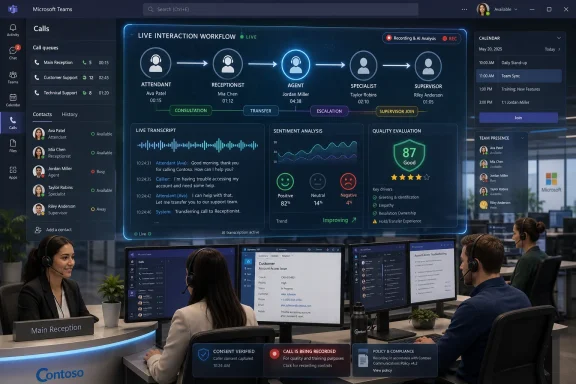
Tendfor launched version 3.20 on June 5, 2026, for customer conversations in Microsoft Teams, adding AI evaluation, sentiment analysis, transcription, redesigned Teams and web clients, and operational tools that bring contact centre agents, reception staff, attendants, and supervisors into a single Teams-based workflow. The release is not merely another incremental update to a niche contact centre product. It is a useful marker of where Microsoft Teams is being pulled next: away from being just the place where employees talk to each other, and toward becoming the place where organisations try to control conversations with everyone else. That ambition is powerful, but it also shifts more operational risk, compliance pressure, and workflow complexity into the Teams estate that IT departments already struggle to govern cleanly.
Microsoft Teams won its place in many organisations as an internal collaboration tool, accelerated by remote work and then cemented by the gravitational pull of Microsoft 365. Once the calendar, chat, meetings, files, identity, and presence graph live in one workspace, the obvious temptation is to route more work through that same surface. Customer service is one of the last big operational domains still split between specialist systems and general workplace software.
Tendfor 3.20 leans directly into that tension. The product’s premise is that reception, contact centre, and customer-facing staff should not have to jump between a classic telephony console, a separate customer service application, Outlook, and Teams just to understand who is available and where a conversation should go. In theory, Teams already knows who is present, busy, in a meeting, away, or reachable. The business case is to turn that signal into a service workflow.
That sounds obvious until it collides with the messiness of real support operations. Receptionists handle ambiguous callers. Agents need escalation paths. Supervisors need visibility into queues and quality. Second-line specialists may not think of themselves as contact centre workers at all, but they are often the people who resolve the issue. Tendfor’s bet is that Teams can become the connective tissue across those roles without forcing every worker into a traditional agent desktop.
The launch also lands in a market where Microsoft has been steadily encouraging contact centre integrations for Teams through certified partner models, Teams Phone, Graph APIs, Azure Communication Services, and Dynamics 365 Contact Center. That ecosystem creates opportunity for vendors like Tendfor, but it also creates a crowded architectural conversation for customers. The question is no longer whether Teams can be connected to customer service. It is which layer of the Microsoft stack should own the experience.
Version 3.20 adds consultation during calls, allowing staff to bring in second-line expertise while the customer interaction is still live. In service terms, that matters because the distinction between a “contact centre agent” and a “knowledge worker who happens to know the answer” is becoming increasingly artificial. A caller may begin at reception, move through a service desk queue, and then require input from finance, legal, engineering, facilities, or a branch office.
Traditional contact centre software has long supported consultation and transfer workflows, but Teams changes the texture of the problem. If the person who can help is already in Teams, has a calendar, has presence state, and can be reached through the same identity system, the handover can become less of a telephony manoeuvre and more of a workplace coordination act. Tendfor’s update is trying to make that coordination visible and manageable.
That is also where the product has to earn trust. A slick transfer button is not enough if presence is stale, if calendars do not reflect actual availability, if users ignore Teams status, or if call routing rules are poorly maintained. The promise of a unified customer conversation environment depends on the quality of the organisation’s underlying Microsoft 365 hygiene. Bad directories and inconsistent team membership do not become clean just because they are surfaced in a better client.
That makes sense in a Teams-based customer service environment. Once more customer contact happens inside a collaboration platform, managers need ways to understand what happened without manually listening to every call or relying only on agent notes. Transcription gives the organisation a record. Sentiment analysis gives it a rough signal. AI-driven evaluation gives supervisors a way to standardise quality review across more interactions than human sampling alone would permit.
But this is also where the sales pitch needs a sober reading. Sentiment analysis can be useful, but it is not a lie detector, a compliance officer, or a full account of customer experience. Tone, accent, language, sarcasm, stress, and context can all distort machine interpretation. If organisations use these tools as prompts for review, they can improve oversight. If they use them as unquestioned scoring systems, they risk creating a brittle management layer that mistakes a model’s confidence for operational truth.
The larger point is that AI in customer service is moving beyond chatbots. It is becoming the instrumentation layer for human work. That may be less glamorous than a fully automated support agent, but it is likely to be more consequential in regulated and complex environments. The customer may still be speaking to a person, but the conversation is increasingly being summarised, scored, searched, retained, and measured by software.
On-demand recording is valuable because not every call needs to be captured in the same way. Some conversations may require recording for quality assurance, dispute resolution, training, or regulatory reasons. Others may be inappropriate or unnecessary to retain. Giving staff controlled flexibility can be useful, provided the organisation has clear policy and audit trails behind the button.
Caller consent is the more sensitive part. Consent requirements vary by jurisdiction and context, and multinational organisations cannot assume that a single recording banner or verbal script solves the problem everywhere. A Teams-based contact environment may involve users in different countries, callers in different countries, and data stored or processed across cloud services. The user interface can help enforce a workflow, but it cannot substitute for legal and compliance design.
For IT administrators, the practical issue is that recording is no longer just a telephony feature. It intersects with retention, eDiscovery, data loss prevention, access control, storage, transcription, and AI analysis. Once a call is recorded and transcribed, it may become discoverable business data. Once it is evaluated by AI, it may become performance data. Those are different governance conversations, and both need to happen before the feature is rolled out broadly.
By tying roles and skills to Teams membership, Tendfor is effectively treating Microsoft 365 group structure as an operational control plane. If a user belongs to the right Team, they can inherit the right assignment. That can reduce administrative lag and lower the chance that a former team member remains available in a queue they should no longer handle.
The trade-off is that Teams membership must then be treated with more seriousness. Many organisations use Teams casually, with owners adding members for convenience and rarely reviewing access. That habit becomes risky if membership drives customer service routing, skill assignment, or reception coverage. What began as collaboration sprawl can become operational misconfiguration.
This is one of the quiet consequences of building business workflow on top of Microsoft 365. Identity and group management stop being background plumbing and become production logic. For sysadmins, that means lifecycle management, naming conventions, ownership policies, access reviews, and automation are not optional hygiene projects. They are what keep the customer-facing workflow from drifting out of alignment.
The updated interface adds shortcuts for routine tasks and supports third-party calling so agents can bring other experts into customer interactions. It also improves visibility through Outlook calendar views, comments, personal Teams notes, and presence status. The theme is not novelty. It is context consolidation.
That matters because customer-facing workers often need to make routing decisions with incomplete information. Is the specialist actually available, or merely green in Teams? Is the manager in a meeting that can be interrupted? Has the receptionist already tried this department? Is there a note that explains why calls should go elsewhere today? Tendfor’s redesign appears aimed at surfacing those small operational clues before a transfer becomes a customer annoyance.
The challenge is that context can become clutter. Agent desktops have a long history of burying workers under panels, tabs, scores, scripts, notes, and status indicators. A Teams-native approach can reduce context switching, but it can also overload the Teams frame with another layer of operational data. The best version of this idea is a calm workspace that helps staff decide quickly. The worst version is a dashboard that makes every conversation feel like air-traffic control.
Microsoft has its own ambitions here, especially with Dynamics 365 Contact Center and Copilot-branded service experiences. But the Teams ecosystem still leaves room for specialist vendors because many organisations do not want to replace their entire service stack just to modernise telephony and reception workflows. They want to reuse Teams, preserve familiar Microsoft 365 identity and presence, and add contact centre controls where needed.
That creates a market with overlapping promises. Microsoft can offer native platform integration. Partners can offer specialised workflows, faster adaptation, and features tuned for particular customer service models. Customers, meanwhile, must decide whether they want a Microsoft-first contact centre architecture, a partner-led Teams extension, or a hybrid that uses Teams as the endpoint while another system remains the operational brain.
Tendfor 3.20 positions itself toward the pragmatic end of that spectrum. It does not claim to reinvent customer service. It says, in effect, that many organisations already live in Teams, and the customer conversation layer should meet them there. For WindowsForum readers managing real estates rather than keynote demos, that is the pitch worth examining.
The first pressure point will be governance. Teams has a way of becoming informal infrastructure before anyone fully documents it. When customer service workflows depend on Teams membership, presence, calendars, call policies, recording rules, and app permissions, the margin for informality shrinks. A tenant that was “good enough” for chat may not be good enough for regulated customer contact.
The second pressure point will be licensing and architecture. Teams Phone, PSTN connectivity, contact centre integrations, Microsoft 365 permissions, and third-party application licensing can produce a complicated bill of materials. The user experience may look unified, but the commercial and technical dependencies underneath it are anything but simple.
The third pressure point will be support boundaries. When a call fails, a recording does not trigger, a transfer behaves oddly, or presence looks wrong, responsibility may span Microsoft, the contact centre vendor, the carrier, the network, and the customer’s own tenant configuration. A Teams-based service environment can simplify the worker’s day while complicating the administrator’s root-cause analysis.
That means the usual Windows concerns remain central: headset drivers, audio device selection, Teams client updates, browser compatibility, conditional access, profile performance, notifications, and multi-monitor behaviour. A redesigned app can help, but it cannot make a poor endpoint setup disappear. In high-volume service roles, small endpoint irritations become measurable operational drag.
There is also a training dimension. Many employees know Teams well enough to chat and join meetings, but customer service workflows require a different level of discipline. Presence must be accurate. Notes must be meaningful. Transfers must be deliberate. Recording prompts must be followed. The Windows desktop becomes the cockpit for a process that is part human judgement, part telephony, part compliance, and part AI-assisted oversight.
For organisations considering Tendfor 3.20, pilot design should therefore include endpoint reality, not just cloud configuration. Test with the headsets, devices, network conditions, Teams client versions, and browser policies that frontline staff actually use. A contact centre demo in a clean tenant tells you very little about Monday morning reception traffic after a Windows update and a headset firmware mismatch.
These questions are not objections to the feature. They are the conditions under which the feature becomes usable. AI oversight can make service quality less anecdotal and reduce the burden on supervisors. It can also create suspicion if workers believe they are being silently scored by a system they cannot inspect or challenge.
The better framing is augmentation, not surveillance. Transcription can help resolve disputes. Sentiment signals can identify calls worth reviewing. Evaluation workflows can make coaching more consistent. But the final judgement should remain accountable to human managers who understand context and policy.
This is where IT, HR, legal, and operations need to collaborate. AI in customer service is not just a tool deployment. It is a workplace governance decision. The technology may live in Teams, but the consequences reach into employee relations, customer privacy, regulatory exposure, and organisational culture.
The cost is concentration. When more workflows converge in Teams, Teams outages, policy mistakes, identity errors, and app issues become more consequential. A collaboration platform becomes a customer service dependency. Microsoft 365 administration becomes part of frontline operational resilience.
That does not make the strategy wrong. In many organisations, the alternative is a patchwork of ageing PBXs, isolated contact centre systems, shared mailboxes, undocumented reception practices, and tribal knowledge. Bringing that into a governed Teams environment may be a substantial improvement. But consolidation should be treated as an architectural decision, not merely a user experience upgrade.
Tendfor 3.20 is interesting because it sits at that inflection point. It packages practical features around consultation, recording, role assignment, monitoring, AI evaluation, and interface design. Taken individually, none of those ideas is revolutionary. Together, they describe the shape of customer service as it is absorbed into the Microsoft 365 workplace.
 Teams Is Becoming the Front Door, Not Just the Back Office
Microsoft Teams won its place in many organisations as an internal collaboration tool, accelerated by remote work and then cemented by the gravitational pull of Microsoft 365. Once the calendar, chat, meetings, files, identity, and presence graph live in one workspace, the obvious temptation is to route more work through that same surface. Customer service is one of the last big operational domains still split between specialist systems and general workplace software.Tendfor 3.20 leans directly into that tension. The product’s premise is that reception, contact centre, and customer-facing staff should not have to jump between a classic telephony console, a separate customer service application, Outlook, and Teams just to understand who is available and where a conversation should go. In theory, Teams already knows who is present, busy, in a meeting, away, or reachable. The business case is to turn that signal into a service workflow.
That sounds obvious until it collides with the messiness of real support operations. Receptionists handle ambiguous callers. Agents need escalation paths. Supervisors need visibility into queues and quality. Second-line specialists may not think of themselves as contact centre workers at all, but they are often the people who resolve the issue. Tendfor’s bet is that Teams can become the connective tissue across those roles without forcing every worker into a traditional agent desktop.
The launch also lands in a market where Microsoft has been steadily encouraging contact centre integrations for Teams through certified partner models, Teams Phone, Graph APIs, Azure Communication Services, and Dynamics 365 Contact Center. That ecosystem creates opportunity for vendors like Tendfor, but it also creates a crowded architectural conversation for customers. The question is no longer whether Teams can be connected to customer service. It is which layer of the Microsoft stack should own the experience.
Tendfor 3.20 Makes the Handover the Product
The most interesting part of Tendfor’s update is not the redesigned interface, though that will be what users notice first. It is the focus on handovers between attendants, receptionists, agents, and specialists. Customer service failures often happen not at the point of first contact, but at the point where a caller is transferred, consulted on, parked, escalated, recorded, or passed into a different operational group.Version 3.20 adds consultation during calls, allowing staff to bring in second-line expertise while the customer interaction is still live. In service terms, that matters because the distinction between a “contact centre agent” and a “knowledge worker who happens to know the answer” is becoming increasingly artificial. A caller may begin at reception, move through a service desk queue, and then require input from finance, legal, engineering, facilities, or a branch office.
Traditional contact centre software has long supported consultation and transfer workflows, but Teams changes the texture of the problem. If the person who can help is already in Teams, has a calendar, has presence state, and can be reached through the same identity system, the handover can become less of a telephony manoeuvre and more of a workplace coordination act. Tendfor’s update is trying to make that coordination visible and manageable.
That is also where the product has to earn trust. A slick transfer button is not enough if presence is stale, if calendars do not reflect actual availability, if users ignore Teams status, or if call routing rules are poorly maintained. The promise of a unified customer conversation environment depends on the quality of the organisation’s underlying Microsoft 365 hygiene. Bad directories and inconsistent team membership do not become clean just because they are surfaced in a better client.
AI Arrives as the Supervisor’s Assistant, Not the Agent’s Replacement
The AI features in Tendfor 3.20 are framed around evaluation, sentiment analysis, and transcription. That is a notable choice. In the current enterprise software cycle, vendors often lead with automation: bots that answer questions, copilots that draft responses, virtual agents that deflect demand. Tendfor’s emphasis is more managerial. It is about turning conversations into reviewable, searchable, comparable operational evidence.That makes sense in a Teams-based customer service environment. Once more customer contact happens inside a collaboration platform, managers need ways to understand what happened without manually listening to every call or relying only on agent notes. Transcription gives the organisation a record. Sentiment analysis gives it a rough signal. AI-driven evaluation gives supervisors a way to standardise quality review across more interactions than human sampling alone would permit.
But this is also where the sales pitch needs a sober reading. Sentiment analysis can be useful, but it is not a lie detector, a compliance officer, or a full account of customer experience. Tone, accent, language, sarcasm, stress, and context can all distort machine interpretation. If organisations use these tools as prompts for review, they can improve oversight. If they use them as unquestioned scoring systems, they risk creating a brittle management layer that mistakes a model’s confidence for operational truth.
The larger point is that AI in customer service is moving beyond chatbots. It is becoming the instrumentation layer for human work. That may be less glamorous than a fully automated support agent, but it is likely to be more consequential in regulated and complex environments. The customer may still be speaking to a person, but the conversation is increasingly being summarised, scored, searched, retained, and measured by software.
Recording and Consent Move Compliance Into the Call Flow
Tendfor 3.20 adds on-demand recording and caller consent features, which may sound like check-box compliance items until you consider how often recording policy breaks down in mixed service environments. Contact centres typically have mature recording rules. Reception desks and departmental lines often do not. When those worlds converge inside Teams, inconsistent recording practice becomes a governance problem.On-demand recording is valuable because not every call needs to be captured in the same way. Some conversations may require recording for quality assurance, dispute resolution, training, or regulatory reasons. Others may be inappropriate or unnecessary to retain. Giving staff controlled flexibility can be useful, provided the organisation has clear policy and audit trails behind the button.
Caller consent is the more sensitive part. Consent requirements vary by jurisdiction and context, and multinational organisations cannot assume that a single recording banner or verbal script solves the problem everywhere. A Teams-based contact environment may involve users in different countries, callers in different countries, and data stored or processed across cloud services. The user interface can help enforce a workflow, but it cannot substitute for legal and compliance design.
For IT administrators, the practical issue is that recording is no longer just a telephony feature. It intersects with retention, eDiscovery, data loss prevention, access control, storage, transcription, and AI analysis. Once a call is recorded and transcribed, it may become discoverable business data. Once it is evaluated by AI, it may become performance data. Those are different governance conversations, and both need to happen before the feature is rolled out broadly.
Microsoft 365 Membership Becomes an Operational Control Plane
One of the more understated changes in Tendfor 3.20 is automatic role and skill assignment through Teams membership. That is the sort of feature administrators may appreciate more than frontline users, because it attacks the unglamorous problem of keeping operational structures aligned with organisational reality. People move teams, change roles, cover shifts, join branches, leave departments, or pick up specialist responsibilities. Manual contact centre administration rarely keeps pace perfectly.By tying roles and skills to Teams membership, Tendfor is effectively treating Microsoft 365 group structure as an operational control plane. If a user belongs to the right Team, they can inherit the right assignment. That can reduce administrative lag and lower the chance that a former team member remains available in a queue they should no longer handle.
The trade-off is that Teams membership must then be treated with more seriousness. Many organisations use Teams casually, with owners adding members for convenience and rarely reviewing access. That habit becomes risky if membership drives customer service routing, skill assignment, or reception coverage. What began as collaboration sprawl can become operational misconfiguration.
This is one of the quiet consequences of building business workflow on top of Microsoft 365. Identity and group management stop being background plumbing and become production logic. For sysadmins, that means lifecycle management, naming conventions, ownership policies, access reviews, and automation are not optional hygiene projects. They are what keep the customer-facing workflow from drifting out of alignment.
The Redesigned Client Is Really a Context Argument
The new Tendfor Teams app and web client replace the legacy Teams app and aim to create a more consistent experience across surfaces. Redesigns are easy to dismiss as cosmetic, but in agent and reception work the interface is the job. Every unnecessary click is a caller waiting. Every hidden status field is a bad transfer. Every mismatch between Teams and web workflows is another reason staff fall back to workarounds.The updated interface adds shortcuts for routine tasks and supports third-party calling so agents can bring other experts into customer interactions. It also improves visibility through Outlook calendar views, comments, personal Teams notes, and presence status. The theme is not novelty. It is context consolidation.
That matters because customer-facing workers often need to make routing decisions with incomplete information. Is the specialist actually available, or merely green in Teams? Is the manager in a meeting that can be interrupted? Has the receptionist already tried this department? Is there a note that explains why calls should go elsewhere today? Tendfor’s redesign appears aimed at surfacing those small operational clues before a transfer becomes a customer annoyance.
The challenge is that context can become clutter. Agent desktops have a long history of burying workers under panels, tabs, scores, scripts, notes, and status indicators. A Teams-native approach can reduce context switching, but it can also overload the Teams frame with another layer of operational data. The best version of this idea is a calm workspace that helps staff decide quickly. The worst version is a dashboard that makes every conversation feel like air-traffic control.
The Contact Centre Is Being Pulled Into the Collaboration Stack
Tendfor is part of AnywhereNow, whose portfolio also includes customer experience, dialogue management, virtual agent, and AI interaction insight products for the Teams ecosystem. That matters because this is not just a single release; it is part of a larger vendor strategy around Teams as the enterprise conversation hub. AnywhereNow is trying to occupy the space between Microsoft’s collaboration platform and the messy reality of customer engagement.Microsoft has its own ambitions here, especially with Dynamics 365 Contact Center and Copilot-branded service experiences. But the Teams ecosystem still leaves room for specialist vendors because many organisations do not want to replace their entire service stack just to modernise telephony and reception workflows. They want to reuse Teams, preserve familiar Microsoft 365 identity and presence, and add contact centre controls where needed.
That creates a market with overlapping promises. Microsoft can offer native platform integration. Partners can offer specialised workflows, faster adaptation, and features tuned for particular customer service models. Customers, meanwhile, must decide whether they want a Microsoft-first contact centre architecture, a partner-led Teams extension, or a hybrid that uses Teams as the endpoint while another system remains the operational brain.
Tendfor 3.20 positions itself toward the pragmatic end of that spectrum. It does not claim to reinvent customer service. It says, in effect, that many organisations already live in Teams, and the customer conversation layer should meet them there. For WindowsForum readers managing real estates rather than keynote demos, that is the pitch worth examining.
Where IT Will Feel the Weight First
For administrators, the immediate appeal of Tendfor 3.20 is consolidation. Fewer disconnected tools can mean fewer training paths, fewer identity silos, and fewer awkward handoffs. If staff already use Teams all day, embedding customer conversation workflows there can reduce the friction of adoption.The first pressure point will be governance. Teams has a way of becoming informal infrastructure before anyone fully documents it. When customer service workflows depend on Teams membership, presence, calendars, call policies, recording rules, and app permissions, the margin for informality shrinks. A tenant that was “good enough” for chat may not be good enough for regulated customer contact.
The second pressure point will be licensing and architecture. Teams Phone, PSTN connectivity, contact centre integrations, Microsoft 365 permissions, and third-party application licensing can produce a complicated bill of materials. The user experience may look unified, but the commercial and technical dependencies underneath it are anything but simple.
The third pressure point will be support boundaries. When a call fails, a recording does not trigger, a transfer behaves oddly, or presence looks wrong, responsibility may span Microsoft, the contact centre vendor, the carrier, the network, and the customer’s own tenant configuration. A Teams-based service environment can simplify the worker’s day while complicating the administrator’s root-cause analysis.
The Windows Angle Is the Endpoint Nobody Talks About
Although this is a Teams and customer experience story, it has a Windows endpoint angle that should not be ignored. Receptionists, agents, and supervisors still spend much of their day on Windows PCs with headsets, browsers, Teams clients, and line-of-business apps competing for attention. The success of a Teams-based contact centre workflow depends on the stability and manageability of that endpoint.That means the usual Windows concerns remain central: headset drivers, audio device selection, Teams client updates, browser compatibility, conditional access, profile performance, notifications, and multi-monitor behaviour. A redesigned app can help, but it cannot make a poor endpoint setup disappear. In high-volume service roles, small endpoint irritations become measurable operational drag.
There is also a training dimension. Many employees know Teams well enough to chat and join meetings, but customer service workflows require a different level of discipline. Presence must be accurate. Notes must be meaningful. Transfers must be deliberate. Recording prompts must be followed. The Windows desktop becomes the cockpit for a process that is part human judgement, part telephony, part compliance, and part AI-assisted oversight.
For organisations considering Tendfor 3.20, pilot design should therefore include endpoint reality, not just cloud configuration. Test with the headsets, devices, network conditions, Teams client versions, and browser policies that frontline staff actually use. A contact centre demo in a clean tenant tells you very little about Monday morning reception traffic after a Windows update and a headset firmware mismatch.
AI Oversight Raises the Bar for Trust
The phrase AI-driven evaluation sounds reassuringly modern, but trust will depend on implementation details. What exactly is being evaluated? How are sentiment scores calculated? Can supervisors review the underlying transcript? Are employees told how AI analysis affects performance review? Can organisations tune criteria by department, language, or service type?These questions are not objections to the feature. They are the conditions under which the feature becomes usable. AI oversight can make service quality less anecdotal and reduce the burden on supervisors. It can also create suspicion if workers believe they are being silently scored by a system they cannot inspect or challenge.
The better framing is augmentation, not surveillance. Transcription can help resolve disputes. Sentiment signals can identify calls worth reviewing. Evaluation workflows can make coaching more consistent. But the final judgement should remain accountable to human managers who understand context and policy.
This is where IT, HR, legal, and operations need to collaborate. AI in customer service is not just a tool deployment. It is a workplace governance decision. The technology may live in Teams, but the consequences reach into employee relations, customer privacy, regulatory exposure, and organisational culture.
The Release Exposes the Real Cost of “One Workspace”
The dream of one workspace is seductive. Employees live in Teams. Customers call in. Supervisors monitor quality. AI transcribes and evaluates. Calendars, presence, notes, and routing all line up. The organisation gets a cleaner, more observable service operation.The cost is concentration. When more workflows converge in Teams, Teams outages, policy mistakes, identity errors, and app issues become more consequential. A collaboration platform becomes a customer service dependency. Microsoft 365 administration becomes part of frontline operational resilience.
That does not make the strategy wrong. In many organisations, the alternative is a patchwork of ageing PBXs, isolated contact centre systems, shared mailboxes, undocumented reception practices, and tribal knowledge. Bringing that into a governed Teams environment may be a substantial improvement. But consolidation should be treated as an architectural decision, not merely a user experience upgrade.
Tendfor 3.20 is interesting because it sits at that inflection point. It packages practical features around consultation, recording, role assignment, monitoring, AI evaluation, and interface design. Taken individually, none of those ideas is revolutionary. Together, they describe the shape of customer service as it is absorbed into the Microsoft 365 workplace.
The Tendfor 3.20 Bet Comes Down to Operational Discipline
Tendfor’s latest release is best understood as a bet that organisations want Teams to become the controlled surface for customer conversations, not just the convenient place where employees happen to be reachable. That bet is credible, but it rewards tenants that are already disciplined and exposes those that are not.- Tendfor 3.20 brings contact centre, attendant, receptionist, supervisor, and specialist workflows closer together inside Microsoft Teams.
- The release adds AI-driven evaluation, transcription, and sentiment analysis, but those tools should be treated as supervisory aids rather than objective truth.
- The redesigned Teams app and web client matter because frontline service work depends on fast access to context, availability, notes, and transfer options.
- Automatic role and skill assignment through Teams membership can reduce administration, but it also makes Microsoft 365 group governance more operationally sensitive.
- Recording, consent, and transcription features require policy design before deployment, especially in regulated or multinational environments.
- The biggest implementation risks are likely to appear in governance, licensing, support boundaries, and Windows endpoint reliability rather than in the headline AI features.
References
- Primary source: IT Brief UK
Published: Fri, 05 Jun 2026 07:00:00 GMT
Tendfor updates Teams customer service with AI tools
AI-driven oversight and call handling could help organisations keep customer service consistent as Teams becomes their main workspace. itbrief.co.uk
