

On June 11, 2026, security researchers reported active TikTok and Instagram Reels campaigns that lure Windows users with fake free Microsoft Office, Windows activation, Spotify Premium, and Adobe tutorials, then push PowerShell commands or downloads that install the Vidar infostealer. The warning matters because the attack does not begin with a suspicious email attachment or a crude text-message link. It begins with a familiar social feed, a short video, and a promise that looks less like phishing than like a “hack” shared by someone who knows a shortcut. That is precisely why Windows users should treat this as more than another scare story about malware.
For years, the default advice for ordinary users was simple: do not click strange links in email, do not open unexpected attachments, and do not trust text messages claiming to be from your bank, delivery company, or IT department. That advice still holds, but it no longer covers the terrain where a lot of people actually make risky computing decisions.
The new bait is not a fake invoice. It is a video that appears to show a working method for getting paid software without paying. The social proof is built into the platform: views, likes, comments, algorithmic repetition, and the strange credibility that comes from seeing the same trick packaged in several slick variations.
That makes this campaign particularly well suited to Windows. The desktop still has a culture of “fixes,” activation tools, registry tweaks, command-line snippets, and unofficial utilities. A short video that tells a user to open PowerShell and paste a command is dangerous because, to the untrained eye, it resembles the legitimate troubleshooting advice that circulates around Windows every day.
The scam also exploits a psychological gap in modern security. People have been trained to distrust unsolicited messages, but not necessarily unsolicited instructions. A link in an email feels like bait. A command typed into PowerShell can feel like agency.
The key detail in this campaign is not that PowerShell exists, or even that malware can be launched through it. That has been true for years. The important shift is that attackers are no longer always trying to sneak past the user; they are increasingly trying to recruit the user into performing the first stage of compromise.
This is the logic behind so-called ClickFix and “paste this command” attacks. Instead of hiding a payload in an attachment and hoping a filter misses it, the attacker tells the victim to perform a sequence of steps manually. Open the Windows menu. Launch PowerShell. Paste this line. Press Enter. The user becomes the loader.
That approach bypasses a lot of the friction that security products introduced into email. Mail gateways can inspect attachments, rewrite links, and block known phishing domains. Social platforms can remove accounts and videos, but they are not built to evaluate every short tutorial as if it were a malware sample. By the time a takedown happens, the video may have already pushed enough victims to an attacker-controlled site or command.
Short-form video gives attackers an unusually efficient format for this kind of social engineering. A thirty-second clip can show fake success, hide technical details, and create a sense of urgency. The viewer does not have time to examine the domain, question the command, or ask why a random account has solved licensing for some of the world’s most heavily protected commercial software.
The campaign also benefits from the way platforms reward repetition and remixing. One account can post polished “tutorials” with Microsoft-like branding. Another can post a stream of engagement bait that directs users to a separate instruction page. Both methods push the same basic proposition: trust the video, not the vendor.
That is why Microsoft Office is such effective bait. Office sits at the intersection of personal productivity, schoolwork, small business, and enterprise workflows. Plenty of users know they need Word, Excel, or PowerPoint; fewer understand the differences between Microsoft 365 subscriptions, volume licensing, web apps, one-time purchases, and counterfeit activation tools. Attackers thrive in that confusion.
That distinction matters because many users still think about malware in visible terms. If the PC boots, the browser opens, and no ransom note appears, they assume the damage is limited or theoretical. Infostealers invert that assumption. The visible machine may look normal while the valuable part of the compromise has already happened.
The most damaging theft may not be a password in the old-fashioned sense. Modern attackers prize session cookies and tokens because they can sometimes help bypass the need to know the password at all. If a browser session, password manager cache, or authentication token is exposed, changing one password on one site may not be enough.
This is also where personal and workplace risk blur. A home Windows PC used for gaming, streaming, school, and “free Office” may also contain saved access to work email, cloud storage, Slack, Teams, GitHub, accounting portals, or remote administration tools. A consumer scam can become an enterprise incident if the infected device has access to business systems.
That gap is becoming harder to defend. TikTok, Instagram Reels, YouTube Shorts, Discord, Reddit, and Telegram are not merely places where scams are discussed. They are distribution networks for instructions, payload links, brand impersonation, and credibility laundering. A malicious tutorial can be shared privately, reposted publicly, and rediscovered through search weeks later.
The platforms have incentives to remove malware promotion, but they are also built around velocity. A polished video can accumulate reach before moderation catches up. Attackers do not need every viewer to comply; they need only a small conversion rate from a very large audience.
For Windows users, this means the old boundary between “browsing” and “installing” has collapsed. A video is no longer passive content if it instructs you to modify the operating system. The moment a clip tells you to run a command, disable a protection, download an installer, or paste code into a terminal, it has crossed from media into system administration.
That is the unavoidable tension. A computer that blocks every unknown command is not a general-purpose computer. Power users, developers, technicians, and admins need terminals, scripting, package managers, remote tools, and unsigned internal utilities. The operating system can warn, log, and sometimes block, but it cannot always distinguish between “admin running a legitimate script” and “victim following a scam video.”
Attackers understand this. They are shifting from pure technical exploitation toward consent laundering. The victim is not tricked into merely clicking; the victim is coached into granting the attack a veneer of legitimacy. Each step feels like confirmation that the user is in control.
This is why advice such as “only run commands you understand” sounds obvious but remains important. A PowerShell line can retrieve remote code, execute it in memory, change Defender exclusions, create persistence, or launch a binary with little visual drama. If the command is copied from a social video promising free software, the safest assumption is that the command is hostile.
A teenager chasing free Spotify Premium may use a family PC that also stores a parent’s tax documents. A freelancer looking for a free Office activation may have client files in OneDrive. A small-business employee may test a “Windows activation” trick on a lightly managed device that still has access to company mail. The ethics of piracy do not reduce the blast radius of credential theft.
Still, the piracy lure matters because it weakens the victim’s instinct to seek official help. Someone who knows they are doing something dubious is less likely to ask a friend, parent, teacher, help desk, or security team before following the steps. Shame is useful to attackers. So is the idea that everyone else is already doing it.
There is a practical lesson here for IT departments: do not rely solely on moral warnings or legalistic policy language. Users need affordable, clear, sanctioned ways to get the software they need. If the legitimate path is confusing, expensive, or poorly communicated, the illegitimate path becomes easier to sell.
The same is true of Windows activation. Many users have encountered legitimate activation prompts, product keys, license transfers, OEM editions, and confusing upgrade states. A scammer does not need to explain licensing accurately. They only need to make the victim believe there is a hidden command that bypasses the hassle.
This is where Microsoft’s own complexity becomes part of the background noise. The company sells Microsoft 365 Personal, Family, Business, enterprise subscriptions, perpetual Office licenses, education plans, and web-based free versions. There are legitimate installers, account portals, store apps, deployment tools, and update channels. In that maze, a fake “simple fix” can feel plausible.
The defensive answer is not for Microsoft to make Office free in every form. It is for users and organizations to be brutally clear about where legitimate software comes from. If the path begins with a TikTok video and ends with PowerShell, it is not a licensing workaround. It is a compromise path.
The second rule is to treat “free premium” claims as malware until proven otherwise. Spotify Premium, Microsoft Office, Adobe apps, CapCut Pro, and Windows activation are recurring lures precisely because they are valuable enough to tempt users but common enough to feel ordinary. If someone has truly found a legal free tier, it will be available through the vendor, not through a hidden command.
The third rule is to respond quickly if you think you ran one of these commands. Disconnecting from the network can limit ongoing communication, but the bigger job is account containment. Assume credentials and sessions may be exposed. Change passwords from a clean device, revoke active sessions where services allow it, rotate recovery codes, and enable multifactor authentication.
Scanning the PC is necessary but not sufficient. Infostealers are designed to collect and leave; by the time a scan finds or removes the payload, the data may already be gone. A clean bill from an antivirus product should not be treated as proof that accounts are safe.
PowerShell logging, script block logging, command-line auditing, attack surface reduction rules, endpoint detection and response, least-privilege accounts, and application control all become more important in this environment. The goal is not to ban PowerShell; that would be impractical in most serious Windows environments. The goal is to make suspicious PowerShell behavior noisy, constrained, and reviewable.
Organizations should also revisit local admin rights. A user who can run arbitrary commands with elevated privileges is a much softer target for this style of scam. Removing unnecessary admin rights will not stop every infostealer, but it can reduce what a pasted command can change, install, exclude, or persist.
Training also needs to become more specific. Generic “don’t click suspicious links” modules do not prepare users for a video that instructs them to open a legitimate Windows tool. Awareness programs should explicitly cover terminal commands, fake activation guides, cracked software, browser cookie theft, and the fact that a social media tutorial can be a malware delivery mechanism.
That does not mean defenders are helpless. It means security messaging has to become more like the threat: timely, specific, and concrete. “Do not run PowerShell commands from TikTok” is more useful this week than “be cyber aware.” “Free Office activation videos are being used to spread infostealers” is more memorable than a generic warning about untrusted downloads.
The best consumer security advice is similarly direct. If you need Office, use Microsoft’s official web apps, a legitimate Microsoft 365 plan, a school or employer license, or a reputable alternative office suite. If you need Spotify Premium, buy it through Spotify or use the free tier. If Windows says it is not activated, resolve that through Microsoft or the PC manufacturer.
There is no magic command that turns commercial software into a safe entitlement. There are only licensing systems, scams, and malware.
That delay benefits attackers. Stolen credentials are often sold, bundled, reused, or tested across services. A single compromised browser profile can expose a map of the user’s digital life: saved passwords, autofill data, cookies, account names, work portals, cloud drives, and personal documents.
For small businesses, the risk is especially acute. Many operate without enterprise-grade device management, but with enough valuable data to attract opportunistic crime. A bookkeeper’s PC, a contractor’s laptop, or a family-owned company’s shared Windows machine may hold banking access, customer records, tax files, and Microsoft 365 sessions.
The scam therefore deserves attention beyond consumer tech columns. It is a supply-chain problem at human scale. Attackers do not need to breach Microsoft, Spotify, or Adobe if they can persuade users to breach themselves.
Users should keep Windows, browsers, Microsoft Defender, and Office updated, but updates alone will not neutralize a willingly executed command. They should use multifactor authentication, but MFA does not make session theft irrelevant. They should use password managers, but a compromised endpoint can still expose active sessions or locally accessible data.
The strongest defense is layered skepticism. A free-license claim should trigger suspicion. A request to paste a command should trigger refusal. A download from a non-vendor site should trigger verification. A social video that impersonates technical authority should be treated as entertainment, not instruction.
For IT teams, the answer is layered control. Monitor script execution, reduce unnecessary privilege, block known malicious domains, use EDR detections for infostealer behavior, restrict unmanaged software installation, and make official software access easier than piracy. The security team that only says “no” will lose to the video that says “here’s how.”
That change should reshape how Windows users think about trust.
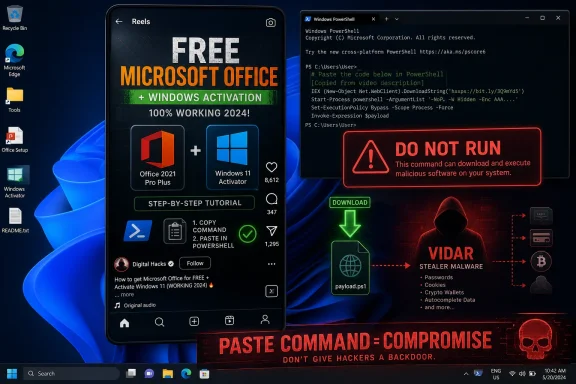 The Scam Has Moved From the Inbox to the Feed
For years, the default advice for ordinary users was simple: do not click strange links in email, do not open unexpected attachments, and do not trust text messages claiming to be from your bank, delivery company, or IT department. That advice still holds, but it no longer covers the terrain where a lot of people actually make risky computing decisions.The new bait is not a fake invoice. It is a video that appears to show a working method for getting paid software without paying. The social proof is built into the platform: views, likes, comments, algorithmic repetition, and the strange credibility that comes from seeing the same trick packaged in several slick variations.
That makes this campaign particularly well suited to Windows. The desktop still has a culture of “fixes,” activation tools, registry tweaks, command-line snippets, and unofficial utilities. A short video that tells a user to open PowerShell and paste a command is dangerous because, to the untrained eye, it resembles the legitimate troubleshooting advice that circulates around Windows every day.
The scam also exploits a psychological gap in modern security. People have been trained to distrust unsolicited messages, but not necessarily unsolicited instructions. A link in an email feels like bait. A command typed into PowerShell can feel like agency.
PowerShell Is Not the Villain, but It Is the Perfect Prop
PowerShell is a legitimate Windows administration tool, and that legitimacy is what makes it useful to attackers. Sysadmins rely on it because it can automate configuration, manage systems at scale, retrieve scripts, and execute complex tasks quickly. The same qualities make it a potent delivery mechanism when a victim is persuaded to run a command they do not understand.The key detail in this campaign is not that PowerShell exists, or even that malware can be launched through it. That has been true for years. The important shift is that attackers are no longer always trying to sneak past the user; they are increasingly trying to recruit the user into performing the first stage of compromise.
This is the logic behind so-called ClickFix and “paste this command” attacks. Instead of hiding a payload in an attachment and hoping a filter misses it, the attacker tells the victim to perform a sequence of steps manually. Open the Windows menu. Launch PowerShell. Paste this line. Press Enter. The user becomes the loader.
That approach bypasses a lot of the friction that security products introduced into email. Mail gateways can inspect attachments, rewrite links, and block known phishing domains. Social platforms can remove accounts and videos, but they are not built to evaluate every short tutorial as if it were a malware sample. By the time a takedown happens, the video may have already pushed enough victims to an attacker-controlled site or command.
The Promise of Free Office Is the Oldest Trick With a New Distribution Network
The lure itself is not sophisticated. Free Microsoft Office, free Windows activation, free Spotify Premium, free Adobe tools: these are familiar promises from the darker corners of search results, cracked-software forums, and sketchy YouTube comments. What has changed is the packaging.Short-form video gives attackers an unusually efficient format for this kind of social engineering. A thirty-second clip can show fake success, hide technical details, and create a sense of urgency. The viewer does not have time to examine the domain, question the command, or ask why a random account has solved licensing for some of the world’s most heavily protected commercial software.
The campaign also benefits from the way platforms reward repetition and remixing. One account can post polished “tutorials” with Microsoft-like branding. Another can post a stream of engagement bait that directs users to a separate instruction page. Both methods push the same basic proposition: trust the video, not the vendor.
That is why Microsoft Office is such effective bait. Office sits at the intersection of personal productivity, schoolwork, small business, and enterprise workflows. Plenty of users know they need Word, Excel, or PowerPoint; fewer understand the differences between Microsoft 365 subscriptions, volume licensing, web apps, one-time purchases, and counterfeit activation tools. Attackers thrive in that confusion.
Vidar Turns a Bad Decision Into an Account-Theft Event
The reported payload, Vidar, is not nuisanceware. It is an infostealer, a class of malware designed to harvest data quickly and quietly from an infected machine. The goal is not to display a prank, slow down the PC, or demand a ransom on the spot. The goal is to turn the user’s device into a source of credentials, cookies, tokens, wallet data, autofill information, browser records, and other material that can be monetized.That distinction matters because many users still think about malware in visible terms. If the PC boots, the browser opens, and no ransom note appears, they assume the damage is limited or theoretical. Infostealers invert that assumption. The visible machine may look normal while the valuable part of the compromise has already happened.
The most damaging theft may not be a password in the old-fashioned sense. Modern attackers prize session cookies and tokens because they can sometimes help bypass the need to know the password at all. If a browser session, password manager cache, or authentication token is exposed, changing one password on one site may not be enough.
This is also where personal and workplace risk blur. A home Windows PC used for gaming, streaming, school, and “free Office” may also contain saved access to work email, cloud storage, Slack, Teams, GitHub, accounting portals, or remote administration tools. A consumer scam can become an enterprise incident if the infected device has access to business systems.
The Social Platform Is Now Part of the Attack Surface
Security teams have long treated email as hostile territory. They monitor domains, scan attachments, test employees with phishing simulations, and tune mail filtering policies. Social media has received less systematic attention, partly because it sits outside the traditional perimeter and partly because blocking it outright is unrealistic for many organizations.That gap is becoming harder to defend. TikTok, Instagram Reels, YouTube Shorts, Discord, Reddit, and Telegram are not merely places where scams are discussed. They are distribution networks for instructions, payload links, brand impersonation, and credibility laundering. A malicious tutorial can be shared privately, reposted publicly, and rediscovered through search weeks later.
The platforms have incentives to remove malware promotion, but they are also built around velocity. A polished video can accumulate reach before moderation catches up. Attackers do not need every viewer to comply; they need only a small conversion rate from a very large audience.
For Windows users, this means the old boundary between “browsing” and “installing” has collapsed. A video is no longer passive content if it instructs you to modify the operating system. The moment a clip tells you to run a command, disable a protection, download an installer, or paste code into a terminal, it has crossed from media into system administration.
Microsoft’s Security Model Assumes Consent, and Scammers Are Learning to Manufacture It
Windows has become much harder to compromise silently than it was in the worst days of drive-by downloads and default-admin chaos. Microsoft Defender, SmartScreen, browser isolation, application reputation, controlled folder access, and default security baselines have all raised the floor. But modern Windows still has to let users and administrators do powerful things.That is the unavoidable tension. A computer that blocks every unknown command is not a general-purpose computer. Power users, developers, technicians, and admins need terminals, scripting, package managers, remote tools, and unsigned internal utilities. The operating system can warn, log, and sometimes block, but it cannot always distinguish between “admin running a legitimate script” and “victim following a scam video.”
Attackers understand this. They are shifting from pure technical exploitation toward consent laundering. The victim is not tricked into merely clicking; the victim is coached into granting the attack a veneer of legitimacy. Each step feels like confirmation that the user is in control.
This is why advice such as “only run commands you understand” sounds obvious but remains important. A PowerShell line can retrieve remote code, execute it in memory, change Defender exclusions, create persistence, or launch a binary with little visual drama. If the command is copied from a social video promising free software, the safest assumption is that the command is hostile.
The Piracy Angle Is Not a Moral Footnote
It is tempting to frame this as a story about people getting what they deserve for trying to pirate software. That is emotionally satisfying and practically useless. Security failures rarely stay confined to the person who made the first bad decision.A teenager chasing free Spotify Premium may use a family PC that also stores a parent’s tax documents. A freelancer looking for a free Office activation may have client files in OneDrive. A small-business employee may test a “Windows activation” trick on a lightly managed device that still has access to company mail. The ethics of piracy do not reduce the blast radius of credential theft.
Still, the piracy lure matters because it weakens the victim’s instinct to seek official help. Someone who knows they are doing something dubious is less likely to ask a friend, parent, teacher, help desk, or security team before following the steps. Shame is useful to attackers. So is the idea that everyone else is already doing it.
There is a practical lesson here for IT departments: do not rely solely on moral warnings or legalistic policy language. Users need affordable, clear, sanctioned ways to get the software they need. If the legitimate path is confusing, expensive, or poorly communicated, the illegitimate path becomes easier to sell.
The Office Brand Gives the Scam a Dangerous Shine
Microsoft Office is not just software; it is a trust signal. Word, Excel, PowerPoint, Outlook, and Microsoft 365 are so embedded in daily computing that anything invoking them can inherit a faint aura of legitimacy. Attackers exploit that familiarity with fake branding, Microsoft-adjacent names, and domains that look plausible to non-specialists.The same is true of Windows activation. Many users have encountered legitimate activation prompts, product keys, license transfers, OEM editions, and confusing upgrade states. A scammer does not need to explain licensing accurately. They only need to make the victim believe there is a hidden command that bypasses the hassle.
This is where Microsoft’s own complexity becomes part of the background noise. The company sells Microsoft 365 Personal, Family, Business, enterprise subscriptions, perpetual Office licenses, education plans, and web-based free versions. There are legitimate installers, account portals, store apps, deployment tools, and update channels. In that maze, a fake “simple fix” can feel plausible.
The defensive answer is not for Microsoft to make Office free in every form. It is for users and organizations to be brutally clear about where legitimate software comes from. If the path begins with a TikTok video and ends with PowerShell, it is not a licensing workaround. It is a compromise path.
The Home User Playbook Has to Change
For individual Windows users, the first rule is simple: never paste a command into PowerShell, Command Prompt, Windows Terminal, or Run because a social media video told you to. That applies even if the video has thousands of likes, a polished voiceover, or comments claiming it works. Popularity is not verification.The second rule is to treat “free premium” claims as malware until proven otherwise. Spotify Premium, Microsoft Office, Adobe apps, CapCut Pro, and Windows activation are recurring lures precisely because they are valuable enough to tempt users but common enough to feel ordinary. If someone has truly found a legal free tier, it will be available through the vendor, not through a hidden command.
The third rule is to respond quickly if you think you ran one of these commands. Disconnecting from the network can limit ongoing communication, but the bigger job is account containment. Assume credentials and sessions may be exposed. Change passwords from a clean device, revoke active sessions where services allow it, rotate recovery codes, and enable multifactor authentication.
Scanning the PC is necessary but not sufficient. Infostealers are designed to collect and leave; by the time a scan finds or removes the payload, the data may already be gone. A clean bill from an antivirus product should not be treated as proof that accounts are safe.
Enterprise IT Should Treat This as a User-Driven Execution Problem
For administrators, this campaign is a reminder that endpoint security cannot be built entirely around blocking malicious files at the perimeter. The user may bring the command to the endpoint by hand. That calls for controls that watch behavior, not just source.PowerShell logging, script block logging, command-line auditing, attack surface reduction rules, endpoint detection and response, least-privilege accounts, and application control all become more important in this environment. The goal is not to ban PowerShell; that would be impractical in most serious Windows environments. The goal is to make suspicious PowerShell behavior noisy, constrained, and reviewable.
Organizations should also revisit local admin rights. A user who can run arbitrary commands with elevated privileges is a much softer target for this style of scam. Removing unnecessary admin rights will not stop every infostealer, but it can reduce what a pasted command can change, install, exclude, or persist.
Training also needs to become more specific. Generic “don’t click suspicious links” modules do not prepare users for a video that instructs them to open a legitimate Windows tool. Awareness programs should explicitly cover terminal commands, fake activation guides, cracked software, browser cookie theft, and the fact that a social media tutorial can be a malware delivery mechanism.
The Security Industry Is Chasing a Faster Culture
There is a broader story here about the mismatch between security review cycles and internet culture. Enterprises plan quarterly awareness campaigns. Attackers generate new short videos, swap domains, clone accounts, and chase platform trends in days or hours. The gap is not merely technical; it is editorial, cultural, and behavioral.That does not mean defenders are helpless. It means security messaging has to become more like the threat: timely, specific, and concrete. “Do not run PowerShell commands from TikTok” is more useful this week than “be cyber aware.” “Free Office activation videos are being used to spread infostealers” is more memorable than a generic warning about untrusted downloads.
The best consumer security advice is similarly direct. If you need Office, use Microsoft’s official web apps, a legitimate Microsoft 365 plan, a school or employer license, or a reputable alternative office suite. If you need Spotify Premium, buy it through Spotify or use the free tier. If Windows says it is not activated, resolve that through Microsoft or the PC manufacturer.
There is no magic command that turns commercial software into a safe entitlement. There are only licensing systems, scams, and malware.
Where the Damage Shows Up After the Video Ends
The aftermath of an infostealer infection can be messy because the symptoms often appear somewhere other than the infected PC. A user may first notice strange sign-ins to email, unauthorized purchases, hijacked social accounts, cryptocurrency theft, spam sent from their profiles, or password reset messages. By then, the malware event may feel disconnected from the short video they watched days earlier.That delay benefits attackers. Stolen credentials are often sold, bundled, reused, or tested across services. A single compromised browser profile can expose a map of the user’s digital life: saved passwords, autofill data, cookies, account names, work portals, cloud drives, and personal documents.
For small businesses, the risk is especially acute. Many operate without enterprise-grade device management, but with enough valuable data to attract opportunistic crime. A bookkeeper’s PC, a contractor’s laptop, or a family-owned company’s shared Windows machine may hold banking access, customer records, tax files, and Microsoft 365 sessions.
The scam therefore deserves attention beyond consumer tech columns. It is a supply-chain problem at human scale. Attackers do not need to breach Microsoft, Spotify, or Adobe if they can persuade users to breach themselves.
The Fix Is Less Glamorous Than the Attack
There is no single patch for this campaign because the vulnerability is not a missing DLL update or a bad Office macro setting. It is the combination of economic temptation, platform reach, Windows scripting power, and user trust in tutorial culture. That makes the fix more boring and more durable.Users should keep Windows, browsers, Microsoft Defender, and Office updated, but updates alone will not neutralize a willingly executed command. They should use multifactor authentication, but MFA does not make session theft irrelevant. They should use password managers, but a compromised endpoint can still expose active sessions or locally accessible data.
The strongest defense is layered skepticism. A free-license claim should trigger suspicion. A request to paste a command should trigger refusal. A download from a non-vendor site should trigger verification. A social video that impersonates technical authority should be treated as entertainment, not instruction.
For IT teams, the answer is layered control. Monitor script execution, reduce unnecessary privilege, block known malicious domains, use EDR detections for infostealer behavior, restrict unmanaged software installation, and make official software access easier than piracy. The security team that only says “no” will lose to the video that says “here’s how.”
The Command Line Is the New Phishing Link
The most concrete lesson from this campaign is that the dangerous object has changed shape. It may not be an attachment. It may not be a link. It may be a command that the victim willingly copies from a video because the video promises something useful, expensive, or forbidden.That change should reshape how Windows users think about trust.
- A PowerShell command from TikTok, Instagram Reels, YouTube Shorts, Discord, or a random forum should be treated as untrusted code, not as a harmless tip.
- A promise of free Microsoft Office, free Windows activation, or free Spotify Premium should be treated as a malware lure unless it comes directly from the vendor’s official channels.
- A PC that ran one of these commands should be handled as potentially compromised even if it appears to work normally afterward.
- Password changes should be made from a clean device, and active sessions should be revoked for important accounts wherever possible.
- Organizations should monitor script execution and reduce local admin rights because user-driven attacks can bypass traditional email-centered defenses.
References
- Primary source: Daily Express
Published: 2026-06-16T06:29:21.077293
Urgent Windows warning issued and don't ignore it if you use Microsoft Office
An urgent alert has been issued to millions of Windows users after the discovery of a new scam that offers Office and Spotify for (contains affiliate links)www.express.co.uk - Related coverage: malwarebytes.com
Hacked sites deliver Vidar infostealer to Windows users | Malwarebytes
We found fake “verify you are human” pages on hacked WordPress sites that trick Windows users into installing the Vidar infostealer.www.malwarebytes.com - Related coverage: cryptopolitan.com
AI TikTok videos promising free Spotify and Windows subscriptions install malware, hacking users
Scammers are now using AI TikTok videos to install malware designed to steal private data with a promise of free Microsoft Windows, Office365, and Spotify Premium.www.cryptopolitan.com
