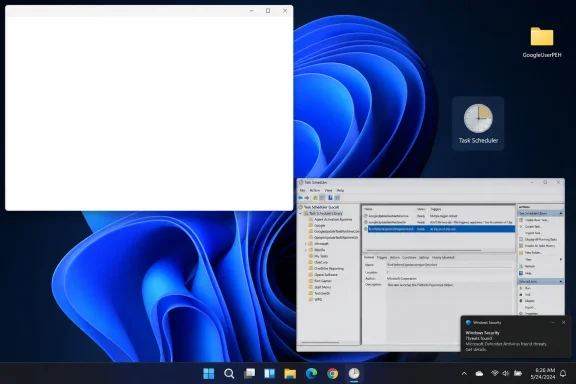
Windows 10 and Windows 11 users are reporting a large blank white window that appears near the upper-left corner of the desktop after startup or unlock, with Reddit and forum reports pointing to a Google Chrome scheduled task named
The bug, at least as users are describing it, is almost comically plain: a blank white rectangle appears, usually in the top-left of the screen, and then either vanishes after a few seconds or sits long enough to interrupt work. There is no useful error message, no application title that explains itself, and no obvious owner. It is the sort of symptom that makes a normal user suspect malware and makes an admin suspect one more background updater that forgot it was supposed to stay in the background.
That is why this report is more interesting than another transient desktop glitch. Windows users are not complaining about a blue screen, a failed cumulative update, or a dead GPU path. They are complaining about a ghost window: a UI artifact from something that apparently should not have had a visible UI in the first place.
According to the WindowsReport write-up, affected users have seen the issue on both Windows 10 and Windows 11, and community reports mention systems built on Intel and AMD hardware. That breadth weakens the tidy theory that this is a single driver stack or one vendor’s graphics control panel misbehaving. If the same sort of window appears across Windows generations and hardware families, the more plausible suspect is a user-space process that runs at login, startup, or unlock.
The reported name of that suspect is the most revealing part. Users on Reddit and ElevenForum have pointed to a Task Scheduler folder called
The suspected task name also fits a broader software trend: “experience” components that exist around the main product rather than inside it. The user may think they installed a browser. The vendor may think it installed an application platform, update client, identity bridge, notification engine, web app runtime, and a small fleet of scheduled jobs. Both views can be true, which is precisely why troubleshooting becomes slippery.
Windows Task Scheduler has long been a place where vendors put work they want to happen outside the obvious application lifecycle. Updaters run there. Telemetry tasks run there. Login helpers run there. Unlock-triggered helpers run there. In a managed environment, that is normal enough that admins rarely get excited until one of those tasks produces a visible symptom.
The blank-window report is therefore less about whether Google made a catastrophic mistake and more about whether a helper component briefly creates a window, fails to paint it, or exposes a web-rendered shell before its contents arrive. A white surface is often what users see when a webview, Chromium surface, or application frame exists before the content pipeline has done its work. That does not prove Chrome is the culprit, but it makes the community’s theory plausible.
But it is not the same as an official root-cause analysis. Google has not publicly confirmed, at least in the reporting available so far, that this task is responsible. Microsoft has not published a Windows known issue tying the symptom to Chrome. There is also a difference between disabling the thing that triggers a symptom and proving that the thing is defective. A scheduled task might be exposing a bug in Windows window activation, a webview initialization path, a GPU acceleration route, an extension hook, or another component that happens to be loaded by Google’s helper.
That distinction matters for users who are tempted to treat the workaround as a universal fix. Disabling a scheduled task can be low-risk, but it is still a change to application behavior. The task may exist to support a Chrome feature, an integration, a notification path, or a user-experience experiment that Google expects to run on unlock. If you disable it, you may stop the white box and also stop something else that is less obvious.
For home users, that may be a perfectly acceptable trade. For enterprise admins, it should be handled like any other mitigation: test it on a small set of machines, document the change, watch for Chrome or Google Workspace side effects, and be prepared for the task to reappear after a browser update. Scheduled tasks installed by auto-updating software have a way of returning from the dead.
A blank white rectangle on the desktop is an information vacuum. It does not say “Google Chrome.” It does not say “Platform Experience Helper.” It does not say “loading.” It does not say “this task is safe.” It simply blocks a chunk of the desktop and then asks the user to infer intent from nothing. That is how harmless bugs acquire the emotional texture of malware.
Modern Windows already has a trust problem around background activity. Users see update prompts, account nags, widgets, search highlights, browser notifications, game launchers, cloud sync alerts, OEM utilities, and security products all competing for attention. When something appears without branding, explanation, or controls, it lands in an environment where users have been trained to be suspicious.
This is where vendors deserve less slack than they often get. A background helper that can create a visible window should have enough polish to identify itself if something goes wrong. If the component is experimental, it should fail silently or log cleanly. If it needs a UI, it should own that UI clearly. A blank white box is not just a rendering bug; it is a breakdown in accountability.
The irony is that the suspected component’s name includes “experience.” The experience, for affected users, is an unexplained obstruction after startup or unlock. It is hard to imagine a more efficient way to remind people that invisible platform plumbing is still plumbing, and plumbing leaks.
Windows 10 is no longer Microsoft’s shiny desktop laboratory. It is the installed base that refuses to disappear, the enterprise workhorse now living in the long shadow of support deadlines and migration pressure. A bug affecting both Windows 10 and Windows 11 therefore points away from a single shell feature and toward the shared Windows application environment that third-party software inhabits.
That shared environment is enormous. Login triggers, unlock events, Task Scheduler actions, notification surfaces, browser runtimes, GPU compositing, and webview rendering all span both operating systems in one form or another. A vendor can ship one helper component and touch both Windows generations at once. That is efficient when everything works and maddening when a small bug becomes cross-version noise.
For Windows 10 users, the timing is especially unwelcome. The platform’s mainstream story is now dominated by end-of-support planning, extended security updates, and whether older hardware should be pushed to Windows 11 or kept alive. A mysterious blank window does not alter that strategic picture, but it does add to the sense that users are juggling an aging OS, modern browser infrastructure, and increasingly opaque background services.
For Windows 11 users, the issue lands differently. It reinforces the perception that the desktop is now full of web-shaped surfaces that can flash, blank, or half-render before they become usable. Whether this particular white box is Chrome’s fault or a Windows interaction, the user experience feels of a piece with a broader shift: the desktop is less a set of local applications and more a live composition of services.
Reports mentioning Intel and AMD systems, and the absence so far of a single GPU vendor pattern, make a graphics-driver root cause less convincing. A rendering issue could still be involved, because almost every modern UI path eventually touches GPU compositing. But the trigger being reportedly tied to an unlock-time scheduled task is more specific than a generic display problem.
That specificity is important. Bugs that happen “sometimes after login” are notoriously hard to pin down because the desktop is busy then. Startup apps launch. Services settle. Cloud sync wakes. Browser updaters check in. Security agents scan. Explorer initializes the shell. A white rectangle appearing in that window of time could belong to almost anything.
The community workaround narrows the field by giving users a repeatable test. If disabling
Still, the responsible conclusion is measured. The available evidence points toward Google’s scheduled task as a likely trigger, not a courtroom-proven cause. Until Google or Microsoft documents the behavior, users should treat the workaround as a practical mitigation with unknown side effects.
A modern consumer PC may have scheduled tasks from Microsoft, Google, Adobe, Apple, Intel, NVIDIA, AMD, OEM support utilities, backup software, game launchers, printer packages, VPN clients, and security tools. Many of those tasks are defensible. Some are sloppy. A few are vestiges of features the user never asked for and cannot easily identify.
The
This is where Windows could be more helpful. Task Manager’s Startup Apps tab made startup programs more visible, but scheduled tasks remain comparatively hidden. Windows has the plumbing to show what ran recently, what opened a visible window, and what process owned it. Yet in everyday troubleshooting, users still rely on screenshots, Reddit guesses, and trial-and-error disabling.
Microsoft has spent years trying to make Windows feel simpler at the surface while the underlying event model has grown more complex. That mismatch is exactly how a blank white box becomes news. The system may be doing something technically ordinary, but the user has no humane explanation for it.
Chrome’s success has always rested on a bargain: users accept a large, constantly updating browser because it is fast, compatible, and secure. That bargain becomes harder to defend when components around the browser behave like a platform but are documented like an implementation detail. Users may not need a dissertation on every helper process, but they do deserve intelligible names and clear failure modes.
There is also a security angle, even if this particular report does not indicate malware. Attackers benefit when users are accustomed to unexplained windows, anonymous background tasks, and vague component names. The more legitimate software behaves opaquely, the harder it is for users to distinguish normal weirdness from compromise.
That is especially relevant because Chrome extensions and browser-adjacent components remain a major attack surface. The user-provided report notes, separately, that a malicious Perplexity AI Chrome extension was removed from the Chrome Web Store, and that Chrome may be gaining a built-in voice typing feature. Those are different stories, but they sit in the same ecosystem: the browser is no longer just a document viewer; it is an operating environment with extensions, AI features, background services, and permissions users often do not fully understand.
Google has the engineering resources to make this boring. If
Users experience the Windows desktop as one environment. When a blank white window appears after unlock, they do not see a neatly bounded vendor responsibility matrix. They see Windows doing something weird. For Microsoft, that means third-party background behavior still affects the perceived quality of the platform.
This is not a new tension. Windows became dominant because it allowed an enormous software ecosystem to plug into the OS in powerful ways. That openness remains one of its strengths, especially compared with more locked-down platforms. But openness without observability turns into superstition. Users should not need to guess which vendor owns a blank surface on their desktop.
Microsoft has made some progress here. Task Manager is more useful than it used to be. Windows Security is more integrated. App permissions are more visible in some areas. But the classic Win32 desktop remains a place where background components can still be difficult to attribute when they misbehave. That is not merely a support nuisance; it is a product-quality issue.
A better Windows would make ownership obvious. If a window appears, there should be a simple way to identify the process, publisher, path, and trigger that created it. Sysinternals tools can help experts, but the baseline desktop should not require a forensic toolkit to answer “what is this white rectangle?”
The right way to approach this is not to start randomly deleting Google folders or uninstalling drivers. First, confirm the symptom. Then check Task Scheduler for the reported
That distinction between disable and delete is important. Disabling preserves a path back. If Chrome later updates, if Google documents the component, or if a missing feature becomes noticeable, the task can be re-enabled. Deleting scheduled tasks from auto-updating software is often futile anyway, because the installer or updater may recreate them.
Admins should go further. They should capture the task details before changing anything, including action path, arguments, trigger, publisher, and last run time. If the issue appears across a fleet, they should test with Chrome versions, Windows builds, user profiles, extensions, and GPU acceleration states before pushing a broad policy workaround. A one-line mitigation can become a help desk boomerang if it quietly breaks a feature a department relies on.
Home users should also be careful about fake fixes. A mysterious white window is exactly the kind of symptom that search-engine spam and “driver updater” scams love to exploit. If the reported workaround applies, use Windows’ built-in Task Scheduler. Do not install a random cleanup tool promising to fix blank boxes.
Microsoft has dealt with its own versions of this. Windows users have seen Search panels fail to load, widgets misbehave, File Explorer flash white in dark mode under certain builds, and account or cloud surfaces appear in places that once felt purely local. Those are not all the same bug, but they rhyme. They are symptoms of a desktop whose native boundaries have softened.
Chrome, Edge, and webview-based apps sit at the center of that shift. They bring enormous capability, but they also bring initialization races, profile dependencies, extension complexity, GPU acceleration quirks, and network-adjacent behavior into moments that used to be simpler. Unlocking a PC used to mean the shell resumed. Now it may mean a small swarm of “experience” components wakes up and negotiates what the user should see.
This does not mean web technology has no place on the desktop. That argument was lost years ago, and in many cases for good reasons. The problem is not that browser engines exist. The problem is that vendors too often treat visible glitches from background web components as tolerable because they are transient.
Transient is not harmless. A white box that lasts two seconds can steal focus, block a click, interrupt a login routine, or spook a user into thinking something is wrong with the machine. In a remote-work or help desk context, those two seconds become a ticket, a screenshot, and a productivity tax.
The truth is probably somewhere in between. Chrome’s background machinery exists for reasons, and some of those reasons benefit users: updates, security fixes, notifications, app integration, and cross-device continuity. But a useful background system still owes the user restraint. It should not seize space on the desktop unless it can explain itself.
This is where power users and admins have a role beyond complaining. Community reports have already done the first stage of incident response: identify a pattern, test a trigger, share a reversible workaround, and avoid claiming more certainty than the evidence supports. That is how the Windows ecosystem often discovers problems before vendors acknowledge them.
But the burden should not stay with the community. Google should confirm whether
A blank white window is not a data-loss bug. It is not a remote-code-execution advisory. It is not, on current evidence, a sign that affected PCs are compromised. Yet it hits a nerve because it exposes how much of the modern desktop runs just out of sight.
RunPlatformExperienceHelperOnUnlock as the likely trigger. The pattern matters because this does not look like a conventional Windows display-driver fault or a broken monitor path. It looks like another small background component surfacing through the desktop at exactly the wrong moment. As first surfaced in user reports and amplified by WindowsReport and Neowin, the episode is a reminder that modern Windows is now a choreography of OS services, browser helpers, scheduled tasks, cloud hooks, and advertising-adjacent “experience” layers.
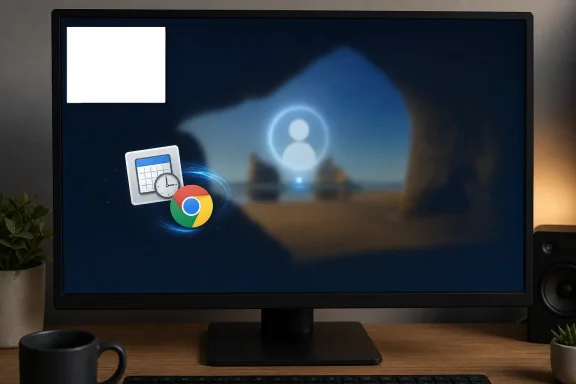 The White Box Is Small News With a Big Windows Lesson
The bug, at least as users are describing it, is almost comically plain: a blank white rectangle appears, usually in the top-left of the screen, and then either vanishes after a few seconds or sits long enough to interrupt work. There is no useful error message, no application title that explains itself, and no obvious owner. It is the sort of symptom that makes a normal user suspect malware and makes an admin suspect one more background updater that forgot it was supposed to stay in the background.That is why this report is more interesting than another transient desktop glitch. Windows users are not complaining about a blue screen, a failed cumulative update, or a dead GPU path. They are complaining about a ghost window: a UI artifact from something that apparently should not have had a visible UI in the first place.
According to the WindowsReport write-up, affected users have seen the issue on both Windows 10 and Windows 11, and community reports mention systems built on Intel and AMD hardware. That breadth weakens the tidy theory that this is a single driver stack or one vendor’s graphics control panel misbehaving. If the same sort of window appears across Windows generations and hardware families, the more plausible suspect is a user-space process that runs at login, startup, or unlock.
The reported name of that suspect is the most revealing part. Users on Reddit and ElevenForum have pointed to a Task Scheduler folder called
GoogleUserPEH, and specifically to a task called RunPlatformExperienceHelperOnUnlock. The name practically announces its job: run Google’s Platform Experience Helper when the user unlocks Windows. The problem is that users are not seeing an “experience.” They are seeing a white rectangle with no explanation.Chrome Is No Longer Just an App You Open
For years, Chrome has been described as a browser, but on Windows it behaves more like a resident platform. It updates itself, syncs identities, handles notifications, brokers web apps, talks to extensions, launches helper processes, and keeps parts of its ecosystem alive even when the main browser window is not the thing the user is thinking about. That is not unique to Chrome; Edge, Teams, OneDrive, Creative Cloud, Steam, Discord, and a dozen security agents all behave similarly. But Chrome’s footprint makes any background oddity more visible.The suspected task name also fits a broader software trend: “experience” components that exist around the main product rather than inside it. The user may think they installed a browser. The vendor may think it installed an application platform, update client, identity bridge, notification engine, web app runtime, and a small fleet of scheduled jobs. Both views can be true, which is precisely why troubleshooting becomes slippery.
Windows Task Scheduler has long been a place where vendors put work they want to happen outside the obvious application lifecycle. Updaters run there. Telemetry tasks run there. Login helpers run there. Unlock-triggered helpers run there. In a managed environment, that is normal enough that admins rarely get excited until one of those tasks produces a visible symptom.
The blank-window report is therefore less about whether Google made a catastrophic mistake and more about whether a helper component briefly creates a window, fails to paint it, or exposes a web-rendered shell before its contents arrive. A white surface is often what users see when a webview, Chromium surface, or application frame exists before the content pipeline has done its work. That does not prove Chrome is the culprit, but it makes the community’s theory plausible.
The Community Workaround Is Useful, but It Is Not a Verdict
The workaround circulating in user reports is straightforward: open Task Scheduler, find theGoogleUserPEH folder, select RunPlatformExperienceHelperOnUnlock, and disable the task. Several users say the blank white window stopped appearing after they did exactly that. On its face, that is a strong clue.But it is not the same as an official root-cause analysis. Google has not publicly confirmed, at least in the reporting available so far, that this task is responsible. Microsoft has not published a Windows known issue tying the symptom to Chrome. There is also a difference between disabling the thing that triggers a symptom and proving that the thing is defective. A scheduled task might be exposing a bug in Windows window activation, a webview initialization path, a GPU acceleration route, an extension hook, or another component that happens to be loaded by Google’s helper.
That distinction matters for users who are tempted to treat the workaround as a universal fix. Disabling a scheduled task can be low-risk, but it is still a change to application behavior. The task may exist to support a Chrome feature, an integration, a notification path, or a user-experience experiment that Google expects to run on unlock. If you disable it, you may stop the white box and also stop something else that is less obvious.
For home users, that may be a perfectly acceptable trade. For enterprise admins, it should be handled like any other mitigation: test it on a small set of machines, document the change, watch for Chrome or Google Workspace side effects, and be prepared for the task to reappear after a browser update. Scheduled tasks installed by auto-updating software have a way of returning from the dead.
The Absence of an Error Message Is the Real Failure
The most user-hostile part of this bug is not that a window appears. Windows users are used to occasional UI weirdness. The failure is that the window apparently gives users no trustworthy way to identify it.A blank white rectangle on the desktop is an information vacuum. It does not say “Google Chrome.” It does not say “Platform Experience Helper.” It does not say “loading.” It does not say “this task is safe.” It simply blocks a chunk of the desktop and then asks the user to infer intent from nothing. That is how harmless bugs acquire the emotional texture of malware.
Modern Windows already has a trust problem around background activity. Users see update prompts, account nags, widgets, search highlights, browser notifications, game launchers, cloud sync alerts, OEM utilities, and security products all competing for attention. When something appears without branding, explanation, or controls, it lands in an environment where users have been trained to be suspicious.
This is where vendors deserve less slack than they often get. A background helper that can create a visible window should have enough polish to identify itself if something goes wrong. If the component is experimental, it should fail silently or log cleanly. If it needs a UI, it should own that UI clearly. A blank white box is not just a rendering bug; it is a breakdown in accountability.
The irony is that the suspected component’s name includes “experience.” The experience, for affected users, is an unexplained obstruction after startup or unlock. It is hard to imagine a more efficient way to remind people that invisible platform plumbing is still plumbing, and plumbing leaks.
Windows 10’s Presence Changes the Story
If this were only a Windows 11 issue, it would be tempting to fold it into the familiar narrative of Windows 11 polish problems: dark-mode flashes, Start menu oddities, Copilot-era shell changes, and web-powered surfaces that do not always feel native. But the reports include Windows 10 as well, which changes the frame.Windows 10 is no longer Microsoft’s shiny desktop laboratory. It is the installed base that refuses to disappear, the enterprise workhorse now living in the long shadow of support deadlines and migration pressure. A bug affecting both Windows 10 and Windows 11 therefore points away from a single shell feature and toward the shared Windows application environment that third-party software inhabits.
That shared environment is enormous. Login triggers, unlock events, Task Scheduler actions, notification surfaces, browser runtimes, GPU compositing, and webview rendering all span both operating systems in one form or another. A vendor can ship one helper component and touch both Windows generations at once. That is efficient when everything works and maddening when a small bug becomes cross-version noise.
For Windows 10 users, the timing is especially unwelcome. The platform’s mainstream story is now dominated by end-of-support planning, extended security updates, and whether older hardware should be pushed to Windows 11 or kept alive. A mysterious blank window does not alter that strategic picture, but it does add to the sense that users are juggling an aging OS, modern browser infrastructure, and increasingly opaque background services.
For Windows 11 users, the issue lands differently. It reinforces the perception that the desktop is now full of web-shaped surfaces that can flash, blank, or half-render before they become usable. Whether this particular white box is Chrome’s fault or a Windows interaction, the user experience feels of a piece with a broader shift: the desktop is less a set of local applications and more a live composition of services.
The Hardware Clues Point Away From the Usual Suspects
When users report a white window, the reflexive troubleshooting path usually starts with graphics drivers. Update the GPU driver. Roll back the GPU driver. Disable hardware acceleration. Check the monitor cable. Test another user profile. Boot clean. That reflex is not wrong, but this case appears to resist a simple hardware explanation.Reports mentioning Intel and AMD systems, and the absence so far of a single GPU vendor pattern, make a graphics-driver root cause less convincing. A rendering issue could still be involved, because almost every modern UI path eventually touches GPU compositing. But the trigger being reportedly tied to an unlock-time scheduled task is more specific than a generic display problem.
That specificity is important. Bugs that happen “sometimes after login” are notoriously hard to pin down because the desktop is busy then. Startup apps launch. Services settle. Cloud sync wakes. Browser updaters check in. Security agents scan. Explorer initializes the shell. A white rectangle appearing in that window of time could belong to almost anything.
The community workaround narrows the field by giving users a repeatable test. If disabling
RunPlatformExperienceHelperOnUnlock stops the symptom, and manually running the task reproduces it, then admins have a practical lead even before the vendor confirms anything. That is the kind of folk-debugging Windows communities are good at: not perfect science, but often enough to separate a broad complaint from a useful mitigation.Still, the responsible conclusion is measured. The available evidence points toward Google’s scheduled task as a likely trigger, not a courtroom-proven cause. Until Google or Microsoft documents the behavior, users should treat the workaround as a practical mitigation with unknown side effects.
Task Scheduler Has Become the Desktop’s Backstage
Task Scheduler is one of those Windows components that normal users rarely open and IT people never fully escape. It is a backstage manager for the OS and the applications that live on it. The trouble is that the backstage has become crowded.A modern consumer PC may have scheduled tasks from Microsoft, Google, Adobe, Apple, Intel, NVIDIA, AMD, OEM support utilities, backup software, game launchers, printer packages, VPN clients, and security tools. Many of those tasks are defensible. Some are sloppy. A few are vestiges of features the user never asked for and cannot easily identify.
The
GoogleUserPEH reports fit neatly into that reality. A user may not know what PEH means, why it runs on unlock, or what feature depends on it. The name is better than a random GUID, but not by much. For a power user, it is searchable. For everyone else, it is a reminder that installed software can add persistent hooks into moments as personal as unlocking your PC.This is where Windows could be more helpful. Task Manager’s Startup Apps tab made startup programs more visible, but scheduled tasks remain comparatively hidden. Windows has the plumbing to show what ran recently, what opened a visible window, and what process owned it. Yet in everyday troubleshooting, users still rely on screenshots, Reddit guesses, and trial-and-error disabling.
Microsoft has spent years trying to make Windows feel simpler at the surface while the underlying event model has grown more complex. That mismatch is exactly how a blank white box becomes news. The system may be doing something technically ordinary, but the user has no humane explanation for it.
Google Needs to Explain the Helper, Not Just Patch the Symptom
If Google’s component is indeed responsible, the fix should not stop at making the white box disappear. Google should explain what the Platform Experience Helper does, why it needs an unlock trigger, and what users lose if they disable it. The existence of a scheduled task is not scandalous. The opacity around it is the problem.Chrome’s success has always rested on a bargain: users accept a large, constantly updating browser because it is fast, compatible, and secure. That bargain becomes harder to defend when components around the browser behave like a platform but are documented like an implementation detail. Users may not need a dissertation on every helper process, but they do deserve intelligible names and clear failure modes.
There is also a security angle, even if this particular report does not indicate malware. Attackers benefit when users are accustomed to unexplained windows, anonymous background tasks, and vague component names. The more legitimate software behaves opaquely, the harder it is for users to distinguish normal weirdness from compromise.
That is especially relevant because Chrome extensions and browser-adjacent components remain a major attack surface. The user-provided report notes, separately, that a malicious Perplexity AI Chrome extension was removed from the Chrome Web Store, and that Chrome may be gaining a built-in voice typing feature. Those are different stories, but they sit in the same ecosystem: the browser is no longer just a document viewer; it is an operating environment with extensions, AI features, background services, and permissions users often do not fully understand.
Google has the engineering resources to make this boring. If
RunPlatformExperienceHelperOnUnlock is benign and necessary, document it. If it is producing a visible window by accident, patch it. If it is part of a feature rollout, give admins a policy surface. The worst outcome would be silence followed by a quiet update that fixes the symptom without telling users what happened.Microsoft Cannot Treat Third-Party Weirdness as Someone Else’s Problem
It would be easy for Microsoft to say, implicitly or otherwise, that a Google scheduled task is Google’s issue. Technically, that may be true. Strategically, it is too narrow.Users experience the Windows desktop as one environment. When a blank white window appears after unlock, they do not see a neatly bounded vendor responsibility matrix. They see Windows doing something weird. For Microsoft, that means third-party background behavior still affects the perceived quality of the platform.
This is not a new tension. Windows became dominant because it allowed an enormous software ecosystem to plug into the OS in powerful ways. That openness remains one of its strengths, especially compared with more locked-down platforms. But openness without observability turns into superstition. Users should not need to guess which vendor owns a blank surface on their desktop.
Microsoft has made some progress here. Task Manager is more useful than it used to be. Windows Security is more integrated. App permissions are more visible in some areas. But the classic Win32 desktop remains a place where background components can still be difficult to attribute when they misbehave. That is not merely a support nuisance; it is a product-quality issue.
A better Windows would make ownership obvious. If a window appears, there should be a simple way to identify the process, publisher, path, and trigger that created it. Sysinternals tools can help experts, but the baseline desktop should not require a forensic toolkit to answer “what is this white rectangle?”
The Sensible Fix Is Boring, Reversible, and Documented
For affected users, the immediate question is practical: should they disable the suspected task? The answer is cautious but not alarmist. If the blank window is disrupting normal use and the task is present, disabling it is a reasonable temporary test, provided the user understands that the change is unofficial and may affect whatever Chrome feature depends on it.The right way to approach this is not to start randomly deleting Google folders or uninstalling drivers. First, confirm the symptom. Then check Task Scheduler for the reported
GoogleUserPEH folder and RunPlatformExperienceHelperOnUnlock task. If present, disable rather than delete. Reboot or lock and unlock the PC to see whether the behavior changes.That distinction between disable and delete is important. Disabling preserves a path back. If Chrome later updates, if Google documents the component, or if a missing feature becomes noticeable, the task can be re-enabled. Deleting scheduled tasks from auto-updating software is often futile anyway, because the installer or updater may recreate them.
Admins should go further. They should capture the task details before changing anything, including action path, arguments, trigger, publisher, and last run time. If the issue appears across a fleet, they should test with Chrome versions, Windows builds, user profiles, extensions, and GPU acceleration states before pushing a broad policy workaround. A one-line mitigation can become a help desk boomerang if it quietly breaks a feature a department relies on.
Home users should also be careful about fake fixes. A mysterious white window is exactly the kind of symptom that search-engine spam and “driver updater” scams love to exploit. If the reported workaround applies, use Windows’ built-in Task Scheduler. Do not install a random cleanup tool promising to fix blank boxes.
The Real Pattern Is Web UI Leaking Into the Desktop
The blank white window is part of a wider pattern Windows users recognize even if they do not name it. More desktop features are rendered by web technologies, backed by cloud services, or wrapped in browser engines. When they work, they allow rapid updates and consistent cross-platform development. When they fail, they often fail as blank panels, white flashes, skeleton frames, or inert rectangles.Microsoft has dealt with its own versions of this. Windows users have seen Search panels fail to load, widgets misbehave, File Explorer flash white in dark mode under certain builds, and account or cloud surfaces appear in places that once felt purely local. Those are not all the same bug, but they rhyme. They are symptoms of a desktop whose native boundaries have softened.
Chrome, Edge, and webview-based apps sit at the center of that shift. They bring enormous capability, but they also bring initialization races, profile dependencies, extension complexity, GPU acceleration quirks, and network-adjacent behavior into moments that used to be simpler. Unlocking a PC used to mean the shell resumed. Now it may mean a small swarm of “experience” components wakes up and negotiates what the user should see.
This does not mean web technology has no place on the desktop. That argument was lost years ago, and in many cases for good reasons. The problem is not that browser engines exist. The problem is that vendors too often treat visible glitches from background web components as tolerable because they are transient.
Transient is not harmless. A white box that lasts two seconds can steal focus, block a click, interrupt a login routine, or spook a user into thinking something is wrong with the machine. In a remote-work or help desk context, those two seconds become a ticket, a screenshot, and a productivity tax.
The White Rectangle Should Push Vendors Toward Accountability
The most charitable reading of this episode is that a benign Google helper briefly exposes an unpainted window during a startup or unlock routine. That would make it an annoying but fixable UI bug. The less charitable reading is that vendors have normalized so many background “experience” components that users are expected to tolerate unexplained desktop behavior as the cost of modern software.The truth is probably somewhere in between. Chrome’s background machinery exists for reasons, and some of those reasons benefit users: updates, security fixes, notifications, app integration, and cross-device continuity. But a useful background system still owes the user restraint. It should not seize space on the desktop unless it can explain itself.
This is where power users and admins have a role beyond complaining. Community reports have already done the first stage of incident response: identify a pattern, test a trigger, share a reversible workaround, and avoid claiming more certainty than the evidence supports. That is how the Windows ecosystem often discovers problems before vendors acknowledge them.
But the burden should not stay with the community. Google should confirm whether
RunPlatformExperienceHelperOnUnlock can produce this behavior. Microsoft should improve the ease with which users can identify window ownership and scheduled-task triggers. And both companies should remember that small visual failures can carry outsized trust costs.A blank white window is not a data-loss bug. It is not a remote-code-execution advisory. It is not, on current evidence, a sign that affected PCs are compromised. Yet it hits a nerve because it exposes how much of the modern desktop runs just out of sight.
The Clues Windows Users Should Keep From This Episode
The practical lesson is not to panic, and it is not to pretend the issue is imaginary because it disappears quickly. A transient, unexplained desktop window is worth investigating precisely because it can usually be traced to a trigger. In this case, the community has produced a plausible one.- The reported blank white window appears after startup or unlock on both Windows 10 and Windows 11, which makes a single Windows 11 shell bug an incomplete explanation.
- User reports point to Google’s
GoogleUserPEHTask Scheduler folder and theRunPlatformExperienceHelperOnUnlocktask as the most useful lead so far. - Disabling the suspected task has reportedly stopped the window for some users, but neither Google nor Microsoft has publicly confirmed that as an official fix.
- Users should disable rather than delete the task if they test the workaround, because a reversible change is safer than tearing out application plumbing.
- Administrators should validate the mitigation on a small group of systems before deploying it broadly, since the task may support a Chrome-related feature that is not yet obvious.
- The broader issue is not just one white rectangle, but the lack of clear ownership when background software creates visible desktop artifacts.
References
- Primary source: Windows Report
Published: 2026-07-04T07:43:18.358487
Windows 11 and Windows 10 Users Hit by Blank White Window Issue
Windows users report a blank white window after startup or unlock, with a Chrome Task Scheduler entry suspected as a possible cause. windowsreport.com
- Related coverage: windowscentral.com
New Windows 11 bug causes flash bang when opening File Explorer | Windows Central
Microsoft's latest December 2025 non-security preview update for Windows 11 comes with two confirmed known issues, one of which will probably hurt your eyes when using dark mode.www.windowscentral.com - Related coverage: windowslatest.com
Microsoft confirms Windows 11 update accidentally breaks dark mode in File Explorer, causing white flashes
Windows 11 KB5070311 finally adds dark mode to File Explorer dialog boxes like copy, but a white-screen flashing bug ruins the experience. www.windowslatest.com
- Related coverage: allthings.how
How to Fix Blank or White Screen When Opening Chrome
Resolve the issue where Google Chrome displays only a blank or white screen at startup by following proven troubleshooting steps for Windows and Linux systems.allthings.how - Related coverage: elevenforum.com
A weird blank empty white box appears briefly after boot-up | Windows 11 Forum
(Ignore the classic Windows 10-era wallpaper; I like it.) This began just recently, and I don't know what it is. no program appears on the bar and it's not...www.elevenforum.com - Related coverage: geekchamp.com
How to Fix Blank or White Screen When Opening Chrome - GeekChamp
×AIChipps - Easy Way to Repair your PC Issues + AI AssistantFix My PC with AI →⚙️PC Running Slow or Unstable?Fix Windows Issues Now… geekchamp.com
- Official source: support.google.com

Chrome opens a completely blank window on launch - Google Chrome Community
support.google.com
- Related coverage: windowsdigitals.com
Windows 11 White Square/Rectangle Box on Desktop Screen
There is a known bug where you might sometimes see a weird white square box on the desktop screen in Windows 11. Here's how to fix the issue.www.windowsdigitals.com - Related coverage: bleepingcomputer.com
Microsoft still working to fix Windows Explorer white flashes
Microsoft has confirmed that it's still working to fully address a known issue that causes bright white flashes when opening the File Explorer on some Windows 11 systems.www.bleepingcomputer.com - Related coverage: windowsphoneinfo.com
Small white popup top left of screen at startup of computer, windows 10
✅ Small white popup top left of screen at startup of computer, windows 10:Hello, my names Christian and I have started this question because I have run into a problem no one else has decided to share or does not have a...www.windowsphoneinfo.com - Related coverage: appuals.com
Fix: Blank Screen or White Pages on Microsoft Edge
When you open Edge, sometimes you might only see a blank or white screen. There are no tabs, address bar, or website content showing, even though the Edgeappuals.com - Related coverage: square-9.com
- Related coverage: casefilingsalert.com
- Related coverage: runzero.com
- Related coverage: tomax7.com