

Windows 11 Dev Channel is acceptable for testing WSL changes, but it is a poor place to keep the only working copy of an active Linux developer environment. The April 18, 2026 report tied to Dev Channel build 26200.8246 is a sharp reminder that a Windows preview can leave the host functional while a WSL 2 distribution becomes unable to launch—and that recovery may depend entirely on backups made before the update.
The immediate recommendation is straightforward: keep Dev Channel on a test machine, a disposable WSL distribution, or a separately backed-up development environment. If the distribution contains the only copy of source, package state, credentials, tooling, or local databases needed for work, move it to a stable Windows installation or establish an export routine before accepting another preview build.
Microsoft’s own Dev Channel positioning supports that distinction. The company describes it as work-in-progress code intended for highly technical users and warns that builds can block key activities or require workarounds. WSL developers are precisely the audience capable of diagnosing those failures—but that does not make an interrupted workstation an acceptable cost for every project.
A Microsoft WSL GitHub issue opened on April 18, 2026 described an alarming post-update failure on Windows 11 Dev Channel build 26200.8246. The affected WSL 2 Ubuntu 22.04 distribution would hang at launch, while its root-level
That is more serious than a failed Linux package update.
The issue report also complicates the usual repair instinct. The reporter said
The GitHub issue is marked closed. However, the visible issue body does not provide a published root-cause explanation or a linked remediation. That matters because a closed ticket is not the same as a documented fix, particularly for anyone deciding whether to keep a production-like development environment on the same update track.
Microsoft recommends export and import as the preferred mechanism for backing up or moving WSL distributions. Before taking a Dev Channel update, open PowerShell or Command Prompt and identify the installed distribution:
Then export the distribution to a VHD file. Substitute the exact distribution name shown by the list command and a destination that is not dependent on the WSL instance being backed up:
For example, a developer whose distribution is named
A disciplined preview-build workflow should include these steps:
Choose upgrade in place when the affected WSL distribution is disposable or reproducible. That includes a fresh Ubuntu instance used to test Windows integration, a sandbox for a new WSL release, or an environment provisioned from documented scripts and repositories. In that model, the occasional rebuild is part of the testing cost.
Choose isolation when you need Dev Channel features but also need dependable Linux work. Keep a test distribution or test PC on Dev Channel, while retaining the primary development environment on stable Windows. An exported VHD provides a practical bridge between those worlds: it creates a recoverable copy of the distribution state rather than forcing a choice between experimentation and preservation.
Choose exit from Dev Channel when the same WSL distribution is your daily workstation and losing access for even a short period would block development, operations work, demonstrations, or support obligations. A stable Windows release does not eliminate all WSL failures, but it avoids voluntarily accepting the cadence and known-risk posture of the most experimental Windows channel.
This is especially important for developers who think source control alone is enough. Git protects committed source; it does not automatically preserve installed compilers, language runtimes, package caches, shell configuration, databases, service data, uncommitted local changes, or the exact behavior of a working environment.
That distinction should shape incident response. First, avoid destructive actions made in frustration—especially unregistering a distribution. Microsoft’s command documentation warns that unregistering permanently removes the distribution’s data, settings, and software. A broken launch is not a reason to erase the only remaining copy of the environment.
Second, preserve evidence. Record the Windows build, WSL version, distribution name, behavior of normal launches, and behavior of
Third, separate recovery from diagnosis. If a known-good export exists, restoring or importing that environment may be the fastest path back to productive work. Diagnosis can continue in an isolated copy, where testing repairs does not endanger the original backup.
WindowsForum readers tracking WSL maintenance updates have seen why this distinction matters. A kernel rebase or a targeted graphics synchronization fix can be useful progress, but WSL is still a stack spanning Windows, the WSL service layer, a lightweight VM, a Linux kernel, and individual Linux distributions. One healthy layer does not guarantee that every other layer is healthy.
That does not mean enthusiasts or IT professionals should avoid the channel altogether. It means the test target needs boundaries. A dedicated test distribution can be rebuilt. A VHD export can be retained. A second machine can absorb a build that is interesting but not trusted. The only setup that lacks a safety margin is the one where the preview build and the sole copy of a working Linux environment occupy the same failure domain.
Microsoft’s WSL command documentation makes export and import part of the supported operational toolkit, not an improvised rescue technique. Use that tooling before each meaningful preview update, and keep the backup outside the environment it is meant to save.
Can
Not necessarily. In the April 18 report,
The next Dev Channel build may be uneventful, and the April 18 failure may remain an isolated report. But the correct response is not to predict perfection; it is to make sure the next update tests Windows and WSL changes without testing the survival of the only Linux workstation you have.
The immediate recommendation is straightforward: keep Dev Channel on a test machine, a disposable WSL distribution, or a separately backed-up development environment. If the distribution contains the only copy of source, package state, credentials, tooling, or local databases needed for work, move it to a stable Windows installation or establish an export routine before accepting another preview build.
Microsoft’s own Dev Channel positioning supports that distinction. The company describes it as work-in-progress code intended for highly technical users and warns that builds can block key activities or require workarounds. WSL developers are precisely the audience capable of diagnosing those failures—but that does not make an interrupted workstation an acceptable cost for every project.
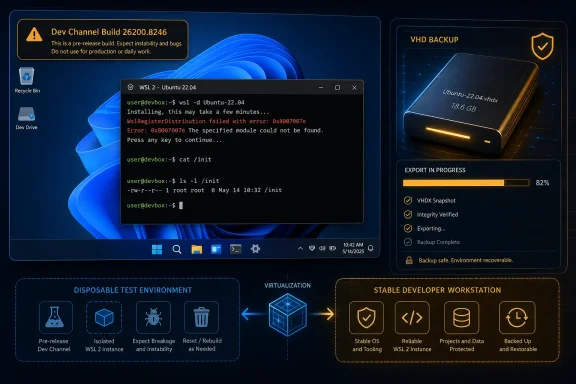 Build 26200.8246 Turned a Preview Warning Into a Concrete Failure Mode
A Microsoft WSL GitHub issue opened on April 18, 2026 described an alarming post-update failure on Windows 11 Dev Channel build 26200.8246. The affected WSL 2 Ubuntu 22.04 distribution would hang at launch, while its root-level /init file was reportedly reduced to 0 bytes rather than the expected 2,781,568-byte binary.That is more serious than a failed Linux package update.
/init sits at the point where the WSL environment begins bringing up the Linux distribution. If that component is empty, the distribution is not simply missing a command-line tool or a desktop integration feature; it may no longer reach a usable shell at all.The issue report also complicates the usual repair instinct. The reporter said
wsl --shutdown hung even though vmmemWSL, wslhost, wslrelay, and wslservice remained running. At the same time, wsl --debug-shell reportedly still reached a booted virtual machine. That pattern suggests a distinction administrators should recognize: the WSL 2 VM layer can be alive while the distribution’s normal startup path is broken.The GitHub issue is marked closed. However, the visible issue body does not provide a published root-cause explanation or a linked remediation. That matters because a closed ticket is not the same as a documented fix, particularly for anyone deciding whether to keep a production-like development environment on the same update track.
Back Up the Distribution Before You Debate the Channel
The practical protection here is not merely copying a project directory to Windows. A serious WSL environment includes the Linux filesystem, installed packages, configuration, permissions, local services, and often development state that does not live neatly inside a Git repository.Microsoft recommends export and import as the preferred mechanism for backing up or moving WSL distributions. Before taking a Dev Channel update, open PowerShell or Command Prompt and identify the installed distribution:
wsl --list --verboseThen export the distribution to a VHD file. Substitute the exact distribution name shown by the list command and a destination that is not dependent on the WSL instance being backed up:
wsl --export <Distro> <FileName> --format vhdFor example, a developer whose distribution is named
Ubuntu-22.04 might choose a dated VHD filename stored on a separate local volume or approved backup destination. The critical point is that the export must finish successfully before the Windows update, not after a startup failure has already exposed a damaged distribution.A disciplined preview-build workflow should include these steps:
- Run
wsl --list --verboseand record the exact distribution names and their WSL version. - Run
wsl --statusandwsl --versionso there is a basic record of the WSL configuration before the update. - Export every distribution that contains irreplaceable work using the VHD export command.
- Confirm that the resulting VHD file exists in the chosen backup location and is not simply a path inside the distribution being protected.
- Only then install the Dev Channel build, and validate that each required distribution launches before resuming normal work.
The Real Choice Is Upgrade, Isolate, or Exit
The question is not whether Dev Channel is “safe” in an absolute sense. Microsoft has already answered that in its warnings: preview builds can interrupt important activity. The useful question is whether the developer environment is intentionally part of the experiment.Choose upgrade in place when the affected WSL distribution is disposable or reproducible. That includes a fresh Ubuntu instance used to test Windows integration, a sandbox for a new WSL release, or an environment provisioned from documented scripts and repositories. In that model, the occasional rebuild is part of the testing cost.
Choose isolation when you need Dev Channel features but also need dependable Linux work. Keep a test distribution or test PC on Dev Channel, while retaining the primary development environment on stable Windows. An exported VHD provides a practical bridge between those worlds: it creates a recoverable copy of the distribution state rather than forcing a choice between experimentation and preservation.
Choose exit from Dev Channel when the same WSL distribution is your daily workstation and losing access for even a short period would block development, operations work, demonstrations, or support obligations. A stable Windows release does not eliminate all WSL failures, but it avoids voluntarily accepting the cadence and known-risk posture of the most experimental Windows channel.
This is especially important for developers who think source control alone is enough. Git protects committed source; it does not automatically preserve installed compilers, language runtimes, package caches, shell configuration, databases, service data, uncommitted local changes, or the exact behavior of a working environment.
A Working VM Does Not Mean a Working Distribution
The April report’swsl --debug-shell detail is the most useful diagnostic clue. If a debug shell can reach a booted VM but launching a named distribution hangs, do not treat the failure as proof that the entire WSL platform is dead. Treat it as evidence that the normal distribution startup sequence needs separate investigation.That distinction should shape incident response. First, avoid destructive actions made in frustration—especially unregistering a distribution. Microsoft’s command documentation warns that unregistering permanently removes the distribution’s data, settings, and software. A broken launch is not a reason to erase the only remaining copy of the environment.
Second, preserve evidence. Record the Windows build, WSL version, distribution name, behavior of normal launches, and behavior of
wsl --shutdown or wsl --debug-shell if used. The build number, 26200.8246, was central to the April report; without that kind of detail, a failure can be impossible to correlate with a specific update.Third, separate recovery from diagnosis. If a known-good export exists, restoring or importing that environment may be the fastest path back to productive work. Diagnosis can continue in an isolated copy, where testing repairs does not endanger the original backup.
WindowsForum readers tracking WSL maintenance updates have seen why this distinction matters. A kernel rebase or a targeted graphics synchronization fix can be useful progress, but WSL is still a stack spanning Windows, the WSL service layer, a lightweight VM, a Linux kernel, and individual Linux distributions. One healthy layer does not guarantee that every other layer is healthy.
Preview Builds Need a Rollback Plan, Not Just Optimism
The key operational mistake is treating Dev Channel as stable Windows with early access. It is better understood as a live integration test where Windows, virtualization, and WSL changes can meet a developer’s unique distribution state.That does not mean enthusiasts or IT professionals should avoid the channel altogether. It means the test target needs boundaries. A dedicated test distribution can be rebuilt. A VHD export can be retained. A second machine can absorb a build that is interesting but not trusted. The only setup that lacks a safety margin is the one where the preview build and the sole copy of a working Linux environment occupy the same failure domain.
Microsoft’s WSL command documentation makes export and import part of the supported operational toolkit, not an improvised rescue technique. Use that tooling before each meaningful preview update, and keep the backup outside the environment it is meant to save.
Frequently Asked Questions
Is one GitHub report enough reason to leave Dev Channel?
One report does not prove that every Dev Channel update will damage WSL distributions. It does prove that a severe failure mode was reported after build 26200.8246, with no visible root-cause explanation or remediation in the closed issue, so relying on one unbacked-up environment is an unnecessary gamble.Can wsl --shutdown fix a distribution whose /init file is empty?
Not necessarily. In the April 18 report, wsl --shutdown itself reportedly hung while WSL-related processes remained running. Restarting the subsystem can help with some WSL problems, but it should not be assumed to repair a damaged distribution startup binary.Should I unregister a WSL distribution that will not launch?
No, not until its data has been safely preserved. Microsoft warns that unregistering permanently removes the distribution and its associated data, settings, and software.Is a VHD export only useful for moving to another PC?
No. It is also a practical backup before a Windows preview update. It gives the administrator or developer a preserved distribution image that can support recovery or isolation if the original instance stops launching.The next Dev Channel build may be uneventful, and the April 18 failure may remain an isolated report. But the correct response is not to predict perfection; it is to make sure the next update tests Windows and WSL changes without testing the survival of the only Linux workstation you have.
References
- Primary source: learn.microsoft.com
Basic commands for WSL | Microsoft Learn
Reference for the basic commands included with Windows Subsystem for Linux (WSL).learn.microsoft.com - Independent coverage: wsl.dev

- Independent coverage: github.com
Releases · microsoft/WSL · GitHub
Windows Subsystem for Linux. Contribute to microsoft/WSL development by creating an account on GitHub. github.com
- Independent coverage: devblogs.microsoft.com
The Windows Subsystem for Linux in the Microsoft Store is now generally available on Windows 10 and 11 - Windows Command Line
Today the Windows Subsystem for Linux (WSL) in the Microsoft Store is dropping its “Preview” label and becomes generally available with our latestdevblogs.microsoft.com - Primary source: WindowsForum
WSL 2.7.0 Kernel Rebase to Linux 6.6 LTS with Security Fixes | Windows Forum
Microsoft has published WSL 2.7.0 — a small-but-important update to the Windows Subsystem for Linux that rebases the WSL2 kernel to a newer point release on...windowsforum.com
