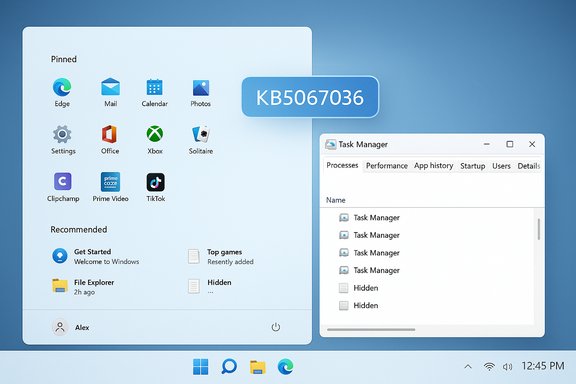
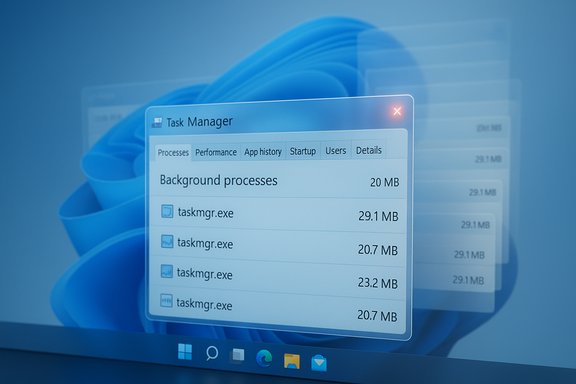
Windows 11 users on recent preview builds are reporting a strange and persistent regression: closing Task Manager with the window “X” sometimes does not terminate taskmgr.exe, and each reopen can spawn another live Task Manager process — producing dozens of background taskmgr.exe instances that quietly consume memory and occasional CPU until explicitly killed.
Microsoft released an optional preview cumulative update, identified as KB5067036, on October 28, 2025. The package ships UI refinements (notably a refreshed Start menu and updated taskbar battery icons) along with a set of quality changes that include an adjustment to Task Manager’s process grouping behavior and other under‑the‑hood fixes. The preview is being deployed in a staged manner across Windows Insider and Release Preview channels, which helps explain why the problem is reproducible on many machines but not universal.
Shortly after the preview began rolling out, several independent outlets and community testers documented the same reproducible symptom: closing Task Manager using the close button leaves behind a running taskmgr.exe, and reopening the utility spawns another one. Those leftover instances appear in Task Manager’s own Processes view, Process Explorer, tasklist output or Get‑Process results — they are real processes, not cosmetic UI duplicates.
On the risk side, the regression hits a tool that every Windows power user, field engineer and admin relies on. That makes the bug disproportionately disruptive relative to its code size: small changes to process‑grouping or enumeration logic can cascade into lifecycle regressions that leak resources in subtle ways. The multiplicative cost of dozens of orphaned Task Manager instances transforms a small defect into an operational problem for vulnerable systems.
Looking ahead, expect a targeted vendor fix: the issue is narrow, reproducible, and tied to an explicit change in the preview notes. When a fix arrives, validate it in a pilot ring before broad rollout, and include lifecycle tests in your acceptance plan to catch similar regressions early. Until that fix appears, the mitigations above are practical, tested and low‑risk.
In short, the Windows 11 Task Manager duplication bug is a real and reproducible lifecycle regression tied to the KB5067036 preview that can leave multiple taskmgr.exe processes resident after closing the UI. The immediate defenses are straightforward — avoid the Close (X), use End task or taskkill, collect diagnostics if you need vendor support, and withhold the optional preview from production systems until Microsoft publishes a corrective update.
Source: XDA Windows 11 is reportedly making more Task Managers whenever you close one
 Background / Overview
Microsoft released an optional preview cumulative update, identified as KB5067036, on October 28, 2025. The package ships UI refinements (notably a refreshed Start menu and updated taskbar battery icons) along with a set of quality changes that include an adjustment to Task Manager’s process grouping behavior and other under‑the‑hood fixes. The preview is being deployed in a staged manner across Windows Insider and Release Preview channels, which helps explain why the problem is reproducible on many machines but not universal.Shortly after the preview began rolling out, several independent outlets and community testers documented the same reproducible symptom: closing Task Manager using the close button leaves behind a running taskmgr.exe, and reopening the utility spawns another one. Those leftover instances appear in Task Manager’s own Processes view, Process Explorer, tasklist output or Get‑Process results — they are real processes, not cosmetic UI duplicates.
What users are seeing (concise reproduction)
- Press Ctrl+Shift+Esc or otherwise open Task Manager.
- Click the top‑right Close (X) button.
- Reopen Task Manager and inspect Processes → Background processes.
- On affected systems, you will see multiple “Task Manager” entries; the count increases each time you repeat open → close.
Verified technical details and scope
- The preview update is KB5067036 and was published on October 28, 2025; it shipped OS builds 26100.7019 and 26200.7019 for Windows 11 channels referenced in community testing.
- The orphaned entries are visible to system tooling (Task Manager, Process Explorer, tasklist, PowerShell Get‑Process), demonstrating they are actual processes rather than a display bug.
- Practical mitigations used by testers include right‑clicking a Task Manager entry in the Processes tab and selecting End task, or running taskkill /im taskmgr.exe /f from an elevated Command Prompt to forcibly terminate all taskmgr.exe instances.
Why this matters: practical impact
Task Manager is a primary troubleshooting tool for both power users and helpdesk engineers. When the tool itself fails to exit cleanly:- Memory pressure can build on low‑RAM devices. Repeated open/close cycles in pathological cases produced gigabytes of resident memory consumed by orphaned managers.
- Diagnostic confusion increases: multiple taskmgr.exe entries under Background processes can mislead users and complicate triage.
- Battery and CPU: while each instance has a small footprint, background sampling or periodic polling by orphaned Task Manager instances may cause periodic CPU spikes that degrade responsiveness and battery life on mobile devices.
- Operational risk for admins: helpdesk workflows rely on Task Manager to inspect processes; in enterprise pilots, this regression increases support load and can complicate remote troubleshooting.
Likely technical cause (analysis and hypotheses)
The behaviour looks like a teardown / lifecycle regression in Task Manager’s close path. Task Manager runs a combination of UI threads, background sampling threads, and references to system services (performance counters, COM objects, etc.. If the window close path does not release a handle, terminate a background thread, or deregister a COM object, the process may remain resident even after the UI disappears.- The KB notes included a change targeting process grouping in Task Manager; grouping touches enumeration and mapping logic and could easily interact with lifecycle logic, leaving a background worker alive when the UI exits. This makes a teardown regression a plausible hypothesis.
- Observed periodic CPU polling from orphaned instances in community reproductions supports the idea that a background sampling thread or registered timer is not being torn down.
How to detect if your PC is affected
- Check the installed build: press Windows+R, type winver, and confirm whether your system is on the affected preview build (KB5067036 or the builds above).
- Reproduce the quick test:
- Open Task Manager (Ctrl+Shift+Esc).
- Close it using the top‑right Close (X) button.
- Reopen Task Manager and look in Processes → Background processes for multiple "Task Manager" entries.
- Use command‑line tooling to count instances:
- PowerShell: Get‑Process -Name taskmgr
- Command Prompt: tasklist /FI "IMAGENAME eq taskmgr.exe"
Immediate mitigations and step‑by‑step fixes
If your device is affected, these mitigations are the fastest and safest options to reclaim resources:- Use Task Manager’s Processes tab:
- Expand Background processes, select the individual Task Manager instance(s), and click End task. This avoids triggering the duplicate‑on‑close behaviour noted when closing via the X.
- Use Command Prompt (admin) for a forced kill:
- Open an elevated Command Prompt (right‑click Start → Windows Terminal (Admin) or Command Prompt as Admin).
- Run: taskkill /im taskmgr.exe /f
This will forcibly terminate all taskmgr.exe instances. - Use PowerShell:
- Stop‑Process -Name taskmgr -Force
- Reboot: a full system restart clears orphaned instances and is a simple if blunt instrument.
- If you require absolute stability on production endpoints, uninstall the optional preview update (KB5067036) or pause preview channel deployments until Microsoft issues a patch. For enterprise fleets, rollbacks or blocking the preview in deployment rings is a sensible containment strategy.
Recommendations for power users and administrators
- Power users: avoid closing Task Manager via the X on systems where KB5067036 is installed; prefer End task or the command line until a patch is released. Document the issue in team runbooks if Task Manager is part of your troubleshooting checklist.
- Helpdesk teams: add a short diagnostic script to detect multiple taskmgr.exe instances (PowerShell Get‑Process -Name taskmgr) and to run taskkill automatically when appropriate. Consider training Tier‑1 agents to look for orphaned Task Manager processes during basic triage.
- Enterprise patching: treat KB5067036 as an optional preview; keep preview updates in pilot rings until Microsoft publishes a corrective update. If your organization already deployed the preview broadly and is seeing the issue, run detection/remediation scripts and open support cases with Microsoft including collected traces.
- Use Process Explorer as an alternative for investigation: it provides richer handle/thread stacks and won’t trigger the same duplication behaviour when inspecting other processes.
QA and product‑development lessons
This regression is a clear example of how subtle lifecycle paths (close, teardown, unregister) can be broken when unrelated subsystems change. Key lessons for vendors and integrators:- Lifecycle regression tests (open → close → reopen cycles) for system utilities must be included in automated and manual test suites; the close path is one of the most frequently exercised code paths in a UI.
- Preview channels and staged rollouts work as intended by surfacing environment‑specific regressions, but they also demand clear communication and cadence for known‑issue acknowledgements and mitigations from the vendor.
- For enterprise rollouts, include helpdesk and developer endpoints in pilot rings since they exercise management tools more aggressively and will likely reveal lifecycle regressions early.
Risk assessment and who should worry
- Low risk: users with high‑RAM desktops or casual users who rarely open/close Task Manager. Occasional orphaned instances are unlikely to affect day‑to‑day productivity on beefy hardware.
- Medium risk: laptop users and field power users. Orphaned instances can increase battery usage and produce occasional UI stutters.
- High risk: constrained VMs, kiosk images, thin clients, demo machines and helpdesk endpoints. There the additive memory and CPU cost of dozens of orphaned Task Manager instances can push systems into swap and materially affect responsiveness. Administrators should block or roll back the preview in production rings until fixed.
What to watch for from Microsoft
- A known‑issue acknowledgement (KIA) on the KB support page or Release Health dashboard that explicitly names Task Manager duplication and offers a targeted remediation or a patch.
- A follow‑up cumulative update or out‑of‑band patch that addresses Task Manager’s teardown logic; historically, Microsoft has released targeted fixes for reproducible, high‑impact regressions discovered in preview channels.
- Guidance on telemetry and repro artifacts that Microsoft recommends you collect when opening Feedback Hub or support cases (ProcMon, ETW, Process Explorer stacks, tasklist output).
Final analysis — strengths, weaknesses and the road ahead
This incident underscores both the strengths and constraints of staged preview rollouts. On the positive side, preview channels and an engaged community identified a lifecycle regression that would be more damaging if it reached broad production without notice. Community reproductions produced measurable diagnostics, practical mitigations, and paths to triage.On the risk side, the regression hits a tool that every Windows power user, field engineer and admin relies on. That makes the bug disproportionately disruptive relative to its code size: small changes to process‑grouping or enumeration logic can cascade into lifecycle regressions that leak resources in subtle ways. The multiplicative cost of dozens of orphaned Task Manager instances transforms a small defect into an operational problem for vulnerable systems.
Looking ahead, expect a targeted vendor fix: the issue is narrow, reproducible, and tied to an explicit change in the preview notes. When a fix arrives, validate it in a pilot ring before broad rollout, and include lifecycle tests in your acceptance plan to catch similar regressions early. Until that fix appears, the mitigations above are practical, tested and low‑risk.
In short, the Windows 11 Task Manager duplication bug is a real and reproducible lifecycle regression tied to the KB5067036 preview that can leave multiple taskmgr.exe processes resident after closing the UI. The immediate defenses are straightforward — avoid the Close (X), use End task or taskkill, collect diagnostics if you need vendor support, and withhold the optional preview from production systems until Microsoft publishes a corrective update.
Source: XDA Windows 11 is reportedly making more Task Managers whenever you close one