

Microsoft began rolling out Xbox mode on April 30, 2026, to Windows 11 PCs in select markets, bringing a controller-first, full-screen Xbox-style interface to laptops, desktops, tablets, and handhelds through a phased Windows Update release tied to Windows 11 versions 24H2 and 25H2. The feature is not a new operating system, and it is not the mythical Windows gaming appliance enthusiasts have been sketching in forum threads for years. But it is the clearest sign yet that Microsoft understands the embarrassment at the heart of PC gaming: Windows runs almost everything, yet often feels like the least console-like way to play it.
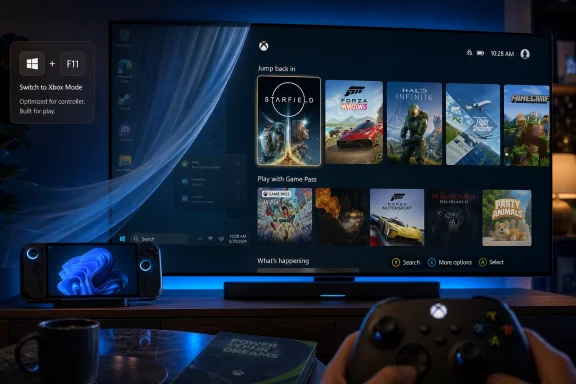
The pitch is simple. Press Win + F11, or enter through the Xbox app, Game Bar, or Task View, and Windows gives way to a simplified gaming surface designed for a controller rather than a mouse pointer. The deeper argument is more interesting: Microsoft is trying to make Windows feel less like Windows at precisely the moments when Windows gets in the way.
For decades, Microsoft’s gaming advantage on PC has been brutally practical. If a game exists for computers, odds are it runs on Windows. That overwhelming compatibility made the platform unavoidable, but it also let Microsoft postpone a more basic design reckoning: the Windows desktop is a terrible ten-foot interface.
The problem has never been whether Windows can launch a game. It can. The problem is everything around that launch: notifications, launchers, driver panels, account prompts, update nags, taskbar focus changes, mouse-dependent dialogs, and the occasional moment when a full-screen game drops you into a desktop that looks absurd on a television across the room.
Steam’s Big Picture mode existed because Valve understood this pain earlier and more clearly. The Steam Deck made the point sharper still. A gaming device does not merely need access to games; it needs to behave like an appliance when the user wants to play and like a computer only when the user chooses to manage it.
Xbox mode is Microsoft’s belated answer. It gives Windows 11 a console-inspired shell that aggregates games from Xbox Game Pass and installed PC storefronts, including the usual third-party suspects. It is not replacing the desktop. It is putting a curtain in front of it.
That distinction matters. Microsoft is not abandoning Windows’ openness, because that openness is still the reason Windows matters in games. Instead, it is trying to hide the platform’s administrative clutter behind an interface that says, in effect, not now — we’re playing.
The ROG Xbox Ally line made the strategic direction explicit. Microsoft and Asus were not just selling another Windows handheld; they were testing whether an Xbox-flavored layer could make Windows feel native on hardware that resembles a console more than a laptop. What was once called the full-screen experience became Xbox mode, and the rebrand is revealing. “Full-screen experience” sounds like a feature. “Xbox mode” sounds like a platform claim.
Handhelds gave Microsoft permission to do something it has historically resisted: create a Windows experience that intentionally suppresses parts of Windows. On supported handheld setups, Xbox mode can limit background processes when configured to start at sign-in, and startup app behavior can be shaped around whether the user is in gaming mode or has returned to the desktop. That is not just a launcher decision. It is operating system posture.
On ordinary desktops and laptops, the promise is more modest. The feature delivers the interface, entry points, controller navigation, and aggregated library, but users should be skeptical of breathless claims that it magically turns Windows into SteamOS. For now, Xbox mode is best understood as a shell and workflow improvement with some optimization hooks, not a wholesale reinvention of Windows’ gaming stack.
Still, the handheld origin matters because it changes the audience. Microsoft is not merely serving PC gamers who already tolerate Windows. It is chasing players who expect the machine to wake, show games, accept a controller, and stay out of the way.
That means some fully updated PCs will not see it immediately. Others may install the update, reboot, check Settings, and still wonder whether the feature exists. Microsoft’s staged enablement model is familiar to anyone who has watched Copilot buttons, Start menu changes, File Explorer experiments, and taskbar features appear on one machine while remaining absent on another with nearly identical build numbers.
This is frustrating, but not irrational. Microsoft uses phased rollouts to detect problems before they detonate across hundreds of millions of devices. Gaming features are especially sensitive because the diversity of Windows hardware is both the platform’s great virtue and its great curse. A shell that behaves perfectly on a desktop with an Xbox controller may misbehave on a tablet, an ultrawide monitor, a hybrid laptop, or a handheld with vendor-specific buttons.
But the slow rollout also undercuts the marketing. When a company says a feature is “beginning to roll out,” users hear “available.” Windows often means “maybe available, depending on region, device eligibility, update state, feature flags, and whatever server-side switch has or has not been thrown for your machine.” That gap is where forum threads are born.
The practical advice is straightforward enough: install the relevant optional update if offered, turn on the setting to receive the latest updates as soon as they are available, and check Settings under Gaming for Xbox mode. If it is not there, the most likely explanation is not user error. It is Microsoft’s distribution machinery doing what it does.
That reality includes multiple game stores, overlapping overlay systems, anti-cheat drivers, GPU control panels, cloud sync clients, update services, audio devices, capture tools, launchers that launch other launchers, and games that were never built with controller-first PC navigation in mind. Xbox mode can aggregate and present. It cannot make every Windows game behave like a console title.
This is where Microsoft’s openness becomes both asset and liability. A SteamOS-like environment on the Steam Deck succeeds partly because Valve controls the primary storefront experience and has built strong conventions around controller input, suspend behavior, compatibility warnings, and verified status. Windows has broader compatibility, but broader compatibility means less control.
That is why the comparison to Steam Big Picture is useful but incomplete. Big Picture is a living-room interface for Steam. Xbox mode is an attempt to make the whole Windows gaming environment feel coherent, even when the pieces come from companies that compete with Microsoft and with each other. That is a harder problem.
It is also the right problem for Microsoft to attempt. Game Pass alone cannot define PC gaming, and the Microsoft Store has never displaced Steam as the gravitational center of the enthusiast PC market. If Xbox mode only worked beautifully for Microsoft’s own catalog, it would be another walled garden sitting on an open platform. Its value depends on whether it can make Windows’ messy pluralism feel intentional.
On handhelds, reducing startup activity and background services can matter. Battery life is limited, thermal headroom is scarce, memory may be shared between CPU and GPU, and every stray process competes with a game that is already running inside tight constraints. A gaming-first startup path can make a real difference there, even if the improvement varies by device and workload.
On desktops, the story is less dramatic. A tower with a high-end GPU and plenty of RAM is not suddenly transformed because the interface is full-screen and controller-friendly. Users may see cleaner navigation, fewer interruptions, and perhaps a more focused session, but they should not expect Xbox mode to rescue a poorly optimized game or reverse the overhead of a bloated Windows installation.
This is where Microsoft needs to resist the temptation to let the internet do its marketing. If enthusiasts conclude that Xbox mode is a performance turbo button, disappointment will follow. If they understand it as a gaming environment that can also support targeted optimizations, the feature has a better chance of being judged fairly.
The phrase “mode” is doing a lot of work. A true mode changes system behavior in durable, observable ways. A launcher changes what you see. Xbox mode appears to live between those categories, and Microsoft’s challenge will be to move it closer to the former without breaking the compatibility that makes Windows valuable.
But the strategic target is broader. Microsoft is responding to the confidence Valve has built around SteamOS: the idea that a gaming PC can feel like a console without surrendering its PC identity. That idea was once niche. The Steam Deck made it mainstream.
Windows still has the library advantage. It runs Game Pass PC titles, anti-cheat-heavy multiplayer games that remain awkward or unsupported on Linux, and decades of software that users already own. For many players, that compatibility is decisive. But compatibility alone no longer wins the experience argument.
SteamOS has taught users to expect fast resume, clean controller navigation, readable UI scaling, sane power management, and an operating environment that treats gaming as the primary job. Windows has historically treated gaming as one of many jobs, then wondered why a handheld running Windows feels like a tiny laptop rather than a purpose-built device.
Xbox mode is Microsoft’s attempt to close that experience gap without giving up the Windows ecosystem. If it succeeds, Windows handhelds become easier to recommend. Living-room PCs become less ridiculous. Gaming laptops become more console-like when docked. And Microsoft gets a unified Xbox-flavored surface across console, PC, and whatever hybrid hardware comes next.
That last point is not incidental. Microsoft has been steadily repositioning Xbox from a box under the television into a service, interface, account system, storefront, and developer ecosystem spread across screens. Xbox mode is the Windows piece of that puzzle.
That is exactly the kind of boring convenience that determines whether a feature becomes habit. Gamers do not want to admire interface philosophy before launching a game. They want to play the thing they were thinking about, ideally before the mood evaporates.
The difficulty is that PC gaming’s storefront fragmentation is not merely technical. It is commercial. Steam, Epic, EA, Ubisoft, Battle.net, GOG, itch.io, and Microsoft all have their own accounts, update systems, overlays, social hooks, refund flows, cloud saves, achievements, and business incentives. A unified library can reduce visible friction, but it cannot make those ecosystems disappear.
Microsoft’s best move is therefore diplomatic minimalism. Xbox mode should not pretend to own games it merely indexes. It should not bury non-Microsoft storefronts beneath Game Pass advertising. It should not become a funnel that treats the rest of PC gaming as content to be tolerated until users subscribe.
If Microsoft gets that balance right, Xbox mode can become a neutral-feeling front door. If it gets greedy, PC gamers will notice instantly. This audience has a long memory for platform nudges disguised as convenience.
This is not a minor optics problem. Consoles train users to expect that system updates are part of the appliance lifecycle. Windows updates train users to expect ambiguity. Is the update safe? Is it optional? Is it preview? Will it break printing, networking, sleep, BitLocker, drivers, or a niche enterprise app that someone still needs? Enthusiasts may shrug. Normal users do not.
For WindowsForum readers, the nuance matters. KB5083631 is not just “the Xbox mode update.” It is a Windows servicing vehicle that also carries other changes and fixes. That bundling is how Windows evolves, but it means a gaming feature arrives as part of a broader OS maintenance decision rather than a clean app-store-style feature download.
Microsoft has been trying to soften this with feature flags and gradual enablement. In theory, that lets the company ship bits broadly and activate experiences cautiously. In practice, it makes Windows feel probabilistic. Two users can compare build numbers and still have different realities.
The irony is that Xbox mode is designed to make Windows feel more predictable at playtime, yet its arrival is governed by one of the least predictable parts of modern Windows. That is not fatal. It is just very Microsoft.
In a corporate environment, the immediate question is not whether Xbox mode is fun. It is whether it creates another surface to manage, explain, disable, or document. A full-screen gaming interface on a work laptop is not a security incident by itself, but it is one more example of consumer Windows and business Windows sharing the same servicing bloodstream.
Microsoft has long walked this line. Windows is a mass-market consumer OS, a gaming platform, a developer workstation, a school device, and an enterprise endpoint. Features built for one persona routinely appear within reach of another. IT departments survive by policy, configuration, and selective indifference.
Xbox mode’s enterprise footprint may be limited, especially if it depends on supported markets, app availability, and user-facing enablement. But the optics still matter. In the same era that Microsoft is pushing AI agents, cloud identity, endpoint security, and management controls, it is also shipping a console shell into the same OS family. That is Windows in one sentence.
The best outcome for IT is boring: clear policy controls, predictable documentation, no surprise defaults, and no consumer gaming prompts on managed devices. The worst outcome would be yet another feature that appears in Settings before administrators have a clean story for it.
That choice tells users what emotional vocabulary Microsoft wants attached to the feature. Xbox means couch, controller, library, friends, Game Pass, console familiarity, and fewer visible knobs. Windows means compatibility, productivity, drivers, desktops, and occasionally mild dread. Xbox mode tries to borrow the former to domesticate the latter.
It also helps Microsoft blur the boundary between Xbox hardware and Windows hardware. If an Xbox-like interface can run on a handheld, a laptop, a desktop, and perhaps future console-PC hybrids, then “Xbox” becomes less a device category than a gaming environment. That has been Microsoft’s direction for years, but Xbox mode makes it visible at the OS layer.
The risk is that Xbox still carries console expectations. Console players expect interface consistency, fast controller response, clean suspend and resume, and games that do not randomly demand a launcher password in a window designed for a mouse. Once Microsoft paints the Xbox name over Windows gaming, Windows’ rough edges become Xbox’s rough edges too.
That may be acceptable if Microsoft treats Xbox mode as a long-term platform investment rather than a seasonal feature. The first version does not need to solve everything. It does need to improve quickly enough that users believe the direction is real.
The more interesting work comes after that. Microsoft needs to make Xbox mode better at handling non-Microsoft launchers, better at indicating which games are controller-friendly, better at managing overlays, better at surfacing cloud saves and install locations, and better at turning a Windows PC into a living-room appliance without lying about the complexity underneath.
It also needs to clarify the performance model. If handhelds get deeper optimizations than desktops, say so. If startup app suppression requires automatic entry into Xbox mode at sign-in, make that understandable. If some gains depend on OEM integration, driver support, or device class, do not let marketing flatten those differences into a generic promise that “games run better.”
Most of all, Microsoft needs to make the feature feel native rather than bolted on. Game Bar has often suffered from being useful but oddly peripheral, a panel that exists near gaming rather than fully inside it. Xbox mode cannot feel like another overlay in a system already full of overlays. It has to feel like a place.
That is a high bar, but Microsoft has advantages Valve does not. It controls Windows. It controls Xbox. It controls Game Pass. It has relationships with OEMs building handhelds, laptops, and desktops. If those pieces cannot produce a coherent gaming surface, the problem is not lack of leverage. It is lack of will.
Source: Stuff South Africa Microsoft rolls out Xbox mode to Windows 11 devices
The pitch is simple. Press Win + F11, or enter through the Xbox app, Game Bar, or Task View, and Windows gives way to a simplified gaming surface designed for a controller rather than a mouse pointer. The deeper argument is more interesting: Microsoft is trying to make Windows feel less like Windows at precisely the moments when Windows gets in the way.
 Microsoft Finally Admits the Desktop Is Bad Furniture for the Living Room
For decades, Microsoft’s gaming advantage on PC has been brutally practical. If a game exists for computers, odds are it runs on Windows. That overwhelming compatibility made the platform unavoidable, but it also let Microsoft postpone a more basic design reckoning: the Windows desktop is a terrible ten-foot interface.The problem has never been whether Windows can launch a game. It can. The problem is everything around that launch: notifications, launchers, driver panels, account prompts, update nags, taskbar focus changes, mouse-dependent dialogs, and the occasional moment when a full-screen game drops you into a desktop that looks absurd on a television across the room.
Steam’s Big Picture mode existed because Valve understood this pain earlier and more clearly. The Steam Deck made the point sharper still. A gaming device does not merely need access to games; it needs to behave like an appliance when the user wants to play and like a computer only when the user chooses to manage it.
Xbox mode is Microsoft’s belated answer. It gives Windows 11 a console-inspired shell that aggregates games from Xbox Game Pass and installed PC storefronts, including the usual third-party suspects. It is not replacing the desktop. It is putting a curtain in front of it.
That distinction matters. Microsoft is not abandoning Windows’ openness, because that openness is still the reason Windows matters in games. Instead, it is trying to hide the platform’s administrative clutter behind an interface that says, in effect, not now — we’re playing.
The Handheld PC Forced Redmond’s Hand
Xbox mode did not begin as a gift to desktop gamers. It emerged from the awkward rise of Windows handhelds, a category that exposed Windows’ strengths and weaknesses with unusual cruelty. Devices like the ROG Ally, Legion Go, and MSI Claw could run enormous PC libraries, but they also inherited a desktop OS never designed to be poked at on a seven-inch screen with thumbsticks.The ROG Xbox Ally line made the strategic direction explicit. Microsoft and Asus were not just selling another Windows handheld; they were testing whether an Xbox-flavored layer could make Windows feel native on hardware that resembles a console more than a laptop. What was once called the full-screen experience became Xbox mode, and the rebrand is revealing. “Full-screen experience” sounds like a feature. “Xbox mode” sounds like a platform claim.
Handhelds gave Microsoft permission to do something it has historically resisted: create a Windows experience that intentionally suppresses parts of Windows. On supported handheld setups, Xbox mode can limit background processes when configured to start at sign-in, and startup app behavior can be shaped around whether the user is in gaming mode or has returned to the desktop. That is not just a launcher decision. It is operating system posture.
On ordinary desktops and laptops, the promise is more modest. The feature delivers the interface, entry points, controller navigation, and aggregated library, but users should be skeptical of breathless claims that it magically turns Windows into SteamOS. For now, Xbox mode is best understood as a shell and workflow improvement with some optimization hooks, not a wholesale reinvention of Windows’ gaming stack.
Still, the handheld origin matters because it changes the audience. Microsoft is not merely serving PC gamers who already tolerate Windows. It is chasing players who expect the machine to wake, show games, accept a controller, and stay out of the way.
The Rollout Is Global in Theory and Microsoft in Practice
The update story is classic Windows: simple in Microsoft’s announcement, messier on actual machines. Xbox mode is rolling out gradually in select markets, with broader availability expected over the following weeks. Users need Windows 11 version 24H2 or later, and the current rollout is associated with the optional KB5083631 preview update.That means some fully updated PCs will not see it immediately. Others may install the update, reboot, check Settings, and still wonder whether the feature exists. Microsoft’s staged enablement model is familiar to anyone who has watched Copilot buttons, Start menu changes, File Explorer experiments, and taskbar features appear on one machine while remaining absent on another with nearly identical build numbers.
This is frustrating, but not irrational. Microsoft uses phased rollouts to detect problems before they detonate across hundreds of millions of devices. Gaming features are especially sensitive because the diversity of Windows hardware is both the platform’s great virtue and its great curse. A shell that behaves perfectly on a desktop with an Xbox controller may misbehave on a tablet, an ultrawide monitor, a hybrid laptop, or a handheld with vendor-specific buttons.
But the slow rollout also undercuts the marketing. When a company says a feature is “beginning to roll out,” users hear “available.” Windows often means “maybe available, depending on region, device eligibility, update state, feature flags, and whatever server-side switch has or has not been thrown for your machine.” That gap is where forum threads are born.
The practical advice is straightforward enough: install the relevant optional update if offered, turn on the setting to receive the latest updates as soon as they are available, and check Settings under Gaming for Xbox mode. If it is not there, the most likely explanation is not user error. It is Microsoft’s distribution machinery doing what it does.
A Console Interface Cannot Erase the PC Beneath It
The most important thing Xbox mode does is also the easiest to overstate. It replaces the experience of navigating Windows with something closer to Xbox. It does not replace the underlying reality of Windows itself.That reality includes multiple game stores, overlapping overlay systems, anti-cheat drivers, GPU control panels, cloud sync clients, update services, audio devices, capture tools, launchers that launch other launchers, and games that were never built with controller-first PC navigation in mind. Xbox mode can aggregate and present. It cannot make every Windows game behave like a console title.
This is where Microsoft’s openness becomes both asset and liability. A SteamOS-like environment on the Steam Deck succeeds partly because Valve controls the primary storefront experience and has built strong conventions around controller input, suspend behavior, compatibility warnings, and verified status. Windows has broader compatibility, but broader compatibility means less control.
That is why the comparison to Steam Big Picture is useful but incomplete. Big Picture is a living-room interface for Steam. Xbox mode is an attempt to make the whole Windows gaming environment feel coherent, even when the pieces come from companies that compete with Microsoft and with each other. That is a harder problem.
It is also the right problem for Microsoft to attempt. Game Pass alone cannot define PC gaming, and the Microsoft Store has never displaced Steam as the gravitational center of the enthusiast PC market. If Xbox mode only worked beautifully for Microsoft’s own catalog, it would be another walled garden sitting on an open platform. Its value depends on whether it can make Windows’ messy pluralism feel intentional.
The Performance Story Needs Discipline, Not Hype
Microsoft and its partners have spent the last year talking about background process reduction, fewer distractions, and better resource focus while gaming. Those are credible goals. They are also dangerously easy to inflate.On handhelds, reducing startup activity and background services can matter. Battery life is limited, thermal headroom is scarce, memory may be shared between CPU and GPU, and every stray process competes with a game that is already running inside tight constraints. A gaming-first startup path can make a real difference there, even if the improvement varies by device and workload.
On desktops, the story is less dramatic. A tower with a high-end GPU and plenty of RAM is not suddenly transformed because the interface is full-screen and controller-friendly. Users may see cleaner navigation, fewer interruptions, and perhaps a more focused session, but they should not expect Xbox mode to rescue a poorly optimized game or reverse the overhead of a bloated Windows installation.
This is where Microsoft needs to resist the temptation to let the internet do its marketing. If enthusiasts conclude that Xbox mode is a performance turbo button, disappointment will follow. If they understand it as a gaming environment that can also support targeted optimizations, the feature has a better chance of being judged fairly.
The phrase “mode” is doing a lot of work. A true mode changes system behavior in durable, observable ways. A launcher changes what you see. Xbox mode appears to live between those categories, and Microsoft’s challenge will be to move it closer to the former without breaking the compatibility that makes Windows valuable.
The Real Target Is Not Steam Big Picture, but SteamOS Confidence
It is tempting to frame Xbox mode as Microsoft’s answer to Steam Big Picture, because the visual comparison is obvious. Both offer a controller-friendly interface. Both are meant for players who want to sit back rather than lean into a keyboard. Both organize games around recent activity and library access.But the strategic target is broader. Microsoft is responding to the confidence Valve has built around SteamOS: the idea that a gaming PC can feel like a console without surrendering its PC identity. That idea was once niche. The Steam Deck made it mainstream.
Windows still has the library advantage. It runs Game Pass PC titles, anti-cheat-heavy multiplayer games that remain awkward or unsupported on Linux, and decades of software that users already own. For many players, that compatibility is decisive. But compatibility alone no longer wins the experience argument.
SteamOS has taught users to expect fast resume, clean controller navigation, readable UI scaling, sane power management, and an operating environment that treats gaming as the primary job. Windows has historically treated gaming as one of many jobs, then wondered why a handheld running Windows feels like a tiny laptop rather than a purpose-built device.
Xbox mode is Microsoft’s attempt to close that experience gap without giving up the Windows ecosystem. If it succeeds, Windows handhelds become easier to recommend. Living-room PCs become less ridiculous. Gaming laptops become more console-like when docked. And Microsoft gets a unified Xbox-flavored surface across console, PC, and whatever hybrid hardware comes next.
That last point is not incidental. Microsoft has been steadily repositioning Xbox from a box under the television into a service, interface, account system, storefront, and developer ecosystem spread across screens. Xbox mode is the Windows piece of that puzzle.
The Storefront Truce Is the Feature’s Most Important Political Move
The most promising part of Xbox mode is not the full-screen UI. It is the aggregated library. Microsoft says Xbox mode can surface Game Pass titles and installed games from leading PC storefronts, giving players a single place to start rather than forcing them to remember which corporate silo owns which executable.That is exactly the kind of boring convenience that determines whether a feature becomes habit. Gamers do not want to admire interface philosophy before launching a game. They want to play the thing they were thinking about, ideally before the mood evaporates.
The difficulty is that PC gaming’s storefront fragmentation is not merely technical. It is commercial. Steam, Epic, EA, Ubisoft, Battle.net, GOG, itch.io, and Microsoft all have their own accounts, update systems, overlays, social hooks, refund flows, cloud saves, achievements, and business incentives. A unified library can reduce visible friction, but it cannot make those ecosystems disappear.
Microsoft’s best move is therefore diplomatic minimalism. Xbox mode should not pretend to own games it merely indexes. It should not bury non-Microsoft storefronts beneath Game Pass advertising. It should not become a funnel that treats the rest of PC gaming as content to be tolerated until users subscribe.
If Microsoft gets that balance right, Xbox mode can become a neutral-feeling front door. If it gets greedy, PC gamers will notice instantly. This audience has a long memory for platform nudges disguised as convenience.
Windows Update Remains the Weirdest Game Launcher in the Industry
There is a strange comedy in delivering a console-like gaming interface through a Windows optional preview update. To get the future of couch PC gaming, users must first do one of the least couch-friendly things in computing: open Settings, check Windows Update, install a multi-gigabyte package, reboot, and then wait for staged availability.This is not a minor optics problem. Consoles train users to expect that system updates are part of the appliance lifecycle. Windows updates train users to expect ambiguity. Is the update safe? Is it optional? Is it preview? Will it break printing, networking, sleep, BitLocker, drivers, or a niche enterprise app that someone still needs? Enthusiasts may shrug. Normal users do not.
For WindowsForum readers, the nuance matters. KB5083631 is not just “the Xbox mode update.” It is a Windows servicing vehicle that also carries other changes and fixes. That bundling is how Windows evolves, but it means a gaming feature arrives as part of a broader OS maintenance decision rather than a clean app-store-style feature download.
Microsoft has been trying to soften this with feature flags and gradual enablement. In theory, that lets the company ship bits broadly and activate experiences cautiously. In practice, it makes Windows feel probabilistic. Two users can compare build numbers and still have different realities.
The irony is that Xbox mode is designed to make Windows feel more predictable at playtime, yet its arrival is governed by one of the least predictable parts of modern Windows. That is not fatal. It is just very Microsoft.
Enterprise IT Will Mostly Ignore It Until Users Ask Why It Exists
For sysadmins, Xbox mode is likely to land as a curiosity unless it appears on managed endpoints where gaming features are unwelcome. The feature applies to Windows 11 24H2 and 25H2, including ordinary PC form factors, which means it may exist on hardware far outside the enthusiast gaming niche.In a corporate environment, the immediate question is not whether Xbox mode is fun. It is whether it creates another surface to manage, explain, disable, or document. A full-screen gaming interface on a work laptop is not a security incident by itself, but it is one more example of consumer Windows and business Windows sharing the same servicing bloodstream.
Microsoft has long walked this line. Windows is a mass-market consumer OS, a gaming platform, a developer workstation, a school device, and an enterprise endpoint. Features built for one persona routinely appear within reach of another. IT departments survive by policy, configuration, and selective indifference.
Xbox mode’s enterprise footprint may be limited, especially if it depends on supported markets, app availability, and user-facing enablement. But the optics still matter. In the same era that Microsoft is pushing AI agents, cloud identity, endpoint security, and management controls, it is also shipping a console shell into the same OS family. That is Windows in one sentence.
The best outcome for IT is boring: clear policy controls, predictable documentation, no surprise defaults, and no consumer gaming prompts on managed devices. The worst outcome would be yet another feature that appears in Settings before administrators have a clean story for it.
The Branding Says More Than the Button
The renaming from full-screen experience to Xbox mode is not cosmetic. It is a strategic flag planted in Windows. Microsoft could have called this Gaming Mode, Controller Mode, or Full-Screen Gaming. It chose Xbox.That choice tells users what emotional vocabulary Microsoft wants attached to the feature. Xbox means couch, controller, library, friends, Game Pass, console familiarity, and fewer visible knobs. Windows means compatibility, productivity, drivers, desktops, and occasionally mild dread. Xbox mode tries to borrow the former to domesticate the latter.
It also helps Microsoft blur the boundary between Xbox hardware and Windows hardware. If an Xbox-like interface can run on a handheld, a laptop, a desktop, and perhaps future console-PC hybrids, then “Xbox” becomes less a device category than a gaming environment. That has been Microsoft’s direction for years, but Xbox mode makes it visible at the OS layer.
The risk is that Xbox still carries console expectations. Console players expect interface consistency, fast controller response, clean suspend and resume, and games that do not randomly demand a launcher password in a window designed for a mouse. Once Microsoft paints the Xbox name over Windows gaming, Windows’ rough edges become Xbox’s rough edges too.
That may be acceptable if Microsoft treats Xbox mode as a long-term platform investment rather than a seasonal feature. The first version does not need to solve everything. It does need to improve quickly enough that users believe the direction is real.
The Update Microsoft Ships Next Will Matter More Than This One
First releases get attention, but second and third releases decide habits. Xbox mode’s initial rollout will be judged on availability, launch reliability, controller navigation, library accuracy, and whether returning to the desktop feels clean. Those are table stakes.The more interesting work comes after that. Microsoft needs to make Xbox mode better at handling non-Microsoft launchers, better at indicating which games are controller-friendly, better at managing overlays, better at surfacing cloud saves and install locations, and better at turning a Windows PC into a living-room appliance without lying about the complexity underneath.
It also needs to clarify the performance model. If handhelds get deeper optimizations than desktops, say so. If startup app suppression requires automatic entry into Xbox mode at sign-in, make that understandable. If some gains depend on OEM integration, driver support, or device class, do not let marketing flatten those differences into a generic promise that “games run better.”
Most of all, Microsoft needs to make the feature feel native rather than bolted on. Game Bar has often suffered from being useful but oddly peripheral, a panel that exists near gaming rather than fully inside it. Xbox mode cannot feel like another overlay in a system already full of overlays. It has to feel like a place.
That is a high bar, but Microsoft has advantages Valve does not. It controls Windows. It controls Xbox. It controls Game Pass. It has relationships with OEMs building handhelds, laptops, and desktops. If those pieces cannot produce a coherent gaming surface, the problem is not lack of leverage. It is lack of will.
The Win + F11 Era Begins With Caveats Attached
Xbox mode is not the Windows gaming revolution some users want, but it is more than a cosmetic launcher if Microsoft keeps building around it. The concrete takeaways are narrow enough to state plainly, and important enough not to bury beneath the branding.- Xbox mode began rolling out on April 30, 2026, for Windows 11 PCs in select markets, with availability expanding gradually rather than arriving for everyone at once.
- The feature requires Windows 11 version 24H2 or 25H2 and is associated with the KB5083631 optional preview update in the current rollout.
- Users can enter Xbox mode through Win + F11, the Xbox app, Game Bar, or Task View once the feature is enabled on their device.
- Xbox mode provides a controller-optimized, full-screen interface that can surface Xbox Game Pass content and installed games from other major PC storefronts.
- The experience is most meaningful for handhelds and living-room PCs, where the standard Windows desktop is least suited to how people actually play.
- Performance expectations should stay grounded, because the first broad PC rollout is primarily about interface, navigation, and reducing friction rather than replacing Windows with a purpose-built gaming OS.
Source: Stuff South Africa Microsoft rolls out Xbox mode to Windows 11 devices
