

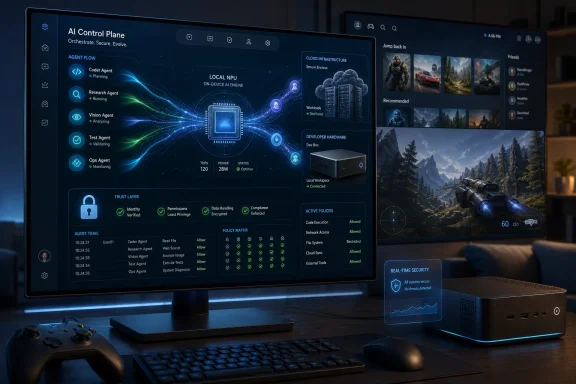
Windows 12 Is Still a Ghost, but Its Outline Is Getting Easier to See
The first discipline in any Windows 12 prediction is admitting what Microsoft has not said. There is no official Windows 12 launch date, no published system requirements, no public product page, and no confirmed branding. Build 2026 came and went without the big-numbered operating system reveal that rumor cycles have been predicting for years.
That absence matters. Microsoft has spent the past few years teaching users that Windows 11 is not a temporary bridge but a living product with annual updates, AI features, new hardware assumptions, and enterprise management hooks. A sudden Windows 12 announcement would risk freezing Windows 11 deployments just as many organizations are still finishing migrations away from Windows 10.
But absence is not emptiness. Build 2026 was full of signals: Microsoft Scout as an always-on personal work agent, MAI-Thinking-1 as a new reasoning model, Surface RTX Spark Dev Box as a local AI development machine, Project Solara as an agent-first device platform, and Windows 365 for Agents as part of a broader enterprise agent runtime. Those are not random announcements. They look like pieces of a platform strategy.
The mistake is to imagine Windows 12 as merely Windows 11 with a centered Start menu moved somewhere else. If Microsoft gives the next Windows a new number, it will likely be because the company wants permission to change the contract between user, PC, cloud, and software. That is what new Windows versions have historically done: not just change the shell, but redraw the boundary of what a PC is supposed to be.
Microsoft Is Building the Next Windows Before It Names It
Windows has often changed before Microsoft formally admitted the change. Windows 10’s servicing model normalized the operating system as a continuously updated platform. Windows 11 used design and hardware requirements to mark a new security and device baseline. Windows 12, if and when it appears, will probably use AI capability as its dividing line.
That does not necessarily mean every Windows 12 PC will need an extravagant NPU or workstation GPU. Microsoft still has to serve schools, governments, small businesses, budget laptops, virtual desktops, and legacy industrial systems. But the premium Windows experience is already being defined by local inference, cloud-connected agents, and AI features that expect modern silicon.
The Copilot+ PC push was the first consumer-facing version of that story. Build 2026 sharpened it into something broader and more developer-driven. Microsoft is no longer only saying that Windows can run AI features; it is saying Windows should become an agent runtime.
That phrase sounds like conference-stage abstraction, but it has real consequences. An agent runtime is not just a chatbot pinned to the taskbar. It implies permissions, identity, memory, observability, app integration, sandboxing, hardware scheduling, data governance, and ways for software to act across multiple applications on a user’s behalf. If Microsoft gets serious about agents in Windows, the OS has to become the broker of those actions.
That is where Windows 12 becomes plausible as a product moment. Microsoft can keep adding agent pieces to Windows 11 indefinitely, but a major version gives the company a clean marketing and compatibility line. It lets Redmond say: this is the Windows built for PCs where AI is not an accessory.
The Copilot Era Was the Warm-Up Act
The most important Windows 12 prediction is also the simplest: Copilot, as users first met it, will not be the center of the next Windows experience. It will either evolve into something less like a sidebar chatbot or be surrounded by agents that make the old Copilot interaction model feel quaint.
That is not because Copilot failed in the way abandoned Microsoft features sometimes fail. It is because the interface pattern is transitional. Asking a chatbot to summarize, search, draft, or change a setting is useful, but it still requires the user to stop, formulate a request, review an answer, and push the work forward.
Agentic computing promises something more ambitious and more controversial. Microsoft Scout, introduced for Frontier customers, points toward an assistant that learns routines, anticipates work, and acts with less direct prompting. Whether that becomes beloved or resented will depend almost entirely on restraint.
The leap from “assistant” to “agent” is not a small UI tweak. An assistant suggests; an agent does. In a Windows context, that means touching calendars, files, messages, browser sessions, corporate data, credentials, and possibly line-of-business applications. The more useful the agent becomes, the more dangerous mistakes become.
That is why Windows 12 cannot simply be “Windows 11 plus more Copilot.” If Microsoft wants agents to matter, the operating system will need visible trust controls: clear approvals, revocable permissions, audit trails, admin policy, and a way to distinguish suggestions from actions. Without that, the agentic future becomes Clippy with administrator privileges.
Hybrid AI Is Microsoft’s Real Windows Strategy
The most credible Windows 12 architecture is not cloud-only AI or local-only AI. It is hybrid computing, with Windows deciding which tasks should run on the NPU, CPU, GPU, local model stack, enterprise cloud, or Microsoft-hosted service.
That sounds mundane compared with science-fiction talk of autonomous assistants, but it is the practical core of the whole strategy. Local AI is good for latency, privacy-sensitive work, offline use, and cost control. Cloud AI is better for large models, expensive reasoning, organization-wide context, and tasks that exceed a laptop’s thermal envelope. A modern Windows PC will need both.
The operating system is the obvious traffic cop. Users should not have to know whether a meeting summary, code analysis, image edit, spreadsheet operation, or search index is running locally or remotely. They should care about speed, accuracy, cost, privacy, battery life, and compliance. Windows can abstract the machinery, but only if Microsoft builds the machinery deeply enough into the platform.
That is why Surface RTX Spark Dev Box matters beyond its likely niche audience. A compact developer machine with 1 petaflop of AI compute and 128GB of unified memory is not a mainstream PC. It is a statement about where Microsoft wants developers to build and test local AI workloads. It says the Windows developer box is no longer just for compiling Win32 apps or testing web code; it is for running serious models at the edge.
The significance is not that everyone will buy one. They will not. The significance is that Microsoft is normalizing a Windows development environment where local AI is first-class, not a toy demo waiting for a cloud API call.
Surface RTX Spark Dev Box Is a Developer Signal, Not a Consumer Preview
It is tempting to look at Surface RTX Spark Dev Box and imagine a future gaming-PC-shaped Windows 12 tower humming under every desk. That misses the point. Spark is not a consumer aspiration product in the Surface Laptop sense. It is a developer bet.
Microsoft needs developers to build agentic software before users can be convinced to rely on it. That means giving developers machines capable of running larger local models, testing memory-heavy workloads, and integrating with Microsoft’s AI stack without turning every experiment into a cloud billing event. Spark is the kind of hardware that says, “Build here first.”
This matters because Windows has been fighting a developer gravity problem for years. Web apps run everywhere. Mobile ecosystems captured much of the consumer software imagination. AI developers often start in Linux-heavy, CUDA-heavy, cloud-heavy environments. Microsoft’s pitch is that Windows can be the productive front end for all of that, including local model development.
If Windows 12 is “dev-first,” it will not be because Microsoft suddenly cares less about ordinary users. It will be because ordinary users will only see meaningful AI experiences if developers can build them. The old Windows model depended on apps. The new model depends on agents, extensions, model integration, and cross-application orchestration.
That creates a subtle risk. Developer-first platforms can become opaque to everyone else. If Windows 12 feels like a playground for AI builders but a surveillance console for office workers, Microsoft will have recreated the classic enterprise software problem: powerful, integrated, and widely disliked.
Project Solara Shows Microsoft Looking Beyond the PC Without Leaving Windows Behind
Project Solara may be the most revealing Build 2026 announcement because it is not simply another Windows feature. It points to a device ecosystem where agents appear in badges, desk companions, and other form factors that do not look like traditional PCs.
That should not be read as Microsoft abandoning Windows. It should be read as Microsoft recognizing that the PC is no longer the only place where work begins or ends. If an agent records a hallway conversation, summarizes a meeting, updates a task list, and later hands context back to a laptop, the “computer” is the whole chain.
The reported Android foundation of Microsoft’s Device Ecosystem Platform is especially telling. Microsoft is pragmatic enough to use the substrate that fits the device rather than force Windows onto everything with a screen, a speaker, or a battery. That is a lesson the company learned the hard way during earlier mobile and embedded adventures.
For Windows 12, the implication is that the OS may become less of a solitary endpoint and more of a command center. Your PC could be where agents are configured, audited, trained, and governed, even when the work happens across badges, phones, cloud desktops, and shared workspaces. Windows remains important not because it runs everywhere, but because it coordinates what runs everywhere.
That is an uncomfortable shift for old-school Windows loyalists. The PC used to be the center of the personal computing universe. In Microsoft’s agentic future, the PC may become the most capable node in a distributed mesh of devices and services.
Agents Replacing Apps Is the Boldest Prediction—and the Easiest to Overstate
The claim that “AI agents will replace apps” is directionally useful and literally wrong. Apps will not disappear. Businesses do not throw away accounting systems, CAD suites, IDEs, browsers, creative tools, CRM platforms, and decades of workflow automation because a keynote introduced a smarter assistant.
What may change is the user’s first point of contact. Instead of opening Outlook, then Teams, then Excel, then a browser, then a ticketing system, the user may ask—or allow—an agent to perform a task across all of them. The apps remain, but they become tools invoked by software rather than destinations visited by humans.
That distinction is crucial. The app model gave users visible places to work. The agent model gives users outcomes, but hides more of the process. That can be wonderfully efficient when the agent is right and maddening when it is wrong.
Windows 12 could therefore become less app launcher and more work broker. The Start menu might matter less than agent permissions. File Explorer might matter less than semantic retrieval. Notifications might matter less than delegated workflows. The operating system’s job would be to make invisible automation legible enough that users still feel in command.
This is where Microsoft’s enterprise DNA could help. Consumer AI products often chase delight first and governance later. Microsoft cannot do that with Windows. If agents are going to touch corporate data, procurement workflows, legal documents, source code, customer records, or regulated communications, the admin story has to exist on day one.
The Security Model Will Decide Whether Agentic Windows Survives Contact With Reality
Every exciting Windows 12 AI prediction has a shadow version that keeps sysadmins awake. An agent that can summarize your inbox can leak your inbox. An agent that can operate apps can operate the wrong app. An agent that learns routines can also preserve sensitive context longer than policy allows.
Microsoft knows this, which is why its Build messaging increasingly ties agents to identity, enterprise controls, Defender, and managed environments. But the burden on Windows will be immense. The OS will need to make delegated action secure in ways that traditional desktop automation never had to be.
The old Windows security model was built around users, processes, files, privileges, and networks. The new one must also reason about intent. Did the user authorize the agent to read this document? Did the agent retrieve data from the right tenant? Did it expose confidential information to a third-party model? Did it act based on poisoned input from an email, webpage, or document?
That last problem is not theoretical. Agents that consume untrusted content and then take actions are vulnerable to instructions hidden inside that content. A malicious document telling an agent to exfiltrate files is not magic; it is the AI-era version of an old input-validation nightmare.
For Windows 12, the winning design will not be the flashiest demo. It will be the dullest, strongest permission architecture. Microsoft needs to make AI actions inspectable, reversible where possible, and governable at scale. Otherwise, enterprises will do what they always do with risky Windows features: disable them by policy and wait three years.
The NPU May Become the New TPM
Windows 11’s most controversial line in the sand was hardware eligibility, especially around TPM 2.0, supported CPUs, and Secure Boot. It would be naïve to assume Windows 12 will avoid a similar fight. The only question is what the new line will be.
An NPU requirement is the obvious candidate, though Microsoft may avoid making it universal at launch. A strict AI hardware cutoff would strand too many recent PCs and invite another compatibility backlash. But Microsoft could still create tiers: Windows 12 runs on a broad base, while the full AI experience requires a defined local inference capability.
That would mirror how Windows has often handled hardware transitions. The OS may install on many machines, but the flagship features work best—or only—on newer devices. For consumers, that becomes marketing. For enterprises, it becomes procurement guidance. For enthusiasts, it becomes a new round of registry hacks, unsupported installs, and forum debates.
The deeper issue is that AI performance is harder to explain than RAM or storage. Users understand “this PC has 16GB of memory.” They may not understand TOPS ratings, model quantization, unified memory, local context windows, or why one NPU enables a feature while another does not. Microsoft will need cleaner language than the industry has provided so far.
If Windows 12 makes AI hardware a first-class requirement, the company must avoid Vista-era confusion. A badge that says “AI PC” is not enough if users discover that the feature they bought the machine for still runs slowly, requires the cloud, or is unavailable outside certain regions.
Xbox Mode Is the Other Windows 12 Story Hiding in Plain Sight
AI dominated Build 2026, but Windows 12 should not be predicted only through the lens of work. Gaming may be the second major force shaping the next Windows shell, especially now that Xbox and PC are converging more openly.
Xbox Mode on Windows 11 is already a meaningful admission: the standard Windows desktop is not good enough for couch gaming, handheld gaming, or controller-first sessions. Steam’s Big Picture mode and SteamOS have shown what a console-like PC experience can feel like when the interface gets out of the way. Microsoft cannot ignore that on its own platform.
The next Xbox, known publicly through Microsoft’s Project Helix messaging, is being positioned around a bridge between Xbox console and PC games. That puts Windows in a strategic position. If Xbox hardware plays Windows games, and Windows PCs offer Xbox-like full-screen experiences, the boundary between console and PC becomes less technical and more experiential.
Windows 12 could make that convergence cleaner. Imagine a PC that can boot directly into a gaming shell, suspend unnecessary background activity, prioritize controller navigation, aggregate libraries, and return to the desktop when needed. That would not make Windows a console OS, but it would finally acknowledge that the desktop metaphor is wrong for a growing part of the PC gaming market.
The challenge is Valve. Steam does not need to own Windows to shape PC gaming expectations. If Microsoft wants Xbox Mode to compete, it must be fast, open to non-Microsoft storefronts, and genuinely lighter than the normal desktop session. A full-screen Xbox app that feels like a skin over background clutter will not be enough.
Asha Sharma’s Xbox Raises the Stakes for Windows Gaming
Phil Spencer’s departure and Asha Sharma’s move into Microsoft Gaming add another layer to the Windows 12 gaming forecast. Leadership changes do not automatically rewrite platform strategy, but they do change emphasis. Sharma’s AI background makes the overlap between Xbox, Windows, cloud, and intelligent systems harder to dismiss as coincidence.
That does not mean the next Xbox becomes an “AI console” in the buzzword sense. Gamers are rightfully suspicious of AI features that sound like cost-cutting, content sludge, or intrusive personalization. But AI can matter in less obnoxious ways: system optimization, accessibility, moderation, game discovery, capture editing, support, and developer tooling.
The more important strategic shift is that Xbox can no longer be understood as only a console business. Game Pass, cloud gaming, Play Anywhere, PC storefronts, handhelds, and next-generation hardware all point toward Xbox as a service layer across devices. Windows is the biggest device surface Microsoft controls.
For Windows 12, that means gaming cannot be treated as a side quest. The OS has to make Microsoft’s own gaming ambitions feel native without locking out the broader PC ecosystem. If Microsoft uses Windows to privilege Xbox too aggressively, PC gamers will rebel. If it does too little, SteamOS and handheld alternatives will keep defining the future without Redmond.
The best outcome is a more modular Windows, where a gaming session and a productivity session are not forced to carry the same baggage. That would benefit everyone: gamers get fewer interruptions, laptop users get better battery behavior, and Microsoft gets a Windows story that extends beyond Copilot.
Enterprises Will Ask the Question Consumers Often Skip
Consumers tend to ask whether an AI feature is cool. Enterprises ask who controls it, where the data goes, how it is logged, whether it can be disabled, and who gets blamed when it acts incorrectly. That difference will shape Windows 12 adoption more than any keynote demo.
For many IT departments, Windows 11 is still the active project. Hardware refreshes, app compatibility testing, security baselines, user training, and Windows 10 end-of-support cleanup remain real work. A new Windows release centered on agents may excite Microsoft’s product teams while exhausting administrators who have barely stabilized the current fleet.
Microsoft therefore has two conflicting incentives. It wants to make Windows 12 feel like a major AI leap. It also needs to make it manageable enough that enterprises do not delay it indefinitely. The company’s answer will likely be staged enablement: features present in the OS but governed by tenant policy, licensing, hardware capability, and Insider-style rings.
That could make Windows 12 unusually fragmented at launch. One user might see an agentic desktop with local model features and Microsoft 365 integration. Another might see a familiar Windows environment with most AI features disabled by their organization. A third might get only cloud-backed features because their hardware lacks the necessary acceleration.
Fragmentation is not automatically bad. It is how enterprise Windows survives. But Microsoft will need to communicate clearly, because nothing breeds resentment faster than a new OS whose headline features are unavailable, hidden behind licenses, or blocked by compliance policy.
The Consumer Version of Agentic Windows Needs a Reason to Exist
The enterprise case for agents is easier to imagine: meetings, documents, workflows, tickets, compliance, scheduling, customer records, and internal knowledge. The consumer case is messier. Most people do not want an autonomous agent rummaging through their family photos, browser tabs, messages, and subscriptions unless the benefit is obvious.
That is why Windows 12 must avoid making AI feel like another layer of nagging. Users already know what unwanted automation feels like: pop-ups, recommendations, account prompts, ads, widgets, and defaults that mysteriously reset. If agentic Windows inherits that behavior, the backlash will be swift and deserved.
A good consumer AI experience would be humble. It would clean up mundane friction: finding settings, organizing files, improving search, helping with accessibility, summarizing local content with permission, managing notifications, and making setup less painful. The PC should feel more capable, not more opinionated.
Microsoft’s temptation will be to over-integrate. Windows is valuable partly because it sits between the user and everything else. That makes it a tempting surface for promotions, subscriptions, and cross-sells. But an AI OS that constantly tries to monetize attention will fail the trust test before users discover its utility.
The best version of Windows 12 would make AI feel like plumbing: present when needed, quiet when not, and removable from workflows where it does not belong.
The Old Windows Compatibility Bargain Is Under Pressure
Windows won because it ran everything. That is still its greatest strength, and also its greatest constraint. Any Windows 12 transformation has to coexist with decades of Win32 software, device drivers, enterprise scripts, weird peripherals, and business applications no one wants to touch because they still work.
Agentic Windows complicates that bargain. Agents need APIs, semantic understanding, permission models, and predictable app behavior. Many legacy applications were never built for another program to reason across their interfaces. They were built for humans clicking buttons.
Microsoft can bridge some of that through accessibility APIs, screen understanding, automation frameworks, and cloud-hosted agent environments. But there is a difference between “an agent can operate this app” and “an agent can operate this app safely, reliably, and supportably.” The first demos well. The second wins enterprise deployment.
This is another reason Windows 12 may arrive gradually in spirit before it arrives in branding. Microsoft needs time for developers to expose agent-friendly capabilities, for admins to define policies, and for users to understand the new interaction model. The OS can provide the rails, but the ecosystem has to lay track.
If Microsoft moves too fast, it risks breaking the compatibility promise. If it moves too slowly, Windows becomes a legacy shell around AI services that live elsewhere. The company’s challenge is to modernize the Windows contract without making customers feel like the old one was revoked.
The Windows 12 Name May Matter Less Than the Cutover Moment
There is a plausible future in which Microsoft delays Windows 12 branding longer than enthusiasts expect. The company could keep shipping Windows 11 updates while introducing more agent APIs, local AI frameworks, hybrid execution, Xbox shell improvements, and enterprise controls. At some point, the platform changes enough that the name becomes a marketing decision rather than an engineering one.
That would frustrate anyone waiting for a clean reveal. But it would fit Microsoft’s current operating style. The company is increasingly comfortable with rolling platform shifts across Microsoft 365, Azure, GitHub, Windows, and Surface rather than tying every change to a boxed-product moment.
Still, Windows version numbers have symbolic power. Windows 11 told OEMs, users, and IT departments that a new baseline had arrived. Windows 12 could do the same for AI PCs. It could become the label for machines designed around local inference, agent governance, and hybrid workflows from the start.
The danger is that branding outruns readiness. If Microsoft calls Windows 12 an AI OS before the agent experience is dependable, users will judge the whole platform by early mistakes. The company has shipped enough half-loved Windows features to know that recovery is harder than restraint.
A better launch would be narrower and more honest: Windows 12 as the first Windows built to coordinate agents, local models, cloud execution, and device ecosystems, with clear limits on what works where. Less magic, more control.
The Next Windows Will Be Judged by Trust, Not Novelty
The concrete Windows 12 predictions are becoming easier to make, even if the release remains unofficial. Microsoft’s direction is now visible enough that the debate should move from “Will it have AI?” to “Will the AI be worth the authority Microsoft wants users to grant it?”
- Windows 12 has not been announced, but Build 2026 strongly suggests Microsoft is preparing Windows for an agent-native future rather than a traditional app-centered refresh.
- AI agents are likely to become a deeper part of Windows, but successful adoption will depend on permissions, auditability, and user control more than chat-style convenience.
- Hybrid computing will probably define the platform, with Windows deciding when to use local silicon, cloud services, or enterprise agent infrastructure.
- Surface RTX Spark Dev Box is best understood as a developer signal for local AI workloads, not as a preview of ordinary consumer hardware.
- Xbox Mode and Project Helix suggest Windows 12 could also become more console-aware, especially for handhelds, living-room PCs, and next-generation Xbox compatibility.
- The biggest adoption risk is not lack of ambition, but confusion over hardware requirements, licensing, privacy, and which AI features actually work on which PCs.
That is the real story hiding underneath the Windows 12 speculation. Microsoft is not merely preparing another desktop refresh; it is trying to make Windows the control plane for a world where software acts before, during, and sometimes instead of the user. If Windows 12 arrives with that ambition intact, its success will not depend on how futuristic it looks on stage, but on whether users and administrators believe the operating system still works for them rather than around them.