
📎 AI Summary:
The original poster, Gunny, asked for help changing their computer name, encountering issues when including spaces in the name. Responders suggested deleting spaces or using dashes, which successfully resolved the problem. Overall, the thread's tone is helpful, with Gunny expressing gratitude for the assistance received.
Thread Author
Hi Gang

Long time been gone but back now.

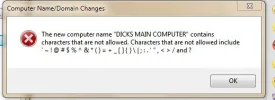
I thought I would change the name of my computer, so I did the procedure and everytime I clicked on change I would get this little box, no matter how I would word it. This is what I was trying to put in "DICKS MAIN COMPUTER" with out the quotes. I used no characters at all as you can see. I tried this on 2 other compters and got the same results.

Thanx....Gunny
 

Attachments

  • BOX.webp
    BOX.webp
    12.6 KB · Views: 588

Joe S

Excellent Member
Member details
Joined
Jan 12, 2009
Messages
3,781
Try deleting the spaces..
Joe
 

Super Sarge

New Member
Member details
Joined
Jun 4, 2009
Messages
1,723
Try putting a dash between the names
I have a computer named EJ-PC-AMD-6000 so dashs work
 

Last edited:

Gunny

Senior Member
Member details
Joined
Jan 28, 2009
Messages
56
Thread Author #4
Hi All

That did it, it don't like spaces. Great thanx a bunch

Take care......Gunny