

Martin Hickie
Senior Member
Member details
- Joined
- Apr 1, 2011
- Messages
- 25
I have the following Windows Games on my Windows 8 PC:
Microsoft Solitaire Collection
Cut the Rope
Pinball FX2
Microsoft Mahjong
Wordament
Microsoft Minesweeper
Once I load them to play on them, I get an error message saying "A connection to Xbox could not be established. Please check your Internet Connection and try again". I can play them wthout connecting but I would like to connect to the internet and play the daily challenges
I have my Microsoft Account on this PC so I can download them.I have tried another account but the same issue keeps coming up. It is nothing to do with my internet connection as I have tried 4 different routers and same issue. I did disable my Antivirus Firewall just in case that could be blocking the connection of Xbox but still same issue and this is alos happening on 2 different PC's with Windows 8 on.
I have contacted Microsoft about this issue and they keep forwarding me to Xbox, which Microsoft think its an Xbox issue but its not.
Xbox have been emailing me some information about the issue im having but the information doesn't help.
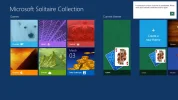
I have attached a picture of Microsoft Solitaire Collection with the error showing.
What else can I do??
Microsoft Solitaire Collection
Cut the Rope
Pinball FX2
Microsoft Mahjong
Wordament
Microsoft Minesweeper
Once I load them to play on them, I get an error message saying "A connection to Xbox could not be established. Please check your Internet Connection and try again". I can play them wthout connecting but I would like to connect to the internet and play the daily challenges
I have my Microsoft Account on this PC so I can download them.I have tried another account but the same issue keeps coming up. It is nothing to do with my internet connection as I have tried 4 different routers and same issue. I did disable my Antivirus Firewall just in case that could be blocking the connection of Xbox but still same issue and this is alos happening on 2 different PC's with Windows 8 on.
I have contacted Microsoft about this issue and they keep forwarding me to Xbox, which Microsoft think its an Xbox issue but its not.
Xbox have been emailing me some information about the issue im having but the information doesn't help.
I have attached a picture of Microsoft Solitaire Collection with the error showing.
What else can I do??
Attachments
-
 Microsoft Defender: No threats detected Scan detailsXbox sign in.webp117.4 KB · Views: 1,368


