📎 AI Summary:
The original poster experiences persistent Windows issues on a new laptop, despite running updates and malware scans. Several suggestions are offered, including rebuilding icon and thumbnail caches and ensuring proper command execution, but these attempts do not resolve the problem. The discussion concludes with the suggestion that the Windows installation might be corrupt if no malware is found, indicating a probable need to reinstall or repair Windows.

OhYeahThisThing

New Member
Joined
Apr 20, 2018
Messages
8
Thread Author #1
Hello guys!
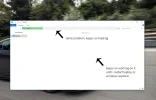
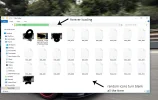
Recently i bought myself a new laptop. Just a few days into using the windows it came with i stumbled upon many problems. It makes the whole windows experience really uncomfortable.One thing that should be noted is that I've used windows ever since I was little and never experienced such difficulties. Since i am not very good at descriptions i made a few screenshots for better graphical representations.Please refer to the pictures for more details. Any feedback would be appreciated.
Regards,
 

Attachments

  • snimka 1.webp
    snimka 1.webp
    81.4 KB · Views: 630
  • snimka 2.webp
    snimka 2.webp
    71.5 KB · Views: 623
  • snimka 3.webp
    snimka 3.webp
    185.5 KB · Views: 616
  • snimka 4.webp
    snimka 4.webp
    37.5 KB · Views: 603
Solution
Hi

Try this and see if your copy of Windows is Activated?

Is Your Windows 10 Activated? Here's How to Check

If it says yes then you don't need to buy a new copy, but you can download the install legally from Microsoft and reinstall it.
It will recognise that you are Activated, (your serial number is stored in the bios) and install a fresh copy of Windows 10 without all the manufactures junk.

Link Removed

Mike

PS, I see Neemo got here before me, anyway if your copy is valid then probable just fixing Windows will do the trick.
Use the Restore Partition, Download and Install a Fresh Copy or try Reset, myself I would get a fresh copy from Microsoft, "Create Install Media" and just have a nice clean installation.

Neemobeer

Windows Forum Team
Staff member
Joined
Jul 4, 2015
Messages
8,995
You can run the following from a command prompt and post a screenshot. slmgr /dlv that should tell us if it's a legitimate license.
 

MikeHawthorne

Essential Member
Microsoft Community Contributor
Joined
May 25, 2009
Messages
6,684
Hi

Try this and see if your copy of Windows is Activated?

Is Your Windows 10 Activated? Here's How to Check

If it says yes then you don't need to buy a new copy, but you can download the install legally from Microsoft and reinstall it.
It will recognise that you are Activated, (your serial number is stored in the bios) and install a fresh copy of Windows 10 without all the manufactures junk.

Link Removed

Mike

PS, I see Neemo got here before me, anyway if your copy is valid then probable just fixing Windows will do the trick.
Use the Restore Partition, Download and Install a Fresh Copy or try Reset, myself I would get a fresh copy from Microsoft, "Create Install Media" and just have a nice clean installation.
 

Solution