
📎 AI Summary:
The thread discusses how to manually delete leftover shortcut menus related to uninstalled software, specifically MetaTrader. The original poster seeks help after uninstalling MetaTrader but still seeing menu entries when right-clicking the desktop. A user replies with detailed steps involving editing the Windows registry to remove specific entries, which the original poster confirms successfully resolves the issue. Overall, the conversation is helpful and positive, focusing on troubleshooting and resolving leftover context menu items.

BillyBoy

New Member
Joined
Sep 19, 2014
Messages
2
Thread Author #1
Hi guys
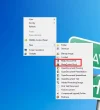
Can anyone help me to delete unwanted shortcut menus please? I had previously install a software called metatrader. Then I had made a complete uninstall a few days ago. The software is gone but the shortcut menus is stll there. How do I delete this manually? Thanks

* I attach a snapshot for you. This menu is shown when I right click on my desktop and select "new".
 

Attachments

  • file.webp
    file.webp
    25.8 KB · Views: 242
Solution
Try this......

Start button > search box, type regedit > press Enter >
expand ( click the pointer in front of ) HKEY_Classes_Root > scroll down to find the 2 items you want to delete.
example :
expand MetaQuotes Book > right click at ShellNew > select Delete.
Repeat the same on MQL4 Source File.
Exit regedit when done.

davidhk129

Senior Member
Joined
May 19, 2012
Messages
1,315
Try this......

Start button > search box, type regedit > press Enter >
expand ( click the pointer in front of ) HKEY_Classes_Root > scroll down to find the 2 items you want to delete.
example :
expand MetaQuotes Book > right click at ShellNew > select Delete.
Repeat the same on MQL4 Source File.
Exit regedit when done.
 

Solution