

Hi,
A friend (who has installed win10 onto his win xp PC and is using classic shell but struggling with the new experience of 10) was following my simple steps to download a screenshare exe file and see if it showed malware as I am seeing in Virustotal.com, Firstly he set the download file option to 'ask where to save it' in Chrome, Edge and Firefox. Downloaded the file though it saved without asking him. He found it on C drive. He then inadvertently double clicked the exe, it installed, so he wanted to uninstall it, he went start > settings >control panel >programs and features, right clicked screenleap and chose uninstall, it got so far and got stuck, he went back to desktop also a rotating ring, pc not right, so rebooted PC. Go back in there to that list again and all the progs are now gone, just says Microsoft OneDrive. He tried launching Msoft word and it was ok, then a few other progs, all ran, so the screen saying 1 prog installed that sounded scary did not denote that he had uninstalled everything !
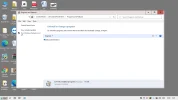
see attached image.
and now Chrome has appeared in that pane to keep Msoft OneDrive company !
I am win7 so I dont have a clue what win10 has done.
What has happened and how can he get his programs list back ?
Regards
DBenz
A friend (who has installed win10 onto his win xp PC and is using classic shell but struggling with the new experience of 10) was following my simple steps to download a screenshare exe file and see if it showed malware as I am seeing in Virustotal.com, Firstly he set the download file option to 'ask where to save it' in Chrome, Edge and Firefox. Downloaded the file though it saved without asking him. He found it on C drive. He then inadvertently double clicked the exe, it installed, so he wanted to uninstall it, he went start > settings >control panel >programs and features, right clicked screenleap and chose uninstall, it got so far and got stuck, he went back to desktop also a rotating ring, pc not right, so rebooted PC. Go back in there to that list again and all the progs are now gone, just says Microsoft OneDrive. He tried launching Msoft word and it was ok, then a few other progs, all ran, so the screen saying 1 prog installed that sounded scary did not denote that he had uninstalled everything !
see attached image.
and now Chrome has appeared in that pane to keep Msoft OneDrive company !
I am win7 so I dont have a clue what win10 has done.
What has happened and how can he get his programs list back ?
Regards
DBenz
Attachments
-
 Microsoft Defender: No threats detected Scan detailsonedrive.webp43.9 KB · Views: 140

