📎 AI Summary:
A user reports encountering the network sharing printer error 0x00000520 when attempting to add a shared printer between Windows 10 and Windows 11. Another user explains that this error indicates a "No such logon session" issue, potentially caused by firewall blocks, misconfigured print sharing setup, or disabled related services. The overall tone suggests troubleshooting this error involves checking system configuration, network settings, and services to resolve the printer sharing problem.

lupiaditya

New Member
Joined
Nov 2, 2023
Messages
1
Thread Author #1
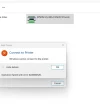
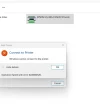
add sharing printer network error 0x00000520
server windows 10
client windows 11 add sharing printer error 0x00000520

please help

thank you
 

Attachments

  • server windows 10.webp
    server windows 10.webp
    14.2 KB · Views: 0
  • server windows 10.webp
    server windows 10.webp
    14.2 KB · Views: 0
Solution
0x00000520 ERROR_NO_SUCH_LOGON_SESSION
A specified logon session does not exist. It might already have been terminated.

  • Could be a firewall blocking
  • You don't have print sharing setup properly
  • You've disabled services or other wise tweaked the system to break sharing
  • Other

Neemobeer

Windows Forum Team
Staff member
Joined
Jul 4, 2015
Messages
8,995
0x00000520 ERROR_NO_SUCH_LOGON_SESSION
A specified logon session does not exist. It might already have been terminated.

  • Could be a firewall blocking
  • You don't have print sharing setup properly
  • You've disabled services or other wise tweaked the system to break sharing
  • Other
 

Solution