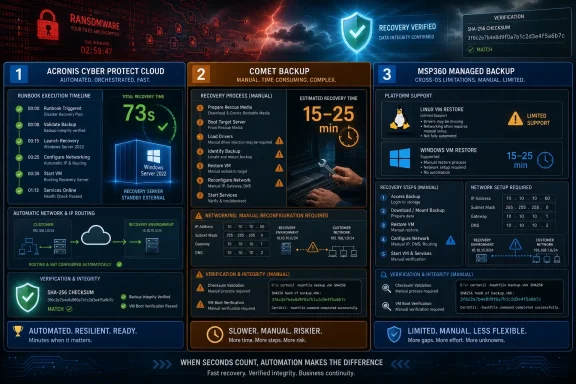
A July 2026 disaster-recovery benchmark from AIMultiple tested Acronis Cyber Protect Cloud, Comet Backup, and MSP360 Managed Backup by restoring live Windows Server 2022 and Ubuntu 24.04 machines after a ransomware-style data-encryption event. The verdict is blunt: the products all restored clean data, but only one behaved like a disaster-recovery platform. Acronis turned backup into a running service in roughly a minute or two; Comet and MSP360 turned backup into a manual operations exercise. That distinction matters because in a real outage, the enemy is not just data loss — it is time, ambiguity, and the number of human decisions required while the business is already down.
Most backup comparisons reward the things backup products are already designed to do: capture data, deduplicate it, store it cheaply, and put it back when asked. This benchmark is more interesting because it asks a harsher question: when the production machine is compromised, how quickly can the workload be made useful again somewhere else?
The test was deliberately small but operationally meaningful. Each product protected a Windows Server 2022 system and an Ubuntu 24.04 system running the same deterministic workload: a web service, a 10,000-row database, and 50 known files. The disaster was a controlled ransomware simulation that encrypted or corrupted the workload data while leaving the operating system alive, forcing the recovery to come from a pre-disaster recovery point rather than from an easy in-place repair.
That design makes the result harder to dismiss. This was not a synthetic file-copy contest or a vendor brochure exercise. The recovered system had to boot, answer an external health probe, and match the original data by checksum. In other words, the benchmark measured the moment users and monitoring systems would care about: when the service is actually back.
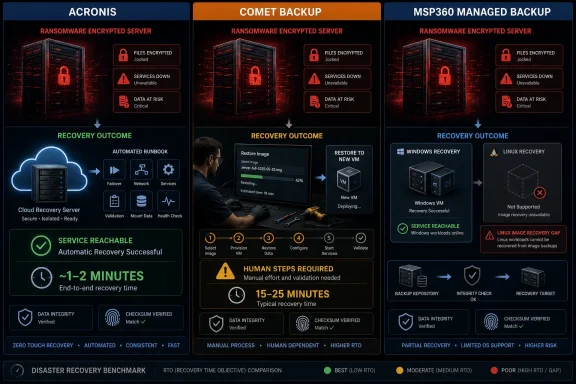
The headline table tells the story. Acronis scored 91 and restored in 73 seconds on Windows and about 108 seconds on Linux. Comet scored 35 and restored Linux manually in roughly 15 to 25 minutes. MSP360 scored 21 overall, with Windows recovery in the same 15-to-25-minute class and Linux effectively absent for image-based disaster recovery.
Acronis Cyber Protect Cloud was the only product tested with an orchestrated DRaaS flow: recovery servers, runbooks, cloud-side failover, completion checks, public-IP assignment, and non-disruptive test failover. In the benchmark, one runbook click started the recovery server in the Acronis cloud, brought up the workload on fresh infrastructure, and returned the application to external reachability. That is why its recovery-time numbers are measured in seconds rather than in operator-shaped ranges.
The runbook detail matters. In a real incident, a runbook is not just convenience; it is a way to reduce panic into procedure. Ordered steps, parallel actions, ping and port checks, approval gates, and nested runbooks turn recovery into something the platform can execute instead of something an administrator has to reconstruct from memory.
Acronis also validates the thing many backup products hand-wave: whether the recovery point actually boots into a usable system. Its automated test failover can boot a recovery server in isolation and assess the result using an AI screenshot check. In the benchmark, that automation correctly flagged a Linux recovery server stuck in journal recovery and later passed a clean Windows boot.
That one failure is not a blemish so much as a useful reminder. A DR platform cannot make a bad recovery point good; it can only expose the problem before production depends on it. The benchmark’s note that a recovery point taken while a backup was still running led to a hung journal-recovery state is exactly the sort of unpleasant discovery DR testing is supposed to surface.
But the benchmark makes clear that Comet is a backup product, not a failover product. There is no recovery server waiting in a vendor cloud, no one-click failover, no runbook, no integrated DR network, and no test failover that boots the machine and proves the service is usable. The process is a restore-to-VM or restore-to-disk workflow, with the administrator doing the sequencing.
The reported mechanics are familiar to anyone who has had to rebuild under pressure. Boot rescue media. Install or launch an agent. Select a disk-image restore. Write the image to a target. Fix the network configuration. Reboot. Confirm the service. Hope nothing about the target environment surprises you.
The disk-image write itself reportedly took only about two minutes, which is the misleadingly comforting part. The full recovery took roughly 15 to 25 minutes because disaster recovery is not the disk write alone. It is every step between declaring failover and receiving a healthy response from outside the recovered environment.
Comet’s reach is broader than its automation. Its disk-image format and restore paths can support bare metal, VMware, Hyper-V via conversion, Proxmox, and cloud recovery into AWS or Azure through image export/import style workflows. That makes it flexible in the hands of an experienced operator. It does not make it a DRaaS system.
That is a real capability. The GPT-to-BIOS/MBR conversion is especially practical because dissimilar firmware is exactly the kind of ugly detail that can derail a bare-metal or cloud-target recovery. A product that can repair that mismatch earns credit in the messy world administrators actually inhabit.
But MSP360’s overall score was crushed by operating-system coverage. The benchmark says its Linux agent does file-level backup only, not bootable image backup, which means no comparable Linux restore-to-VM disaster recovery path. Because the test averaged Windows and Linux sub-scores, that missing half of the estate pulled the total down to 21.
This distinction is important for MSPs. A Windows-only customer may look at the MSP360 result and see a tolerable manual-recovery product with broad cloud target support. A mixed Windows and Linux customer should see a structural coverage problem, not a mere scoring quirk.
MSP360 also lacks the DR engine that would make recovery more than a restore. The product may use disaster-recovery language in marketing, and it can restore images to useful destinations, including public clouds. But in this benchmark, the orchestration layer was the human being at the console.
The 50-file SHA-256 manifest matched. The database checksum matched. The ransomware-simulation artifacts were gone. The restored services answered cleanly. From a pure data-protection standpoint, the tested products did the fundamental job.
That is why the benchmark is more damaging to sloppy DR marketing than to backup products themselves. Comet and MSP360 did not fail because they could not restore data. They fell behind because they required too much manual work between stored backup and resumed service.
For WindowsForum readers, that distinction is the useful part. Many environments do not need fully orchestrated DRaaS for every workload. But every environment should know whether its chosen product recovers a machine or merely provides the materials from which an administrator can rebuild one.
On Comet’s Linux restore, the benchmarkers rewrote netplan configuration in the rescue environment. On MSP360’s Windows restore, they used the cloud provider’s out-of-band console to set the correct static IP after the server booted. Neither is exotic work, but both are outage-time work.
This is where DRaaS earns its keep. A platform with a recovery server and defined networking model can attach a public IP, manage VPN connectivity, isolate test networks, and encode much of the network cutover into the failover plan. A manual image restore drops the original machine into a new context and makes the administrator reconcile the difference.
The benchmark also notes that none of the products provided a built-in third-party public DNS failover integration such as automatic Cloudflare-style A-record rerouting. Acronis offers custom DNS and multiple VPN modes, but not an automatic public DNS cutover. Comet and MSP360 leave the network path largely to the operator.
That matters because service recovery is not only boot success. A machine can be alive, logged in, and even internally healthy while still invisible to users. The measured RTO rightly stopped at external reachability, not at “the VM booted.”
This is the kind of problem that backup success logs do not always communicate in business terms. A backup job can complete, a recovery point can exist, and the restore process can still produce a system that does not return the workload fast enough — or at all. The only way to know is to boot and test.
Comet’s “simulate restore” style dry run does not substitute for that, because it does not prove that a machine starts and serves traffic. MSP360’s restore verification is more meaningful because it can boot an image as a Hyper-V virtual machine and check logon, but the benchmark could not run it on cloud test hosts without local Hyper-V. It also validates a backup in a local hypervisor context rather than executing a vendor-hosted recovery-site failover.
The difference is not academic. A test failover is rehearsal. A dry run is paperwork. A boot verification is useful, but it is still narrower than proving the full service path under the same recovery model that would be used in a real outage.
Acronis has the advantage of a managed recovery site in its own cloud or Azure, plus on-premises VMware and Hyper-V options and documented AWS EC2 migration. MSP360 lacks a vendor-managed DR cloud but reaches AWS, Azure, and Google Cloud through native restore options, making it the only product in the test with a Google Compute Engine path. Comet can reach AWS and Azure through VMDK or VHDX export/import flows, alongside bare metal and common hypervisors.
This is why procurement grids can mislead. A row that says “AWS,” “Azure,” or “VMware” does not tell you whether the product will orchestrate failover into that target or merely generate an image an administrator can carry there. Both are valuable. They are not the same.
For MSPs, the temptation is to sell destination breadth because it looks impressive and maps easily to client questions. The benchmark argues for a more operational question: who does the work when the primary server is gone? If the answer is “the technician,” the target list is just the map, not the recovery plan.
Acronis ran consecutive failover drills and averaged the results because the workflow was controlled by the platform. Comet and MSP360 had machine-level steps that could be timed precisely, but the full recovery included provisioning, rescue workflows, image handling, networking edits, and reboot sequencing. Those are human steps, so the honest number is a range.
That does not mean 15 to 25 minutes is bad for every workload. For a small internal application, a branch-office service, or a non-critical host, that might be perfectly acceptable. For a revenue-facing service, a domain controller, a line-of-business database, or a healthcare workflow, the distinction between 73 seconds and 20 minutes is not cosmetic.
The more important lesson is that RTO is not just a storage-performance measure. It is a measure of how many assumptions have been pre-decided. Acronis pre-decides more of them in the platform. Comet and MSP360 leave more of them for the incident.
Comet and MSP360 are closer to backup products with disaster-recovery-capable restore paths. That is not an insult. A manual image restore to a cloud VM or hypervisor can absolutely be part of a disaster-recovery plan. But the plan is not the product unless the product can execute the failover.
This is where buyers should ask concrete questions instead of accepting category labels. Is there a recovery server? Is there a runbook? Can the product perform a non-disruptive test failover? Does it assign networking automatically? Can it prove the workload is reachable externally? Does failback involve delta synchronization, or is it a full manual restore in reverse?
The benchmark’s scoring reflects that philosophy. Failover automation, test failover, connectivity, and failback are not decorative enterprise features. They are the difference between a backup archive and a recovery system.
For Linux-heavy or mixed estates, the conclusion is harsher. MSP360’s lack of Linux image-based recovery means it cannot provide symmetric disaster recovery across the environment tested. That does not merely lower a benchmark number; it complicates the operating model.
Comet looks more balanced across Windows and Linux image backup, but still lacks orchestration. It is better understood as a flexible backup engine that can be used in a DR plan rather than as the DR platform itself. In the right hands, that distinction may be acceptable.
Acronis is the only one of the three that behaved like a service-continuity product across both tested operating systems. Its main caveat is not recovery speed but operational discipline around recovery-point quality and failback. The benchmark notes that returning to original hardware may require bootable media and manual reprotection, so the story is not magic from failure to final steady state.
In that scenario, the safest move is often to recover elsewhere from a known-good point. The benchmark’s Acronis note — pause the running backup before failing over and select a clean recovery point — is a reminder that speed must not outrun judgment. Fast recovery from a bad point is still bad recovery.
Manual products make that judgment harder because the administrator is also building the recovery environment. During an incident, the same person may be deciding which recovery point is clean, provisioning a target, writing the image, repairing boot configuration, changing network settings, and verifying data integrity. That is a lot of cognitive load at the worst possible time.
Automation does not remove the need for judgment, but it narrows the number of moving parts. That is why Acronis’s advantage is bigger than its stopwatch number. It shifts the recovery workflow from improvised engineering to controlled execution.
What the score does establish is a clean taxonomy. Acronis is a DRaaS platform with backup underneath it. Comet is a backup platform that can be used for manual disaster recovery. MSP360 is a backup platform with useful Windows image recovery and broad cloud restore destinations, but with a major Linux image-recovery gap.
That taxonomy is more valuable than the numbers alone. It gives administrators a way to challenge vendor language and internal assumptions. If a product cannot run a recovery server, execute a runbook, perform a real test failover, and bring a service up on alternate infrastructure without hand assembly, calling it disaster recovery is generous.
The benchmark also reinforces an old truth: the restore is not the recovery. Recovery includes bootability, network identity, application health, external reachability, and data integrity. Leaving any of those to be discovered during an incident is how backup confidence turns into outage pain.
 The Benchmark Separates Recovery From Restore
Most backup comparisons reward the things backup products are already designed to do: capture data, deduplicate it, store it cheaply, and put it back when asked. This benchmark is more interesting because it asks a harsher question: when the production machine is compromised, how quickly can the workload be made useful again somewhere else?The test was deliberately small but operationally meaningful. Each product protected a Windows Server 2022 system and an Ubuntu 24.04 system running the same deterministic workload: a web service, a 10,000-row database, and 50 known files. The disaster was a controlled ransomware simulation that encrypted or corrupted the workload data while leaving the operating system alive, forcing the recovery to come from a pre-disaster recovery point rather than from an easy in-place repair.
That design makes the result harder to dismiss. This was not a synthetic file-copy contest or a vendor brochure exercise. The recovered system had to boot, answer an external health probe, and match the original data by checksum. In other words, the benchmark measured the moment users and monitoring systems would care about: when the service is actually back.
The headline table tells the story. Acronis scored 91 and restored in 73 seconds on Windows and about 108 seconds on Linux. Comet scored 35 and restored Linux manually in roughly 15 to 25 minutes. MSP360 scored 21 overall, with Windows recovery in the same 15-to-25-minute class and Linux effectively absent for image-based disaster recovery.
Acronis Wins Because It Owns the Moment After Failure
The strongest result in the benchmark is not that Acronis restored data correctly. All three products did that. The decisive advantage is that Acronis had a disaster-recovery engine waiting on the other side of the backup.Acronis Cyber Protect Cloud was the only product tested with an orchestrated DRaaS flow: recovery servers, runbooks, cloud-side failover, completion checks, public-IP assignment, and non-disruptive test failover. In the benchmark, one runbook click started the recovery server in the Acronis cloud, brought up the workload on fresh infrastructure, and returned the application to external reachability. That is why its recovery-time numbers are measured in seconds rather than in operator-shaped ranges.
The runbook detail matters. In a real incident, a runbook is not just convenience; it is a way to reduce panic into procedure. Ordered steps, parallel actions, ping and port checks, approval gates, and nested runbooks turn recovery into something the platform can execute instead of something an administrator has to reconstruct from memory.
Acronis also validates the thing many backup products hand-wave: whether the recovery point actually boots into a usable system. Its automated test failover can boot a recovery server in isolation and assess the result using an AI screenshot check. In the benchmark, that automation correctly flagged a Linux recovery server stuck in journal recovery and later passed a clean Windows boot.
That one failure is not a blemish so much as a useful reminder. A DR platform cannot make a bad recovery point good; it can only expose the problem before production depends on it. The benchmark’s note that a recovery point taken while a backup was still running led to a hung journal-recovery state is exactly the sort of unpleasant discovery DR testing is supposed to surface.
Comet Restores the Machine, but the Operator Performs the Disaster Recovery
Comet Backup came through on the most basic promise: it restored the ransomware-hit Ubuntu server byte-exact clean, and the recovered application answered from a new host. That is not trivial. For many small providers and technically capable shops, that may be enough if they accept the labor cost and the longer outage window.But the benchmark makes clear that Comet is a backup product, not a failover product. There is no recovery server waiting in a vendor cloud, no one-click failover, no runbook, no integrated DR network, and no test failover that boots the machine and proves the service is usable. The process is a restore-to-VM or restore-to-disk workflow, with the administrator doing the sequencing.
The reported mechanics are familiar to anyone who has had to rebuild under pressure. Boot rescue media. Install or launch an agent. Select a disk-image restore. Write the image to a target. Fix the network configuration. Reboot. Confirm the service. Hope nothing about the target environment surprises you.
The disk-image write itself reportedly took only about two minutes, which is the misleadingly comforting part. The full recovery took roughly 15 to 25 minutes because disaster recovery is not the disk write alone. It is every step between declaring failover and receiving a healthy response from outside the recovered environment.
Comet’s reach is broader than its automation. Its disk-image format and restore paths can support bare metal, VMware, Hyper-V via conversion, Proxmox, and cloud recovery into AWS or Azure through image export/import style workflows. That makes it flexible in the hands of an experienced operator. It does not make it a DRaaS system.
MSP360’s Windows Recovery Is Useful, but Its Linux Gap Is Fatal to the Score
MSP360 Managed Backup lands in a more awkward place. On Windows, it looks broadly similar to Comet’s class of recovery: manual, image-based, and workable. In the benchmark, it restored a Windows Server image onto separate cloud hardware, converted GPT/UEFI assumptions for a BIOS/MBR recovery host, booted the machine, fixed networking by hand, and returned the service byte-exact clean.That is a real capability. The GPT-to-BIOS/MBR conversion is especially practical because dissimilar firmware is exactly the kind of ugly detail that can derail a bare-metal or cloud-target recovery. A product that can repair that mismatch earns credit in the messy world administrators actually inhabit.
But MSP360’s overall score was crushed by operating-system coverage. The benchmark says its Linux agent does file-level backup only, not bootable image backup, which means no comparable Linux restore-to-VM disaster recovery path. Because the test averaged Windows and Linux sub-scores, that missing half of the estate pulled the total down to 21.
This distinction is important for MSPs. A Windows-only customer may look at the MSP360 result and see a tolerable manual-recovery product with broad cloud target support. A mixed Windows and Linux customer should see a structural coverage problem, not a mere scoring quirk.
MSP360 also lacks the DR engine that would make recovery more than a restore. The product may use disaster-recovery language in marketing, and it can restore images to useful destinations, including public clouds. But in this benchmark, the orchestration layer was the human being at the console.
The Data Integrity Result Is the Quiet Good News
It would be easy to read the score gap as a story of one product working and two products failing. That would be wrong. All three products produced byte-exact recovery of the test workload.The 50-file SHA-256 manifest matched. The database checksum matched. The ransomware-simulation artifacts were gone. The restored services answered cleanly. From a pure data-protection standpoint, the tested products did the fundamental job.
That is why the benchmark is more damaging to sloppy DR marketing than to backup products themselves. Comet and MSP360 did not fail because they could not restore data. They fell behind because they required too much manual work between stored backup and resumed service.
For WindowsForum readers, that distinction is the useful part. Many environments do not need fully orchestrated DRaaS for every workload. But every environment should know whether its chosen product recovers a machine or merely provides the materials from which an administrator can rebuild one.
The Network Is Where Manual Recovery Becomes Real
The most revealing operational finding may be the least glamorous: both manual products brought back the source machine’s static network configuration. That is exactly what an image restore should do, and exactly what can make the recovered host unreachable.On Comet’s Linux restore, the benchmarkers rewrote netplan configuration in the rescue environment. On MSP360’s Windows restore, they used the cloud provider’s out-of-band console to set the correct static IP after the server booted. Neither is exotic work, but both are outage-time work.
This is where DRaaS earns its keep. A platform with a recovery server and defined networking model can attach a public IP, manage VPN connectivity, isolate test networks, and encode much of the network cutover into the failover plan. A manual image restore drops the original machine into a new context and makes the administrator reconcile the difference.
The benchmark also notes that none of the products provided a built-in third-party public DNS failover integration such as automatic Cloudflare-style A-record rerouting. Acronis offers custom DNS and multiple VPN modes, but not an automatic public DNS cutover. Comet and MSP360 leave the network path largely to the operator.
That matters because service recovery is not only boot success. A machine can be alive, logged in, and even internally healthy while still invisible to users. The measured RTO rightly stopped at external reachability, not at “the VM booted.”
Test Failover Is the Feature Buyers Undervalue Until the First Bad Backup
The benchmark’s Acronis journal-recovery incident is a useful case study in why test failover is not a luxury checkbox. A recovery point captured during an active backup led to a Linux recovery server hanging in journal recovery. The automated test failover caught the failure condition independently.This is the kind of problem that backup success logs do not always communicate in business terms. A backup job can complete, a recovery point can exist, and the restore process can still produce a system that does not return the workload fast enough — or at all. The only way to know is to boot and test.
Comet’s “simulate restore” style dry run does not substitute for that, because it does not prove that a machine starts and serves traffic. MSP360’s restore verification is more meaningful because it can boot an image as a Hyper-V virtual machine and check logon, but the benchmark could not run it on cloud test hosts without local Hyper-V. It also validates a backup in a local hypervisor context rather than executing a vendor-hosted recovery-site failover.
The difference is not academic. A test failover is rehearsal. A dry run is paperwork. A boot verification is useful, but it is still narrower than proving the full service path under the same recovery model that would be used in a real outage.
Target Breadth Does Not Equal Disaster Recovery Maturity
One of the benchmark’s more counterintuitive findings is that target reach was not where the products separated. Acronis and MSP360 each reached six of seven destination types, while Comet reached five. On raw destination count, the manual products are not embarrassingly behind.Acronis has the advantage of a managed recovery site in its own cloud or Azure, plus on-premises VMware and Hyper-V options and documented AWS EC2 migration. MSP360 lacks a vendor-managed DR cloud but reaches AWS, Azure, and Google Cloud through native restore options, making it the only product in the test with a Google Compute Engine path. Comet can reach AWS and Azure through VMDK or VHDX export/import flows, alongside bare metal and common hypervisors.
This is why procurement grids can mislead. A row that says “AWS,” “Azure,” or “VMware” does not tell you whether the product will orchestrate failover into that target or merely generate an image an administrator can carry there. Both are valuable. They are not the same.
For MSPs, the temptation is to sell destination breadth because it looks impressive and maps easily to client questions. The benchmark argues for a more operational question: who does the work when the primary server is gone? If the answer is “the technician,” the target list is just the map, not the recovery plan.
RTO Is a Human-Factors Metric Disguised as a Stopwatch
The benchmark reports Acronis recovery in precise seconds and Comet/MSP360 recovery as a 15-to-25-minute range. That difference in precision is itself a finding. Automation produces repeatable timings; manual recovery produces operator-dependent windows.Acronis ran consecutive failover drills and averaged the results because the workflow was controlled by the platform. Comet and MSP360 had machine-level steps that could be timed precisely, but the full recovery included provisioning, rescue workflows, image handling, networking edits, and reboot sequencing. Those are human steps, so the honest number is a range.
That does not mean 15 to 25 minutes is bad for every workload. For a small internal application, a branch-office service, or a non-critical host, that might be perfectly acceptable. For a revenue-facing service, a domain controller, a line-of-business database, or a healthcare workflow, the distinction between 73 seconds and 20 minutes is not cosmetic.
The more important lesson is that RTO is not just a storage-performance measure. It is a measure of how many assumptions have been pre-decided. Acronis pre-decides more of them in the platform. Comet and MSP360 leave more of them for the incident.
The Marketing Word “DRaaS” Needs a Receipts Test
The benchmark lands especially hard on the industry’s elastic use of “DRaaS.” Disaster recovery as a service should mean the vendor provides a recovery environment and orchestrates failover into it. By that definition, Acronis fits the category in this test.Comet and MSP360 are closer to backup products with disaster-recovery-capable restore paths. That is not an insult. A manual image restore to a cloud VM or hypervisor can absolutely be part of a disaster-recovery plan. But the plan is not the product unless the product can execute the failover.
This is where buyers should ask concrete questions instead of accepting category labels. Is there a recovery server? Is there a runbook? Can the product perform a non-disruptive test failover? Does it assign networking automatically? Can it prove the workload is reachable externally? Does failback involve delta synchronization, or is it a full manual restore in reverse?
The benchmark’s scoring reflects that philosophy. Failover automation, test failover, connectivity, and failback are not decorative enterprise features. They are the difference between a backup archive and a recovery system.
Windows Shops Can Read the Results Differently Than Mixed Estates
For a Windows-only environment, MSP360’s low overall score needs context. The Windows recovery path worked, and the product showed useful restore breadth. If the business can tolerate a manual 15-to-25-minute recovery and has staff ready to execute it, MSP360 may still belong in a shortlist for backup-led recovery.For Linux-heavy or mixed estates, the conclusion is harsher. MSP360’s lack of Linux image-based recovery means it cannot provide symmetric disaster recovery across the environment tested. That does not merely lower a benchmark number; it complicates the operating model.
Comet looks more balanced across Windows and Linux image backup, but still lacks orchestration. It is better understood as a flexible backup engine that can be used in a DR plan rather than as the DR platform itself. In the right hands, that distinction may be acceptable.
Acronis is the only one of the three that behaved like a service-continuity product across both tested operating systems. Its main caveat is not recovery speed but operational discipline around recovery-point quality and failback. The benchmark notes that returning to original hardware may require bootable media and manual reprotection, so the story is not magic from failure to final steady state.
The Ransomware Scenario Favors Platforms That Reduce Decisions
The simulated disaster did not crash the operating system. It corrupted the workload data and left the source machine running, which resembles many ransomware incidents where the first priority is to avoid restoring corrupted state or continuing to trust a compromised host.In that scenario, the safest move is often to recover elsewhere from a known-good point. The benchmark’s Acronis note — pause the running backup before failing over and select a clean recovery point — is a reminder that speed must not outrun judgment. Fast recovery from a bad point is still bad recovery.
Manual products make that judgment harder because the administrator is also building the recovery environment. During an incident, the same person may be deciding which recovery point is clean, provisioning a target, writing the image, repairing boot configuration, changing network settings, and verifying data integrity. That is a lot of cognitive load at the worst possible time.
Automation does not remove the need for judgment, but it narrows the number of moving parts. That is why Acronis’s advantage is bigger than its stopwatch number. It shifts the recovery workflow from improvised engineering to controlled execution.
The Scoreboard Says “Acronis,” but the Real Winner Is a Better Definition
The benchmark’s weighted score — 91 for Acronis, 35 for Comet, 21 for MSP360 — is useful, but it should not be read as a universal buying order. It is a score for disaster recovery under a specific methodology, not a complete evaluation of pricing, support, storage economics, security posture, or everyday backup management.What the score does establish is a clean taxonomy. Acronis is a DRaaS platform with backup underneath it. Comet is a backup platform that can be used for manual disaster recovery. MSP360 is a backup platform with useful Windows image recovery and broad cloud restore destinations, but with a major Linux image-recovery gap.
That taxonomy is more valuable than the numbers alone. It gives administrators a way to challenge vendor language and internal assumptions. If a product cannot run a recovery server, execute a runbook, perform a real test failover, and bring a service up on alternate infrastructure without hand assembly, calling it disaster recovery is generous.
The benchmark also reinforces an old truth: the restore is not the recovery. Recovery includes bootability, network identity, application health, external reachability, and data integrity. Leaving any of those to be discovered during an incident is how backup confidence turns into outage pain.
The Practical Lesson Hidden in the Stopwatch
The useful buying guidance from this benchmark is not “always buy the fastest product.” It is to match the recovery model to the business consequence of downtime. A manual image restore can be rational for some workloads; it is reckless for others.- Acronis was the only tested product that delivered orchestrated failover through a recovery server and runbook rather than a manual restore workflow.
- Comet and MSP360 both restored data cleanly, but their recoveries depended on an operator provisioning, restoring, fixing networking, and validating service return.
- MSP360’s Windows image recovery was materially stronger than its overall score suggests, but its lack of Linux image-based recovery is a serious limitation for mixed estates.
- All three products produced byte-exact recovery of the tested workload, so the benchmark’s separation is about automation, RTO, and operating-system coverage rather than data correctness.
- Network reconfiguration was a decisive manual-recovery friction point because restored images carried source-side static addressing into a new environment.
- Buyers should treat “DRaaS” as a claim that requires proof of runbooks, recovery servers, test failover, networking automation, and a credible failback path.
References
- Primary source: AIMultiple
Published: 2026-07-02T20:40:13.093270
Disaster Recovery Benchmark: Acronis vs Comet vs MSP360
aimultiple.com
- Related coverage: help.msp360.com
VMware Virtual Machine Restore Plan | Help Center
VMware Virtual Machine Restore plan configuration, running and editinghelp.msp360.com - Related coverage: docs.cometbackup.com
Comet Backup usage | Comet Documentation
NOTE: The Comet Management Console was previously referred to as the Comet Server.docs.cometbackup.com
- Related coverage: msp360.com
VM backup for VMware and Hyper-V | MSP360 Backup Software
Back up and restore virtual machines with reliable VMware and Hyper-V backup from MSP360. Get the best third-party solution for your VM Backup.www.msp360.com - Related coverage: cometbackup.com
VMware Backup Software for Virtual Machines | Comet Backup
Protect VMware vSphere and ESXi virtual machines with fast, secure backup. Includes CBT, deduplication, and quick VM recovery for disaster protection. www.cometbackup.com
- Related coverage: acronis.com
Acronis Disaster Recovery for Acronis Cyber Protect Cloud | Acronis Resource Center
Make disaster recovery painless and increase efficiency with orchestration, runbooks, and automatic failover. When you add Acronis Disaster Recovery, you can easily extend the cloud recovery services your clients need. www.acronis.com
- Related coverage: dl.acronis.com