Windows 10 Cannot change Some Shortcut Icons

Gary Hesprich

New Member
Joined
Mar 2, 2018
Messages
3
Cannot change Icon on some shortcuts in windows 10. The [Change Icon...] button is greyed out. Other shortcuts work fine.

Icon permissions "Allow" Full control for all users
 

Solution
OK, I had tried to create a new shortcut with the same result before contacting forum. But, per your suggestion I tried again. while doing that, I noticed that there seemed to be something odd about the shortcut Target: "MyHarmony". So I changed the target to the ".exe" file. This seems to have resolved the issue. While I am still confused, the problem is resolved, and life is good again.

Thank You for Your Help !! ...Gary

Gary Hesprich

New Member
Joined
Mar 2, 2018
Messages
3
Can you provide some examples so we can better help you with your problem.

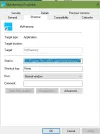
OK. Attached file is Screen Shot of Shortcut Properties with the [Change Icon] button disabled. Please let me know if I can provide any additional details.

Thank You ...Gary
 

Attachments

  • Shortcut ~ no change Icon.webp
    Shortcut ~ no change Icon.webp
    16.6 KB · Views: 299

Neemobeer

Windows Forum Team
Staff member
Joined
Jul 4, 2015
Messages
8,998
LNK files don't always have to point to an exe or dll file for there icon. They can contain a special structure called ICON_LOCATION that can hard point to an icon. Unless you understand the format of a shell link file you wont be able to modify this behavior. I would simply create a new shortcut to the program in question. You can then edit the icon on the new shortcut(s)
 

Gary Hesprich

New Member
Joined
Mar 2, 2018
Messages
3
OK, I had tried to create a new shortcut with the same result before contacting forum. But, per your suggestion I tried again. while doing that, I noticed that there seemed to be something odd about the shortcut Target: "MyHarmony". So I changed the target to the ".exe" file. This seems to have resolved the issue. While I am still confused, the problem is resolved, and life is good again.

Thank You for Your Help !! ...Gary
 

Solution
Back
Top