In June 2026, Microsoft added a large set of Teams features across AI calling, Copilot-powered search, Teams Rooms, meeting security, mobile file previews, frontline scheduling, phone administration, and anti-impersonation protections for organizations using Teams on desktop, mobile, room devices, and managed calling environments.
The headline is not that Teams received another busy monthly changelog. The headline is that Microsoft is turning Teams into the control surface for AI-assisted work, customer contact, room intelligence, and administrative enforcement. June’s update reads less like a productivity app refresh and more like a blueprint for where Microsoft thinks the workplace operating system is headed.
Teams has spent years trying to be the place where work happens. In June 2026, Microsoft made a sharper claim: Teams should increasingly be the place where agents work on behalf of humans, departments, and IT policy.
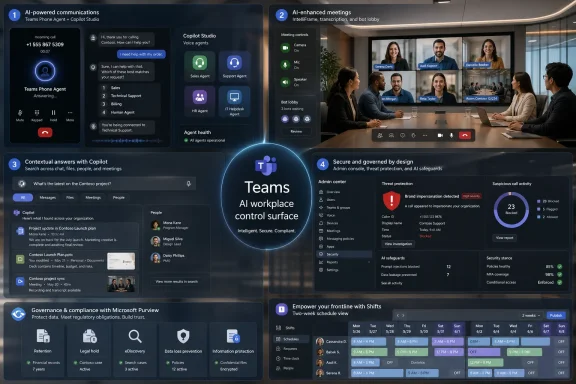
The most visible example is Teams Phone Agent, a new AI calling experience designed to answer incoming calls, understand what the caller needs, resolve routine questions, schedule appointments, and route callers to the right department. That is not just voicemail with a better script. It is Microsoft putting conversational automation directly into the phone layer of Teams, where many organizations still handle customer service, internal support, appointment setting, and basic triage.
The more strategic piece is the integration with custom voice agents built in Copilot Studio. Microsoft is no longer treating Teams Phone as merely a cloud PBX bolted onto Microsoft 365. It is positioning it as a programmable communications surface where businesses can plug in specialized workflows: bill payment, help desk routing, customer intake, HR requests, field service dispatch, or anything else that can be modeled as a conversational process.
That is a meaningful shift for administrators. Traditional Teams Phone deployments involve numbers, policies, call queues, auto attendants, devices, and compliance settings. Agent-enabled Teams Phone adds another layer: who is allowed to build these agents, what data they can access, how their behavior is audited, and when a human must remain in the loop.
Microsoft is betting that organizations will accept that complexity because the payoff is lower call volume for staff and faster answers for callers. The risk is that every automated front door becomes another place where a bad configuration, overconfident answer, or poorly governed integration can create operational friction at scale.
June’s contextual Copilot search is Microsoft’s answer to that problem. Instead of forcing users to remember the right keyword, channel, date, or sender, Teams can now surface answers from natural-language questions inside the search experience. The idea is simple: ask what you need to know, and Copilot does the digging.
That sounds obvious in 2026, but it matters because Teams is not a clean document repository. It is a messy blend of meetings, chats, channels, files, loops, reactions, recordings, links, apps, and fragments of decisions that never make it into a formal document. If Microsoft can make that mess searchable in a way that respects permissions and context, Teams becomes more valuable than the sum of its notification streams.
The advanced file discovery work points in the same direction. Teams can now index more files associated with channels and provide smarter filters by type, sender, and date. For users, this is a quality-of-life improvement. For organizations, it is Microsoft acknowledging that Teams has become an accidental document management layer whether IT wanted it to or not.
The challenge is trust. Users will need to understand when Copilot is answering from a chat, a file, a meeting transcript, or some combination of all three. Administrators will need to understand how retention, permissions, and compliance boundaries shape those answers. AI search is useful only if users believe both that it found the right thing and that it was allowed to find it.
This is where Teams’ AI push becomes physical. Remote meetings are one thing; hybrid meetings are where bad room layouts, missing cables, unclear audio, and poor camera framing still punish anyone who is not sitting at the conference table. Microsoft’s Teams Rooms work is aimed at the awkward middle ground where the room is technically connected but socially and operationally uneven.
Expanded IntelliFrame with people labels is a good example. Remote attendees often see a conference room as a row of tiny heads, partial profiles, and unclear speakers. Labeling people in the room is not glamorous, but it attacks one of hybrid work’s most persistent problems: the remote participant’s disadvantage in reading the room.
The Department of Defense support for Teams Rooms on Android also matters more than it may sound. Government and regulated environments have slower adoption curves, stricter requirements, and more complicated procurement paths. When Microsoft extends Teams Rooms support into those environments, it is not just chasing feature parity; it is trying to make Teams acceptable as standardized infrastructure.
There is a broader theme here. Microsoft is not treating meeting rooms as dumb accessories attached to Teams. It is treating them as managed, intelligent, policy-bound nodes in the Microsoft 365 estate. That will appeal to IT teams that want consistency, but it also means room devices are becoming part of the same governance conversation as endpoints, identities, and collaboration data.
That is the right instinct. Social engineering succeeds because it exploits timing, pressure, and familiarity. A call claiming to be from IT, finance, a bank, a vendor, or an executive does not need to defeat encryption if it can persuade someone to share information, approve a request, or install something they should not.
Brand impersonation protection is especially relevant as voice fraud becomes more convincing. Teams Phone is now part of many organizations’ internal and external communications fabric, so a spoofed or suspicious call is not merely a nuisance. It can become a business email compromise incident with a voice channel attached.
The new Security Detection Reports inside Teams Admin Center give administrators another way to monitor these patterns. That is useful, but the admin center is not where the first bad decision happens. The more important design choice is warning the user before they engage too deeply.
The addition of bot detection before meetings also reflects a new reality. Meetings are no longer attended only by people and sanctioned recording tools. AI note-takers, transcription bots, third-party assistants, and unknown automation services are now trying to enter meetings as routine participants. Microsoft’s new policy can identify likely bots, send them to the lobby separately, and require organizer approval before entry.
That will not end the debate over meeting bots, but it gives organizations a better default posture. The question is no longer whether AI should attend meetings. The question is who controls which AI attends, what it records, where that data goes, and whether participants are meaningfully informed.
Microsoft added expanded policy controls for digital workers, dedicated management for Teams core agents, additional Purview-related administrative capabilities, and centralized management for Teams Phone device applications. Each of these is sensible in isolation. Together, they show how Teams administration is broadening from collaboration management into agent governance, device management, security response, compliance, telephony, and AI policy.
That is a lot to ask of Teams admins, many of whom already sit at the intersection of Exchange, Entra ID, SharePoint, Intune, Purview, Defender, and Microsoft 365 licensing. The modern Teams admin is no longer just deciding who can create a team or whether guests can join a meeting. They are being asked to govern automated callers, meeting bots, branded reactions, digital workers, room intelligence, and data exposure through AI search.
The Purview angle is especially important. Once Teams features begin summarizing, searching, transcribing, labeling, and acting on communications, compliance boundaries become more complicated. Retention policies, eDiscovery, audit logs, sensitivity labels, and insider risk controls all become part of the Teams feature story.
Microsoft’s advantage is that it can wire these controls into the Microsoft 365 stack better than almost anyone else. Its disadvantage is that the stack is already dense. Smaller organizations may welcome defaults and automation, while larger organizations will want proof that new AI surfaces can be governed with the same seriousness as email, files, and endpoints.
The irony is that AI features often arrive pitched as simplification. For end users, they may be. For IT, simplification usually arrives only after a new round of policy design, licensing review, security validation, and user education.
That matters because Teams’ biggest competitor is not always Slack, Zoom, or Google Meet. Often, it is user fatigue. If switching chats loses context, files are hard to find, downloads disappear into mystery, and mobile previews lag, users begin routing work around the official tool.
Preserved workspace context is particularly telling. Teams is full of small interruptions: a chat ping, a channel mention, a meeting reminder, a file request, a call. If the app can better preserve where a user was before they switched conversations, it reduces the cognitive tax of living inside a busy collaboration client.
Grouped muted and meeting chats also acknowledge that not every conversation deserves equal visual weight. Teams has historically struggled with information hierarchy. It treats too many things as urgent until users manually discipline the app into something tolerable.
Support for apps inside private and shared channels is another practical expansion. Private and shared channels have always promised more precise collaboration boundaries, but feature gaps often made them feel like second-class spaces. Bringing more app support into those contexts makes them more viable for cross-functional work that cannot simply happen in a standard channel.
This is a different flavor of Teams than the one experienced by office workers arguing with meeting recaps and chat notifications. For frontline managers, the issue is not whether Copilot can summarize a brainstorming session. It is whether schedules can be built, changed, communicated, and staffed without a spreadsheet becoming the unofficial system of record.
The intelligent Assign Open Shifts feature is where Microsoft’s AI ambitions meet a practical scheduling problem. If the system can help match open shifts to available workers under the right rules, it can save managers time and reduce staffing gaps. If it gets the rules wrong, it can create resentment quickly.
The new two-week planning view is similarly mundane and important. Scheduling is temporal work; managers need to see patterns, gaps, conflicts, and coverage over time. A better planning view can be more valuable than a sophisticated feature buried three clicks away.
Frontline features also sharpen Microsoft’s broader Teams proposition. Teams is not only trying to be the digital headquarters for knowledge workers. It is trying to span office staff, retail workers, hospital teams, field technicians, factory supervisors, and public-sector operations. That breadth is powerful, but it means Teams must serve very different definitions of “work” inside the same product family.
The value is obvious. Meeting notes become more useful when attribution is accurate. Hybrid participants can follow discussion more easily. Recaps can distinguish between a decision, an objection, and a follow-up owner.
But voice enrollment also sits near sensitive territory. Voice is biometric-adjacent in the way users experience it, even when the technical implementation and policy framing are more specific. Organizations will need to communicate clearly about what is enrolled, how it is used, who can access it, and how users opt in or out.
Teams Phone’s improved voicemail transcription, now with 14 additional languages, expands the same theme. Voice content is becoming searchable, analyzable, and actionable across more regions and workforces. That is a productivity gain for multinational organizations, but it also increases the amount of spoken communication that becomes stored text.
For compliance teams, this is not a minor distinction. Text is easier to search, retain, classify, and discover. It is also easier to expose if permissions, retention, or review processes are poorly designed.
A meeting begins before anyone joins, when agendas, room availability, and attendee context matter. It continues during the call through audio, video, captions, reactions, bots, room devices, and shared content. It persists afterward through transcripts, recaps, files, tasks, decisions, and search. Microsoft’s Teams roadmap is increasingly built around that full lifecycle.
The upside is continuity. The same platform can help schedule the shift, answer the call, run the meeting, label the room participants, detect the bot, find the file, transcribe the voicemail, warn about impersonation, and preserve the compliance trail.
The downside is concentration. The more Teams becomes the operating layer for work, the more outages, licensing changes, admin mistakes, and policy misconfigurations matter. Organizations that standardize deeply on Teams gain integration, but they also deepen dependence.
That dependence is not automatically bad. IT standardization exists because fragmented tools create security, compliance, and support problems. But Microsoft’s June update shows how quickly standardization can become platform gravity. Once Teams owns the workflow, the meeting room, the phone call, and the AI assistant, moving away becomes less a software migration and more an organizational redesign.
For end users, the improvements are tangible. Search should feel more natural. File discovery should be less painful. Mobile previews should be faster. Meeting rooms should be more intelligible. Calls should be safer. Frontline scheduling should be easier.
For administrators, the work shifts from enabling features to governing systems of action. AI agents do not merely display information; they answer calls and perform workflows. Meeting bots do not merely attend; they record, summarize, and export. Search does not merely retrieve; it synthesizes. Rooms do not merely connect; they diagnose, assist, and identify.
That is why Microsoft’s security and admin additions are not side notes. They are prerequisites for the AI story Microsoft wants to tell. Without bot detection, impersonation warnings, Purview controls, agent management, and reporting, the June release would look reckless. With them, it looks more credible, though still demanding.
The next pressure point will be defaults. Which features arrive enabled? Which require premium licensing? Which can be controlled tenant-wide? Which expose data in new ways? These questions will determine whether June’s additions feel like welcome modernization or another round of Microsoft 365 governance homework.
The headline is not that Teams received another busy monthly changelog. The headline is that Microsoft is turning Teams into the control surface for AI-assisted work, customer contact, room intelligence, and administrative enforcement. June’s update reads less like a productivity app refresh and more like a blueprint for where Microsoft thinks the workplace operating system is headed.
 Microsoft’s Teams Strategy Is Now Agent-First
Teams has spent years trying to be the place where work happens. In June 2026, Microsoft made a sharper claim: Teams should increasingly be the place where agents work on behalf of humans, departments, and IT policy.The most visible example is Teams Phone Agent, a new AI calling experience designed to answer incoming calls, understand what the caller needs, resolve routine questions, schedule appointments, and route callers to the right department. That is not just voicemail with a better script. It is Microsoft putting conversational automation directly into the phone layer of Teams, where many organizations still handle customer service, internal support, appointment setting, and basic triage.
The more strategic piece is the integration with custom voice agents built in Copilot Studio. Microsoft is no longer treating Teams Phone as merely a cloud PBX bolted onto Microsoft 365. It is positioning it as a programmable communications surface where businesses can plug in specialized workflows: bill payment, help desk routing, customer intake, HR requests, field service dispatch, or anything else that can be modeled as a conversational process.
That is a meaningful shift for administrators. Traditional Teams Phone deployments involve numbers, policies, call queues, auto attendants, devices, and compliance settings. Agent-enabled Teams Phone adds another layer: who is allowed to build these agents, what data they can access, how their behavior is audited, and when a human must remain in the loop.
Microsoft is betting that organizations will accept that complexity because the payoff is lower call volume for staff and faster answers for callers. The risk is that every automated front door becomes another place where a bad configuration, overconfident answer, or poorly governed integration can create operational friction at scale.
Search Finally Starts Acting Like It Knows Where It Lives
Teams search has long been one of the product’s more frustrating contradictions. The app contains an enormous amount of organizational memory, but finding the right file, message, decision, or comment often feels like spelunking through a chat archive with a flashlight whose batteries are half dead.June’s contextual Copilot search is Microsoft’s answer to that problem. Instead of forcing users to remember the right keyword, channel, date, or sender, Teams can now surface answers from natural-language questions inside the search experience. The idea is simple: ask what you need to know, and Copilot does the digging.
That sounds obvious in 2026, but it matters because Teams is not a clean document repository. It is a messy blend of meetings, chats, channels, files, loops, reactions, recordings, links, apps, and fragments of decisions that never make it into a formal document. If Microsoft can make that mess searchable in a way that respects permissions and context, Teams becomes more valuable than the sum of its notification streams.
The advanced file discovery work points in the same direction. Teams can now index more files associated with channels and provide smarter filters by type, sender, and date. For users, this is a quality-of-life improvement. For organizations, it is Microsoft acknowledging that Teams has become an accidental document management layer whether IT wanted it to or not.
The challenge is trust. Users will need to understand when Copilot is answering from a chat, a file, a meeting transcript, or some combination of all three. Administrators will need to understand how retention, permissions, and compliance boundaries shape those answers. AI search is useful only if users believe both that it found the right thing and that it was allowed to find it.
Teams Rooms Is Becoming the Meeting’s Second Operator
Teams Rooms received one of the more consequential sets of June updates, especially around Facilitator capabilities. Microsoft is expanding the meeting room from a passive endpoint into something closer to an active participant: diagnosing room issues, helping before and during meetings, accessing external knowledge, suggesting room replacements, and responding to voice interaction.This is where Teams’ AI push becomes physical. Remote meetings are one thing; hybrid meetings are where bad room layouts, missing cables, unclear audio, and poor camera framing still punish anyone who is not sitting at the conference table. Microsoft’s Teams Rooms work is aimed at the awkward middle ground where the room is technically connected but socially and operationally uneven.
Expanded IntelliFrame with people labels is a good example. Remote attendees often see a conference room as a row of tiny heads, partial profiles, and unclear speakers. Labeling people in the room is not glamorous, but it attacks one of hybrid work’s most persistent problems: the remote participant’s disadvantage in reading the room.
The Department of Defense support for Teams Rooms on Android also matters more than it may sound. Government and regulated environments have slower adoption curves, stricter requirements, and more complicated procurement paths. When Microsoft extends Teams Rooms support into those environments, it is not just chasing feature parity; it is trying to make Teams acceptable as standardized infrastructure.
There is a broader theme here. Microsoft is not treating meeting rooms as dumb accessories attached to Teams. It is treating them as managed, intelligent, policy-bound nodes in the Microsoft 365 estate. That will appeal to IT teams that want consistency, but it also means room devices are becoming part of the same governance conversation as endpoints, identities, and collaboration data.
Security Moves From the Admin Console Into the Call Itself
June’s Teams security updates are notable because several of them show up at the moment of user risk, not just in a report after the fact. Brand impersonation warnings during calls, suspicious call reporting, and mobile impersonation alerts all suggest Microsoft is trying to bring security signals closer to the user’s decision point.That is the right instinct. Social engineering succeeds because it exploits timing, pressure, and familiarity. A call claiming to be from IT, finance, a bank, a vendor, or an executive does not need to defeat encryption if it can persuade someone to share information, approve a request, or install something they should not.
Brand impersonation protection is especially relevant as voice fraud becomes more convincing. Teams Phone is now part of many organizations’ internal and external communications fabric, so a spoofed or suspicious call is not merely a nuisance. It can become a business email compromise incident with a voice channel attached.
The new Security Detection Reports inside Teams Admin Center give administrators another way to monitor these patterns. That is useful, but the admin center is not where the first bad decision happens. The more important design choice is warning the user before they engage too deeply.
The addition of bot detection before meetings also reflects a new reality. Meetings are no longer attended only by people and sanctioned recording tools. AI note-takers, transcription bots, third-party assistants, and unknown automation services are now trying to enter meetings as routine participants. Microsoft’s new policy can identify likely bots, send them to the lobby separately, and require organizer approval before entry.
That will not end the debate over meeting bots, but it gives organizations a better default posture. The question is no longer whether AI should attend meetings. The question is who controls which AI attends, what it records, where that data goes, and whether participants are meaningfully informed.
The Admin Burden Gets Heavier Even as the Tools Improve
Every useful Teams feature eventually becomes an administrative question. June’s update is no exception.Microsoft added expanded policy controls for digital workers, dedicated management for Teams core agents, additional Purview-related administrative capabilities, and centralized management for Teams Phone device applications. Each of these is sensible in isolation. Together, they show how Teams administration is broadening from collaboration management into agent governance, device management, security response, compliance, telephony, and AI policy.
That is a lot to ask of Teams admins, many of whom already sit at the intersection of Exchange, Entra ID, SharePoint, Intune, Purview, Defender, and Microsoft 365 licensing. The modern Teams admin is no longer just deciding who can create a team or whether guests can join a meeting. They are being asked to govern automated callers, meeting bots, branded reactions, digital workers, room intelligence, and data exposure through AI search.
The Purview angle is especially important. Once Teams features begin summarizing, searching, transcribing, labeling, and acting on communications, compliance boundaries become more complicated. Retention policies, eDiscovery, audit logs, sensitivity labels, and insider risk controls all become part of the Teams feature story.
Microsoft’s advantage is that it can wire these controls into the Microsoft 365 stack better than almost anyone else. Its disadvantage is that the stack is already dense. Smaller organizations may welcome defaults and automation, while larger organizations will want proof that new AI surfaces can be governed with the same seriousness as email, files, and endpoints.
The irony is that AI features often arrive pitched as simplification. For end users, they may be. For IT, simplification usually arrives only after a new round of policy design, licensing review, security validation, and user education.
Collaboration Features Still Matter Because Teams Is Still a Daily App
It would be easy to let the AI and security news swallow the rest of June’s update, but the smaller collaboration changes are the ones many users will feel first. Faster PowerPoint and Excel previews on mobile, a new list view for apps, preserved workspace context when switching conversations, grouped muted and meeting chats, an improved download manager, Quick Share for images, and support for apps inside private and shared channels are not dramatic. They are the kind of repairs that make Teams less irritating.That matters because Teams’ biggest competitor is not always Slack, Zoom, or Google Meet. Often, it is user fatigue. If switching chats loses context, files are hard to find, downloads disappear into mystery, and mobile previews lag, users begin routing work around the official tool.
Preserved workspace context is particularly telling. Teams is full of small interruptions: a chat ping, a channel mention, a meeting reminder, a file request, a call. If the app can better preserve where a user was before they switched conversations, it reduces the cognitive tax of living inside a busy collaboration client.
Grouped muted and meeting chats also acknowledge that not every conversation deserves equal visual weight. Teams has historically struggled with information hierarchy. It treats too many things as urgent until users manually discipline the app into something tolerable.
Support for apps inside private and shared channels is another practical expansion. Private and shared channels have always promised more precise collaboration boundaries, but feature gaps often made them feel like second-class spaces. Bringing more app support into those contexts makes them more viable for cross-functional work that cannot simply happen in a standard channel.
Frontline Work Gets the Most Grounded Improvements
The frontline worker updates in Shifts are among the least flashy but most operationally concrete changes in the June release. Drag-and-drop scheduling, intelligent Assign Open Shifts, improved multi-selection, and a two-week planning view all target the real-world pain of managing hourly, distributed, or shift-based teams.This is a different flavor of Teams than the one experienced by office workers arguing with meeting recaps and chat notifications. For frontline managers, the issue is not whether Copilot can summarize a brainstorming session. It is whether schedules can be built, changed, communicated, and staffed without a spreadsheet becoming the unofficial system of record.
The intelligent Assign Open Shifts feature is where Microsoft’s AI ambitions meet a practical scheduling problem. If the system can help match open shifts to available workers under the right rules, it can save managers time and reduce staffing gaps. If it gets the rules wrong, it can create resentment quickly.
The new two-week planning view is similarly mundane and important. Scheduling is temporal work; managers need to see patterns, gaps, conflicts, and coverage over time. A better planning view can be more valuable than a sophisticated feature buried three clicks away.
Frontline features also sharpen Microsoft’s broader Teams proposition. Teams is not only trying to be the digital headquarters for knowledge workers. It is trying to span office staff, retail workers, hospital teams, field technicians, factory supervisors, and public-sector operations. That breadth is powerful, but it means Teams must serve very different definitions of “work” inside the same product family.
Voice Recognition and Transcription Move Deeper Into the Platform
Express Voice Enrollment for speaker recognition is another June feature that deserves attention because it changes the friction around identity in meetings. Speaker recognition can improve transcripts, recaps, and meeting intelligence by identifying who said what, especially in shared rooms where multiple people speak through the same device.The value is obvious. Meeting notes become more useful when attribution is accurate. Hybrid participants can follow discussion more easily. Recaps can distinguish between a decision, an objection, and a follow-up owner.
But voice enrollment also sits near sensitive territory. Voice is biometric-adjacent in the way users experience it, even when the technical implementation and policy framing are more specific. Organizations will need to communicate clearly about what is enrolled, how it is used, who can access it, and how users opt in or out.
Teams Phone’s improved voicemail transcription, now with 14 additional languages, expands the same theme. Voice content is becoming searchable, analyzable, and actionable across more regions and workforces. That is a productivity gain for multinational organizations, but it also increases the amount of spoken communication that becomes stored text.
For compliance teams, this is not a minor distinction. Text is easier to search, retain, classify, and discover. It is also easier to expose if permissions, retention, or review processes are poorly designed.
Microsoft Is Solving Hybrid Work by Instrumenting Everything
The June Teams update has a unifying idea: if Microsoft can instrument the call, the meeting, the room, the file, the schedule, the agent, and the admin policy, it can make work feel less fragmented. That is an attractive vision because the modern workplace is fragmented in precisely those ways.A meeting begins before anyone joins, when agendas, room availability, and attendee context matter. It continues during the call through audio, video, captions, reactions, bots, room devices, and shared content. It persists afterward through transcripts, recaps, files, tasks, decisions, and search. Microsoft’s Teams roadmap is increasingly built around that full lifecycle.
The upside is continuity. The same platform can help schedule the shift, answer the call, run the meeting, label the room participants, detect the bot, find the file, transcribe the voicemail, warn about impersonation, and preserve the compliance trail.
The downside is concentration. The more Teams becomes the operating layer for work, the more outages, licensing changes, admin mistakes, and policy misconfigurations matter. Organizations that standardize deeply on Teams gain integration, but they also deepen dependence.
That dependence is not automatically bad. IT standardization exists because fragmented tools create security, compliance, and support problems. But Microsoft’s June update shows how quickly standardization can become platform gravity. Once Teams owns the workflow, the meeting room, the phone call, and the AI assistant, moving away becomes less a software migration and more an organizational redesign.
The June Release Makes Teams More Useful and More Governable, but Not Simpler
The most honest reading of June’s Teams update is that Microsoft improved the product while also making the Teams estate more complex. That is not a contradiction. Mature enterprise software often gets better and harder at the same time.For end users, the improvements are tangible. Search should feel more natural. File discovery should be less painful. Mobile previews should be faster. Meeting rooms should be more intelligible. Calls should be safer. Frontline scheduling should be easier.
For administrators, the work shifts from enabling features to governing systems of action. AI agents do not merely display information; they answer calls and perform workflows. Meeting bots do not merely attend; they record, summarize, and export. Search does not merely retrieve; it synthesizes. Rooms do not merely connect; they diagnose, assist, and identify.
That is why Microsoft’s security and admin additions are not side notes. They are prerequisites for the AI story Microsoft wants to tell. Without bot detection, impersonation warnings, Purview controls, agent management, and reporting, the June release would look reckless. With them, it looks more credible, though still demanding.
The next pressure point will be defaults. Which features arrive enabled? Which require premium licensing? Which can be controlled tenant-wide? Which expose data in new ways? These questions will determine whether June’s additions feel like welcome modernization or another round of Microsoft 365 governance homework.
June’s Teams Update Rewards the Organizations That Read the Fine Print
Microsoft’s June 2026 Teams release is broad enough that different groups will notice different wins, but the practical lessons are fairly clear.- Organizations using Teams Phone should evaluate Teams Phone Agent and Copilot Studio voice agents as contact-flow changes, not just feature toggles.
- Teams administrators should review meeting bot policies before unsanctioned AI assistants become a normal part of sensitive meetings.
- Security teams should treat brand impersonation warnings and suspicious call reporting as user-facing controls that need training, not invisible backend protections.
- Teams Rooms customers should plan for AI-assisted room management as part of device governance, support workflows, and hybrid meeting standards.
- Frontline organizations should test the Shifts improvements with real managers, because scheduling tools succeed or fail on daily usability.
- Compliance teams should revisit retention, transcription, search, and voice recognition policies as Teams turns more spoken and informal work into searchable data.
References
- Primary source: Windows Report
Published: 2026-07-01T12:42:08.056351
Microsoft Added These New Features to Teams in June 2026
Microsoft rolled out a massive June update for Teams with AI meetings, smarter calling, security upgrades and collaboration features. windowsreport.com
- Official source: techcommunity.microsoft.com
- Official source: learn.microsoft.com
Facilitator in Teams Rooms - Microsoft Teams | Microsoft Learn
This user guide provides comprehensive setup instructions and information on using the Facilitator agent within Teams Rooms. The AI-powered Facilitator agent or app lets meeting participants hold unscheduled meetings and use Facilitator to transcribe the entire meeting conversation and create...learn.microsoft.com - Official source: adoption.microsoft.com
Microsoft Teams – Microsoft Adoption
Microsoft Teams is the hub for teamwork in Microsoft 365, bringing people, conversations and content all together.adoption.microsoft.com - Official source: microsoft.com
Microsoft 365 Roadmap | Microsoft 365
The Microsoft 365 Roadmap lists updates that are currently planned for applicable subscribers. Check here for more information on the status of new features and updates.www.microsoft.com
- Official source: support.microsoft.com
Wat is er nieuw in Microsoft Teams | Microsoft Support
Ontvang updates over nieuwe functies voor Microsoft Teams in deze regelmatig bijgewerkte opmerkingen bij releases.support.microsoft.com
- Related coverage: techrepublic.com
Microsoft Teams Is Getting 5 Major AI Upgrades in 2026
Microsoft Teams is rolling out new AI-powered Copilot features in 2026, including interactive meeting agents, smarter recaps, and SharePoint sharing.www.techrepublic.com
- Related coverage: techradar.com
Microsoft Teams Phone System review | TechRadar
Microsoft Teams Phone System offers an easy to set up, integrated VoIP for business, but it does have some configuration limitations.www.techradar.com - Related coverage: windowscentral.com
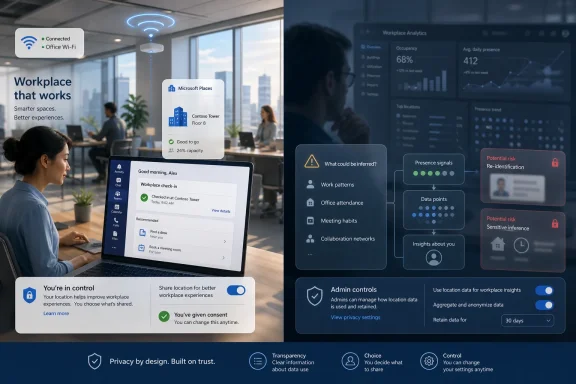
Microsoft’s controversial Wi‑Fi tracking in Teams is back — but this time with better privacy controls | Windows Central
After multiple delays, Microsoft finally launched its controversial Teams Wi‑Fi tracking feature, promising more transparency and better user control.www.windowscentral.com - Related coverage: techriver.com
- Official source: cdn-dynmedia-1.microsoft.com