

Windows 7 .NET Framework 4 Installation Failure

TALLY

New Member
Joined
Mar 26, 2010
Messages
90
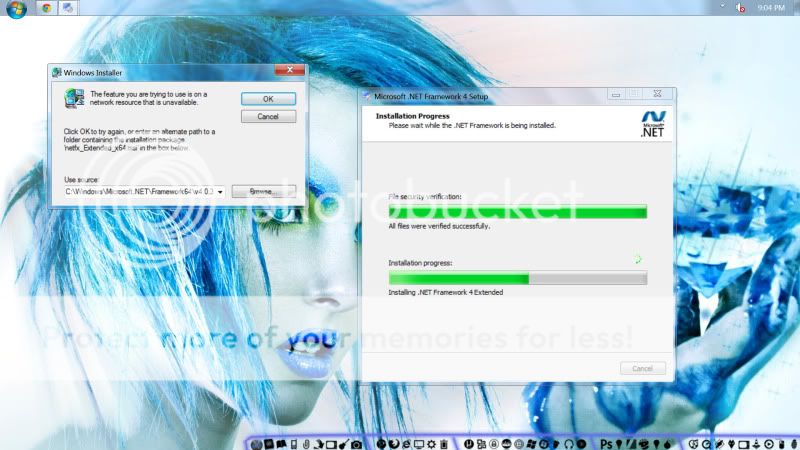
I have windows 7 ultimate x64 and I have been trying to install microsoft .NET Framework 4. However, every time I try, it always fails. It gets about halfway through the installation and a window pops up asking for me to open the location of an .msi that is not there. It's not in the setup fies and its not in the location that is given.


Here is a screen cap of the installation and the window that pops up asking for the .msi file.

1-30.jpg


Maybe this file that I am supposed to open is somewhere Im not looking, but any help is greatly appreciated. Thank You.
 

Solution
I would suggest you download and try again. You may need the earlier version to be installed first.

Net Framework 3
Link Removed due to 404 Error


Net framework 4
Link Removed
  • Link Removed
There are SO many reasons for this, starting from a bad service pack update to a bad dll... Take a look here Link Removed and go through the first few solutions from Microsoft and tell us if you resolved the issue.
 

Honestly......?

Im not some noob. If I have a question its because I have searched everywhere and this is a last resort. Thanks for nothing.
 

I would suggest you download and try again. You may need the earlier version to be installed first.

Net Framework 3
Link Removed due to 404 Error


Net framework 4
Link Removed
  • Link Removed
 

Solution
Since you are in a Windows 7 forum and not a .Net Framework forum, perhaps some more background information about what you are doing would help.

For instance, which version of .Net 4 did you download? What is the _Extended and have you searched you computer for it. The path showing in your attachment does not show the complete path so we could check. Is your internet connection available?

Some of these questions may seem silly to you, but I am not a .Net Framework user. I do, however, have .Net 4 installed.
 

Back
Top