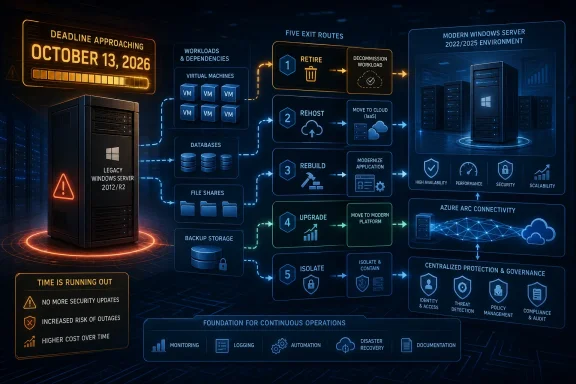
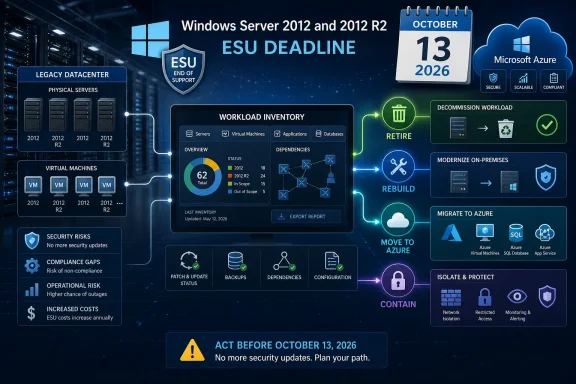
Windows Server 2012 and Windows Server 2012 R2 Extended Security Updates end on October 13, 2026, but applying that final update is not the migration strategy. Organizations should use the remaining window to identify every surviving instance and decide whether its workload will be retired, rebuilt, moved to Azure, or temporarily contained while a supported replacement is completed.
Microsoft’s lifecycle documentation confirms that both server releases left extended support on October 10, 2023. ESU provided a three-year security bridge, but that bridge ends on October 13, 2026, with no additional annual extension promised.
The obvious Windows Server 2012 R2 systems are rarely the entire estate. The greater risk lies in virtual machines excluded from routine reports, dormant disaster-recovery copies, appliances managed by vendors, and physical servers that disappeared from the configuration database without disappearing from the network.
Discovery should therefore combine management records with observed evidence. An actionable sweep can follow this sequence:
The output should be a signed-off workload register, not a count of operating systems. A server name without an owner, business purpose, recovery requirement, or replacement date is an unresolved risk rather than a completed inventory item.
Retire systems whose business function has ended, been duplicated, or moved elsewhere. Before deletion, verify retention obligations, export required data, remove scheduled integrations, revoke service accounts and certificates, update backup policies, and document how the workload could be recovered if the retirement decision is reversed.
Rebuild applications that remain necessary and can run on a supported Windows Server release. A new-server migration is generally easier to validate and reverse than carrying years of configuration history into another operating system, particularly where undocumented services, old drivers, or security agents may complicate an in-place upgrade.
Move to Azure when relocation is operationally and financially appropriate. Microsoft offers ESU coverage for eligible Windows Server 2012 and 2012 R2 environments in Azure, but moving an old VM does not modernize the application or extend the October 13 deadline. It changes where the transition runs; it does not eliminate the need to complete it.
Contain temporarily when an application cannot be replaced before ESU ends. Containment is an exception with an expiration date, not a fifth lifecycle phase. Restrict inbound and outbound connectivity, remove unnecessary internet access, limit administrative paths, monitor the system, maintain tested recovery media, and assign a named owner and replacement milestone.
A simple decision matrix keeps the loudest application owner from setting policy for the entire estate. Score each workload against these factors:
Administrators should now verify entitlement server by server. The method depends on whether a workload receives coverage through Azure, Azure Arc-enabled servers, or a commercial licensing arrangement using an ESU product key.
For Azure-hosted systems, confirm that every expected VM is in the correct subscription and is configured to receive updates. For Azure Arc-enabled systems, confirm that each server remains connected, appears under the correct tenant and subscription, and has ESU enabled rather than merely having the Arc agent installed.
For commercially licensed on-premises systems, reconcile the purchased entitlement with the servers intended to consume it. Confirm that the applicable key was installed and activated on each machine, then retain evidence linking the device, licensing route, owner, and update history.
The final check is patch delivery. An entry in a licensing portal does not prove that Windows Update, a management platform, or the organization’s deployment process successfully installed an ESU update on the endpoint. Review installation results locally and centrally, investigate machines reporting no recent updates, and test the process on representative systems before October.
This distinction matters especially for isolated servers. Restricted connectivity may be an appropriate security control, but it can also prevent licensing checks, management communication, or update delivery. The runbook must explain how those machines receive, validate, and report updates without quietly reopening broad network access.
Before October 13, confirm current backups and perform an actual recovery test for critical workloads. Capture configuration records, service states, dependencies, available storage, licensing evidence, update health, and the approved rollback method. Identify application owners who will perform functional validation rather than limiting testing to whether Windows restarts.
During deployment, use staged groups where the estate permits it. Monitor boot behavior, application services, authentication, scheduled jobs, backups, integrations, management agents, and business transactions. A successful update status is not equivalent to a successful application test.
After deployment, preserve proof that the update was installed and that the workload passed validation. Record failures, rollbacks, and machines that missed the window. Any server that cannot install or retain the final ESU update should immediately move into an escalated containment or shutdown decision.
The rollback plan should specify who can authorize it, what evidence triggers it, how long the organization can operate on the previous state, and how the failed server will be protected afterward. Rolling back may restore service, but it may also remove the last available security update and leave the workload in a more exposed condition.
The strongest containment plans minimize both connectivity and consequence. Remove unused roles, disable unnecessary services, restrict management to controlled systems, separate the server from general user networks, rotate privileged credentials, and monitor permitted traffic. Backups should be protected from the legacy server rather than trusting the legacy server to protect its own backups.
Recovery also deserves more attention after October 13. Restoring an old image may restore an old patch level, expired credentials, broken agents, or obsolete network rules. Recovery testing should prove that the organization can restore the application into its intended contained environment and return it to the verified final update state.
An exception should include a replacement owner, funding path, review date, and shutdown target. Without those controls, “temporary isolation” becomes the next migration plan in disguise.
The practical deadline is therefore earlier than October 13, 2026. That date is the last scheduled boundary for ESU coverage, not the day to begin finding dependencies, negotiating with vendors, or discovering that the only person who understands a critical Windows Server 2012 R2 application has left the organization.
Microsoft’s lifecycle documentation confirms that both server releases left extended support on October 10, 2023. ESU provided a three-year security bridge, but that bridge ends on October 13, 2026, with no additional annual extension promised.
 Find the Servers That the CMDB Forgot
The obvious Windows Server 2012 R2 systems are rarely the entire estate. The greater risk lies in virtual machines excluded from routine reports, dormant disaster-recovery copies, appliances managed by vendors, and physical servers that disappeared from the configuration database without disappearing from the network.Discovery should therefore combine management records with observed evidence. An actionable sweep can follow this sequence:
- Export all servers identified as Windows Server 2012 or Windows Server 2012 R2 from the configuration management database, endpoint-management platform, patching service, and security console.
- Search Active Directory computer accounts for server objects, including disabled and stale accounts, and reconcile them against the first export rather than assuming old accounts are harmless.
- Inventory every supported hypervisor and cloud-management console for powered-on, powered-off, suspended, templated, and replicated virtual machines. A powered-off VM can return to production after the deadline just as easily as an active one can remain there.
- Review physical hardware management records, rack documentation, warranty lists, and out-of-band management consoles to identify hosts that are absent from software-based inventory.
- Examine backup catalogs, replication jobs, disaster-recovery plans, monitoring targets, DNS records, DHCP reservations, firewall objects, certificate inventories, and vulnerability-scanner results for names or addresses not present in the master list.
- Ask application owners and service providers to confirm what operating system supports each workload. Vendor-maintained servers and “temporary” departmental applications are common places for unsupported Windows installations to survive.
- Validate each discovered machine directly where access is available, recording the operating-system edition, workload owner, application, dependencies, network exposure, backup status, ESU method, and planned disposition.
The output should be a signed-off workload register, not a count of operating systems. A server name without an owner, business purpose, recovery requirement, or replacement date is an unresolved risk rather than a completed inventory item.
Put Every Workload Into One of Four Lanes
The deadline creates a technical problem, but the disposition decision is primarily about the application. Hardware age matters, yet application compatibility, authentication dependencies, recovery requirements, vendor support, and exposure usually determine whether a workload can move safely.Retire systems whose business function has ended, been duplicated, or moved elsewhere. Before deletion, verify retention obligations, export required data, remove scheduled integrations, revoke service accounts and certificates, update backup policies, and document how the workload could be recovered if the retirement decision is reversed.
Rebuild applications that remain necessary and can run on a supported Windows Server release. A new-server migration is generally easier to validate and reverse than carrying years of configuration history into another operating system, particularly where undocumented services, old drivers, or security agents may complicate an in-place upgrade.
Move to Azure when relocation is operationally and financially appropriate. Microsoft offers ESU coverage for eligible Windows Server 2012 and 2012 R2 environments in Azure, but moving an old VM does not modernize the application or extend the October 13 deadline. It changes where the transition runs; it does not eliminate the need to complete it.
Contain temporarily when an application cannot be replaced before ESU ends. Containment is an exception with an expiration date, not a fifth lifecycle phase. Restrict inbound and outbound connectivity, remove unnecessary internet access, limit administrative paths, monitor the system, maintain tested recovery media, and assign a named owner and replacement milestone.
A simple decision matrix keeps the loudest application owner from setting policy for the entire estate. Score each workload against these factors:
- Application support on a newer Windows Server release should determine whether rebuilding is immediately feasible.
- Unsupported drivers, backup components, antivirus tools, monitoring agents, and hardware dependencies should be treated as migration blockers requiring replacement or removal.
- Authentication, database, file-share, certificate, DNS, scheduled-task, and third-party API dependencies should be mapped before changing the server.
- Recovery objectives should determine how much testing, rollback capacity, and parallel operation the migration needs.
- Internet exposure and access from untrusted networks should raise the urgency of retirement or isolation.
- A lack of a vendor-supported migration path should trigger escalation rather than indefinite ESU-style thinking.
Prove ESU Coverage Before the Last Window
Microsoft describes ESU as a last-resort bridge. It provides eligible security updates but not new features, customer-requested non-security fixes, design changes, or a restoration of normal product support.Administrators should now verify entitlement server by server. The method depends on whether a workload receives coverage through Azure, Azure Arc-enabled servers, or a commercial licensing arrangement using an ESU product key.
For Azure-hosted systems, confirm that every expected VM is in the correct subscription and is configured to receive updates. For Azure Arc-enabled systems, confirm that each server remains connected, appears under the correct tenant and subscription, and has ESU enabled rather than merely having the Arc agent installed.
For commercially licensed on-premises systems, reconcile the purchased entitlement with the servers intended to consume it. Confirm that the applicable key was installed and activated on each machine, then retain evidence linking the device, licensing route, owner, and update history.
The final check is patch delivery. An entry in a licensing portal does not prove that Windows Update, a management platform, or the organization’s deployment process successfully installed an ESU update on the endpoint. Review installation results locally and centrally, investigate machines reporting no recent updates, and test the process on representative systems before October.
This distinction matters especially for isolated servers. Restricted connectivity may be an appropriate security control, but it can also prevent licensing checks, management communication, or update delivery. The runbook must explain how those machines receive, validate, and report updates without quietly reopening broad network access.
Treat October 13 as a Change Event, Not a Calendar Reminder
The final patch window needs the same discipline as a major production release. By then, the organization should know which servers are expected to remain online, why they remain, how they receive ESU updates, and what happens if the final update causes a regression.Before October 13, confirm current backups and perform an actual recovery test for critical workloads. Capture configuration records, service states, dependencies, available storage, licensing evidence, update health, and the approved rollback method. Identify application owners who will perform functional validation rather than limiting testing to whether Windows restarts.
During deployment, use staged groups where the estate permits it. Monitor boot behavior, application services, authentication, scheduled jobs, backups, integrations, management agents, and business transactions. A successful update status is not equivalent to a successful application test.
After deployment, preserve proof that the update was installed and that the workload passed validation. Record failures, rollbacks, and machines that missed the window. Any server that cannot install or retain the final ESU update should immediately move into an escalated containment or shutdown decision.
The rollback plan should specify who can authorize it, what evidence triggers it, how long the organization can operate on the previous state, and how the failed server will be protected afterward. Rolling back may restore service, but it may also remove the last available security update and leave the workload in a more exposed condition.
Isolation Buys Time but Transfers Risk
A contained Windows Server 2012 R2 machine will not become supported merely because its firewall rules are strict. Isolation reduces reachable attack paths, while unsupported application components, credentials, administrative practices, removable media, and trusted upstream systems can still introduce risk.The strongest containment plans minimize both connectivity and consequence. Remove unused roles, disable unnecessary services, restrict management to controlled systems, separate the server from general user networks, rotate privileged credentials, and monitor permitted traffic. Backups should be protected from the legacy server rather than trusting the legacy server to protect its own backups.
Recovery also deserves more attention after October 13. Restoring an old image may restore an old patch level, expired credentials, broken agents, or obsolete network rules. Recovery testing should prove that the organization can restore the application into its intended contained environment and return it to the verified final update state.
An exception should include a replacement owner, funding path, review date, and shutdown target. Without those controls, “temporary isolation” becomes the next migration plan in disguise.
The practical deadline is therefore earlier than October 13, 2026. That date is the last scheduled boundary for ESU coverage, not the day to begin finding dependencies, negotiating with vendors, or discovering that the only person who understands a critical Windows Server 2012 R2 application has left the organization.
References
- Primary source: learn.microsoft.com
Windows Server 2012 R2 known issues and notifications | Microsoft Learn
View announcements and review known issues and fixes for and Windows Server 2012 R2learn.microsoft.com - Primary source: WindowsForum
Windows Server 2019 EOL: ESU to 2029 and Migration Paths | Windows Forum
Windows Server 2019 has entered a new phase of its lifecycle: mainstream support ended on January 9, 2024, and Microsoft will provide security-only updates...windowsforum.com