sacredboy
Well-Known Member
Member details
- Joined
- Jul 13, 2016
- Messages
- 13
Hi there,
Laptop: ASUS R552JV.
OS: Windows 10 x64.
The following error occurs occasionally:
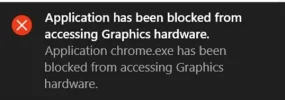
Application has been blocked from accessing graphics hardware.
Application chrome.exe has been blocked from accessing Graphics hardware.
Tried to update driver for Intel HD Graphics 4600 but it seems no updates for my processor Intel HD 4700HQ 2.40 GHz.
Guys, what else can be done?
Does it refer to Intel HD graphics or nVidia graphics?
Thank you.
Laptop: ASUS R552JV.
OS: Windows 10 x64.
The following error occurs occasionally:
Application has been blocked from accessing graphics hardware.
Application chrome.exe has been blocked from accessing Graphics hardware.
Tried to update driver for Intel HD Graphics 4600 but it seems no updates for my processor Intel HD 4700HQ 2.40 GHz.
Guys, what else can be done?
Does it refer to Intel HD graphics or nVidia graphics?
Thank you.