📎 AI Summary:
The thread discusses issues with a display showing a red area after hibernating and waking a Windows laptop with an extended monitor setup. The original poster notes that the problem only occurs after hibernation and not after shutdown, suggesting it may be related to the sleep state. Contributors recommend updating the GPU driver and checking for recent software or setting changes, but the issue appears unresolved, indicating it may be a unique or less common problem with a potential connection to graphics driver or display configuration.

chathuranga8887

New Member
Joined
Nov 23, 2016
Messages
3
Thread Author #1
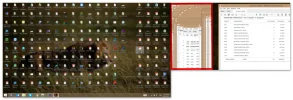
I have connected a display as extended monitor .but after i hibernate the laptop it diplay like this
Is there anyway to correct this issue .
An image from 'extended Display Not working properly'. Two computer screens showing a forum page on the left and a lion image on the right.
 

Last edited by a moderator:

kemical

Essential Member
Joined
Aug 28, 2007
Messages
36,163
Hi,
just to clarify do you mean the browser repeating as there looks like several browsers open all with the same tabs open?

Have you checked for malware? Try running Malwarebytes

Are you running any extensions or plug-ins with the browsers? If so try disabling anything new or not wanted.
 

chathuranga8887

New Member
Joined
Nov 23, 2016
Messages
3
Thread Author #3
not only browser it happen to all the application .only that red area only
An image from 'extended Display Not working properly'. A cluttered desktop with many icons and an overlapping window showing a corrupted or glitched PDF file.
 

Attachments

  • 221111.webp
    221111.webp
    177.3 KB · Views: 339
Last edited by a moderator:

chathuranga8887

New Member
Joined
Nov 23, 2016
Messages
3
Thread Author #5
This because i hibernate the pc.if i shutdown the pc this will not appear again .but after the hibernate this appear again after the pc on