📎 AI Summary:
The forum thread discusses a significant flaw in Windows 10 related to File History and user account naming, where the operating system inconsistently displays user folder names with different capitalizations and paths, causing confusion. The original poster shares their experience of renaming folders and encountering irregularities post-update, and mentions potential issues with modern app installations following recent Windows updates. Other contributors suggest different installation approaches and personal configurations to avoid such issues, with some planning to clean reinstall or revert to Windows 8.1 if problems persist, indicating overall frustration with stability and consistency in Windows 10.

brkkab

Excellent Member
Joined
Mar 4, 2013
Messages
2,346
Thread Author #1
I just found a huge Windows 10 flaw and it has impact on File History, too.
All us previous Windows users that login with a Microsoft Account have all noticed how Windows 10 names our user accounts after our Microsoft Account.
I just noticed this flaw in File History.
In previous Windows versions my account was Keith. In 10 it changes that to keith.
After I installed Windows 10, I changed my personal folder on my hdd to that name. The first time before I moved my documents, etc. off my ssd. I renamed and applied and ok'd it. I then renamed it to keith like 10 likes and took ownership of everything.
I then pointed 10 to my Contacts, Desktop, Documents, Downloads, Favorites, Links, Music, Pictures, Saved Games, Searches and Videos to my hdd.
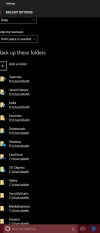
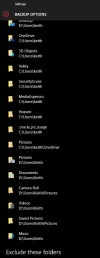
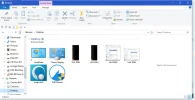
File History and Windows 10, too are showing 3/4 of these folder in D:\Users\Keith\* and 1/4 in D:\users\keith\*.
Huge blunder Microsoft
That's just like a Store blunder, I've found. Has any other past Windows 8/8.1 users like myself found that 10 only installs the pre-installed modern app's and not the 8/8.1 apps that still work in 10.
That's a huge pain in the neck, that it doesn't install the most rece.nt modern app's that do work in 10, that we used in 8/8.1.
 

Solution
Maybe I take a different path, at the end of the installation, when the Q&As start, I skip the request for signing in with a MS account and on the next page, sign in with a local (David). At a later stage I resign in with the MS account. This name has not changed for me, in the File Explorer - users. Subsequently, none of the other problems you have experienced, have occurred. Why, I know not, but it does seem that the only fault is why you would have the two different usernames.
I cannot comment on the Store problem. I can only say that I have only two "Apps" running, both of which I was using in Windows 8.1.
But I confess that I am not certain what you mean by "Has any other past Windows 8/8.1 users like myself found that 10...

brkkab

Excellent Member
Joined
Mar 4, 2013
Messages
2,346
Thread Author #2
I'll have to upload some screenshots to show the Windows 10 & File History flaw. I've got File History running now.It will probably take a few hour's to run.
 

davehc

Essential Member
Premium Supporter
Joined
May 1, 2008
Messages
5,546
Maybe I take a different path, at the end of the installation, when the Q&As start, I skip the request for signing in with a MS account and on the next page, sign in with a local (David). At a later stage I resign in with the MS account. This name has not changed for me, in the File Explorer - users. Subsequently, none of the other problems you have experienced, have occurred. Why, I know not, but it does seem that the only fault is why you would have the two different usernames.
I cannot comment on the Store problem. I can only say that I have only two "Apps" running, both of which I was using in Windows 8.1.
But I confess that I am not certain what you mean by "Has any other past Windows 8/8.1 users like myself found that 10 only installs the pre-installed modern app's and not the 8/8.1 apps that still work in 10."
 

Solution

brkkab

Excellent Member
Joined
Mar 4, 2013
Messages
2,346
Thread Author #4
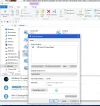
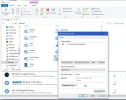
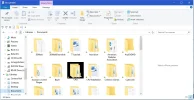
It's definitely weird in C:\Users it has me named keith. Then if setup File Explore to show Libraries on the left and then I click on Libraries, it's shows my first and last name, capitalized properly.
Ever since they put out January & February's updates, I've noticed some weird stuff.
I'm really hoping this doesn't happen on the new pc I'm buling next moth. I was gonna hook the pc up today with just my 2 video cards, M.2 ssd, Intel SSD, Barracuda3TB hdd, the DDR4 ram my mobo, cpu, Arctic Liquid Freezer 240 and the psu that arrives later today.
That way so I could have Windows, my drivers and the cpu/ram overclocked.
I'm skeptical with how 10's been recently for me.
I do know when I get the case next month' this will take forever, but I'm going to make my user folder on my external hdd and then cut/paster each folder where they go after making those folders, too. Documents, etc. Then I'm gonna format my Seagate hdd & Intel ssd on this pc, before they move to the new case/pc.
Then, hopefully the issues will disappear. If not, it could also be my OneDrive synched settings.
If things aren't how I like them, I'll go back to 8.1 Pro. I had everything 10 has, except for Cortana and the Xbox app.
Thanks to Stardock, I had a start menu (Start8) that booted to the desktop since Windows 8 and could run modern app's in resizable windows on the desktop (ModernMix).
 

brkkab

Excellent Member
Joined
Mar 4, 2013
Messages
2,346
Thread Author #5
Here are some screenshots.
 

Attachments

  • FH1.webp
    FH1.webp
    26.3 KB · Views: 290
  • FH2.webp
    FH2.webp
    27.9 KB · Views: 275
  • Lib1.webp
    Lib1.webp
    54.5 KB · Views: 278
  • Lib2.webp
    Lib2.webp
    64.8 KB · Views: 298
  • Lib3.webp
    Lib3.webp
    46.1 KB · Views: 289
  • Lib4.webp
    Lib4.webp
    52.3 KB · Views: 290

brkkab

Excellent Member
Joined
Mar 4, 2013
Messages
2,346
Thread Author #6
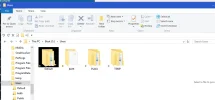
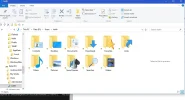
Here's what C:\Users and my data drive looks like.
 

Attachments

  • Users.webp
    Users.webp
    28.5 KB · Views: 253
  • Datadrv.webp
    Datadrv.webp
    44.2 KB · Views: 251