📎 AI Summary:
The user is experiencing a persistent "Windows failed to start" error (0xc0000225) and cannot access Windows or Safe Mode, even after trying multiple recovery methods including EasyRE and custom bootable USBs, without having original installation discs. Responders suggest verifying the system's BIOS configuration (likely Legacy mode), downloading official Windows 7 ISO files, and creating bootable installation media, with some indicating the system is probably configured as Legacy rather than UEFI. Overall, the thread discusses troubleshooting steps for a startup error on Windows 7, with the consensus leaning toward confirming system setup and ensuring proper bootable media to repair the corrupted system.

mvidaure

New Member
Joined
Aug 18, 2014
Messages
2
Thread Author #1
I am experiencing a "Windows failed to start" error (0xc0000225) and cannot even start windows or run safe mode (f9). Plus I didn't have the installation discs.

I have tried EasyRE via both CD and USB but both result in the same problem. When I actually try to perform an 'Automated Repair' on my computer, I get in red text "The selected partition is corrupted and could not be accessed or repaired. Please select a different drive to continue." It is also labeled as NO under Active.

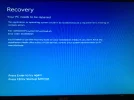
Since I do not have a the installation discs, I made a USB with a Windows_7_Recovery_Disc iso (as shown here http://www.sevenforums.com/tutorials/31541-windows-7-usb-dvd-download-tool.html) but it also doesn't work. I get the blue screen that I attached and none of the options do anything.

Thanks in advance,
Miguel
 

Attachments

  • IMG_2358.webp
    IMG_2358.webp
    801 KB · Views: 516
Solution
I will say you system is a Legacy configuration. If you have the Install Files from and .iso and burned that .iso to a DVD, it will boot unless there is something physically wrong with the system. A flash drive, the same thing, but you should not be seeing a message about winload.efi... and I am not referring to a Recovery drive that you may have downloaded instead of the Windows 7 install media.

Saltgrass

Excellent Member
Microsoft Community Contributor
Joined
Oct 16, 2009
Messages
15,153
Could we confirm your Windows 7 install is configured as UEFI?

Have you tried downloading the Windows 7 .iso and burning a DVD? You can find your own site to download but the link shown should allow that download and use the second set of links to download from Digital River.

http://techpp.com/2009/11/11/download-windows-7-iso-official-direct-download-links/

Have you done anything to your system such as altering partitions or removing partitions?
 

mvidaure

New Member
Joined
Aug 18, 2014
Messages
2
Thread Author #4
Could we confirm your Windows 7 install is configured as UEFI?

Have you tried downloading the Windows 7 .iso and burning a DVD? You can find your own site to download but the link shown should allow that download and use the second set of links to download from Digital River.

http://techpp.com/2009/11/11/download-windows-7-iso-official-direct-download-links/

Have you done anything to your system such as altering partitions or removing partitions?

Thank you for responding!

I don't know if my Windows 7 install is configured as UEFI. I'm trying to find ways to see this info but they all require actually being able to access Windows/the desktop. If it helps, this is my computer: http://www.cnet.com/products/acer-aspire-m3470-uc30p-a-series-a8-3800-2-4-ghz-none/specs/

Yes, I have tried different Windows 7 .iso and via both burnt disc and USB but none work. They either don't do anything or lead to the blue screen I linked in my first post.

NO, I haven't messed with partitions at all.
 

Saltgrass

Excellent Member
Microsoft Community Contributor
Joined
Oct 16, 2009
Messages
15,153
I will say you system is a Legacy configuration. If you have the Install Files from and .iso and burned that .iso to a DVD, it will boot unless there is something physically wrong with the system. A flash drive, the same thing, but you should not be seeing a message about winload.efi... and I am not referring to a Recovery drive that you may have downloaded instead of the Windows 7 install media.
 

Solution