ofap

New Member
Joined
Apr 10, 2010
Messages
4
Hi, I had Windows 7, but then I had to re-format the PC and now it's not like I had before. Maybe you guys can help me put it just the way it was.

Number one - It used to open all windows of the same type (ie. all IE's windows, all explorer's windows) in one tab, that after clicked would display a menu, or the Aero Peek of the different windows, that appeared in the taskbar. Now it opens every window in a seperate tab.

Number two -The items that I pinned to the taskbar used to stay there, regardless of I open them or not. Now, if I open one of those that are pinned, they are gone untill I close said program.

Number three - How to activate the drag and drop in the start menu. I can only open stuff, even when I click and hold.

Number four - How do I make items in the taskbar larger? They seem smaller

That's all, and would be a great help. Thanks in advance
 

Last edited:
Solution
Hi and you are welcome to win7forums. :)


Number one - It used to open all windows of the same type (ie. all IE's windows, all explorer's windows) in one tab, that after clicked would display a menu, or the Aero Peek of the different windows, that appeared in the taskbar. Now it opens every window in a seperate tab.

Do you mean taskbar grouping ?


Number two -The items that I pinned to the taskbar used to stay there, regardless of I open them or not. Now, if I open one of those that are pinned, they are gone untill I close said program.

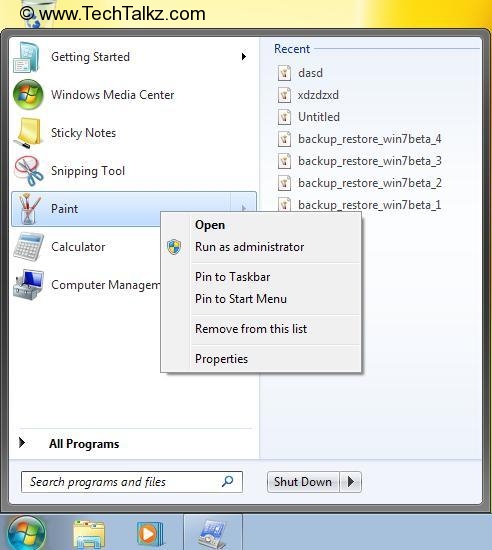
Right click on a shortcut > Pin to taskbar. (Although not all program shortcuts can be pinned this way). Also enable grouping in Taskbar and Start menu Properties...

cybercore

New Member
Joined
Jul 7, 2009
Messages
15,641
Hi and you are welcome to win7forums. :)


Number one - It used to open all windows of the same type (ie. all IE's windows, all explorer's windows) in one tab, that after clicked would display a menu, or the Aero Peek of the different windows, that appeared in the taskbar. Now it opens every window in a seperate tab.

Do you mean taskbar grouping ?


Number two -The items that I pinned to the taskbar used to stay there, regardless of I open them or not. Now, if I open one of those that are pinned, they are gone untill I close said program.

Right click on a shortcut > Pin to taskbar. (Although not all program shortcuts can be pinned this way). Also enable grouping in Taskbar and Start menu Properties.

PinToTaskbar_Win7_1.jpg


Number three - How to activate the drag and drop in the start menu. I can only open stuff, even when I click and hold.

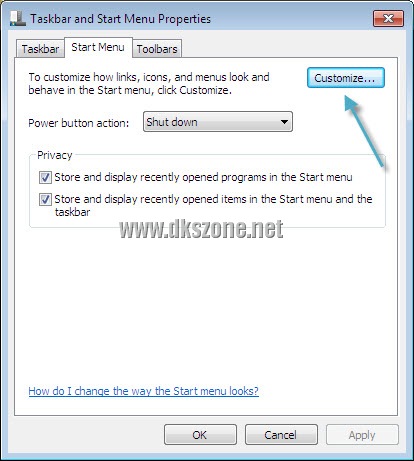
Control Panel > Taskbar and Start Menu Properties > Customize, check the corresponding option to enable drag and drop.

taskbar_start_menu_properties%5B8%5D.jpg


Number four - How do I make items in the taskbar larger? They seem smaller

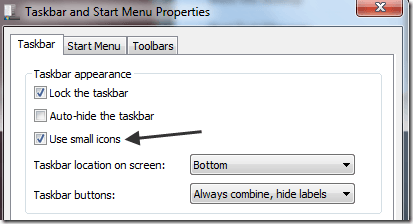
Same, Taskbar and Start Menu Properties > Uncheck "Use small icons"

captured_Image.png7_thumb.png
 

Solution

ofap

New Member
Joined
Apr 10, 2010
Messages
4
Hi and you are welcome to win7forums. :)


Do you mean taskbar grouping ?


Right click on a shortcut > Pin to taskbar. (Although not all program shortcuts can be pinned this way). Also enable grouping in Taskbar and Start menu Properties.

PinToTaskbar_Win7_1.jpg


Control Panel > Taskbar and Start Menu Properties > Customize, check the corresponding option to enable drag and drop.

taskbar_start_menu_properties%5B8%5D.jpg


Same, Taskbar and Start Menu Properties > Uncheck "Use small icons"

captured_Image.png7_thumb.png


Thanks alot! This really helped me!