

Windows 10 Offer To Save Password - Missing in Microsoft Edge

W7towindows8

Senior Member
Joined
Feb 6, 2014
Messages
12
Running Windows 10 Pro, on a Dell XPS machine.
When I went to Settings > Privacy & Services > to click on the "Offer To Save Password", is NOT there
any more for Microsoft Edge?

Screenshot: : ImageBam
 

Solution
You don't need to reinstall. Microsoft opened the 1809 build to "advanced users" if you go into Windows updates and do a "check for updates" it will kick off an upgrade to 1809 now.

W7towindows8

Senior Member
Joined
Feb 6, 2014
Messages
12
Click into the edge settings - Settings - Passwords and autofill. Save passwords 0n


It's already On, plz see screnshot, what I don't understand is where did the Option to "Offer To Save Password " gone?
I I'm having the latest version on Microsoft Edge - Microsoft Edge 42.17134.1.0


Screenshot:
 

davehc

Essential Member
Premium Supporter
Joined
May 1, 2008
Messages
5,554
Are you up to date?

If you followed my path, this is what you should be looking at.

37201
 

W7towindows8

Senior Member
Joined
Feb 6, 2014
Messages
12
Yeah, I checked my version of Microsoft edge is version : Microsoft Edge 42.17134.1.0

Latest Version:
Edge on Windows 1044.17763.1.0


Not sure why it doid NOT update my Microsoft Edge , wnen Windows Does an Update, and I 've the
Latest Windows Updates

Screenshot: I

Now, where I can Download the Latest copy of Microsoft Edge to Upgrade version?
 

Last edited:

davehc

Essential Member
Premium Supporter
Joined
May 1, 2008
Messages
5,554
It comes automatically with the cumulative updates. Go into settings - Updates and "Check for updates"
 

W7towindows8

Senior Member
Joined
Feb 6, 2014
Messages
12
It comes automatically with the cumulative updates. Go into settings - Updates and "Check for updates"
Look at my Screenshot from my previous Reply.I've have all the latest Windows Updates, shy from Re-installing Windows 10
again, since Microsoft Edge is part of the OS, how can one upgrade, without RE-installing Windows??
 

W7towindows8

Senior Member
Joined
Feb 6, 2014
Messages
12
But it still does not address the problem, why Windows 10 DOES it's Updates,it did not Update my
Microoft Edge,
The ONLY reason, I came up with, is I do not have the M. Edge as my Default Browser, and I have
the registry alter to turn off the Windows defender permanently.
 

Neemobeer

Windows Forum Team
Staff member
Joined
Jul 4, 2015
Messages
8,998
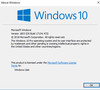
Which version of Windows 10 are you on? Press Windows key + r then type winver

My guess is your on 1803. Edge 44.17763.1.0 is only available on Windows 10 1809
 

W7towindows8

Senior Member
Joined
Feb 6, 2014
Messages
12
Which version of Windows 10 are you on? Press Windows key + r then type winver

My guess is your on 1803. Edge 44.17763.1.0 is only available on Windows 10 1809


Doesn't Microsoft site offers only one version of Windows 10, and depending on the user,one gets either the Home version , Pro version or the Enterprise version as long as the Product key is Legit?
 

davehc

Essential Member
Premium Supporter
Joined
May 1, 2008
Messages
5,554
It's already On, plz see screnshot, what I don't understand is where did the Option to "Offer To Save Password " gone?
I I'm having the latest version on Microsoft Edge - Microsoft Edge 42.17134.1.0


Screenshot:

latest version:

Microsoft Edge 44.17763.1.0
Microsoft EdgeHTML 18.17763
 

W7towindows8

Senior Member
Joined
Feb 6, 2014
Messages
12
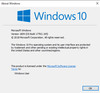
Correct. But you need to update your build to 1809


Guess there is No workaround in getting the newer version of Windows 10 1809, except to RE-nstall my Windows 10 Pro
again. This just tells you , how long my last installation of Windows 10 Pro, so just get a copy from Microsoft and it will be the newest version of Windows 10? - Thanks for the help & suggestion.
 

Neemobeer

Windows Forum Team
Staff member
Joined
Jul 4, 2015
Messages
8,998
You don't need to reinstall. Microsoft opened the 1809 build to "advanced users" if you go into Windows updates and do a "check for updates" it will kick off an upgrade to 1809 now.
 

Solution

W7towindows8

Senior Member
Joined
Feb 6, 2014
Messages
12
You don't need to reinstall. Microsoft opened the 1809 build to "advanced users" if you go into Windows updates and do a "check for updates" it will kick off an upgrade to 1809 now.


Thanks !! Success - Able to Upgrade to V 1089, without any loss of Data.


Last edited:

W7towindows8

Senior Member
Joined
Feb 6, 2014
Messages
12
See my post #6
Do you now have the option to save passwords?


Yes - Thanks for asking, the New version of M. Edge does change a lot with the new & "Improved" version
like it has 2 Plane window, with the Advanced feature on one plane window. Even tested it, after putting in
the Login info for a site that I frequent,and Clicking "Remember me', when I signed it,
M. Edge, "offers To Save" the password.


Last edited:

W7towindows8

Senior Member
Joined
Feb 6, 2014
Messages
12
The ONLY thing, I noticed is that,when I clicked on the site that, I saved the Login info, it DOES nOt Autofill the fields in the
Login ?..when I went to checked the "Manage Passwords", the info, is Saved?
 

Back
Top