

Windows 10 Where are the system icons located

Vetral32

Well-Known Member
Joined
Oct 7, 2015
Messages
38
Hi so I was trying to change one of the system icons but I can't do that without knowing what dll it is in or wherever. Here is a picture.
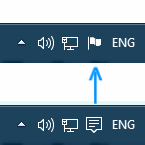
npepnBi.png


I was talking to a person before and he said it could be done but not easily. He said to look in *imageres.dll* and *shell32.dll*. I looked but found nothing. By the way the picture was edited, I didn't actually find out how.

Thanks - Vetral32
 

Solution
Good call, looks like you would need to replace Ordinals 183 - 218 with the correct sized icons as listed in Icon groups 20101-20104


I would be sure to make a backup copy of explorer.exe before you change anything.

Neemobeer

Windows Forum Team
Staff member
Joined
Jul 4, 2015
Messages
8,998
I don't think anyone is going to have the answer for you. I can tell you from running procexp that the notification icon is part of the explorer.exe process. This is a list, at least on my system, of everything explorer.exe has a handle to. You may or may not want to look through every dll and see if you can locate the icon.
 

Attachments

Vetral32

Well-Known Member
Joined
Oct 7, 2015
Messages
38
Maybe I can change it because I found it in resource tuner (right clicks explorer.exe open in resource tuner) but I need to ask my friend which is a genius of computers to see if it will break my pc. Thank you!
 

Neemobeer

Windows Forum Team
Staff member
Joined
Jul 4, 2015
Messages
8,998
Good call, looks like you would need to replace Ordinals 183 - 218 with the correct sized icons as listed in Icon groups 20101-20104


I would be sure to make a backup copy of explorer.exe before you change anything.
 

Solution

Vetral32

Well-Known Member
Joined
Oct 7, 2015
Messages
38
Everytime I open the edited explorer.exe I get this :

THIS APP CANNOT RUN ON THIS PC
Check with the application developer

help!
 

Neemobeer

Windows Forum Team
Staff member
Joined
Jul 4, 2015
Messages
8,998
It may not run because it's a signed file and no longer can be verified because you made changes to it. You may have to revert back to a backup. Hopefully you followed my suggestion to keep a backup.
 

Vetral32

Well-Known Member
Joined
Oct 7, 2015
Messages
38
Yes of course I was in command prompt.

(What I did in command prompt)
taskkill /IM explorer.exe /F
C:
cd windows
del explorer.exe
ren explorer2.exe explorer.exe
explorer.exe (CANT RUN)
del explorer.exe
ren backupexplorer.exe explorer.exe (NO PERMISSION)
(OPEN COMMAND PROMPT ADMINISTRATOR)
C:
cd windows
ren backupexplorer.exe explorer.exe
explorer.exe
exit
 

Back
Top