📎 AI Summary:
The WindowsForum thread discusses customization options for the Windows 8 Start Screen, including changing backgrounds, pinning items, and managing tiles. Contributors share tips on personalizing the interface, such as adjusting settings through the Charm Bar and creating desktop shortcuts to reduce tile clutter. The overall tone is helpful, with users providing practical advice and solutions for managing the Start Screen and recovering deleted tiles.

SupportTypeGuy

New Member
Joined
Oct 28, 2012
Messages
17
Thread Author #1
Hi everyone,

I was wondering what if any customization's can be made to the start screen. I know about pin/unpin and larger/smaller but out of curiosity has anyone found ways to update the background image, or maybe add shortcuts that don't appear in the actual "All Programs" listing?

Just curious, thanks for any information you can provide.
 

Solution
Sandy,

Yes, I can. Ideally I would like to know which one; but, just go to Win+Q, find the item wanted, Rt Clk & select "Pin to Start" to put 'its' Tile on that Start screen.

OR

Rt Clk on Start & on the resultant Bar @ the bottom of that screen hit All Apps icon @the right end & then do the same as I have described above.

Cheers,
Drew

Medico

Essential Member
Joined
Sep 20, 2011
Messages
1,144
Change background: Charms Bar, Settings, Change PC Settings, Personalize Tab, Start Screen.

You can try to right click on anything and see if there is a Pin To Start.
 

kemical

Essential Member
Joined
Aug 28, 2007
Messages
36,163
Hi,

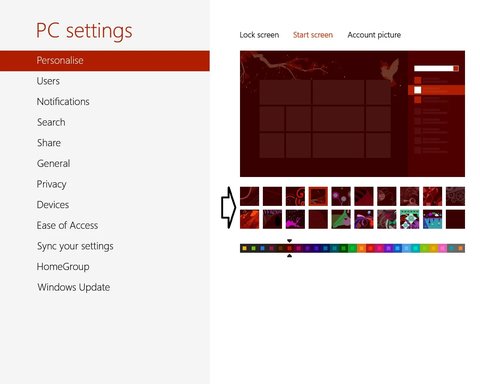
if you open up the charms, by placing the cursor top or bottom right of the screen, click on the cog or settings and then change pc settings.
Make sure your on the tab of Personalise and then click the middle setting, Start screen. You'll then see the screen shown in the screen shot below. Arrowed are the available back drops which of course change slightly depending on the colour used.

Link Removed
 

Drew

Banned
Joined
Mar 25, 2006
Messages
3,560
Tom,

Yes, one can Rk Clk on something & Pin to Start BUT,

If a person doesn't want heaps of Tiles on Start any of those same things can be told to be a desktop shortcut. If one doesn't want a pile of icons on the desktop, tell them not to show & they will all be accessible via the Desktop Toolbar.

Aside from that Ross has shown where/how to customize the Start screen's appearance. Plus there is sizing & grouping of Tiles.

Myself I prefer to just have a window on the Taskbar holding the content of WinQ, then I can just stay on Desktop (instead of using Start & Tiles).

Cheers,
Drew
Link Removed
 

Sandy Hutchinson

New Member
Joined
Dec 9, 2012
Messages
1
I just accidently deleated a tile from my start page (just got the computer) and this my first time working with Windows 8. Can anyone tell me how to get it back?
 

Drew

Banned
Joined
Mar 25, 2006
Messages
3,560
Sandy,

Yes, I can. Ideally I would like to know which one; but, just go to Win+Q, find the item wanted, Rt Clk & select "Pin to Start" to put 'its' Tile on that Start screen.

OR

Rt Clk on Start & on the resultant Bar @ the bottom of that screen hit All Apps icon @the right end & then do the same as I have described above.

Cheers,
Drew
 

Solution